Search Results for 'buddypress'
-
AuthorSearch Results
-
September 27, 2015 at 10:16 am #244831
In reply to: Best Theme for Busy Community?
Henry Wright
ModeratorHi @julia_b
http://www.bpinspire.com/ might be useful to you. It showcases lots of popular BuddyPress websites and themes.
September 26, 2015 at 4:52 pm #244824In reply to: Restricting Group Deletion to Super Admin
danbp
ParticipantCheck for group_creator.
September 26, 2015 at 3:57 pm #244823In reply to: Rename Home URL+Slug in BP Group
ParticipantIMO, you’re strugling with something unnecessary.
The group home tab shows the group activity by default and URL when on this page isdomain.com/groups/groupname/Your function is ok and it is not necessary to add /activity/ to the original slug. The action name for group activity page is
home. If you add it manually to ‘domain.com/groups/groupname/home’, home will be stripped by default. And if you change home to xyz, you’ll get a 404 error.Renaming the tab to a more accurate string is possible of course. Changing the group activity URL isn’t.
function my_bp_groups_default_tab() {
global $bp;

$bp->bp_options_nav[$bp->groups->current_group->slug]['home']['name'] = 'Group Activity';
}
add_action('bp_groups_setup_nav', 'my_bp_groups_default_tab');
September 25, 2015 at 3:50 pm #244791ModeratorThe template you’ll need to override is entry.php.
September 25, 2015 at 1:27 pm #244788In reply to: Error 404 on all components of buddypress
ParticipantHi,
deactivate any plugins except buddyPress and follow the BP’s install guide .
September 25, 2015 at 1:25 pm #244787In reply to: Activity stream disappears in WordPress dashboard
ParticipantDid you activated permalinks ? Is mod_rewrite on in htaccess ?
Details here.September 25, 2015 at 1:13 pm #244785In reply to: Error 404 on all components of buddypress
nagarjunsarathy
ParticipantHi,
I am facing the same issue.
My WordPress version- 4.3.1
BuddyPress version- 2.3.3
Theme- Twenty Thirteen
Plugins used- Branded Login Screen, Register Plus Redux.As an Admin, able to edit my profile but not able edit profile as an user.
And all components of BuddyPress is throwing 404 error.
Can anyone please help me as I am new to this field.Thanks
September 25, 2015 at 12:28 pm #244784In reply to: Activity stream disappears in WordPress dashboard
Skvirly
ParticipantHi @danbp
Bad news. I deactivated all plugins and activated WP theme 2015. All works well. I only activated BP 2.3.3. and the activity stream already gives me exactly the same error:
Fatal error: Allowed memory size of 268435456 bytes exhausted (tried to allocate 7680 bytes) in xxx/wp-content/plugins/buddypress/bp-core/bp-core-functions.php(147) : runtime-created function on line 1Seemingly I am the only one with this problem. Should I proceed to a completely fresh install ?
September 25, 2015 at 11:46 am #244782In reply to: Activity stream disappears in WordPress dashboard
ParticipantHi @skvirly,
unfortunately, i think nothing about your issue, except that it seems that something is interfering somewhere.
The best practice in such case is to start from the begin.
Activate WordPress and 2015 theme. Check that anything is correctly working.
Then activate BuddyPress. Re-check.
Then bbPress. Re-check.
Then, activate Sweet Date theme. Re-check.If all is Ok, and only if all, you now have a base install of WP/BP/bbP and your theme working correctly. There shouldn’t be any notice or warning at this stage. If you got one, it’s a probleme with the theme.
If this is ok, you add one plugin. And re-check. This normally make things easier to debug.
As it is apparently related to xprofile, it could be possible that if you use contactform plugin for your register page, that something is wrong with that plugin. But this is only a hypothesis, not a certainty.Note that php memory_limit of 128 mo is enought to run a script, when BP is running on a single install. Aside, note also it’s default for php 5.6 version.
Happy debuging.
September 25, 2015 at 6:32 am #244781In reply to: No Avatar Uploader for Groups
unwiredtech
ParticipantUpdate:
I tried to disconnect the plugin and the uploader is now available. However my customization and custom loop is no longer applicable. I really like the plugin but sadly I need to let it go.
I will this one
https://github.com/WebDevStudios/WDS-BuddyPress-Project-FrameworkSeptember 24, 2015 at 4:37 pm #244763In reply to: Activity stream disappears in WordPress dashboard
Participant@danbp : I am checking my error logs generated by the server. I have a large amount of
“PHP Notice: Undefined offset: 1 in /hermes/bosoraweb076/b2865/ipg.skvirlcom/wp-content/plugins/buddypress/bp-xprofile/classes/class-bp-xprofile-field-type-multiselectbox.php on line 126”Can it be related to the problem or is this something else ?
September 24, 2015 at 4:33 pm #244762In reply to: Bug Report (class-bp-attachment-avatar.php)
ModeratorHi @damland
Thanks for the report. Bug reports can be opened on Trac:
https://buddypress.trac.wordpress.org
The username and password you use here in the forums will work there too.
September 24, 2015 at 4:23 pm #244760In reply to: Why bpthumb == bpfull ?
DAM
Participant@shanebp @henrywright
it’s a buddypress bug, I’ve added a fix here: https://buddypress.org/support/topic/bug-report-class-bp-attachment-avatar-php/
hope it will be included on next update (soon)September 23, 2015 at 9:07 pm #244735In reply to: Post Excerpt Missing When Viewed on Facebook
bluerockerr
ParticipantJust a quick follow up, I removed the “BuddyPress Members only” plugin and added a different one to restrict page access and everything works now. It seems the issue was with the plugin.
September 23, 2015 at 8:35 pm #244732In reply to: Activity stream disappears in WordPress dashboard
Participant@danbp: I already had done the deactivation/activation procedure. It was inconclusive because it depended on which plugin I would activate first which one would create the error.
The debug mode indeed gives a clue. The error message in the activity stream in the dashboard is:
“Fatal error: Allowed memory size of 268435456 bytes exhausted (tried to allocate 7680 bytes) in …/wp-content/plugins/buddypress/bp-core/bp-core-functions.php(147) : runtime-created function on line 1”I already had asked Ipage to up my memory limit and they had increased it to 128MB. Seemingly even that is not enough. I am surprised how much memory is needed with this little plugins. How much should I ask for now knowing that I still want to include Paid Memberships Pro ?
Thank you for your support !September 23, 2015 at 6:55 pm #244729In reply to: Registration and Activation pages
wakeatlas
ParticipantI tried adding a new field group as instructed in this page https://codex.buddypress.org/getting-started/guides/modifying-the-registration-form/ but i couldn’t see them on the /registration page. How do i make them visible on the registration page?
September 23, 2015 at 4:40 pm #244724In reply to: Change text on Registration page
Eskymo
ParticipantHi danbp
I’ve read through that before and it doesn’t sound so easy to me.
I’m not a PHP, BuddyPress or WordPress expert I’m afraid, so editing core files is not something I feel comfortable doing. Plus if I wanted to add an image where would I do that? That’s why I was hoping there was a way to do this using a template file as I want to do more than just change the page title.
I don’t know how to generate a .MO file and I wouldn’t know how to edit a .PO or a .MO file either or what to put in them.
If you offer any further support, that’d be great.
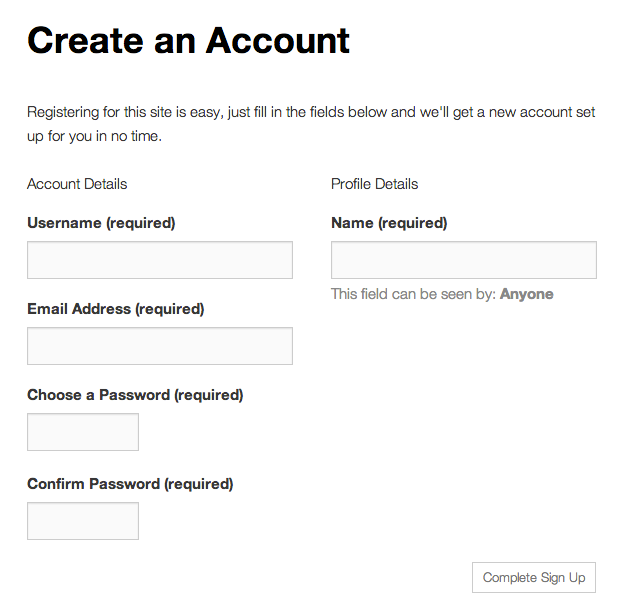
So far, I’ve copied this file: buddypress/bp-themes/bp-default/registration/register.php into my child theme and edited it and added content form tips where I want them, but I’m still left with the ‘Create an Account’ text at the top that I can’t get rid of – any ideas?
Evie
September 23, 2015 at 4:16 pm #244721In reply to: How to replace “Groups” with “Campaigns”
ParticipantThe easiest way for that is to use the language file.
September 23, 2015 at 3:39 pm #244719In reply to: Registration and Activation pages
ParticipantPlease, try to do something before asking such trivial question. Seems you never used/modified a profile avatar. BuddyPress has no album or gallery. This can be added by plugin.
September 23, 2015 at 3:34 pm #244718ParticipantYou can add custom option fields for References and Places Worked:
Not sure that adding a memberlist as drop down is very clever. What if you get a community of hundreds of members ?
To get database info, see here: (that’s a common WP task)
https://codex.wordpress.org/Class_Reference/wpdbSeptember 23, 2015 at 3:25 pm #244716In reply to: Registration and Activation pages
ParticipantI dont see this page https://buddypress.org/wp-content/uploads/15/2013/10/reg-form-default-state.png
when i go to my site /register.September 23, 2015 at 3:25 pm #244715In reply to: Change text on Registration page
ParticipantThe easiest way for that is to use the language file.
September 23, 2015 at 11:47 am #244707In reply to: Hiding Admin from Members List
ParticipantThanks for the link, but I’m not a WordPress or Buddypress coder, so it’s all a bit beyond me to be honest…
September 23, 2015 at 11:37 am #244706In reply to: Hiding Admin from Members List
ModeratorThis can be done with
bp_parse_args(). See the Using bp_parse_args() to filter BuddyPress template loops article for a tutorial.September 23, 2015 at 11:05 am #244705In reply to: Change text on Registration page
ParticipantOK, I’ve gone through the buddypress plugin folder and found all instances of the words ‘Create an Account’ and there is only one file in which added edits will appear on the site and it’s this file:
/wp-content/plugins/buddypress/bp-members/bp-members-screens.php
How can I add this file to my buddy child theme so that I can make the text changes I require so that I’m not edited core plugin files?
However this doesn’t help with wanting to edit the ‘Registering for this site is easy….’ bit of text. So Can anyone help with a complete solution here?
Thanks
-
AuthorSearch Results