Search Results for 'change buddypress menu'
-
Search Results
-
Hi all
I wanted to get rid of the ”Visit” link on the buddypress admin bar.
What i did was ghoing into the bp-core-adminbar.php and changed the:
add_action( ’bp_adminbar_menus’, ’bp_adminbar_random_menu’, 100 );
to…
remove_action( ’bp_adminbar_menus’, ’bp_adminbar_random_menu’, 100 );
The ”Visit” link is now gone and I haven’t done anything else, is this correct or is there anything else I need to do?
Please advise
Regards
THi all,
It’s a well covered topic here, but my problem seems to be common, although a definite answer doesn’t appear easy to find.
Registration issues, once submitted, I’m not going any further, the validation doesn’t activate, and the new user doesn’t capture. This is with my theme installed (Unite 2.0 by Parallelus (Andy Wilkerson)), however it does work on BuddyPress’s default theme. And if I install a basic theme like twenty10, I can get it to work no problems once I copy the required files across.
So my thoughts are, that there is something function wise that is missing or broken in Unite 2.0 theme (which I have to use as the client requires this, and has spent money customizing), and is conflicting, or not being called identically. I have followed just about all steps I can think of, and can’t fix the final missing piece,
Has anyone come across something like this? The functions.php file for unite is quite small, so I have pasted it below, as a starting point, and if you need any more info or files I can pass them on:
My setup is as follows:
Latest WordPress
Latest BuddyPress
BuddyPress Templates modified to work as expected on my theme or not modified and clean installed, not working
functions.php#================================================================== # # Admin control panel setup # #================================================================== # Default theme variables and information $themeInfo = get_theme_data(TEMPLATEPATH . '/style.css'); $themeVersion = trim($themeInfo); $themeTitle= trim($themeInfo); $shortname = strtolower(str_replace(" ","",$themeTitle)) . "_"; $postIndex = false; // special case variable for index paging bug // set as constants //................................................................ define('THEMENAME', $themeTitle); define('THEMEVERSION', $themeVersion); // shortcuts variables //................................................................ $cssPath = get_bloginfo('stylesheet_directory') . "/"; $themePath = get_bloginfo('template_url') . "/"; $themeUrlArray = parse_url(get_bloginfo('template_url')); $themeLocalUrl = $themeUrlArray . "/"; // setup info (category list, page list, etc) //................................................................ $allCategories = get_categories('hide_empty=0'); $allPages = get_pages('hide_empty=0'); $pageList = array(); $categoryList = array(); // create category and page list arrays //................................................................ foreach ($allPages as $thisPage) { $pageList[$thisPage->ID] = $thisPage->post_title; $pages_ids[] = $thisPage->ID; } foreach ($allCategories as $thisCategory) { $categoryList[$thisCategory->cat_ID] = $thisCategory->cat_name; $cats_ids[] = $thisCategory->cat_ID; } // Translation ready code //................................................................ // Make theme available for translation, Translations can be filed // in the "languages" directory. To change language just change // the value of $locale with laguage .mo file name.. // for example: global $locale; $locale = 'pa_IN'; load_theme_textdomain( THEMENAME, TEMPLATEPATH . '/languages' ); // This theme uses wp_nav_menu() in one location. //................................................................ if (version_compare( get_bloginfo('version'), '3.0', '>=' )) { register_nav_menus( array( 'primary' => __( 'Primary Navigation', $themeTitle ), ) ); } # Admin Menu Options // include options functions //................................................................ include_once('theme_admin/includes/option_functions.php'); // Menu structure //................................................................ function this_theme_menu() { add_menu_page('Theme Options', THEMENAME, 10, 'theme-setup', 'loadOptionsPage', get_template_directory_uri().'/theme_admin/images/themePanelIcon.png'); add_submenu_page('theme-setup', 'General Settings', 'General Options', 10, 'theme-setup', 'loadOptionsPage'); add_submenu_page('theme-setup', 'Home Page', 'Home Page', 10, 'homepage-options', 'loadOptionsPage'); if ( version_compare( get_bloginfo('version'), '3.0', '<' ) ) { // Theme menu manager only used for WP versions earlier than 3.0 add_submenu_page('theme-setup', 'Main Menu', 'Main Menu', 10, 'mainmenu-options', 'loadOptionsPage'); } add_submenu_page('theme-setup', 'Slideshow', 'Slideshow', 10, 'slideshow-options', 'loadOptionsPage'); add_submenu_page('theme-setup', 'Sidebar', 'Sidebar', 10, 'sidebar-options', 'loadOptionsPage'); add_submenu_page('theme-setup', 'Blog', 'Blog Pages', 10, 'blog-options', 'loadOptionsPage'); // 18-Aug ubhi -ps (added the blog link) add_submenu_page('theme-setup', 'Portfolio', 'Portfolio Pages', 10, 'portfolio-options', 'loadOptionsPage'); add_submenu_page('theme-setup', 'Contact Page', 'Contact Page', 10, 'contact-options', 'loadOptionsPage'); } // Create menu //................................................................ add_action('admin_menu','this_theme_menu'); // call and display the requested options page //................................................................ function loadOptionsPage() { global $themeTitle,$shortname,$pageList,$categoryList,$wp_deprecated_widgets_callbacks; include_once('theme_admin/includes/options_pages/'. $_GET .'.php'); // Get the list in array array form of excludes $customOptionsPages = array('slideshow-options', 'mainmenu-options', 'blog-options', 'portfolio-options', 'sidebar-options'); if ( !in_array($_GET, $customOptionsPages) ) { include_once("theme_admin/options.php"); } } # Addon Functions and Content include_once("theme_admin/includes/addon-functions.php"); # Include Widgets include_once('theme_admin/includes/widgets.php');I have seen several threads claiming that changing ‘admin_menu’ to ‘network_admin_menu’ will get the plugin settings to appear in the site admin under Buddypress.
This works and the menu items are visible and you can get to the settings page fine. However, if you make any changes and try to save them you will get a “404 not found” error. It is looking for wp-admin/network/options.php, but that appears to have moved and is no longer there.
Does anyone know what to change to save new settings?
HELP!!!!
Hi. I created a clean install of buddypress on bluehost. I played around with the template and invited 5 people to test it and all worked well. Initially it was set up on a temp url provided by bluehost, which was:
http://66.147.244.227/~connedn5
Once i was happy with it all i changed the name servers with my domain hosting company to point my domain at the new site. The domain, which was originally pointing at a wordpress.com blog, was http://www.connectinghr.org. This propogated fine after about 30 minutes. I then changed the wordpress address and Site address url’s in the General settings of my new wordpress.org site to the new http://www.connectinghr.org domain as directed by the bluehost guys. I should say that at this point, it kicked me out of wordpress and i had to contact the bluehost guys to change my password (even though i had not changed it!) so i could get back in.
I then went and invited new members to join the site by email. But now i have a number of problems:
1) I can see the new members listed in the ‘users’ menu in the admin part of the wordpress dashboard, but i cant see them on the site itself. The only people i can see are the ones that i had in the original test group from before i switched the domain pointing.
2) the members themselves cant access the site either. They created profiles, but cant access. If i cut and past the url for their profile into my browser – for example:
http://www.connectinghr.org/members/mattalder/
Then I get the following message:
“This user has been marked as a spammer. Only site admins can view this profile.”
When i look at them from within the wordpress users dashboard, they all look fine – they are not marked as pending or spammers or anything. They all appear – there are 13 of them.
So I then created another profile for me, to test the system. I get as far as creating the profile, and it tells me that i have been successful and it has sent me an email to activate my account, but no email arrives. I suspect this is the issue with the others, but i cant be sure.
Can anyone shed any light on this?? Im desperate! I have gone live with the site thinking it was fine, but its not!
Please help!
I am a newbie. I am still so happy that I find BP and I hope that I can solve all these problems!
-login and register error-
I can’t get even I register on crome. – (But I can login as a member and adminboth IE & Chrome).-Create a group-
I can’t create a group. (Please check out below and I don’t know why)
: I finish 4 steps but never get a group after click “finish” button
-> update : Again, this work on IE but not on Chrome! T.T– error msg –
1. All of BP page shows “deleted” on that page. I swear I never type it on CSS or PHP
I check with firebug and it says ” p>delted /p> ” (sorry can’t write )
How can I remove that “deleted”?-One last thing!-
Is there anyway to change BP menu as original BP page? At least I’d like to have button menu like this
http://testbp.org/members/johnjamesjacoby/All these problem wasn’t happen when I tried on “Buddypress Test drive” blog. So I guess my blog may has problem with BuddyPress Template Pack.
Below is my blog info. I am using BuddyPress Sliding Login Panel, and BP is not main theme.
If you anyone knows any of above answers, Please let me know! I truly wish that I can solve it and use BP. Otherwise I have to give it up T.T-Basic info-
*Crome is my basic browser!
1. blog add : http://koreangossipgirl.com/
2. WP : right under 3.1 (I think mine is 3.05)
3. theme : 2010 Weaver 1.5.4
3. BP : BuddyPress Default 1.2.7
4. Related BP Plugin : BuddyPress Profile Privacy, Buddypress Profile Widget for Blogs, BuddyPress Sliding Login Panel, BuddyPress Template Pack, Theme My Login, Remove BuddyPress AdminBar, Membership lite, CubePoints Buddypress IntegrationTopic: Top Nav Bar Display Problems
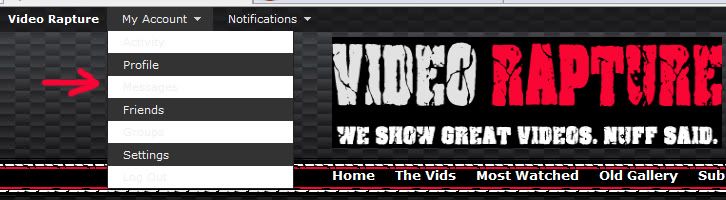
Okay so I’m trying to integrate buddypress into my wordpress theme and aside from the some of the alignment issues (not too concerned with it at the moment but if anyone wants to help id appreciate it), there is some weird display problems with the top nav bar. Some of the menu items have a white background or something and it’s very hard to read the text, so how can I change either the background color or the text color on the top nav menu.
I took a screen shot of it so you can see what I’m talking about.http://i132.photobucket.com/albums/q23/flipskater8391/Untitled-1.jpg
Thanks for any help!