Hello,
buddypress codex says it should be fairly easy to change the default pages.
https://codex.buddypress.org/themes/bp-custom-php/:
Defining custom slugs
Developers may modify the default URL slugs for activity, forums, etc by adding a statement in the bp-custom.php file.
// change 'discuss' to whatever you want
define( 'BP_FORUMS_SLUG', 'discuss' );
I tried putting these in my function.php, but that does not work.
define( 'BP_FORUMS_SLUG', 'discussions' );
define ( 'BP_ACTIVITY_SLUG', 'community' );
if I do what is suggested in this tutorial
Customizing Labels, Messages, and URLs
Slugs
For example, if you are running a sports website with BuddyPress, you could rename the URL slug example.com/members to example.com/players by changing the url of the corresponding component page in the WordPress admin -> pages.
I can change the page’s slug , but cannot edit the page anymore.
I am using wp composer / shortcodes to design the activity page and these do not work if the slug is renamed from wp admin >pages. I am not able to add text, nor images to the page.
Can anybody help, please?
Thank you.
Hello,
I am newbie at making website. I am making a website that has a buddypress, woocommerce and wc vendors. I edit the buddypress member-header.php for myshop link on my child’s theme and put bp-custom.php on my plugin folder. My problem is that whenever I go to other member’s my account page (where you can see add friend, public message and private message tab), in activity when I click on profile, it goes directly to my profile not to the other member’s profile. How will I fix this? I want to see the other member’s profile not mine. Thank you in advance.
Hello,
I have a problem where i got stuck.
On the User profiles I want to have nothing but an “about me” page and a page called “projects”.
The users should be able to create projects they are working on and the profile should show a list off all their projects. Users can click on the projects and see the content (text and images) and comment them. Users should also be able to write each other messages and add others as friends.
Thats all. No activity stream, favorites and such.
How can I do that the easiest way?
Thanks in advance,
Marvin
 Anonymous User
Inactive
At What priority does Easy Custom Post Types hooks ‘init’ ?
You need to be sure the post type has been defined before using bp_activity_set_post_type_tracking_args() so change ‘bp_init’ to ‘init’ and try to add a very late priority, eg:
// Don't forget to add the 'buddypress-activity' support!
add_post_type_support( 'sd_article', 'buddypress-activity' );

function customize_page_tracking_args() {
    // Check if the Activity component is active before using it.
    if ( ! bp_is_active( 'activity' ) ) {
        return;
    }

    bp_activity_set_post_type_tracking_args( 'sd_article', array(
        'component_id'             => 'activity',
        'action_id'                => 'new_sd_article',
        'bp_activity_admin_filter' => __( 'Neuer Artikel veröffentlicht', 'custom-domain' ),
        'bp_activity_front_filter' => __( 'Artikel', 'custom-domain' ),
        'contexts'                 => array( 'activity', 'member' ),
        'bp_activity_new_post'     => __( '%1$s hat den neuen <a href="%2$s">Artikel</a>', 'sozialdynamik' ),
        'bp_activity_new_post_ms'  => __( '%1$s hat den neuen <a href="%2$s">Artikel</a>, on the site %3$s', 'sozialdynamik' ),
        'position'                 => 100,
    ) );
}
add_action( 'init', 'customize_page_tracking_args', 1000 );
1. I just did it to test, the original code you provided was for pages – having established that it worked I then had an entry in the activity, in the admin it showed ‘Published a new page’ – i then changed the post type to my custom one and set my action id and notice in the admin it said ‘Unregistered action – new_blog_page’ in the Action Column for the page test entry – I realised this was the ‘action_id’ from your original code so new the code worked. It just does not work when I set my CPT for some reason. The CPT does create an activity entry but using the default message.
2. It is registered using Easy Custom Post Types plugin, however I have another CPT in my child theme (services-type.php) and the same thing happens for this post type.
3. This is possible for the CPT in my child theme but not the one’s created using the ECPT plugin – I will test with this disabled and perhaps migrate the CPT’s into the child theme if I find that it is causing the conflict.
Sorry!
Indeed, the New Post generates an activity item with ‘user wrote a new item’ – if a then change the CPT to ‘page’ but leave the action ID as my custom one the WordPress Admin and the Frontend both show my custom activity message! my code is below – the %3$s makes sense as I not running multi-site:
// Don't forget to add the 'buddypress-activity' support!
add_post_type_support( 'sd_article', 'buddypress-activity' );

function customize_page_tracking_args() {
    // Check if the Activity component is active before using it.
    if ( ! bp_is_active( 'activity' ) ) {
        return;
    }

    bp_activity_set_post_type_tracking_args( 'sd_article', array(
        'component_id'             => buddypress()->activity->id,
        'action_id'                => 'new_sd_article',
        'bp_activity_admin_filter' => __( 'Neuer Artikel veröffentlicht', 'custom-domain' ),
        'bp_activity_front_filter' => __( 'Artikel', 'custom-domain' ),
        'contexts'                 => array( 'activity', 'member' ),
        'bp_activity_new_post'     => __( '%1$s hat den neuen <a href="%2$s">Artikel</a>', 'sozialdynamik' ),
        'bp_activity_new_post_ms'  => __( '%1$s hat den neuen <a href="%2$s">Artikel</a>, on the site %3$s', 'sozialdynamik' ),
        'position'                 => 100,
    ) );
}
add_action( 'bp_init', 'customize_page_tracking_args' );

----->
I hope this is clearer!! :0)
Anonymous UserInactive
Hi i’m sorry. It must be because i’m french, but i’m not sure to understand what you reported 🙁
If i “rephrase” like this :
When adding the buddypress-activity support for my custom post type and specifying custom action strings arguments i don’t manage to have my custom strings displayed into the activity stream but instead the default action string eg : user wrote a new item
Would it be ok with your description of the trouble ?
%3$s should do something if your config is multisite. Is your config multisite ?
I would also prefer to show the page title as is shown when a blog is posted as supposed to just showing “User has posted a new ‘item’” – perhaps a %4$s can be added???
This would require some more activity meta. I haven’t included this part in core, so you’ll need to add a filter to achieve your goal. But let’s try to fix things step by step. I’m going to investigate on the “rephrase” i’ve just done.
My first impression is i’m a bit surprised as i’m using Post type activities for one of my plugin and everything seems to be ok… See this image :
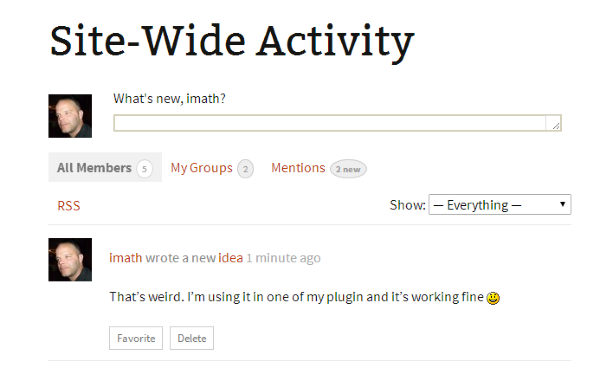
Saw the 2.2 update today and was very pleased to see we can now have activity for Custom Post Types – so exited was I that I updated immediately!!! (coincidentally doing some dev’ stuff/maintenance)
However my excitement soon passed – after poking around for the last few hours as the code you suggested did not seem to work fully it seems I have the following situation:
1. When I specify my Custom Post Type, i do indeed get an activity entry …wahaay!!! – unfortunately the message is the default and not my custom message :0(
2. If I specify the post type as ‘page’ – the message is my custom one (front end and back end) but obviously the activity feed is not updated as ‘page’ is not my CPT (previous entries from testing revealed this behaviour as when I changed the CPT back to page I have left the ‘action_id’ set to my CPT) :0(
I also have a question, it seems the custom message %1$s for the user’s name – %2$s for the the link and %3$s for site name.
For some reason %3$s doesn’t do anything?
I would also prefer to show the page title as is shown when a blog is posted as supposed to just showing “User has posted a new ‘item'” – perhaps a %4$s can be added???
Any help here would be most appreciated!! :0)
Regards
Sam
The last BP2.2 allow to add custom post type in activity feed, that’s great !
I understood the filter is with the CPT name like ‘new_blog_page’
How is it possible to save different activities according to taxonomies ? I mean I have a custom post type with 2 different taxonomies and I’d like to display in activity :
“%1$s posted a new TAXONOMY 1”
“%1$s posted a new TAXONOMY 2” etc…
all filtered by CPT taxonomy name…
Is it possible ?
@henrywright Thanks! Here is what I did:
edited /wp-content/plugin/buddypress/bp-activity/activity-template.php
Found the activity loop and changed $defaults = array(
‘display_comments’ => ‘stream’
That puts all comments on the top but only the comments are pulled to the top. What I really wanted was the entire conversation is pulled to the top.
Also, I think what I have done is crude and somehow, not ‘proper’. For instance, when I update buddypress plugin, all my changes will be gone.
How do I make sure that the changes remain?
Also, I have gone through https://codex.buddypress.org/developer/function-examples/bp_activity_add/
But still am nebulous about:
You can add items to the activity stream using bp_activity_add(). You’d write a custom function and hook it to the relevant action which fires when a group message has been posted (see a)
Can you elaborate?
Lastly, the codex page talks about adding new activity to database. I hope, it makes sure that one gets to see messages posted to only those groups one is authorized to see.
PS – When I crack it, is there any way I can contribute to the codex so other newbies like me have access to the stuff? How?
Thanks!
I have several custom post types on my website that are not working correctly with a category search filter (http://docs.designsandcode.com/search-filter/) and BuddyPress. For example, I have applied the following code to one of my pages:
<?php echo do_shortcode(‘[searchandfilter fields=”encyclopedia-category,post_date” types=”select,daterange” hierarchical=1 hide_empty=1 submit_label=”Filter”]’); ?>
This is intended to filter “Encyclopedia” post types by category (http://dennishoppe.de/en/wordpress-plugins/encyclopedia). The filter works perfectly on my category and single page, but fails on the archive page.
The issue is somehow connected to BuddyPress because when I set the BuddyPress Activity Stream page as my homepage, the filter stops working and redirects me to my home page and displays something similar to the following in the URL rather than displaying the category page as appropriate:
https://sandbox.stratics.com/?encyclopedia-category=slug
However, when I use any other static page as the homepage (such as a standard homepage instead of the Activity Stream), the filter starts working again. I suspect this has something to do with the way the search filter uses permalinks and the way BuddyPress treats permalinks when it is used as a homepage, but I am at a loss at this point.
The filter works just fine for my normal posts, but not for custom posts.
The following codex page provides an example of how to change the activity pagination to a custom number:
Using bp_parse_args() to filter BuddyPress template loops
Ok, I have my directory structure set up correctly in my custom theme /buddypress/members/single/. I was editing home.php and member-header.php successfully.
I made a change to home.php and now it doesn’t seem to be locating the member-header.php correctly. All the profile page will show is a ul of links to a ‘Activity’ etc. Nothing else. The weird thing is I can still edit member-header.php successfully when I remove the home.php file and use the one in the plugin folder.
I have tried copying and pasting the default home.php and this doesn’t work either. There now seems to be a weird issue with using home.php within my custom theme folder.
Edit: Ignore This I am an idiot
Anyone had a similar issue?
@djpaul – I’m not sure if it was working on the previous server; I THINK something related to mod_sec settings on that server was causing problems for the site, so I had to move it. Weird things started happening… changing widgets order would not save properly (found a work around by entering accessibility mode in screen options) – also custom menu settings would not add pages to the custom menu – could not figure out why.. so moved to new server.. now widgets save and stuff.
@danbp – I do use a bp-custom to make a user’s profile default show their profile instead of activity tab. (Wish I knew how to get rid of the “BASE” showing there!) – but I don’t think anything else is doing any custom pagination loop stuff in bp-custom or theme functions or anything.
not seeing anything in server error log.
not sure how to check for css or js errors.. like using the w3c validator? or is this a java console debugger thing I have heard about?
Not sure what to put, my_bp_activities_per_page_5_on_groups_activity (would that be the proper first line of the code? (or where (bp-custom?) – to modify groups display. Trying to understand that page you referenced and the trac codes.
when I tried adding – it does show a new page of groups, but only displays 2 groups, yet under that is says “Viewing 8 – 14 of 211 groups ” – strange.
Wanting to keep the topmost horizontal nav bar for BP pages like BP activity etc and for WP admin pages but not on individual multisite blog pages. Possible?
Hi,
I would really like to have my profile page the same as it is on this website, with the Activity feed to the right on the profile picture.
I’ve searched the web and couldn’t really find anything to help me so I thought I would come here to ask if it was a big task to do or something fairly straightforward? and if anyone would be able to tell me how to go about it ? I really appreciate any help, many thanks!
This is what I have

This is what I would like to do

I’m using a custom theme that is buddypress supported.
Using buddypress 2.1.1 and wordpress 4.1
thank youuu!
I have a freshly installed WordPress/BuddyPress with no content added.
Wordpress is 4.1 (latest.tar.gz downloaded on Jan 8, 2014)
BuddyPress is whatever version it installs when I installed the plugin about 10 minutes afterwards.
At first it seems to be installed, even though there is very little apparent change in the outward appearance of the default website.
But when I follow the path of Settings -> BuddyPress and then click the Pages tab, I get a page where I associate a WordPress page with each BuddyPress component directory. When I click on ‘View’ for either of the ‘Members’, ‘Activity’, or ‘Groups’, I get a 404 page. Apparently the paths of /members, /groups, or /activity were not included.
Similar problems happen, for example, if I were to try to create a group.
I’ve noticed that this has been going on for several years. I’ve found postings regarding this going on 5 years back, but those are older versions in which required different steps to resolve that are no longer reproducible. I find it surprising that I’ve found so little on this given that I’ve done practically nothing to customize the installation.
I’m running a WP 4.1 and BP 2.1.1. Here’s what I did and what I’m trying to do. I’ve chosen my registration page as my homepage http://freewall.net (still looking for ways to customize it).
If you click the header link, you’ll be taken to the registration page (if logged out). If you are logged in, however, you’ll be redirected to http://freewall.net/members/, which is what I wanted to change to http://freewall.net/stream/.
Is there a way for me to work on it?
I would like to remove the white background that comes on some of the buddypress plugins, such as user profiles, buddypress activity widget, groups, and buddypress log in.
I had help from another user who helped remove the blank wall on my Activity page. This is what he told me to do and it worked perfectly:
.activity article {
background: none;
}
If anyone can help with the rest, that would be awesome! Please and thank you.
hi @navinachettri,
wide question ! Causes are multiple, from server power to browser settings, medias size and some conflict with a theme, a plugin or a custom function….
An easy thing to do is to restrain the image size and weight in the media settings.
Another thing would be to check the activity page code if you use a child-theme.
About flickering, have you tested with different brower ? Could also be a js conflict…
As you see, your question brings more question as answers. Good debug. 😉
To remove @username near the header avatar on profile page, use this (in bp-custom.php)
function bpfr_remove_mention_from_profile() {
	// hide the hardcoded @ sign and username
	echo '<style> h2.user-nicename { display:none; } </style>';

	if( bp_is_user() && ! bp_get_member_user_id() ) {
        $user_id = 'displayed: '. bp_displayed_user_id();
    } else {
        $user_id = 'get_member_user: '. bp_get_member_user_id();
    }

	remove_filter( 'bp_get_displayed_user_mentionname', bp_activity_get_user_mentionname( bp_displayed_user_id() ) );

}
add_filter( 'bp_get_displayed_user_mentionname', 'bpfr_remove_mention_from_profile' );
To remove the mention sub tab from profile page, use this (in bp-custom.php):
function bpfr_hide_mention( $retval = 1 ) {
	$retval = false;
	// condition
	if ( bp_is_user() && ! bp_is_my_profile() ) {
		$retval = true;
	}
	return $retval;
}

function bpfr_hide_mention_nav() {
	// stop if condition is not ok
	if ( ! bpfr_hide_mention() ) {
		return;
	}
	// otherwise we remove the nav item
	//bp subnav items
	bp_core_remove_subnav_item( 'activity', 'mentions' );
}
add_action( 'bp_ready', 'bpfr_hide_mention_nav' );
To unlink @mention (this removes only the link not the mentionned username) AND remove the public message button, use this (in bp-custom.php):
add_filter( 'bp_activity_do_mentions', '__return_false' );
To allow the new BP 2.1 @mention tool in bbPress, use this (in bp-custom.php):
function bpfr_bbpress_maybe_load_mentions_scripts( $retval = false ) {
	if ( function_exists( 'bbpress' ) && is_bbpress() ) {
		$retval = true;
	}

	return $retval;
}
add_filter( 'bp_activity_maybe_load_mentions_scripts', 'bpfr_bbpress_maybe_load_mentions_scripts' );
Tested with WP 4.1 – BP 2.1.1 – bbP 2.5.4
Tempera theme was recently updated and normally you haven’t to use the old buddybar.
So the define is of no utility… (see ticket)
BP use now the WordPress Toolbar.
It looks also that you have 2 activity pages, 2 members page and 2 groups page. There should be only one. See if you have deleted pages, and clear the trash.
Also set up the pretty permalinks (anything but default), or at least re-save that setting page.
Finally, make a test with one of wp’s default theme, bring anything to work, before activating Tempera.
I use another theme of the same author, and if like i suspect, there is the same theme customization tool in Tempera, you must be carefull with that theme settings.
In BP settings, you have an option to show/hide the toolbar to logged out user. Deactivate it.
And read the theme doc attentively ! 😉
Give this a try – add to bp-custom.php or child-theme functions.php
This will show only blog activities on site/user activity & rss page.
function bpfr_filtering_activity( $retval ) {
	$retval['object'] = 'blogs';
		return $retval;
	}
add_filter( 'bp_before_has_activities_parse_args', 'bpfr_filtering_activity' );
Codex reference: https://codex.buddypress.org/developer/using-bp_parse_args-to-filter-buddypress-template-loops/
Interesting thing.
When renaming the page name from activity to something else- the page will not display the added content- be it a shortcode or just some custom text that I write. Also the name of the page will not display and instead it says ” site wide activity”
I am using the latest version of wp and bp, theme -buddypress special.
I thought it might me theme realted but switching to a default theme doesn’t display the image added, nor the text.
I am talking about some custom wp content- “welcome to the site..” Not the activity feed that works fine.
P.s I also tried renaming the slug using “define slug” but it didn’t work.
Hello,
I get the same error message in the BuddyPress Activity admin page. Also, AG Custom Admin don’t seem to give any solution either.
Does anyone have a recommendation on how to solve this?
Thanks


