Search Results for 'custom activity page'
-
Search Results
-
Hi there,
I am not sure if this has already been answered so apologies if it has (I cannot find an answer). What i would like to do is remove some of the icons and menus from my BuddyPress profile page. Currently I have 6 buttons on the profile (‘Profile’,’Activity’,’Notifications’,’Friends’,’Forums’,’Settings’). These have sub menus as well, for example if I choose ‘Profile’, its submenus are ‘Home’, ‘View’, ‘Change Profile Picture’.
What I would like to do is remove everything but ‘Friends’, ‘Forums’ and ‘Settings’. Then I would like only “replies created” to be shown when the user clicks on the ‘Forums’ button. I am currently using bbPress within my site for the forums if that helps (I would add an image but I am having trouble doing so).
If anyone could help me with this or point me in the right direction to achieve what I would like that would be great!
Many thanks.I’ve followed the guide at:
And I’ve made woocommerce products appear in the activity stream via the code below:
<?php

add_post_type_support( 'product', 'buddypress-activity' );

function customize_page_tracking_args() {
    // Check if the Activity component is active before using it.
    if ( ! bp_is_active( 'activity' ) ) {
        return;
    }

    bp_activity_set_post_type_tracking_args( 'product', array(
        'component_id'             => buddypress()->blogs->id,
        'action_id'                => 'new_product_page',
        'bp_activity_admin_filter' => __( 'Published a new product', 'custom-domain' ),
        'bp_activity_front_filter' => __( 'Pages', 'custom-domain' ),
        'contexts'                 => array( 'activity', 'member' ),
        'activity_comment'         => true,
        'bp_activity_new_post'     => __( '%1$s posted a new <a href="%2$s">product</a>', 'custom-textdomain' ),
        'bp_activity_new_post_ms'  => __( '%1$s posted a new <a href="%2$s">product</a>, on the site %3$s', 'custom-textdomain' ),
        'position'                 => 100,
    ) );
}
add_action( 'bp_init', 'customize_page_tracking_args' );

?>
What I’m trying to do is make it so the Product Post Title appears hyperlinked instead of a static word (in this case, “Product”):
'bp_activity_new_post' => __( '%1$s posted a new <a href="%2$s">product</a>', 'custom-textdomain' ),I don’t know PHP, so I thought I might be able to just jam something similar I’ve found to replace that line of code, such as:
sprintf( __( '%1$s created a new Product post, %2$s', 'buddypress' ), bp_core_get_userlink( (int) $post->post_author ), '' . $post->post_title . '' );Unfortunately, that doesn’t work.
I am using a customize theme. I don’t have any custom functions in bp-custom.php. Yes I know forum support is limited where third party themes are concerned but I can’t fix it.
here is my buddypress activity page https://www.upsozluk.com/etkinlik/
How can I fix the gap? There is no problem in mobile version of my website, but only computers have this space problem. i am using the latest version of wordpressThanks!!
Hi, I have a site with no functions. the only plugin activated is buddy press,
so when it loads the object for the nav after the bp-wrap div it has
<nav class=”main-navs no-ajax bp-navs single-screen-navs horizontal users-nav” id=”object-nav” role=”navigation” aria-label=”Member menu”>
I had the site with custom themes and functions and removed everything to try and find out where it was getting hung up.
Is there something else I can trouble shoot this with to find out why it does not load with Ajax – I thought that should be the default
WP is 5.6
Theme twenty twenty-one 1.1
php 7.4
Buddy Press info Version 7.1.0
Active components Community Members, Extended Profiles, Account Settings, Friend Connections, Private Messaging, Activity Streams, Notifications, User Groups
Active template pack BuddyPress Nouveau 7.1.0 ( I have tried with bp legacy also )
Toolbar No
Account Deletion Yes
Community Members: Profile Photo Uploads Yes
Community Members: Cover Image Uploads Yes
Extended Profiles: Profile Syncing Yes
User Groups: Group Creation Yes
User Groups: Group Photo Uploads Yes
User Groups: Group Cover Image Uploads Yes
Activity Streams: Post Comments Yes
Activity Streams: Activity auto-refresh YesHi, i feel like im doing this properly but i never get the right result. i have a custom meta called “featured” in activity meta. For testing purposes the meta values are 1,2,3,4 my goal is to have an activity loop order activities by the meta value. i’ve checked the documentation and i came up with this.
<?php

get_header(); ?>

<?php get_template_part('page-parts/general-title-section'); ?>

<?php get_template_part('page-parts/general-before-wrap');

$atts =  array(
			'title'            => 'Latest Activity',// title of the section.
			'pagination'       => 1,// show or not.
			'load_more'        => 0,
			'display_comments' => 'threaded',
			'include'          => false,     // pass an activity_id or string of IDs comma-separated
			'exclude'          => false,     // pass an activity_id or string of IDs comma-separated
			'in'               => false,     // comma-separated list or array of activity IDs among which to search
			'sort'             => 'DESC',    // sort DESC or ASC
			'page'             => 1,         // which page to load
			'per_page'         => 5,         // how many per page.
			'max'              => false,     // max number to return.
			'count_total'      => true,

			// Scope - pre-built activity filters for a user (friends/groups/favorites/mentions).
			'scope'            => false,

			// Filtering
			'user_id'          => false,    // user_id to filter on
			'object'           => false,    // object to filter on e.g. groups, profile, status, friends
			'action'           => false,    // action to filter on e.g. activity_update, new_forum_post, profile_updated
			'primary_id'       => false,    // object ID to filter on e.g. a group_id or forum_id or blog_id etc.
			'secondary_id'     => false,    // secondary object ID to filter on e.g. a post_id.

			// Searching
			'search_terms'     => false,         // specify terms to search on.
			'use_compat'       => bp_use_theme_compat_with_current_theme(),
			'allow_posting'    => false,    // experimental, some of the themes may not support it.
			'container_class'  => 'activity',// default container,
			'hide_on_activity' => 1,// hide on user and group activity pages.
			'for'              => '', // 'logged','displayed','author'.
			'role'             => '', // use one or more role here(e.g administrator,editor etc).
            'for_group'        => '',// group slug.
		);

		$atts['meta_query']= array(
                                    array(
                                        'key' => 'featured',
                                        'value' => '0',
                                        'type' => 'numeric',
                                        'compare' => '!=',
                                        ),
                                        'meta_type' => 'numeric',
                                'orderby' => 'meta_value_num',
                                'meta_key' => 'featured',
                                'order' => 'DESC'
                                );

 ?>
			<div id="buddypress">


		<?php do_action( 'bp_before_activity_loop' );


if ( bp_has_activities( $atts ) ) : ?>

            <div class="<?php echo esc_attr( $atts['container_class'] ); ?>
            <?php if ( ! $atts['display_comments'] ) : ?> hide-activity-comments<?php endif; ?>">

                <ul id="activity-stream" class="activity-list item-list">

					<?php while ( bp_activities() ) : bp_the_activity(); ?>

						<?php bp_get_template_part( 'buddypress/activity/entry' ); ?>
					<?php endwhile; ?>

					<?php if ( $atts['load_more'] && bp_activity_has_more_items() ) : ?>
                        <li class="load-more">
                            <a href="<?php bp_activity_load_more_link() ?>"><?php _e( 'Load More', 'buddypress' ); ?></a>
                        </li>
					<?php endif; ?>
                </ul>

				<?php if ( $atts['pagination'] && ! $atts['load_more'] ) : ?>
                    <div class="pagination">
                        <div class="pag-count"><?php bp_activity_pagination_count(); ?></div>
                        <div class="pagination-links"><?php bp_activity_pagination_links(); ?></div>
                    </div>
				<?php endif; ?>

            </div>

        <?php else : ?>
            <div id="message" class="info">
                <p><?php _e( 'Sorry, there was no activity found. Please try a different filter.', 'buddypress' ); ?></p>
            </div>
        <?php endif; ?>

?>
			</div>


		<?php do_action( 'bp_after_activity_loop' ); ?>

<?php get_template_part('page-parts/general-after-wrap'); ?>

<?php get_footer(); ?>
everything here works except for the order. for some reason it always orders by activity ID. am i missing something here? Thanks in advance im going crazy with this.
Hi.
I’m having an issue with Groups that causes the activity to show “Load More” instead of showing latest group updates/posts. Filters also do not work for me on group activity stream.I have it setup to show the groups Activity feed by default instead of a homepage for the group.
If set a homepage for the group and then navigate to ‘Activity’ everything works as it should.
Filters work. However, my requirement is to have latest posts load first by default.I’m using Buddypress Nouveau on a custom WordPress theme based on Underscores.
Any insight or troubleshooting ideas would be greatly appreciated!
All the best,
JustinHello,
I installed BP on my site and it was working well. But now, the “standard member front page” is gone. The page where you have your menu items: activity, messages, notifications, friends, groups, etc. What I mean by “standard member front page” is this: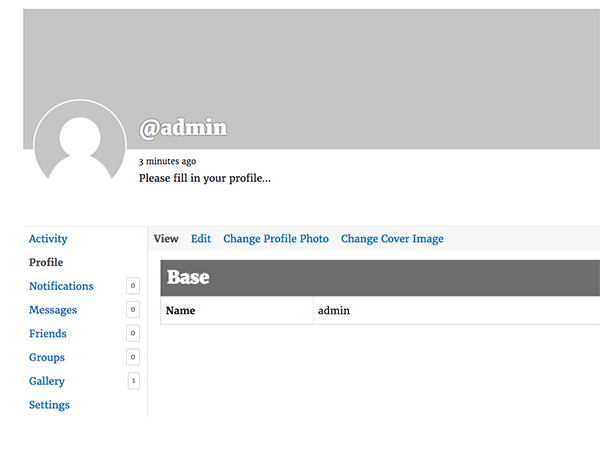
I don’t understand how this page can disappear. Now when you login the website defaults to a “you’re now logged in as X” page. And if you navigate to the member directory and click on your profile, there is just a list of your friends and groups. No activity, no messages, no notifications tabs.
In addition to BP, I’m using the Profile Builder plugin, and Profile Builder Customization Toolbox. In the Appearance> customization > BuddyPress nouveau settings, I have selected the enable default front page for member profiles. I also have selected the display the biographical info from the member’s WordPress profile.
WP version:5.5.3
BP version: 6.4.0
Theme: Werkstatt
website: queerarmenianlibrary.comHello,
i hope someone can help me because i am driving myself crazy at this point. im fairly new to wordpress and thought that i would give it a shot to try and have the themes custom post “video” show up in the activity stream as well as merge their comments. finding this link in the codex, https://codex.buddypress.org/plugindev/post-types-activities/i managed to have this in my bp-custom.php
 function customize_page_tracking_args() {

    if ( ! bp_is_active( 'activity' ) ) {
        return;
    }

    add_post_type_support( 'video', 'buddypress-activity' );


    bp_activity_set_post_type_tracking_args( 'video', array(
        'action_id'                         => 'new_video',
        'bp_activity_admin_filter'          => __( 'Published a new video', 'custom-textdomain' ),
        'bp_activity_front_filter'          => __( 'Video', 'custom-textdomain' ),
        'bp_activity_new_post'              => __( '%1$s posted a new <a href="%2$s">video</a>', 'custom-textdomain' ),
        'bp_activity_new_post_ms'           => __( '%1$s posted a new <a href="%2$s">video</a>, on the site %3$s', 'custom-textdomain' ),
        'contexts'                          => array( 'activity', 'member' ),
        'comment_action_id'                 => 'new_video_comment',
        'bp_activity_comments_admin_filter' => __( 'Commented a video', 'custom-textdomain' ),
        'bp_activity_comments_front_filter' => __( 'Video Comments', 'custom-textdomain' ),
        'bp_activity_new_comment'           => __( '%1$s commented on the <a href="%2$s">video</a>', 'custom-textdomain' ),
        'bp_activity_new_comment_ms'        => __( '%1$s commented on the <a href="%2$s">video</a>, on the site %3$s', 'custom-textdomain' ),
        'position'                          => 100,
    ) );

}
add_action( 'bp_init', 'customize_page_tracking_args' );
now only some of the activity shows up as there is no thumbnail image or a comment button. i might have misunderstood but i thought this would be all i needed. also i have alread enabled site tracking, indexing and allowed comments everywhere.
here is the themes cpt registration where var $post_type = ‘video’;:
	function register() {


			register_post_type( $this->post_type, array(
				'labels' => array(
					'name' => __('Videos', 'themify'),
					'singular_name' => __('Video', 'themify'),
					'add_new' => __( 'Add New', 'themify' ),
					'add_new_item' => __( 'Add New Video', 'themify' ),
					'edit_item' => __( 'Edit Video', 'themify' ),
					'new_item' => __( 'New Video', 'themify' ),
					'view_item' => __( 'View Video', 'themify' ),
					'search_items' => __( 'Search Videos', 'themify' ),
					'not_found' => __( 'No Videos found', 'themify' ),
					'not_found_in_trash' => __( 'No Videos found in Trash', 'themify' ),
					'menu_name' => __( 'Videos', 'themify' ),
				),
				'supports' => array('title', 'editor', 'thumbnail', 'custom-fields', 'excerpt', 'comments'),
				'hierarchical' => false,
				'public' => true,
				'exclude_from_search' => false,
				'query_var' => true,
				'can_export' => true,
				'capability_type' => 'post',
				'has_archive' => 'video-archive',
				'menu_icon' => 'dashicons-format-video',


"taxonomies"=>array("category"),
			));
			register_taxonomy( $this->tax, array( $this->post_type ), array(
				'labels' => array(
					'name' => __( 'Video Categories', 'themify' ),
					'singular_name' => __( 'Video Categories', 'themify' ),
				),
				'public' => true,
				'show_in_nav_menus' => true,
				'show_ui' => true,
				'show_tagcloud' => true,
				'hierarchical' => true,
				'rewrite' => true,
				'query_var' => true,
			));
			register_taxonomy( $this->tag, array( $this->post_type ), array(
				'labels' => array(
					'name' => __( 'Video Tags', 'themify' ),
					'singular_name' => __( 'Video Tags', 'themify' ),
				),
				'public' => true,
				'show_in_nav_menus' => true,
				'show_ui' => true,
				'show_tagcloud' => true,
				'hierarchical' => false,
				'rewrite' => true,
				'query_var' => true,
			));
			if ( is_admin() ) {
				add_filter('manage_edit-'.$this->tax.'_columns', array( $this, 'taxonomy_header' ), 10, 2);
				add_filter('manage_'.$this->tax.'_custom_column', array( $this, 'taxonomy_column_id' ), 10, 3);

				add_filter('manage_edit-'.$this->tag.'_columns', array( $this, 'taxonomy_header' ), 10, 2);
				add_filter('manage_'.$this->tag.'_custom_column', array( $this, 'taxonomy_column_id' ), 10, 3);
			}
		}
the site is https://balalatet.com/activity/ if you’d like to see
Please helpDoes anyone know how to incorporate replying to BuddyPress discussions within the activity feed? We are using the BuddyBoss platform and BuddyBoss custom theme.
We are trying to be a mainly forum/discussion-based site and we don’t use WP comments. So I want to have users be able to just click a “Reply” button in the activity feed to reply right there, versus being redirected to a new page (similar to Facebook’s reply/comments but for discussions).
We don’t modify the core files, only modify through child theme. We are also running bbPress through BuddyBoss. We have GoDaddy hosting with a LAMP managed server setup.
WordPress v5.5.3
BuddyBoss Platform v1.5.3
BuddyBoss Theme 1.6.0Hi
I’m using buddypress with BP-Nouveau and I’ve noticed that when I disable the custom front page for groups, the search function in the directory is not working, while is working if the custom front page is enabled. It is a bug? or there is another way to make it to work?
I’ ve disabled all the plugins and I have no custom code, but kept BP-Nouvau and ocean wp theme and still it does not work. Unfortunately the only difference is that the “enabled/disabled custom front pages for groups” determines whether the search works or not.
When I inspect the “search” in the activity group page the references are different dipending on the enabling of the Custom front pages for groups.
Here is a link that shows which search buttons do not work : https://www.x-simili.it/booking/Thank you so much
CorradoTopic: Customizing activity form
Hello,
actually i’m trying to customize the activity form by adding some combo-boxes under the textarea (only for the homepage)
i’m using BuddyPress 6.3.0
This is the first time i’m using (WordPress,PHP,BuddyPress) so could you please help me 🙂
I have a custom loop on my home page and it gets all activities based on the groups the user is subscribed to, the problem is that while the activity content is correct, the group name and group avatar stay all the same for the last fetched group
<?php if ( bp_has_activities(bp_ajax_querystring( 'activity' ) . '&action=activity_update&scope=groups' ) ): ?> //this only gives me activity updates only and limits it to the groups I'm subscribed to
 <?php while ( bp_activities() ) : bp_the_activity(); ?>
  <?php bp_group_avatar( ); ?> //this repeats the same group avatar
  <?php bp_group_name(); ?> //this repeats the same group name
  <?php bp_activity_content_body(); ?> //all contents are different and correctly presented
 <?php endwhile; ?>
<?php endif; ?>
are there methods I could use for example
bp_the_activity_group_nameandbp_the_activity_group_avatar?We are using Total WordPress Theme with BuddyPress and everything is working well, except when I post a blog post… the post shows on my activity page with some initial shortcodes showing from Visual Composer…
[vc_row][vc_column][vc_column_text css=”.vc_custom_1595275549516{padding-bottom: 20px !important;}”]Saturn in Aquarius is the beginning of
I understood Visual Composer was compatible and not sure why the code is showing.
Any ideas? Thanks in advance.
Theme – Cera
I am still struggling to figure out how to separate the activity streams. I just want each member to have their own activity stream.
Let me explain…
I have an activity stream in each members profile page already but..they all share the same feed.
I want the activity feeds to be separate.
If I post in members page A then post in members page B – you will have to go to both members pages to see each post. Example- A post stays in A members page
Please someone help
I want to learn how to customize this myself.Under the users profile picture on their profile page the latest post appears. Why?? I want to remove this. Every time I post a comment in the activity stream under my profile picture on my profile page the comment appears. The creators of my theme told me they do not help with customization.
I have tried using this CSS code below but it only got rid of the time stamp not the actual latest message.
You can use custom CSS to hide it
body.my-activity div#latest-update {
display: none;
}Under the users profile picture on their profile page the latest post appears. Why?? I want to remove this. Every time I post a comment in the activity stream under my profile picture on my profile page the comment appears. The creators of my theme told me they do not help with customization.
Site is a multisite. On the specific subsite, On the teams page on backend. It is showing all groups from all subsites. I’d like to filter out to show only the groups for that current subsite.
I have applied this code- http://buddypress.org/support/topic/buddypress-multisite-shared-users-but-segregated-groups-activity-forums/.
I think the way to achieve this is to add custom query using bp_parse_args to exclude certain group ids. But I wasn’t able to achieve it. Can someone give me an idea or some inputs on how to get this.
I’ve got some custom functions inside bp-custom.php that I want only to appear on the community wide activity page and not in any groups, is it possible to do this?
Topic: Redirect logged in users
Hello everyone, my first post here in need of assistance, hope you can help me out.
My “home” page is the register page for users without login.
If they are logged in, I want to redirect them to the activity page. Like this example: http://localhost/website/members/USERNAMEI am using this code for the redirect in bp-custom.php
<?php
    function bbg_bp_loggedin_register_page_redirect_to( $redirect_to ) {
    if ( bp_is_component_front_page( 'register' ) )
        $redirect_to = bp_get_root_domain() . '/members/USERNAME_HERE';

    return $redirect_to;
}
add_filter( 'bp_loggedin_register_page_redirect_to', 'bbg_bp_loggedin_register_page_redirect_to' );
?>
This is not working because I don’t know how to add the logged in username to the redirect after /members/USERNAME_HERE
Thank you in advance,
MKTGP
Hi there, I’m having trouble with getting BP running. This are my stats:
+ WordPress 5.0.8
+ BuddyPress Version 5.1.2
+ Custom Template made by myself from scratch so I have no idea on what WP tags call the BP functions into display
+ I DONT use “the_content()” WP tag on the index because I load my content with the Ajax Load More plugin
+ I DO use “the_content()” WP tag on both -pages- and -single- post viewI would like to use the “members” BP on my current page template, must I do a hierarchical overload so that buddypress pulls a special template but only for the “members” BP page? because I mean, currently all pages pull the WP hierarchy php “page” files, but members dont seem to appear, maybe I’m lacking a special hierarcy BP “page” file so that BP recognizes it and displays the members table?
I would also like to use the BP profile on a “single post” template, like when someone presses a “view profile” link then user gets redirected to the profile page with the activity posts of that person, sort of like in facebook the profile page yo know? do I need to create a special php on the BP hierarchy logic so that it can display the profile (cover image, profile pic, extended profile data, posts-activity) inside the WP single page hierarcy template?
what WP fuction is it that BP uses to display its content? I guess its not “the_content()” right? because I do use that tag but nothing displays…
I hope I can get some support, I’ll make my best to explain myself if I wasnt being clear enough


Hello! I’m having a hard time finding a solution to this issue. When I create a subnav tab, the new post/comment box is missing. Any help is appreciated!
Apparently I don’t know how to attach images.