Skip to:
Content
Pages
Categories
Search
Top
Bottom

Search Results for 'forum'

Viewing 25 results - 126 through 150 (of 20,277 total)
  • Author
    Search Results
  • #331543
    AWOL
    Participant

    Unrelated to my earlier posts, I was doing some debugging on another plugin, and was getting a lot of warnings and deprecated messages regarding a couple of BP functions, most of which I have been able to track down in my code; however one in particular persists, as follows;
    PHP Deprecated: Function bp_core_get_user_domain is <strong>deprecated</strong> since version 12.0.0! Use bp_members_get_user_url() instead
    It would be useful for me, and I am sure others, if the full list of deprecated functions is made available, as well as anything that uses them, because several of the ones I was using were not the exact function appearing in the debug log, but changing them (because I thought they might be the ones triggering the warning or deprecated message) did cut the number of messages in the debug log. I still don’t know for certain though. It would also be useful to have a complete list of available functions and what they do, particularly those that would be commonly used, all in one place – if this is available already, I can’t find it, so apologies if that is the case. Previous changes, inconsistencies and the sheer amount of old information that is still out there, including these forums, makes it extremely difficult to find the right function in the right circumstance, which I assumed, perhaps wrongly, was a part of why the new Buddypress is needed.

    #331542
    freelanceme
    Participant

    The error message you’ve encountered is related to the Elementor plugin in WordPress. It seems like there’s an issue with the plugin’s code, specifically in the Controls_Stack class when trying to sanitize settings. Here’s a breakdown of the error:

    Argument 1 passed to Elementor\Controls_Stack::sanitize_settings() indicates that the sanitize_settings method of the Controls_Stack class is expecting an array as its first argument.
    must be of the type array, null given means that the function received null instead of an array as the argument.
    The error occurred when the code called this method in the file /wp-content/plugins/elementor/includes/base/controls-stack.php on line 1084.
    To resolve this issue, you can try the following steps:

    Check for Plugin Conflicts: Sometimes, conflicts with other plugins can cause such errors. Deactivate other plugins one by one to see if the issue persists when Elementor is the only active plugin.

    Update Elementor: Make sure you’re using the latest version of the Elementor plugin. Outdated versions may contain bugs that have been fixed in newer releases.

    Check for Theme Compatibility: Your WordPress theme might not be fully compatible with the version of Elementor you’re using. Try switching to a default WordPress theme (e.g., Twenty Twenty-One) temporarily to see if the error still occurs.

    Debugging: If the issue persists, you may need to debug the specific code in the Elementor plugin. This usually requires some knowledge of PHP and WordPress development. You can use debugging tools like Xdebug or enable WordPress debugging to get more information about the error.

    Contact Elementor Support: If you can’t resolve the issue on your own, consider reaching out to Elementor’s support or community forums. They may have encountered similar issues and can provide guidance on how to fix it.

    Backup and Restore: As a last resort, if none of the above solutions work, you can try restoring a backup of your WordPress site to a point before the error occurred. This should revert your site to a stable state, but you’ll lose any changes made after the backup date.

    Remember to take proper precautions, such as backing up your site and data, before making any significant changes to your WordPress installation.

    #331342
    lordmatt
    Participant

    A full restore would wipe the newest entries in the forum. Not to mention all the activity data between the last backup and now.

    Is there any other way to solve this?

    Where does the tool look for the last active data? Maybe we could diagnose the fault and create a better solution.

    #331281
    buddypressnoob
    Participant

    Hello Forum,

    how can you create a page, which only contains the user profile (from BuddyPress)?

    Thank you for your help!

    #331259
    Mike Witt
    Participant

    @awol, regarding your bbPress tangent — my experience is that neither the BP forum (this one) nor the bbP support forum work the way BP and bbP do “out of the box.” Perhaps it has something to do with the theme, or perhaps they’re customized. But if you want to see how they’re going to work together your you, I’d suggest setting up a test site and installing them with your theme. Also robin-w on the bbpress forum has a plug-in that allows for a lot of customization and is pretty good about answering these kind of questions.

    #331256
    AWOL
    Participant

    Hi @imath,
    Thanks for that, and sorry to be a pain (although hopefully I am bringing up things that do need addressing and are not unique to my setup), but I have discovered something else that is not working as I expect, as follows:
    If someone comments on an Activity post, on my existing (not test) setup, that comment has the options below it to either Reply, Edit or Delete; but the reply and edit options are missing in my test setup for non-admin users, and the reply one is missing for admin. I am still using the default theme on my existing site, whereas I am using Nouveau on the test site, so is this a Nouveau issue? I downgraded to the current non beta BP on my test site but no difference. I am going to also investigate if a plugin is causing it, but as I have the same plugins on both sites it seems unlikely. I deactivated one plugin that seemed the most likely culprit (Buddypress Edit Activity from Buddyboss – https://en-gb.wordpress.org/plugins/buddypress-edit-activity/) but it was still the same (except of course this plugin is what adds the edit button in the first place, but the reply one is still missing).

    On a bit of a tangent, can I assume that this forum is running on bbpress? It’s just that I am thinking about adding a forum but am not finding this one very user friendly – for example the reply button is not visible until you hover over the post you want to reply to, and then it doesn’t automatically add the “@name” at the beginning, plus everything is written in a code box rather than normal input, just for starters. Font size could do with being larger too. Or is it just me?

    songdove
    Participant

    I’m back 2yrs later, trying with another build using buddypress. I thought I solved this question away from the support forums here, but don’t remember what I did at the moment. I want the members of private groups, to see private group activity in their main newsfeed. Non members should not see this activity, but members should. I don’t know if I found a code snippet or what, I need to fix this. I want an FB-like experience where you see any activity from any of your groups in your main newsfeed. If you aren’t a member of a private group, you won’t see it’s activity, but if you are a member of a private group, you will.

    #331208
    vincentmarin
    Participant

    Good morning. External links do not open in a new tab. I tried with two extensions but it still doesn’t work. Thanks to the forum for the help

    Frederic Pilon
    Participant

    Hello!

    I’m currently in the middle of integrating a bbpress/buddypress site and this has come up;

    I’m using groups to prevent access to some forums, but is there a way to do the same with some pages?

    Like say page X is only available if you have user role Y?

    #331007
    manuellaola
    Participant

    I’m looking for a plugin or code that extends the text editor for forums with a drag’n’drop function for images. I ask for help

    阿卡林刘
    Participant

    My WordPress is running on Docker’s Debian operating system, I enabled the multi-site network mode, hoping to create a separate forum, but when I installed the BuddyPress plugin and created the group, there were some problems: although the group function can be created, the group cannot be accessed normally.
    At first, I thought it was a conflict problem with a certain plugin, and I disabled all plugins, but the bug still exists, and I hope that the official can fix this bug.

    Details:
    – Runtime Environment: Docker
    – Docker Version: 24.0.5
    – Docker Image: wordpress:latest
    – PHP Version: 8.0.30

    #330977
    Steinallenein
    Participant

    Absolutely, incorporating voice messages into online conversations can add a dynamic and personal touch. If you’re looking for a plugin or solution that allows users to leave voice comments in the Activity Stream or forum, there are a few options to consider. While I don’t have access to real-time information beyond September 2021, I can suggest a general approach and some potential directions you can explore, including for StreamWatchers:

    Audio Recording Libraries: Look for JavaScript audio recording libraries that can be integrated into your web platform. These libraries can provide the necessary tools to record audio and save it as a file or transmit it to the server. Examples include Recorder.js, Microm.js, and MediaRecorder API.

    Voice Messaging APIs: Some services offer APIs specifically designed for voice messaging. These APIs can streamline the process of recording, storing, and retrieving voice messages. Check out services like Twilio, Nexmo (Vonage), or Agora, as they might offer voice-related APIs that can be integrated into your platform.

    Third-Party Plugins: Explore platforms like WordPress if you’re looking for forum integration. WordPress has a wide range of plugins, and some might cater to voice messaging. Additionally, consider checking out community platforms like Discourse or Vanilla Forums that might have voice messaging integrations or plugins available.

    Custom Development: If you have specific requirements, you might need to consider custom development. Working with developers or development teams, you can create a tailored solution that seamlessly integrates voice messaging into your platform’s existing features.

    As for “StreamWatchers,” it seems like you’re referring to a term or brand. If “StreamWatchers” is a specific plugin, service, or product related to your query, I recommend checking the official website or documentation for information on whether it supports voice messaging or integrates with the desired platforms.

    Remember to prioritize user experience and data privacy when implementing such features, especially when dealing with audio content. Always ensure that users are informed about data usage, recording permissions, and storage practices.

    Before making any decisions, it’s a good idea to research the latest developments in this space and consider reaching out to relevant communities or forums for recommendations and insights from others who might have implemented similar features.

    #330964
    Symphony Velenciano
    Participant

    Has the 404 errors been fixed yet? I just created a new install, installed a new version of buddypress, and add the pages to a new menu. The Activity and Member page is now working, but the Setting is still not. Now if I go into Pages, and open the pages directly, they work fine. But not from the menu or the backend from the top right hand corner. Changing permalinks doesn’t help as it points them to other pages. I tried on another computer, same thing. Hosting company is on it’s third day still trying to figure the issue. It’s not any of the default themes, although with SocialV, their buddypress plugin doent’s even recognize that buddypress is already installed! I’m using the latest PHP version, no clue. All other pages work except buddypress pages. I saw this same issue in the forums, but no one knew the answer or the fix for this, and many of them are just left unanswered.

    lmstearn
    Participant

    WP Ver: 6.3; BuddyPress Ver: 11.2.0; BBPress Ver: 2.6.9
    Hi, as creating a group and applying it to an existing private forum A is not possible, a new, empty, private forum B is created by default instead. Once the existing forum A is added to the group, will it break anything to remove the newly created empty forum B?
    The two forums appeared to be linked in some way.
    Thanks.

    #330693

    In reply to: bp_members_loop

    Mike Witt
    Participant

    @canister, for what it’s worth I’ve gotten a lot of good help on doing things with the members loop from the buddydev forum: https://buddydev.com/support/forums/

    matterdesign
    Participant

    Hi there,

    We are using BuddyPress for online courses.

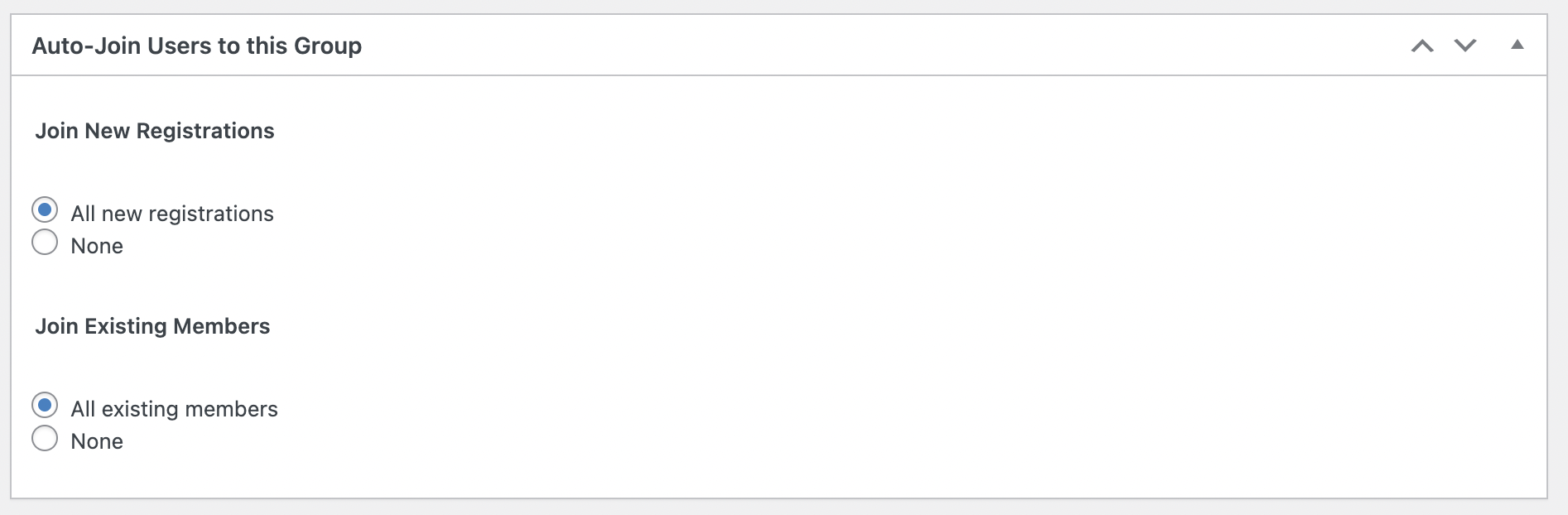
    In the past (pre May 23) when a user purchased a course they would only get added to the group associated to that specific course and so only see the specific course forum. E.g. Purchase Course X, get added to Group X and Forum X.

    Something happened recently whereby the function changed and now what is happening is that user purchase Course X, and gets added to Group X, Y, Z and Forum X, Y, Z

    I believe it might have something to do with this option “Auto-join Users To This Group” that doesn’t seem to be working as it should:

    https://sketchingnow.com/wp-content/uploads/2023/07/1690279927-1161-Screen-Shot-2023-07-25-at-11.10.59-am.png

    Or perhaps you can share more about this function?

    #330466
    cthangaraja
    Participant

    Thanks for the reply. But buddyboss does have a forum component.

    Forum Discussions


    https://online-communities.demos.buddyboss.com/forums/forum/mobile-application/

    #330465
    fawp
    Participant

    Hi @cthangaraja – as far as I’m aware, BuddyBoss, like BuddyPress, doesn’t have a forum component of their own.

    So you would need an additional forum plugin (such as bbPress, wpForo, Asgaros, etc.)

    #330454
    cthangaraja
    Participant

    Hi,

    I am using Buddyboss. I think its internally uses buddypress. I want to the users to participate only the discusions not to create new forums.

    #330452
    fawp
    Participant

    Hi @cthangaraja

    What forum are you using? bbPress?

    cthangaraja
    Participant

    Hi

    I want to link woocommerce product and buddypress forum via tags. When user opening particular forum discussion, i would like to load the products which has same tag that are added to discussion also vice versa. How is possible?

    cthangaraja
    Participant

    Hi

    I would like to restrict new forum creation option to admin or moderator. How to achieve this?

    #329933

    In reply to: Hide pages/content

    flamuren
    Participant

    Thanks alot Venutius. Except for the bad reviews on that plugin it seems to be a good fit to try.

    I will try to keep on google and look in the support forum, to do some more research as you propouse.

    If anyone else have anything to recommend I am all ears 🙏

    #329901
    flamuren
    Participant

    Hi,

    I am building a membersite using buddypress, bbpress and package it with buddyx theme.

    If I visit as non-logged in I can see activites, forums, member etc. Is it possible to somehow block that? Perhaps re-direct to a login/register page as facebook does?

    Best regards,

    flamuren

    #329868
    brycejune
    Participant

    Hi @steel-rat,

    Hope so you’re doing well, if the widget is not displaying any content, there are a few factors to consider. First, make sure the widget is properly configured. Check the settings to ensure it is set to display the latest activities from the correct sources, such as forum topics and BuddyPress activities. Verify that you have selected the appropriate options and saved the changes.

    It’s also important to review the user permissions associated with the activities. Ensure that the user who posted the forum topics has the necessary permissions to be included in the Latest Activities widget. Check the user roles and permissions settings to make sure they are allowed to contribute to the activities that should be displayed.

    Hope so this will help you!

    Regards,
    Bryce June

Viewing 25 results - 126 through 150 (of 20,277 total)
Skip to toolbar