Search Results for 'theme'
-
AuthorSearch Results
-
April 18, 2016 at 7:49 am #252567
In reply to: Change Cover Image Does Not Work
danbp
ParticipantHi,
You’re using a premium theme for which we can’t help you on this forum. You should ask on their support, included in the license. Or read theme’s documentation.
April 18, 2016 at 7:28 am #252563In reply to: Cropping Tool not showing
ParticipantHi,
you say Cropping Tool not showing… you omited to say with your theme.
Have you tested with Twenty Fifteen ? If the tool appears with Twenty, you’ll need to adjust your theme or ask his author for support.
f you’re confortable with CSS, maybe you can use Firebug to get some precious information to help you doing that adjustment.
April 17, 2016 at 4:53 pm #252542In reply to: [Resolved] Modify Profile Details Location
ParticipantHi,
a simple, but raw solution would be to use CSS. Something like:
#buddypress .standard-form #profile-details-section {
   float: left;
   clear: left;
}
But it’s raw and probably need some adjustment with your theme, and some mobile devices detection rules.
Another solution could be to use this premium plugin, by BuddyDev.
April 16, 2016 at 8:34 pm #252526In reply to: All I get is a list of comments
@mercime
Participant@noahboddy BuddyPress is compatible with nearly all WordPress themes. Checked out the source code of your theme’s page.php. It’s clean and should work with BP. So in all probability, the conflict could with another plugin. Good luck.
April 16, 2016 at 6:30 pm #252524In reply to: All I get is a list of comments
noahboddy
ParticipantThanks @mercine! I’ll give that a go after the weekend. I do have one question: is BuddyPress only compatible with certain themes? That’s another thing I was going to look into. I’m still learning,so I appreciate the help!
April 16, 2016 at 8:06 am #252497In reply to: Start up group problem.
sharmavishal
Participantcan u check if it works with the bp default or twenty fifteen theme on your site?
April 15, 2016 at 10:59 pm #252489In reply to: Bulk add a member to all groups and promote to admin
gdams82
ParticipantBTW, that was tested in WordPress 4.4.2 and BuddPress 2.5.2 on local XAMPP running Apache/2.4.17, PHP/5.6.15, custom theme, 25 plugins.
April 15, 2016 at 6:56 pm #252483In reply to: Most links redirect to homepage
skulldragon
ParticipantWeird, I deactivated the plugins and changed the theme the other day and it didn’t work.
Yesterday, started off deactivating 404 to 301 and surprise, that was it.
April 15, 2016 at 12:29 pm #252474@mcuk
ParticipantThis might work to hide it for logged out users (put in bp-custom.php):
function hide_bubble_logged_out () {
	if ( !is_user_logged_in() ) {
		?><style type="text/css">.bubble { display: none; }</style><?php
	}
}
add_action( 'bp_ready', 'hide_bubble_logged_out' );
April 14, 2016 at 5:44 pm #252460In reply to: Most links redirect to homepage
shanebp
ModeratorThere is most likely a conflict with one of your other plugins.
Try deactivating theme one at a time. Start with ‘Page Links To’.After that, try switching momentarily to a WP theme like 2013 to determine if it is your theme.
April 14, 2016 at 4:49 pm #252457In reply to: Most links redirect to homepage
Participant1. Which version of WordPress are you running? The latest
2. Did you install WordPress as a directory or subdomain install? Normal install in root
3. If a directory install, is it in root or in a subdirectory? Root
4. Did you upgrade from a previous version of WordPress? If so, from which version? No
5. Was WordPress functioning properly before installing/upgrading BuddyPress (BP)? e.g. permalinks, creating a new post, commenting. Yes
6. Which version of BP are you running? The latest
7. Did you upgraded from a previous version of BP? If so, from which version? If there was another version around 2 months ago, yes. Issue persists through both updates.
8. Do you have any plugins other than BuddyPress installed and activated? If so, which ones?
404 to 301
All in one Favicon
bbPress
BP Profile Search
BuddyPress
BuddyPress Cover Photo
Custom Facebook Feed
Divi Builder
Elegant Themes Updater
Events Manager
Go – Responsive Pricing & Compare Tables
K Elements
List category posts
Page Links To
rtMedia for WordPress, BuddyPress and bbPress
s2Member Framework
Slider Revolution
Taxonomy Metadata
WP FullCalendar
WPBakery Visual Composer9. Are you using the standard WordPress theme or customized theme? KLEO
10. Have you modified the core files in any way? No
11. Do you have any custom functions in bp-custom.php? No
12. If running bbPress, which version? Or did your BuddyPress install come with a copy of bbPress built-in? Latest
13. Please provide a list of any errors in your server’s log files.
14. Which company provides your hosting? Siteground
15. Is your server running Windows, or if Linux; Apache, nginx or something else? Apache I think.
April 14, 2016 at 4:37 pm #252456In reply to: Buddypress comment showing in all pages
ParticipantWe’re unable to help you for Yoo Helios premium theme.
Have you assigned a particular template to the mandatory BP pages: activity, members, groups,… ? If yes, remove them, as BP pages must stay “empty”. Just give them a title and nothing else.
Instead of using an exotic function, better try this solution.
is_buddypressfn definition: You can tell if a page is displaying BP content by whether the current_component has been defined. More here.April 14, 2016 at 3:58 pm #252452In reply to: vertical alignment for /groups and /members
DrMarkRhodes
ParticipantI found a way to edit the theme. It wasn’t the most elegant, but it worked very well for spacing. I added <br> <br> at the very bottom of the header.php file. It put some white space in there so the BuddyPress search buttons were not partially hidden under the bottom of the header menu.
April 14, 2016 at 3:53 pm #252450In reply to: Buddypress comment showing in all pages
christopherwayne
ParticipantHi @danbp
Thanks!!I found this code to solve the problem pasting it into funtions.php of my current theme, but it does not work. With the theme Twenty Thirteen not the comment list appears, so it is clear that the issue is a problem I am using.
add_filter(‘tc_show_comments’, ‘disable_comments_buddypress_pages’);
function disable_comments_buddypress_pages( $bool ){
if ( is_page() && is_buddypress() )
return false;
return $bool;
}April 14, 2016 at 8:21 am #252440In reply to: Buddypress comment showing in all pages
ParticipantThis comment template is in your theme and has nothing to do with BuddyPress. Best way to ensure is to test with Twenty Fifteen.
After that, you may need a child-theme and use some template overload. Read documentation.April 14, 2016 at 6:06 am #252436In reply to: Comment list at the end of the activity stream
ParticipantI found this code to solve the problem pasting it into funtions.php of my current theme, but it does not work. With the theme Twenty Thirteen not the comment list appears, so it is clear that the issue is a problem I am using.
add_filter(‘tc_show_comments’, ‘disable_comments_buddypress_pages’);
function disable_comments_buddypress_pages( $bool ){
if ( is_page() && is_buddypress() )
return false;
return $bool;
}April 13, 2016 at 2:46 pm #252411Dono12
ParticipantYes. I might add I have bbpress child theme don’t think that should matter
April 12, 2016 at 10:57 am #252369In reply to: Hide Members List in Public Groups
ModeratorPity that the theme needs to be hacke as…
To avoid that, you should be using a child theme.
Or you could put the code in bp-custom.php.April 12, 2016 at 7:27 am #252365aminipix
ParticipantHi!
@mcUK, I am really struggeling with the class selector! I cant figure out where to find my themes selector for#main-navigation .main-nav ul li.bubble {
Pressing f12, what should I be looking for? See the picture below.
PictureAlso, when not logged in, I get the number “13” instead of “0”…
Please advice….best regards!
April 12, 2016 at 5:00 am #252363In reply to: Hide Members List in Public Groups
mlapl1
ParticipantThank you very much. Pity that the theme needs to be hacke as, presumably, this will have to be added every time the theme is updated – but it is a good start. Thanks again
April 11, 2016 at 6:07 pm #252350In reply to: Additional activity update meta
ModeratorUnless you are explicitly using the BP default theme, I believe you should be using this file:
buddypress\bp-templates\bp-legacy\js\buddypress.jsAnd you should be able to overload that file in your theme.
April 11, 2016 at 2:08 pm #252335In reply to: Complete chat system???
celziobiaz
ParticipantWell, there are several Group chat rooms integrated well with BuddyPress.
When you choose, you need to consider the following:
1 – You can install one on your server, but if you have more than 10 chatters, that will probably load your server. Most shared hosting services, do not allow to install a chat on the server as it is high cpu/mem consumer. In addition, sharing files is dead slow.2 – I recommend a group chat hosted service, it will offload all activity to a remote server, bandwidth is not a consideration. They work with CDN, so everything is pretty fast.
As for your question:
I am very much in favor of RumbleTalk chat plugin, works very well and integrate with your users base.– Ability to send any files (anything from videos, photos, music, etc.)
Yes -You can upload files, pdf,excel..etc, I think any file, but they have size limit
– Ability to text chat
Yes
– Ability to video or voice call to a friend
Yes – they have private chat (you need to allow it in the settings), you must be in ssl to use it (WebRTC)
– (Optional) ability to add other friends or users to the chat
Yes – you can allow facebook/twitter friends
– (Optional) ability to screen share (desktop sharing)
No – no screen sharing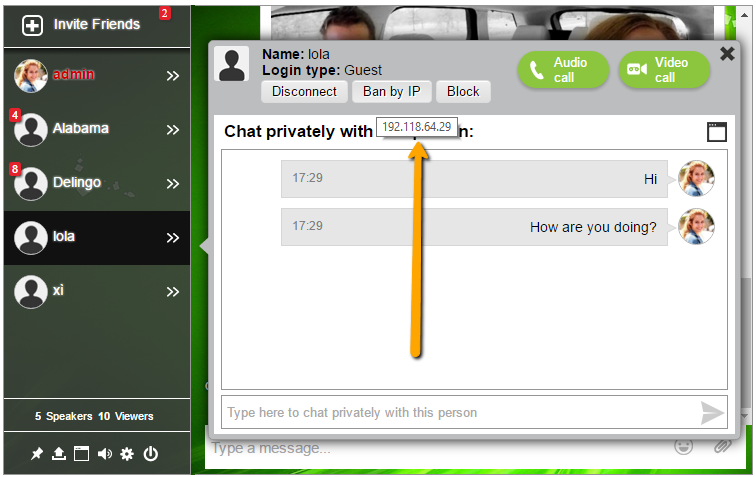 April 10, 2016 at 1:54 pm #252296
In reply to: Hide Members List in Public Groups
ModeratorThis will remove the ‘Members’ link on group pages:
function bp_group_remove_members_tab() {

    if ( ! bp_is_group() )
	return;

    global $bp;
    if (isset($bp->groups->current_group->slug) && $bp->groups->current_group->slug == $bp->current_item) 	{
         $bp->bp_options_nav[$bp->groups->current_group->slug]['members'] = false;
    }
}
add_action( 'bp_setup_nav', 'bp_group_remove_members_tab', 999 );
You can put it in your theme/functions.php
also – I think there is probably a better way to code this… ?April 10, 2016 at 11:01 am #252291In reply to: Shortcode to create Edit Profile Page
Henry Wright
ModeratorSo on successful login it looks as though Simple Membership’s
swpm_loginhook runs. With the Simple Membership plugin activated, try adding this to your theme’s functions.php file:add_action( 'swpm_login', function( $user, $pass, $remember ) { if ( ! $user || is_wp_error( $user ) ) { return; } bp_core_redirect( bp_loggedin_user_domain() ); } );Please note I haven’t tested.
April 8, 2016 at 8:55 pm #252258In reply to: Show additional fields on member profile header
ModeratorThey mean the theme that is currently activated.
-
AuthorSearch Results


