Search Results for 'wordpress'
-
AuthorSearch Results
-
December 8, 2016 at 9:28 am #261881
In reply to: WordPress 4.7 breaks BuddyPress
danbp
ParticipantHi @archie22is,
thank you for your report. But when you write such information, it is of your responsability to give correct information.
Such alarming title can confuse any user. It is unfair and to be honest, it is only concerning you (it’s your install who has that issue, not WordPress or BuddyPress, in their globality). Especially that the error message has nothing to do with BuddyPress.
In other words, you annonce 2 wrong information on the wrong forum.
The error is related to bbPress. And there is already a topic about this warning on WordPress support.
Read it and try to repair or add your own opinion to that topic.
Open also – if none exist – a topic on bbPress support.December 7, 2016 at 10:46 pm #261863tergra
ParticipantFound the source of the issue. I had put the field (First name (Base)) in another group of fields, because it only makes the registration process longer and doesn’t bring anything valuable to the site. But when yo do so, it breaks the registration process for some reason. It no longers makes the required verifications.. I’m now implementing the solution of changing is_required described here by ModemLooper : https://buddypress.trac.wordpress.org/ticket/5373?cversion=0&cnum_hist=3
It seems to work, I only have a issue with the css (I put a big div with display none before xprofile fields and I’m closing it at the end, just before the submit button, but it puts the submit button on the right as if the xprofile field was there, weirdly/Buddypress should really have that in core as this required Xprofile field is really not user-friendly AT ALL. 😉
Thanks everyone ! 🙂
December 7, 2016 at 10:17 pm #261860In reply to: Core Pages not Populating
ParticipantPlease be serious,
why do you use index.php (it is a file), when i give you the correct path in my previous answer ?
Such URL‘s can’t work:http://eltconjunction.com/index.php/groups/You’re on buddypress support forum and your BP pages where correctly displayed, a few hours back when i visited your site.
The error you have now is related to ppress. If you have issue with it, you have to ask for help on the appropriate support.
I invite you to read any plugins documentation you want to use BEFORE using them. And encourage you to learn a bit about internet, wordpress and how to build a site…
December 7, 2016 at 5:40 pm #261847In reply to: bp-template-notice failure
melodies
ParticipantHello @danbp,
Below are the details, as requested:– The WordPress version was 4.6.1.
(upgraded to 4.7 to see if that will solve the problem, but it didn’t).
– The BuddyPress version is 2.7.2.
– The BbPress version is 2.5.11.
– The problem started when I upgraded from “WordPress 4.5.3” and “BuddyPress 2.6.1.1” to “WordPress 4.6.1” and “BuddyPress 2.6.2.”
– The theme I tested with is: Twenty Sixteen.
– I have not modified the core files.
– WordPress was installed as a directory, in both root and a subdirectory (Both are having the same problem).
– The only custom functions in bp-custom.php is define ‘BP_FRIENDS_SLUG’.
– The server is running on nginx, and there are no errors in the server log files for today.
I deactivated all non-BuddyPress related plugins, to make sure they’re not the cause of the problem.
This is the only notice that ever appears on the screen and in the source of the page:
<div id=”message” class=”bp-template-notice updated”>
<p>You successfully left the group.</p>
</div>
This happens when I click the “leave group” button on the Groups page, and then refresh the page. After that, if I click on a BuddyPress profile page, it will still display “You successfully left the group” on the profile page as well. Trying to create a new success or error notice by clicking the “Add Friend” button, making an “edit profile” change, or refreshing the page does not change or remove the notice either. No other notice will show except for “You successfully left the group.”
I do not use any cache plugins.
I contacted the host company to see if there is a problem with the install or the server, but they said they couldn’t find any problems on their end. They cleared the server cache and uploaded new WordPress files, but the BuddyPress problem is still there.
Why is “You successfully left the group” the only notice showing on all bp templates?
December 7, 2016 at 5:18 pm #261846In reply to: Core Pages not Populating
ParticipantJust checked your site… seems to work !
http://eltconjunction.com/register/ is ok
http://eltconjunction.com/members/ is ok
http://eltconjunction.com/members/Alliebells15/ (your profile is……. OK !)
http://eltconjunction.com/groups/ is ok (no groups, but the page is correctly displayed)So what is the problem ? Do you mean perhaps some missing buttons to access those pages ?
Please read here if it’s the case:
December 7, 2016 at 12:49 pm #261832In reply to: Creating Landing Page
Venutius
ModeratorHow about this:
December 7, 2016 at 8:01 am #261823In reply to: How do I integrate BuddyPress?
ModeratorYou need to find some tutorials on adding plugins to wordpress.
Can you get to the Dashboard in your installation? It should have the URL of http://www.yoursite.com/wp-admin/
From the Dashboard are you able to get to Plugins? If so then click on Add New and BuddyPress will be displayed (if not enter BuddyPress into the search, once you see BuddyPress then you can click on Install and then Activate.
December 7, 2016 at 7:56 am #261822In reply to: Placing widgets and sidebar in Forms layout
ModeratorIf you theme’s default page has a sidebar then it’s possible to control which widgets are shown on different pages including the BuddyPress Pages by using Display Widgets SEO Plus.
December 7, 2016 at 4:51 am #261820In reply to: How do I integrate BuddyPress?
aubreyw
ParticipantModemlooper, thanks, but as I mentioned, I think that’s what I’ve been trying, exactly the way the BuddyPress instructions are written. But when I do that, BuddyPress is only downloading to my own hard drive – not to my WordPress account or Bluehost, or wherever it’s supposed to download to (I really don’t know). A little more detail would help. I’m seriously a WordPress/BuddyPress beginner. 🙂
December 7, 2016 at 4:19 am #261819In reply to: How do I integrate BuddyPress?
modemlooper
Moderatorin the admin, visit plugins, click add new, search “BuddyPress”, install then activate.
December 6, 2016 at 4:52 pm #261803In reply to: Blog subscriber vs. BP user
ModeratorUse something like https://wordpress.org/plugins/restrict-content/
Block off BP pages to logged in users and you dont have to do anything special.
Add users manually like danbp suggested. Non members cans still comment on blog posts.
December 6, 2016 at 3:17 pm #261800In reply to: Blog subscriber vs. BP user
ParticipantHi @vukhachminh, @doulos12,
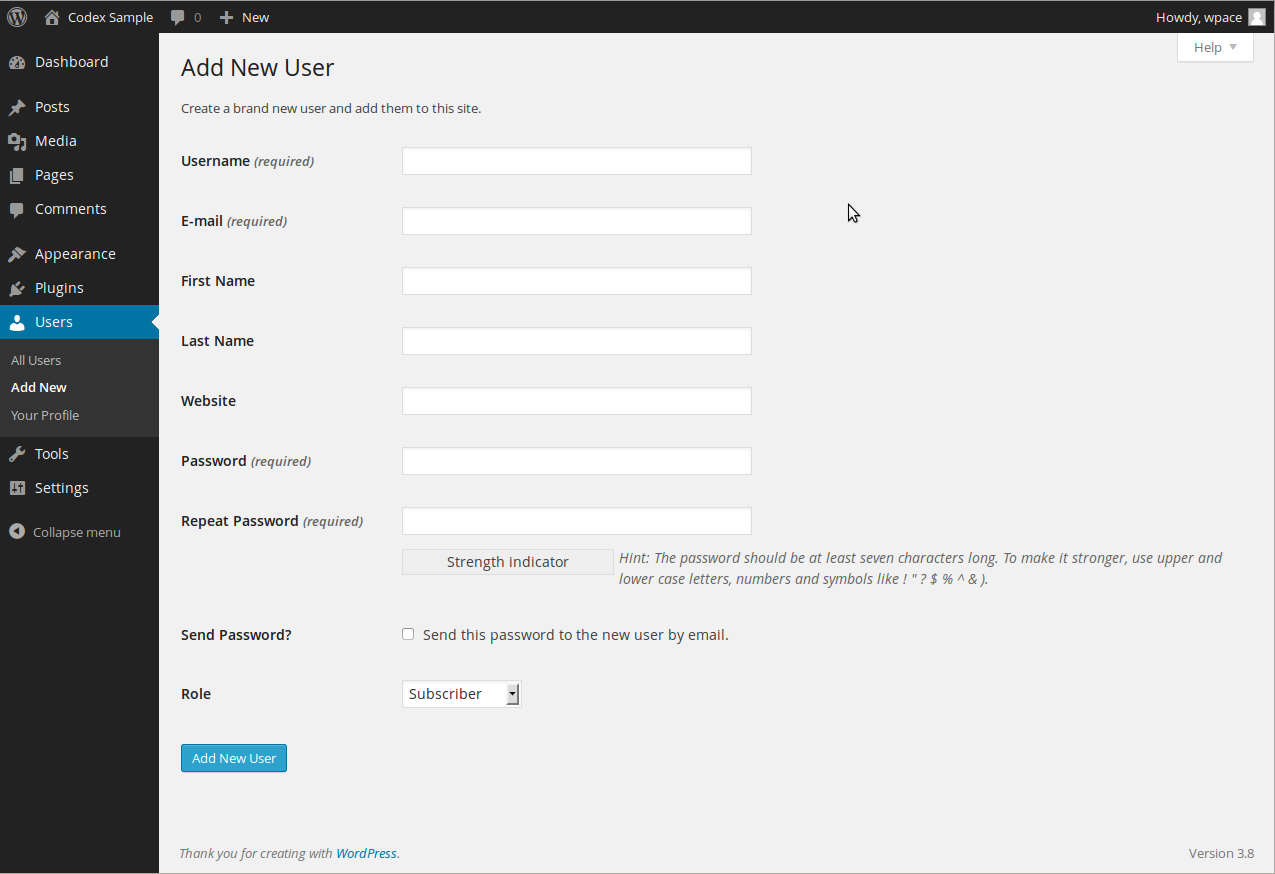
– “subscriber” is wp’s default role. This is site admin territory and is handled on this screen.
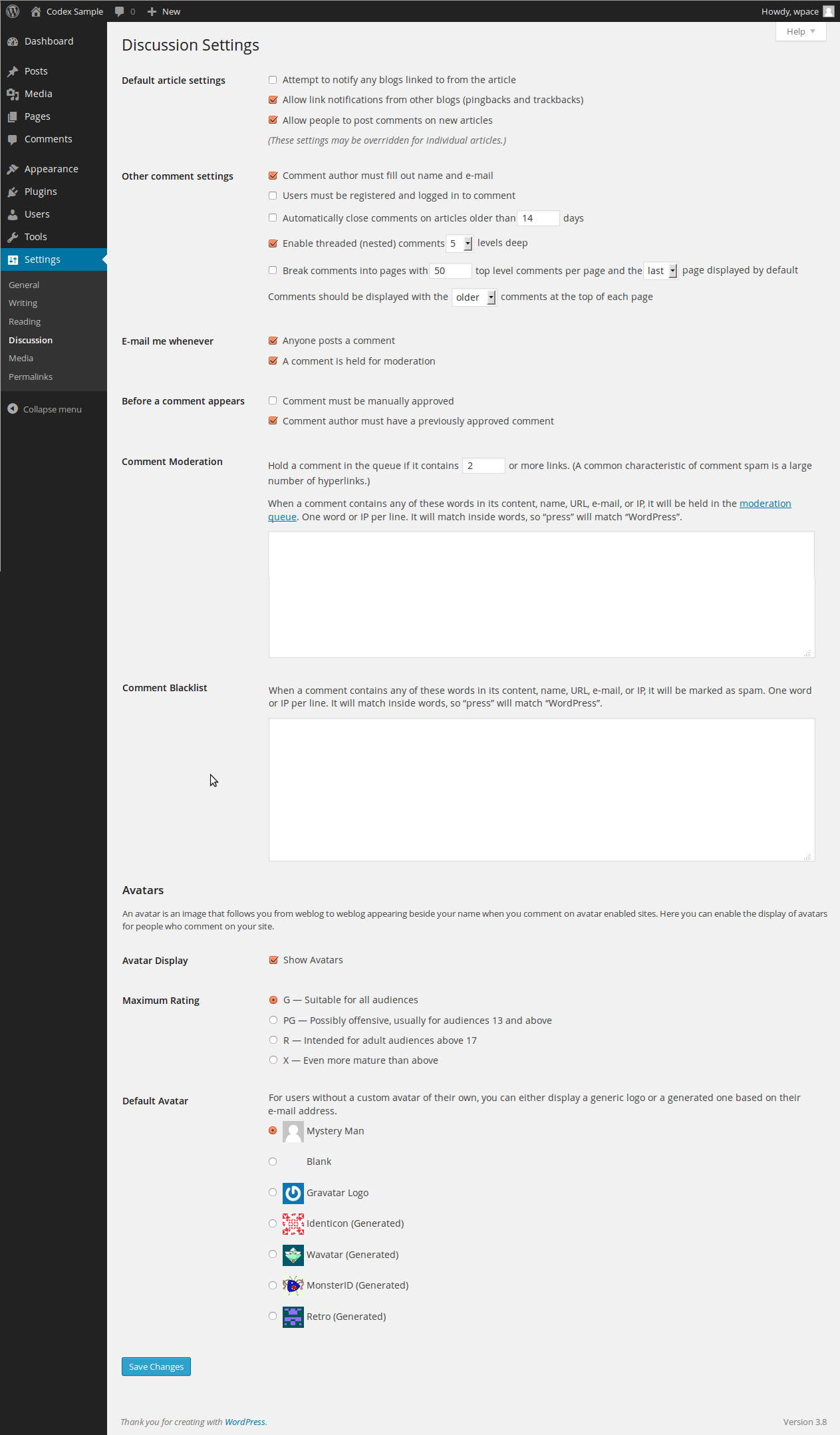
– who can comment can be defined in wp settings.
 December 6, 2016 at 10:04 am #261790Participant
Is “xprofile component” the feature exposed in “Settings > BuddyPress” named “Extended Profiles” (at the very top of the config page)? (It probably is, but I just want to be sure, thanks.)
Yes it is !
it is possible […] to effect the change of either the email or password fields?
Yes it is ! from here: your-site.abc/members/USERNAME/settings/ – the link can be found under the top right usermenu on wp’s toolbar: username > settings > general OR/AND on the buddymenu, when you’re on your profile: Settings ! And that’s it !

For all other BP related questions, please read through the codex, i really have no time to (re)write all explanations. Sorry, hope you uderstand.
December 6, 2016 at 9:48 am #261789Jay
ParticipantThanks for the background info about WP, @danbp. It certainly is interesting to see how the little old single-user blog platform called “WordPress” has mushroomed into the gargantuan that it is today, following the old adage, “Man expands to fill the available space.”
Obviously I’m a bit of a noobie to WordPress (I’ll admit, so feel free to flame away ;)), but I’d like to ask about your reference to the clause “When BP is activated, and if you use the xprofile component…” I am a bit confused about “the xprofile component” and was wondering if you can help me understand it a bit better.
Is “xprofile component” the feature exposed in “Settings > BuddyPress” named “Extended Profiles” (at the very top of the config page)? (It probably is, but I just want to be sure, thanks.)
I am fully cognizant of the fact that one can preclude access to the WP Dashboard in a number ways, including by Role, etc., and I plan to do that. However, that causes me to provide exposure to the standard WP Profile fields (or as many of thsoe fields that I want to expose, that is) so that the user can modify them. This includes the critical email and password fields.
Relating to this situation, you didn’t quite address my key question as to whether it is possible (without serious WP core hacking — something I would NEVER do, btw) to effect the change of either the email or password fields?
Now listen, I realize that probably sounds like a shameless noobie question, but it really begs the question of whether modifying the email/password fields outside of the WP dashboard is considered “bad form” in some way.
Thanks in advance for your advice and insights.
December 6, 2016 at 9:40 am #261788In reply to: What WP theme should I use for BuddyPress?
ParticipantDecember 6, 2016 at 9:31 am #261787Participanti’ll try to explain. You’re using WordPress and a plugin called BuddyPRess which add a community dimension to WP.
Members are the heart of BP. Anything done by the plugin will return something related to members: activities, friendships, dicussion and much more.
How is this possible ?
Because WP let you register members separately. To do this, WP ask for a username(pseudonym), a password and a valid email.You cannot avoid this, whatever plugin you use. It is how it works.
Now, we have 2 different question in this topic.
1) how to restrict access to profile settings ?
2) do we need a plugin for that ?About point 1
WordPress was designed to be a blog builder. A CMS with one blog author who was mainly also the site
owner/builder… This changed with the years and today, you can handle a multiauthor blog.When you install BP, you can still handle a multiauthor blog (or even blogs) and also a big community of different users, whith different (wp) roles.
What hasn’t changed is the way WP handles authors(or members): from within the dashboard, whatever the role.
When BP is activated, and if you use the xprofile component, you can build a registration form who is added to the original wp registration form. This form is then available on each user profile and can be modified from there.
To restrict user access to wp-admin, you can use different technique. This depends of your coding knowledge or working philosophy, with custom code or applying some plugin solution.
This is independant of BuddyPress and out of the scope of this forum. Just remember that BP let you access to your credentials from front-end.
About point 2
– in theory, you don’t need a plugin
– you always need to read about a plugin before using it.
For example, the workaround mentionned in this topic about the usage of Profile Builder.
– here a recent tutorial – for beginners – you may found more advanced advice by googling about “wordpress restrict dashbord access”.When you read the teaser on that plugin page, you already should have understand that you don’t need it !
Simple to use profile plugin allowing front-end login, user registration and edit profile by using shortcodes.Astonishment ! BuddyPress offers exactly the same options (among others).
What ever plugin you use, the regiter process of WordPress won’t change, and the user list or the user data will always be at the same place. What plugins do (most of them), is to modify the appearance of that process.
What you can also do is to remove all WP related items from the toolbar, if you use it. This is widely documented and discussed on WP’s support and codex. It’s WP territory and has nothing to do with the fact you use BuddyPress.
Admitting you found a solution for the backend, you need to use BP’s login widget. From there, users can enter the site. And if they loosed their password, they can ask for a new one from there (usually the sidebar, on front-end).
December 6, 2016 at 1:00 am #261779In reply to: What WP theme should I use for BuddyPress?
ParticipantI’ll try to make this my last question. I think I’m going to purchase and use the BoddyBoss theme. Now that I have already added WordPress to my Bluehost account, I also have to add the BuddyBoss theme and BuddyPress to my Bluehost account as well, is that correct? And does it matter which order I add them in?
December 5, 2016 at 10:34 pm #261775In reply to: Limiting to private membership
ModeratorThere’s a few different ways you could go about this, there’s a few privacy plugins that will hide different aspect of the site from public view. One is BP Registration Options, this installs new member moderation (so you can choose who to allow on you site) and BuddyPress privacy, where the BuddyPress pages are all private, but the WordPress pages and posts are still public.
If that’s not private enough for you then there’s BP Simple Private which allows you to hide all aspects of your site apart from the homepage.
December 5, 2016 at 10:25 pm #261773In reply to: What WP theme should I use for BuddyPress?
ParticipantThanks Venutius. The part I find confusing is that all those themes have nice fancy images and layouts, but none of them appear to be anything like an online community layout. If I choose one of the themes from WordPress Themes Directory, is it safe to assume I can easily modify it (without knowing any code) to the look and feel of an online community?
December 5, 2016 at 9:56 pm #261772In reply to: Blog subscriber vs. BP user
ModeratorYou don’t have to be logged in to comment in WordPress
December 5, 2016 at 9:47 pm #261770In reply to: What WP theme should I use for BuddyPress?
ModeratorBuddyPress used to come with it’s own theme, it’s still there though not really supported.
The theme dictates the look and feel of your site so recommendation is difficult, also there’s a choice to be made between premium and free themes.
For the free themes just take a look over on the WordPress Themes Directory
December 5, 2016 at 8:05 pm #261756In reply to: How can I get a registration shortcode?
ParticipantHi,
BuddyPress use templates to show his stuff.
The registration is part of WP and BP’s xprofile component add only some additionnal fields to the original register form.If you open a template file you will see a lot of code and many lines starting by do_action( ‘something’ );
These files are all stored in bp-templates/bp-legacy/buddypress/
Now you have already the where and the what. here’s the how.
To show some text on the register page you have two options:
1) altering the whole template file bp-templates/bp-legacy/buddypress/members/register.php
2) add what you want by using an action hookThe second method is the fasted and the easiest. You just need to write a function and you’re done.
function valeriemanne() {
   echo 'Here i am !';
}
add_action( 'bp_before_register_page', 'valeriemanne' );
Add this to your child theme functions.php file or into bp-custom.php
WordPress codex references
add_action
Child themeDecember 5, 2016 at 5:40 pm #261738In reply to: Cannot See Groups
ModeratorThis may of may not be of help:
https://wordpress.org/plugins/buddypress-custom-profile-menu/
December 5, 2016 at 1:40 pm #261706In reply to: Read Only Group?
ModeratorThink this was the plugin Hugo was thinking of, it’s not been updated in 4 years though.
December 5, 2016 at 4:14 am #261694In reply to: last_activity empty in members loop
ryanrain
ParticipantThanks @wordpressrene, I’m having a closely related issue. WP 4.6.1, BP 2.7.2.
Just to restate the issue for clarity, my client brought to my attention what she considers to be a bug: in places such as the members listing and individual profiles, no recent update is shown for some members who *have* been active.
looking around in the code, it appears that the bp_member_latest_update() function seems to not include forum replies or activity comments, just updates.
HOWEVER, the bp_member_last_active() function DOES include activity comments in its calculation of how much time has passed since the user interacted with the site. One sees that a person was active, but for some mysterious reason that activity isn’t shown. My personal opinion is that all activity, including activity comments, should be included in bp_member_latest_update() by default, but my guess is that this is by design.
Any advice as to how to print out a user’s most recent activity regardless of its type? Can anyone point me in the right direction? Thanks everyone!
-
AuthorSearch Results


