Search Results for 'wordpress'
-
AuthorSearch Results
-
October 23, 2022 at 11:50 pm #326769
rewindzpro
ParticipantYes, I only get the WordPress email saying that I have new registration.
October 22, 2022 at 10:03 am #326756Topic: Unable to Display All Forums
in forum How-to & Troubleshootingdmmclan
ParticipantI have a new Site
Wordpress 6.0.3
WPBakery 6.9.0
BuddyPress 10.4.0I have 4 top level forums
only 3 will display, the 4th will show up in a menu, but not in the static display on the forums front page.
I have been through all settings but do not find anything that would effect this displayOctober 19, 2022 at 7:04 am #326709In reply to: register form plugin
DixieKim
ParticipantHow to add custom fields to the WordPress registration form ?
October 16, 2022 at 11:56 pm #326657Gomle
ParticipantHello, and thank you for all the great work!
I have been using WordPress for about 15 years. I started my first online community in 2008.
I then chose not to use Buddypress, because at the time it was fine with a forum. Facebook hadn’t invented its activity wall yet, and people didn’t expect too much.Now in 2022 I am in the process of re-launching this old online community again, after it has been dead for a number of years. (Mostly because Facebook arrived)
Meanwhile, I’ve been using WordPress & Woocommerce a lot – last couple of years – with Gutenberg and Blocks. An absolutely fantastic solution to a lot of problems!If you use WordPress, it’s because you can do something yourself, but you can’t do everything.
I was therefore really looking forward to getting started with Buddypress in relation to the relaunch I’m about to start, but I was a little disappointed when I saw that it is not at all possible to use gutenberg to style the absolutely required pages. For example Register, Profile, Members, Activity etc.
I think many who now use WordPress are people who want to own their own information, have 100% control, and to shape something themselves out of their own creativity. They may have some knowledge, but not always enough to do programming, or to go deep into css and theme design etc. They don’t have time for that either.
Gutenberg blocks are therefore the perfect bridge between those who know a LITTLE, but need the help of software to do the rest, and who want to create something quickly.
I think there are many of us..Wordpress scores highly here with blocks and easy solutions.
You can now use Kadence Theme + Gutenberg blocks to create almost anything you want.
I’m not a programmer myself, but I own a couple of companies. Much of the joy is being able to create something, see it being used, make it work – and I can do that by using blocks.
I’ve gone back and forth between Buddypress and Buddyboss, after I realized that Buddypress doesn’t yet have this functionality and tried to think what I really want.
With Buddyboss, I get a great theme, and it has all the functionality I need – but I’m completely locked into just that. Also, I’m not very impressed with companies that take credit for a product that was originally created by someone else. That is why I prefer to use Buddypress, and I also see Buddypress as the authority here.I think you Buddypress developers will be able to deliver something more in the future, than what I expect from a company working with a product not originally made by themselves.
But still I see it difficult using Buddypress as it would turn out to be much more expensive, since I have to contact someone at upWork to do it the way I want it.
To many people it would be more logical to pay a couple of hundred dollars to be able to start tomorrow.So my contribution to the discussion is perhaps not a secret: Make buddypress elements ready to use as blocks. And make sure to market it as a “point and click system with Gutenberg”
Additionally, specifically for my online community, I will need:
– Forums
– Private messaging
– Notification system
– Nice looking user profiles
– Speedy site
– Friends
– Follow friends
– Moderation system for both community and forums.October 15, 2022 at 4:46 pm #326650In reply to: How to create login and register pages
JKDuck
ParticipantSoory, I am lost.
You just need to create new pages and paste [shortcode] in your pages.
I “just need to” is perfect wording w/o contend. When I create a new page in WordPress and add shortcode the published page will display the shortcode, i.e. [bbp-register].
No help here?
October 14, 2022 at 9:30 pm #326644Topic: BP links all bring back so same user!
in forum How-to & Troubleshootingjman2286
ParticipantGood afternoon, I installed BP and youzify. I went to appearance > menus and added the overview and activities tabs to my main menu. I have a few users that signed up and when Everyone clicks the tabs it redirects them to my profile, https://saltytoadfishing.com/members/mannersjustin/. I have checked under customize theme > menus as well and the links look correct. However when the links are clicked they still go back to my profile. Is there a tag for the current logged in user? If so I could just put that in the permalink and problem would be solved.
Wordpress 6.0.2
BP 10.4.0
https://saltytoadfishing.com/October 13, 2022 at 5:09 pm #326622Unsal Korkmaz
ParticipantMobile app.
Browser only websites are dying, slowly. Can you imagine discord, telegram etc without a mobile app?
I am working on a wordpress theme that focuses on being a bridge for headless wordpress + https://quasar.dev
I believe BuddyPress can be ground breaking for any mobile app that built with WordPress.
October 11, 2022 at 7:31 pm #326582asr2230
ParticipantI’ve been running into an issue where I can’t compose a message with an admin account. However, with a non-admin account, I’m able to compose and send messages. My WordPress version is 6.0.2, and BuddyPress is version is 10.4.0. I tried deactivating plugins and that didn’t work. The link to my site is https://clcboats3dev.wpengine.com/.
October 11, 2022 at 2:26 pm #326578sophiaknows
ParticipantHello dear Buddypress team,
I need to make the groups directory show each group’s main forum url (/forum/), instead of its home (showing members) so, clicking the group link in the directory page , it would send directly to the forum.
I realize this may require more abilities than I have, but is it even possible? I searched through the Buddypress plugin files (specifically bp-groups/screens/directory.php, but I have to say I hit a wall. I was thinking of adding /forum/ somewhere and here it is :’)
The url concerned is https://freefullpdf.com/wordpress/groups/ (work in progress), with WordPress 6.0.2, Buddypress 10.4.0 and bbpress 2.6.9 (for the forum part).
Thank you very much for any responseOctober 11, 2022 at 9:11 am #326575In reply to: Unable To Edit My Buddypress website Activity Page
SophiaCarden
ParticipantHow to Turn WordPress Site Into a Social Network ?
October 8, 2022 at 9:32 pm #326548In reply to: Unable to Manage Group Members
pgrafix
ParticipantSince this appears to be a bug and have yet to get a response here, I have created a ticket (https://buddypress.trac.wordpress.org/ticket/8752)
October 3, 2022 at 9:16 pm #326482Mathieu Viet
ModeratorYou’re welcome @dimensionmedia. No worries I understood your point 😁. I won’t talk more about this subject here and focus on BuddyPress instead. You made a very good point about the WordPress Plugins directory:
Ok, so if the WordPress repo is our advantage – then how do we use that advantage? how do we stand out (from member sites and other social plugins)? how do we feature BB plugins that are trust worthy and maintainable that avoid people having to dive into thousands of plugins in this “important advantage”? Good questions, looking forward to hearing more from people about them.
You’re right, I believe we can try to help Users with this kind of shortcuts:
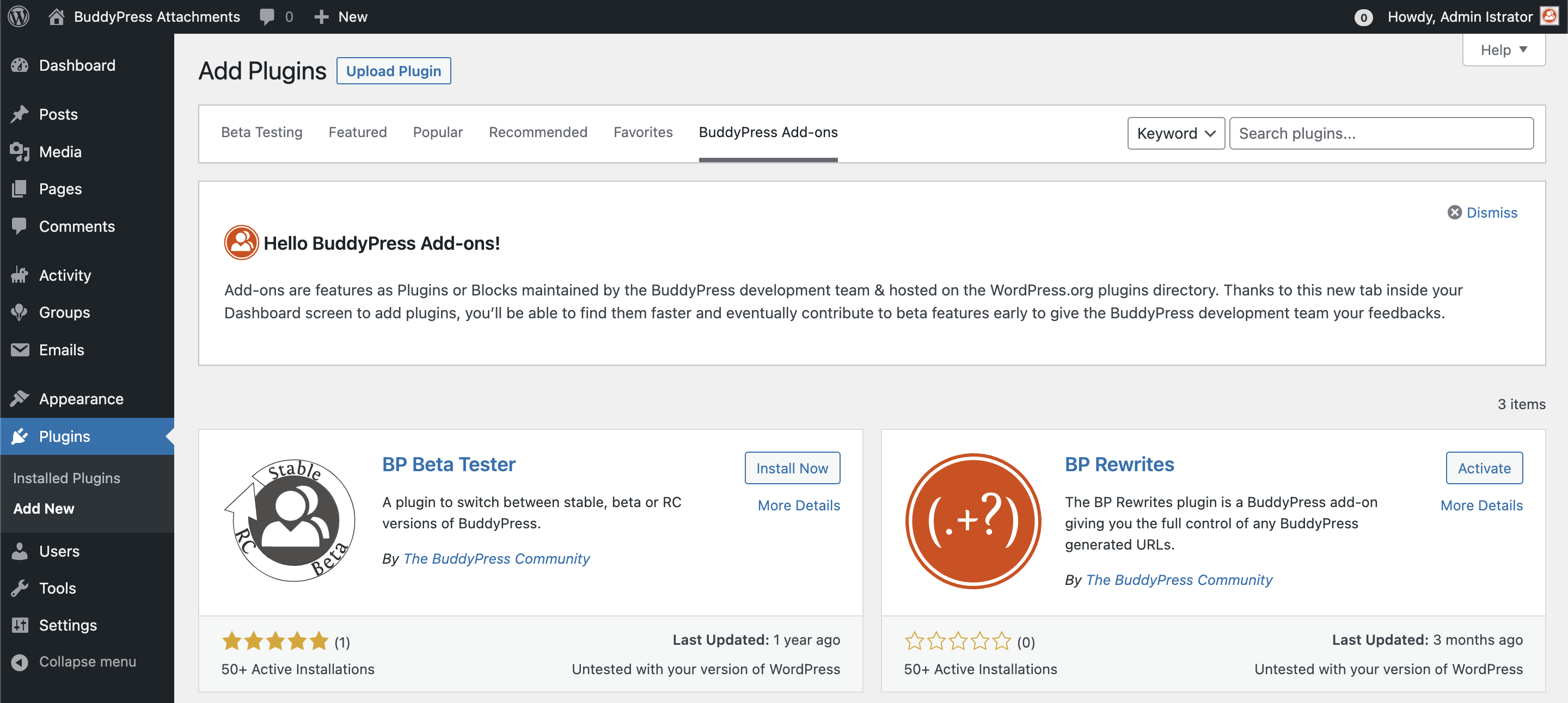
But we’d need more contributors to test/review BuddyPress plugins, which is maybe a too big dream I’m doing, I agree 😇
What I was meaning, was: It’s possible to transform optional components into plugins and preserve the current user experience and only install what they need, thanks to the WordPress.org API.
Another advantage of being into WordPress.org plugins directory are updates (semi or fully automatic). The Plugin team is also doing a great job to eventually “suspend” plugins in case of security issues or wrong behaviors.
October 3, 2022 at 8:08 pm #326481David Bisset
ParticipantThanks for the reply @imath. I was simply implying to look and see what they are doing – SOME of what they are doing I think fits into general interest (look at how they deal with media). They are doing research and it would be foolish to ignore some parts, even if it in the end it leads to ways we can mold it more toward BuddyPress thinking.
Sometimes you can lead my example, other times you can lead by taking something and making it better in some way.
There’s a balance with addons – too many and a user can get overwhelmed with choices and research but overall I lean toward simple as possible. Perhaps it’s something that is simple for a niche purpuse that uses BuddyPress “under the hood”. It’s not a great example but thinking about “how can I spin up a special kind of to-do app that I can add my friends and share and collab with, while still owning my data, control, etc”. Thought of this today while my kid was showing me what she does in Notion today.
Ok, so if the WordPress repo is our advantage – then how do we use that advantage? how do we stand out (from member sites and other social plugins)? how do we feature BB plugins that are trust worthy and maintainable that avoid people having to dive into thousands of plugins in this “important advantage”? Good questions, looking forward to hearing more from people about them.
I don’t believe BuddyPress is missing THAT many features. Part of this is also changing with the times. Which means maybe thinking a little differently – even if it’s me thinking differently from how I look at BuddyPress when I started with it so many years ago. ☮️
October 3, 2022 at 5:55 pm #326479ModeratorHi @dimensionmedia & @sunsetcowboy
Thanks a lot for your very interesting feedbacks 😍.
I think we’ve deliberately avoid the buddyboss subject because it has been talked a lot here https://wptavern.com/buddypress-plugin-usage-declining-remaining-contributors-discuss-path-forward and we end up talking more about this fork than BuddyPress 😇.
I believe we shouldn’t try to do features the same way they’re doing. We need to lead by example, to innovate, to carry on being good citizens of the open source and being supportive about WordPress choices (eg: going into blocks as much as we can).
I don’t think « customers » are into the BuddyPress « targets ». We want to provide totally free, open source & secure community features to WordPress sites and every human being. We’re trying to make wise & « general interest » oriented choices.
We have a very important advantage : we are into the WordPress Official Plugins directory, we should really use this advantage and split BuddyPress into smaller parts as it will always be easier to install Addons hosted on the WordPress Plugins directory.
The « lite » featured Buddypress idea is very interesting, it could be BP Core + BP Members, the only 2 required components.
And David, we really need to organize this « Buddy-World-Camp » 🙌😅. We also need to get together 😍
October 3, 2022 at 11:07 am #326476restorm
ParticipantBTW: I tried to send you a detailed request via your website, but there’s a bug in your “Contact Me” function. When I try to submit the message, I get an error saying “Could not verify the reCaptcha response.” But there is no reCaptcha function!
Here’s the request I tried to send:
“Hello! We are using the Formidable Forms plugin to generate surveys and reports. The reports are group-specific, so we need to attach the user’s group ID to the survey data.Formidable Forms has no integration with BuddyPress, but they can access the WordPress user profile metadata.
Can I hire you to write a routine that would copy the current user’s group ID from the BuddyPress tables into their WP user profile metadata?
I don’t have much money, so I’m hoping this wouldn’t be too complicated. Thanks!”
October 3, 2022 at 11:04 am #326475ParticipantI might be too close to BuddyPress since using it since the 0.1 days (yes, that version is right). I do agree more with the comments so far about the “product fit” and some of that “vibe” feels like some people talking about where WordPress itself (which BP relies on) although I feel WordPress still fills many holes and has a long life to it. But there are two factors I consider to be competitors that offer attractive, “modern/hip”, and easier (in same cases) solutions:
– TikTok, Instagram, etc. social networks – the trend of posting content OUTSIDE your site and not truly 100% owning it. These are the “Wix” and “Medium” versions that WordPress exists with. They are easier to setup and the social mass effect can’t be beat. It would be neat though to have a BP-lite that could setup a TikTok like video sharing network (perhaps that could intergrate with 3rd parties). I’m not sure if there’s a “build this feature and it will help big” here, since if a user or client wants to use them you can’t stop them. But appeal maybe to the niche (which BuddyPress has always done well) and the customizers out there that maybe want something like them, or something that has a slimed down feature set with an attractive new theme/look.
– BuddyBoss. Surprised this hasn’t been brought up. Look at what they are doing in terms of features. The past few freelance projects that the cilents could have used BuddyPress on for new projects, they went and paid for BuddyBoss. My observations has been because of the (1) marketing, (2) features, and (3) continued support (the mobile app also maybe played a part although I’ve heard disappointing experiences about that). I know some don’t like BuddyBoss because they’ve forked BP and (as far as I know) really haven’t contributed anything back (GPL, open source, etc.) But if you’re looking for features, look at what this for-profit company is doing (big and small) because logically they are likely listening to their base and current customers and their actions and focus might be some input.
I do support a BuddyCamp (I used to have a BuddyCamp Miami way back… in 2010 I think?).
Some good BuddyPress plugins have been difficult to recommend because of their maintenance or lack thereof, with no fault to the authors. But BuddyPress always needs SOME plugins when being used for projects. Might be also nice for other plugin companies (say Yoast?) to promote their BuddyPress support.
I would love to see a new theme but not sure yet what direction to offer further $0.02 on that.
No real comments from a coding perspective – there are developers here with more experience in that. A “BuddyPress lite” plugin if you’re talking about “restarting from another plugin” might be worth some discussion. Imagine just spending 5 minutes with a few clicks and you have your own private, secure social network just for your friends/family. Simple. Easy. Modern looking, works with modern tech, etc.
October 1, 2022 at 2:32 pm #326458ModeratorHi & thanks a lot for your feedback @user4forum
It’s funny you’re talking about BP Reply by email, as I’ve contributed for comment reply by email for WordPress a while ago and it stayed in the void! See https://core.trac.wordpress.org/ticket/52283
I guess we could use some code of it for BuddyPress 😅.
About BuddyDrive and Rendez-vous, I was their first contributor so I know them pretty well 😀. Some ideas I had when building BuddyDrive came back lately while working on BP Attachments.
More than being in BP Core, I believe users are expecting plugins to be maintained and we think moving them to BP Core will make this goal satisfied. I’m more interested in a BP Core restricted to the minimum and every other optional components to be packaged into BP Addons we can install and activate separately.
September 30, 2022 at 4:44 am #326420Renato Alves
ModeratorBefore diving into technical or feature suggestions since as a developer I’m automatically wired to go via that route, I thought about asking non-technical people about the product, BuddyPress, itself.
I recently participated in the WordCamp US and had the chance of talking to a few people, besides conversations I had online (Slack, etc). I think the overall feedback I gathered is that BuddyPress needs to find its product-market fit.
## Product-market Fit
The overall argument is that BuddyPress made sense when it was created because organizations needed a unique social network. Nowadays this is easily solvable with other tools that weren’t available at the time like Slack, Discord, Telegram, Facebook Groups, etc.
It’s much easier now to create social communities/networks using those tools than using BuddyPress. So as a project, we are not only competing against other open source projects but also with big companies which provide a solution to this problem in a much better way.
So far, all the conversation I’ve read about this issue sort of understands this new reality but the solutions presented miss this important point. So finding a new “place” for BuddyPress in this new scenario might actually be the most important thing we can do and that will define how we spend our resources going forward.
## BuddyPress’ problems
### Complexity
Before I became a BuddyPress contributor, I used to build small communities for clients. One of the first things I noticed about this niche was that all communities were the same but different. There was always a small tweak or a small feature on top of an existing component needed. BuddyPress was perfect for business. Clients didn’t know how to do it, so they hired me to build or extend it for them.
Even to this day, I still think BuddyPress suffers from this “problem”. If you are not a developer, BP is too hard to change. In BuddyPress’ marketing, it sells itself as flexible software, which is, but only if you are a developer extending or building something on top of it. Not to the regular users that install or try to use it.
I think this is an area where other tools thrive in comparison. People don’t usually build social networks with BuddyPress because it is open source. That also includes WordPress. They use WordPress because it is easy, a good solution for a problem at hand: “how do I make my own dam website?”.
Quoting feedback I got recently:
Every good product is a tool that helps people execute their creative vision, saves them time on boring tasks, or entertains in some way.
On top of that, BuddyPress is still considered expensive to many, be that due to the need to hire developers, to buy themes and plugins to accomplish their creative vision.
### Feature Set
I think BuddyPress has a strong foundation of features to create a social community. But as mentioned before, users are trying to execute this creative vision, so there is always something more needed.
This is an area where BuddyPress lacks as a project and in extensions (plugins that add features to BuddyPress) as well.
The most emblematic examples are the Follow Feature and the Media component. The first one because it is so basic in the land of social networks. And the latter in the lands of Instagram and photo apps. But the core BuddyPress plugin lacks both.
On top of that, features/components are pretty hard to integrate or extend as mentioned. Whereas other tools, provide an almost seamless experience, a rich set of features in a Jetpack-like style where you only need the click of a button to get something working and showing in the default theme.
### Conservatism
Here speaking as a contributor and observer of both WordPress and BuddyPress.
BuddyPress is still too conservative when it comes to changes or new features, however small they are. There seems to be a philosophy or approach that it’s practiced not against change but I’d argue that it is an almost “orthodoxical” concern to changes and new features which in my opinion is impeding the project to evolve.
A recent example was the introduction of PHPCS support which to me it would be considered a no-brainer but that it took more time to convince than I anticipated or expected.
And this is also an overall theme with BuddyPress. I see a willingness of the project to experiment and a desire to evolve but we still move at a very slow pace (even in the heyday of the project).
There is a “desire” to change and evolve but over years I also see a hesitation which “drags” the project a little bit.
### Low number of contributors
BuddyPress has been suffering from a low number of contributors in recent years. The reasons for that could be varied. It is also not clear if that’s actually a big problem for the project. I’d argue that it is not that big.
But it is clear that identifying what’s turning possible contributors away is a very good first step. And what we can do to revert that.
## Finally, some suggestions for the project
### Decide on a product market fit
This should have a high priority. Whatever we decide here will dictate how resources will be spent. What features will be built. What areas will have the most attention. IMO, this might be the most consequential decision for the future of the project.
### Improve the feature set
As mentioned previously, basic features of a social network are still missing in BuddyPress. Privacy, social networking, and following features are all missing. In the past, the argument I’ve always heard/read was that those features were better off served by plugins. Whereas users would be more likely to expect them inside the core plugin.
So I think BuddyPress needs a more complete set of social networking features. And that those features should be more integrated with each other and other parts of the site.
h3. Improve the project’s marketing
I think we need to do a better job of marketing what we offer. Not only look and feel but also of presenting information to the user.
–
That’s it! Not a lot of suggestions but I’m purposefully not adding technical suggestions to the project because I feel this is secondary. As long as we do not get into a new product market fit, we might not be addressing the real issue of the project.
=)
September 28, 2022 at 5:53 pm #326402ModeratorHi @ok2net @muhittinsahilli & @johnjamesjacoby 😉
Thanks a lot for your feedbacks 😍. Very interesting ideas!! I’ll add the « spam protection » one I received on Twitter to the list.
Just like John who gave the right example as a Project Lead, I’ll share my ideas 😁.
A first category of ideas is about getting more hands to help us build great things:
– A BuddyPress annual meeting like a BuddyCamp but online to welcome everyone on earth: a « World-BuddyCamp »
– As BuddyPress is more than just a plugin, we should probably have more « official » teams to compliment the BP Core one: Support, Theme, Docs, REST API, Marketing (?), …
– The BuddyPress.org network to host developer/contributors docs & Core development updates.
– A great BP Standalone theme for the BuddyPress.org site as well as a replacement for the BP Default theme.
– Providing recommanded Addons to help new users choose the right BP plugins for their need.À second category of ideas is about code:
– making BP Rewrites the default URL parser,
– going even more granular than we are, moving optional components as BuddyPress add-ons: this would probably help us to improve each feature and Core/Members with the basic features a user can expect from a community feature software.
– Blocks to standardize ways to share media/rich tools into activity streams, private conversations and why not Template pack & themes.
– Of course BP Attachments, user generated media to share with the BP community as well as giving WordPress Admins a new source for their editorial content.
– Private conversations revamped looking more like private chats / slack exploring WebRTC or Server-Sent Events.And finally I invite @dcavins, @espellcaste, @boonebgorges, @djpaul, @r-a-y, @mercime and all the members of the team to follow @johnjamesjacoby example! Let’s all share what we think BuddyPress is missing 😇
September 28, 2022 at 12:13 pm #326396ParticipantEven better would be if that data is in the WordPress user meta data. We’re trying to access it via a hidden field in a Formidable Forms survey.
September 28, 2022 at 12:14 am #326385John James Jacoby
KeymasterDeep admin integration for all core components and logged-in Members – show me my activity in my User Profile, etc…
A default set of universally wrappable theme-side template parts for one-line-of-code integration into any WordPress theme/builder/blocks, that ultimately outputs what equates to a self-hosted Tumblr clone.
September 23, 2022 at 3:20 pm #326332In reply to: PMPRO + Buddypress + bbpress + bbp style pack
Mike Witt
Participant@kerchmcc, @sub0810, @maryreyes:
Just wanted to make sure you saw the latest developments (the bbPress thread just above).
I’ve also updated the bbPress Track ticket with the suggested code. I don’t feel competent to say that it’s correct, but it appeared to work on my test site:
https://bbpress.trac.wordpress.org/ticket/3454#comment:2
Hopefully someone who really understands these things will take a look at the ticket!
Mike
September 22, 2022 at 5:56 pm #326326Topic: Broken site after uninstalling BP
in forum How-to & Troubleshootingvojtechkubala
ParticipantAfter removing BP, whenever I click on any item in my menu, it gives me an error thrown: Call to undefined function bp_is_activity_component(). Besides that, when I want to install it back, it does not show itself in the plugins on wordpress. Could you pls help me?
Thank you
September 19, 2022 at 3:30 pm #326280Topic: bedrock wordpress setup
in forum How-to & Troubleshootingprojectassistant
ParticipantHaving issues with BP profile completion widget when using the bedrock setup, while using the normal wordpress setup, we are not having this issue, I checked the error logs but it is being truncated and cannot see the error log
September 19, 2022 at 8:03 am #326261In reply to: buddy press pages not working
deepvyas
ParticipantIs there a way to delete/block/disable all the RSS feeds?
Did you read here how to do it – https://perfmatters.io/docs/disable-rss-feeds-wordpress/
-
AuthorSearch Results


