Hi,
it’s not possible without heavy code modification. The usermenu is intended to be on the toolbar.
But you can give this a try. All items will be visible on the toolbar, instead under the howdy.
function laura() {
global $bp, $wp_admin_bar;
remove_action( 'bp_setup_admin_bar', 'bp_members_admin_bar_my_account_menu',4);
}
add_action( 'bp_setup_nav', 'laura', 4 );
Reference: /bp-members/bp-members-adminbar.php:74
WP Codex wp_admin_bar
@slothlovechunk – Thanks for your in-depth debugging.
This does seem like a bug. Can you create a new ticket with exactly what you wrote here:
https://buddypress.trac.wordpress.org/newticket (use the same credentials as you use here on buddypress.org)
And reference this ticket where the meta SQL changes were made:
https://buddypress.trac.wordpress.org/ticket/5919
Thanks so much!
Note that there is a Trac ticket for this also, should it turn out to be some kind of BuddyPress bug: https://buddypress.trac.wordpress.org/ticket/6194
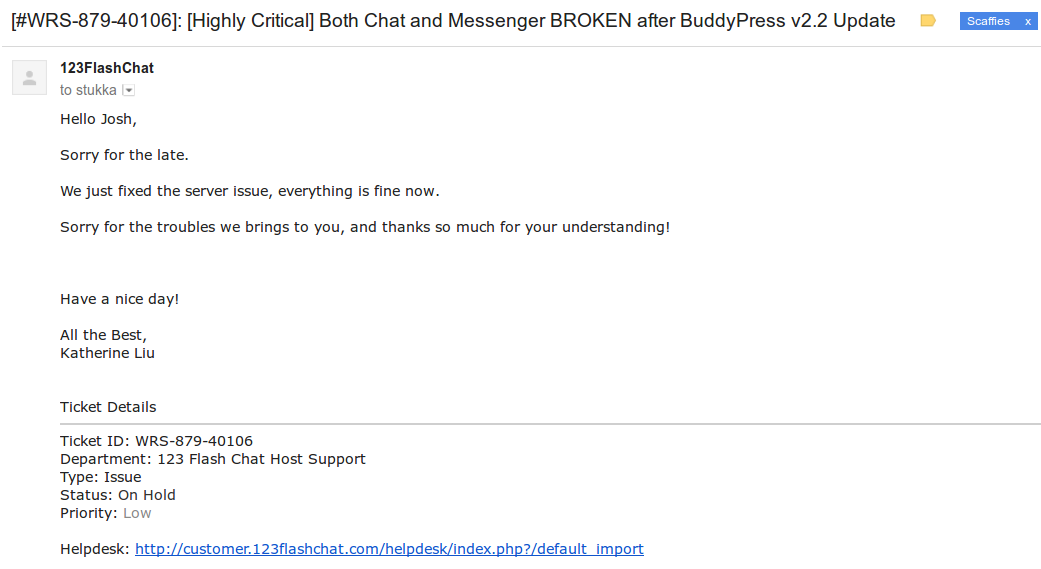
We did not get any technical details. Quote:
[#WRS-879-40106]
We just fixed the server issue, everything is fine now.
Sorry for the troubles we brings to you, and thanks so much for your understanding!
Here is the screenshot of the email:
NSFW: http://scaffies.nl/wordpress/wp-content/uploads/2015/02/Chat-Support-Ticket-WRS.png
You are most welcome to contact our vendor in Hongkong with the ticket number and ask for technical details (I wouldn’t understand what they mean, anyway, I am afraid).
host [at] 123flashchat.com
(It is called “flash” but in fact we use the HTML5 version)
Just noticed:
since yesterday’s BuddyPress Update to v2.2 the dropdown menu no longer works.
We use WP4.1 and everything on latest revisions.
We use a commercial theme (i.e. paid for) called DynamIX version 3.1.2 by themeva
http://themeforest.net/item/dynamix-business-corporate-wordpress-theme/113901
I don’t know if it is more helpful to open a thread up for different problems, or if they are related and should be in one thread – I don’t have that much insight into how this works, and figure if there are different causes to these issues (except for v2.2 update, which is the single cause for these) inside the update, it may be easier to have different threads to help resolve them?
The drop-down menu is on every single page, as part of the header, see arrow on the top right.
NSFW: http://scaffies.nl/
Details for all issues and changes are on the Change Log:
NSFW: http://scaffies.nl/change-log-2015/
Sorry!
Indeed, the New Post generates an activity item with ‘user wrote a new item’ – if a then change the CPT to ‘page’ but leave the action ID as my custom one the WordPress Admin and the Frontend both show my custom activity message! my code is below – the %3$s makes sense as I not running multi-site:
// Don't forget to add the 'buddypress-activity' support!
add_post_type_support( 'sd_article', 'buddypress-activity' );

function customize_page_tracking_args() {
    // Check if the Activity component is active before using it.
    if ( ! bp_is_active( 'activity' ) ) {
        return;
    }

    bp_activity_set_post_type_tracking_args( 'sd_article', array(
        'component_id'             => buddypress()->activity->id,
        'action_id'                => 'new_sd_article',
        'bp_activity_admin_filter' => __( 'Neuer Artikel veröffentlicht', 'custom-domain' ),
        'bp_activity_front_filter' => __( 'Artikel', 'custom-domain' ),
        'contexts'                 => array( 'activity', 'member' ),
        'bp_activity_new_post'     => __( '%1$s hat den neuen <a href="%2$s">Artikel</a>', 'sozialdynamik' ),
        'bp_activity_new_post_ms'  => __( '%1$s hat den neuen <a href="%2$s">Artikel</a>, on the site %3$s', 'sozialdynamik' ),
        'position'                 => 100,
    ) );
}
add_action( 'bp_init', 'customize_page_tracking_args' );

----->
I hope this is clearer!! :0)
 Anonymous User
Inactive
@philippmuenchen @henrywright
Ok got it.
First i’ve just created this ticket and suggested a patch to solve the issue.
Now, you can still have it working by simply requesting a ‘not single’ member type using false as an extra argument eg :
bp_get_member_type( bp_get_member_user_id(), false );
So you’ll get the member type name, but not the singular name. If you want to have the singular name, here’s another gist :
https://gist.github.com/imath/3a5c5ade44eae997fdfd
Hi @jessy-marco
Thanks for pointing this out. I’ve opened a Trac ticket to try to get this fixed.
Hi @format19
These are the capabilities that admins have which editors don’t:
- activate_plugins
- create_users
- delete_plugins
- delete_themes
- delete_users
- edit_files
- edit_plugins
- edit_theme_options
- edit_themes
- edit_users
- export
- import
If you’re not comfortable granting full admin rights, then perhaps you could cherry-pick these? As you probably know, the add_cap() function will add capabilities to a given role.
Ref: https://codex.wordpress.org/Function_Reference/add_cap
I agree but it doesn’t pickup specific page template (the one I put in “Groups”) but generic template…
I use WP4.1 and BP2.2
Anyway I could achieve what I want by modifying generic page setting in my theme, and also SEO title with this topic.
Hmm, it sounds harsh that you get burned and have problems on each update because ive not really had many problems when updating in the past, maybe a few small ones but not many, and if i have had a few problems ive just held off updating for a couple of weeks until the fixes have been issued into buddypress or the plugins.
After trying out “ALOT” of themes (paid and free) with buddypress and wordpress over the past 2 years i have made my own conclusion that the best themes to use in both cases are usually the bare bones and lightweight themes that can have things integrated by yourself as and when needed, this way you are cutting out alot of problems that can be caused within the theme itself, i know some themes look amazing but they can also cause alot of problems for you in the future if not regular updated by the developer.
If your comfy with design i would always opt for a lightweight and barebones theme and build upon that. less things built into a theme = easier to troubleshoot! (This is just my opinion)
I have tried numerous themes that have caused wiered things to happen with certain plugins, yet work fine on the default themes for example.
As for setting up a local test server, this is quite easy to do now, you should definitely look into using something like XXAMP and give it a try.
I still havent got round to testing the new buddypress update yet on my themes and plugins as i fell asleep lol.
Hi Henry,
I’m just new with wordpress and buddypress 🙂 it’s gonna be hard for me to start coding something.
As you said, i’m gonna try to open a topic in ideas forum.
thx for your support 🙂
I’m running 2.2.0 on WP 4.1 on a local development server.
I activated Buddypress when ‘Anyone can Register’ was off. Switched it on, but the Activate and Register pages are not autogenerated as the Codex suggests they should be.
I’ve tried reinstalling and retrying with all other plugins deactivated and default WP theme 2015 activated. I’ve also followed the (now-outdated) codex instructions about template hierarchy and created copies of the template files in a child theme directory. None of these work.
I can successfully create pages ‘Activate’ and ‘Register’ in WordPress and select them in Settings > Buddypress > Pages, but both just load the home page, not ‘activate.php’ or ‘register.php’. (This is true regardless of what theme is active, so is not theme-related).
Can anyone assist?
Another option might be something like this: https://wordpress.org/plugins/buddypress-private-message-for-friends-only/. I haven’t used it myself, so I’m not positive it still works.
If P2 fits your needs, there is a P2-Likes plugin. https://wordpress.org/plugins/p2-likes/
P2 is not a standard theme. There is a lot of custom stuff going on there, so unlike most themes, you will have trouble making BP and P2 play nice.
If you need Likes on BP, this looks to be an option: https://wordpress.org/plugins/buddypress-like/
Thanks for your efforts!
We use a cmmercial theme (i.e. paid for) called DynamIX version 3.1.2 by themeva
http://themeforest.net/item/dynamix-business-corporate-wordpress-theme/113901
We do not really have that kind of background, skills, or resources to run test sites with default and other themes, and test all plug-ins against every change (I estimate we use about 50 plugins – we make sure that they are compliant with the latest WP versions, and are popular, i.e. proven on many thousands of sites).
A test site seems like a major pain in the butt, but given today’s events, may not be such a bad choice. We had expected there was more communication between developers, since WordPress and Buddypress are usied in such a HUGE number of sites – yet fairly simple updates break major stuff across many sites. So there may not be much of a choice of running a separate test site, or simply wait several weeks after new releases until the bugs are worked out – we do run another commercial security package, which may not make this too bad of a choice.
We got burned on EVERY BuddyPress update this is just by far the worst one so far. Sadly … since the software allows us to run a popular site.
It could be from the X2 theme, but it was under WordPress -> Settings -> BuddyPress -> Pages, so I assumed it was BuddyPress.
If that’s the case, I need to find a good BuddyPress-powered theme that would work for my music site until I can afford a custom one. Any suggestions?
Hi all,
At my site swagnillaice.com, when I set and save the search page, it goes back to -None- and the following message is on top:
The following active BuddyPress Components do not have associated WordPress Pages: Search Page. Repair
How can I get my search page to stay on the one I’ve set?
Thanks,
Nathan Pinno
Didn’t know “Featured Posts” was a Twenty Fourteen thing. Oops! 🙂
For anyone else reading, some more info on the “Featured Content” option in Twenty Fourteen can be found here:
https://codex.wordpress.org/Twenty_Fourteen
Will try to look this when I have some more time.
About the member widget avatar CSS, looks like Twenty Fourteen showcases a bug 🙁
Try this patch to fix the staggering issue:
https://buddypress.trac.wordpress.org/attachment/ticket/5817/5817.clear.patch
@onesmart – After looking into this some more, I would say this is a bug with the WP-reCAPTCHA plugin.
They are incorrectly using the 'wpmu_validate_user_signup' filter. You should use another reCAPTCHA plugin:
https://wordpress.org/plugins/search.php?q=recaptcha
@onesmart – Can you list exactly which plugins you are using with links to the repo?
There are numerous reCAPTCHA plugins. I tried WP-reCAPTCHA by itself, but that doesn’t include any BuddyPress integration and doesn’t create the error?.
Update – Error duplicated (needed to submit the form!). Doing some more research. More to come.