Search Results for 'wordpress'
-
AuthorSearch Results
-
June 4, 2013 at 1:17 pm #165359
tduschei
ParticipantSolved. Thanks so much @mercime !
For the noobs out there, make sure you have the opening and closing php tags for step 3 (functions file).
-Tom
June 4, 2013 at 8:53 am #165344In reply to: Automatic pages creation does not work
@mercime
Participanti installed WordPress 3.5.1 with Buddypress plugin 1.6.5
@eraz0r Question is, why are you installing an old BP version when BP 1.7.2 is available for download?The installation wizard seem to link the pages like this wordpress\activity
Is your WP/BP installed in subdirectory, i.e. example.com/wordpress/? Deactivate all plugins except BuddyPress and Use the BP Default theme after you activate BP and go through the Installation Wizard (which has been removed/deprecated in BP 1.7 above)
June 4, 2013 at 7:59 am #165342In reply to: Mesocolumn – free theme for buddypress
Participant@rkcorp The theme looks great.
While awaiting theme review (up to 4 weeks), please make sure that your theme meets the WordPress Theme Review guidelines. Scanned source code at themes trac and there are issues which need to be be addressed. e.g. scripts and styles in <head> for one.
The following information should be of assistance in getting your theme to meet all the criteria:
* Theme Review – https://codex.wordpress.org/Theme_Review
* Theme Unit Checklist – https://codex.wordpress.org/Theme_Unit_Test
* Theme Development – https://codex.wordpress.org/Theme_Development
* Theme-Check Plugin – https://wordpress.org/extend/plugins/theme-check/
* Debogger Plugin – https://wordpress.org/extend/plugins/debogger/After you’ve updated your theme to meet WP Theme Review guidelines, you’ll just need to upload a new version of the theme. You’ll still retain your place in the theme review queue.
June 4, 2013 at 6:19 am #165337In reply to: problem sidebars theme Nebraska
millo
Participanthi,
no activate BP template pack plugin. It is new installation.General Information
WordPress Version: 3.5.1
URL: http://redpublica.loading.es
Theme Version: 1.2
Framework Version: 2.1
PHP Version: 5.4.15Installed Plugins
ajax-event-calendar/ajax-event-calendar.php
backupwordpress/plugin.php
bbpress-enable-tinymce-visual-tab/init.php
bbpress-like-button/bbpress-like.php
bbpress/bbpress.php
bp-avatar-suggestions/bp-avatar-suggestions.php
buddy-bbpress-support-topic/buddy-bbpress-support-topic.php
buddypress-activity-plus/bpfb.php
buddypress-followers/loader.php
buddypress-profile-tabs/bp-profile-tabs.php
buddypress-twitter/loader.php
buddypress-xprofile-custom-fields-type/bp-xprofile-custom-fields-type.php
buddypress/bp-loader.php
carousel-without-jetpack/jetpack-carousel.php
contact-form-7/wp-contact-form-7.php
duplicate-post/duplicate-post.php
launchpad-by-obox/index.php
login-with-ajax/login-with-ajax.php
revslider/revslider.php
tinymce-advanced/tinymce-advanced.php
use-google-libraries/use-google-libraries.php
wordpress-importer/wordpress-importer.phpThanks
June 3, 2013 at 9:34 pm #165311bp-help
Participant@chase8705
You should always use a child theme instead of modifying the theme directly because if you update that theme then it will overwrite any modifications you made but if you made a child theme then the update will not effect modifications and all mods in the child theme will be preserved. Please see:
https://codex.buddypress.org/developer/theme-development/a-quick-look-at-1-7-theme-compatibility/
and
https://codex.wordpress.org/Child_ThemesJune 3, 2013 at 2:32 pm #165297inge12
ParticipantIn searching for a solution to my problem of unwanted sidebars I found https://codex.buddypress.org/developer/theme-development/a-quick-look-at-1-7-theme-compatibility/ which provides instructions of how to insert BP specifications into a child theme.
To get the results you want, you need to first create a child theme for your main wordpress theme. Then you put the specifications that apply only to the BuddyPress portion of the site into the child theme. You would need to do this:
So if we want to remove the sidebar for BP pages but not for all WP ‘pages’ or call a specific BP sidebar get_sidebar(‘buddypress’), we could take a copy of page.php and rename it to ‘community.php.’ and have BP use this file for all it’s requirements, as can be seen from the order above the first two files will not be found but the third will be and therefore used.
And so will I – to solve my problem.
June 3, 2013 at 11:50 am #165291In reply to: Member search results
Henry
MemberGot a response over at Trac if anyone is interested
June 3, 2013 at 6:30 am #165277In reply to: Buddypress Spam BOTS PLEASE HELP
ParticipantOne plugin that looks good for preventing registration spam is WangGuard. (Search for it in the WordPress repository.) I’ve just installed it, so can’t tell you if it’s as good as it sounds. (I run a very busy blog and allow commenting by unregistered users. Akismet catches spam and Conditional Captcha deletes it without my seeing it. The latter reduced spam from hundreds of comments a day [marked by Akismet] to near-zero. Only the occasional human spammer gets in.)
Allowing unmoderated registrations is spammer nirvana. 😉 I allowed posting by unregistered users so I could turn off user registration. Now that I’m wanting to use Buddypress, I had to enable registration but installed WanGuard. Within a few hours, I had one registration attempt — even though Buddypress can’t be seen anywhere on the site yet — but no successful registration, thanks to WangGuard. Tomorrow will tell me more.
June 2, 2013 at 9:36 pm #165263Participant@tduschei How to add sidebar to all BuddyPress pages in Twenty Eleven theme http://wp.me/p1I84P-60
June 2, 2013 at 9:31 pm #165262Pin
ParticipantTried, didn’t worked.
If anyone will ever need this, the trick is done via .htaccess file.RewriteCond %{HTTP_HOST} !^www\..* [NC]
RewriteRule ^ http://www.domain.com%{REQUEST_URI} [R=301,L]So, explained, if your blog/BP network has old links without www. and you recently changed the website URL to http://www.domain.com because you started using a CDN, this will help you to get you’re whole network back with no dead links. Tested on all sides, no errors.
my .htaccess file looks like this:
# BEGIN WordPress
<IfModule mod_rewrite.c>
RewriteEngine On
RewriteBase /RewriteCond %{HTTP_HOST} !^www\..* [NC]
RewriteRule ^ http://www.domain.com%{REQUEST_URI} [R=301,L]RewriteRule ^index\.php$ – [L]
RewriteCond %{REQUEST_FILENAME} !-f
RewriteCond %{REQUEST_FILENAME} !-d
RewriteRule . /index.php [L]
</IfModule># END WordPress
Credits:
– http://www.456bereastreet.com/archive/200601/search_engines_and_canonical_urls/
– the most awesome hosting company support for tweaking the code (KnownHost)Cheers! 🙂
June 2, 2013 at 8:17 pm #165258In reply to: Bug? BuddyPress shows wrong author's archives
Garrett Reiniggen
ParticipantBuddyPress Default (BuddyPress 1.7.2, WordPress 3.5.1). What number did you mean? I see fewer entries in the list as it should be. I see 2 instead of 3, 4 instead of 5, etc. And I get “Not Found” if only one item is available from the author. Only after a page refresh I get to see all the entries. Twenty Ten theme has no problem and displays author’s archives correctly.
June 2, 2013 at 6:49 pm #165249In reply to: 1.9 top features – ideas
MemberUpload profile image at activation https://buddypress.trac.wordpress.org/ticket/4132
+1 to that idea or any way of encouraging users to add an avatar during sign up.
A big improvement could also be made to the activity stream. Currently it isn’t possible to have personal activity AND friend’s activity in the same feed. Would be nice.
June 2, 2013 at 2:57 pm #165233In reply to: Best way to limit friend requests to avoid spam
Ben Hansen
Participantgiving members the ability to flag things as spam through akismet seems like a very sticky wicket to me probably something which would be better addressed as plugin. i for one would not want to give that ability to any user. i can barely get my staff to do that correctly under wordpress.
June 2, 2013 at 11:23 am #165230SK
ParticipantJune 2, 2013 at 9:55 am #165226In reply to: 1.9 top features – ideas
Participant@bphelp Are you referring to this one? https://wordpress.org/plugins/buddypress-activity-privacy/
The description says
The plugin add the ability for members to choose who can read his activity before it posted (Anyone, Logged In Users, My Friends, Admins Only, Only me, My Friends in Group , Group Members …etc).
June 2, 2013 at 4:51 am #165211In reply to: Create page of groups loop
Participant@inetbizo you can post blocks of code in pastebin.com and post the generated URI here. You’re describing what looks to be this section of the Groups Directory page https://buddypress.trac.wordpress.org/browser/tags/1.7.2/bp-themes/bp-default/groups/groups-loop.php
June 2, 2013 at 4:43 am #165207In reply to: Shortcode/Sidebar Buddypress Registration Page
Participant@therandomguy12345 What theme are you using? Check out http://wpmu.org/how-to-build-a-facebook-style-members-only-wordpress-buddypress-site/
June 2, 2013 at 4:38 am #165205In reply to: integrating BP
ParticipantUser registration is currently not allowed.
@theoptimystic If as you said in previous post that you enabled registration in Settings > General, then you might have a plugin that’s controlling your registration process.Checking the source code of your home page, I see that there’s a pageline-buddypress plugin and the BP Template Pack plugin activated in your site. BP Template Pack plugin is no longer required as of BP 1.7 to make your theme compatible with BuddyPress. At least that’s true for nearly all WordPress themes. Deactivate those plugins, change to Twenty Twelve theme and check if issues are resolved.
June 2, 2013 at 2:15 am #165199Chase8705
ParticipantOk I did that but then it took me to my Log In page but it says “User Registration Is Currently Not Allowed.” So I went into my general setting of wordpress and went to go check the “Anyone Can Register” box but it is greyed out. How can I make it so that anyone can register?
June 1, 2013 at 11:41 pm #165191shiftyRZA
Participanthttps://buddypress.trac.wordpress.org/ticket/4586
Apparently this was fixed for BP 1.7
June 1, 2013 at 9:09 pm #165179In reply to: 1.9 top features – ideas
Participant@bphelp I think you aren’t giving the developers enough credit. Version releases have been accelerating
1.2 to 1.5 took 20 months
1.5 to 1.6 took 11 months
1.6 to 1.7 took 8 monthsTrac can be deceptive, but based on current roadmap https://buddypress.trac.wordpress.org/roadmap 32% of 1.8 is completed and 1.8 is due in July (7 weeks from now). Even if that is revised and we get 1.8 only in November, we could possibly see 1.9 as early as May next year (or we may not…this is pure speculation).
Eitherway, most major projects I know close scoping for a version long before a beta of the previous version is released.
@mercime Thanks. BTW #4796 was started by Boone.w.r.t. #5008, the idea is to have widget for “previews” of the different tabs. Site/Group admins can decide for themselves which widgets (or even none at all) they want to show on the member profile page.
In a similar vein, groups could have member widgets too (though I havent requested them yet, and there is no ticket for them). I think it’s pretty reasonable to show some group members on the group profile.
June 1, 2013 at 8:12 pm #165176Scott Seitz
ParticipantThanks so much for documenting this rcain. I’m set up in a local server development environment (obviously not advertising to search engines) and was trying to figure out why the WP comments were not showing up in the BP activity stream! You just saved me a lot of time!!
June 1, 2013 at 6:40 pm #165172In reply to: Invalid Activation Key
rjlucas
ParticipantI am using wordpress version 3.5.1
It is a directory install, but it is in a subdirectory.
I did not upgrade wordpress. This was a new install.
I am running buddypress version 1.7.2
I have the following plugins installed and active: bbpress, all in one event calendar, tinymce advanced, buddypress media, jetpack, subtle background patterns, wordpress importer.
I am using a customized theme called “Salutation” which is designed to work with buddypress.
I have not modified the core files and do not have any custom functions.
I am running bbpress version 2.3.2
My host is godaddy.
I am on a linux server.
June 1, 2013 at 2:37 am #165154Participant@fearracious glad you resolved the issue on your own 🙂
Marking this as resolved.June 1, 2013 at 1:40 am #165153In reply to: can't create groups
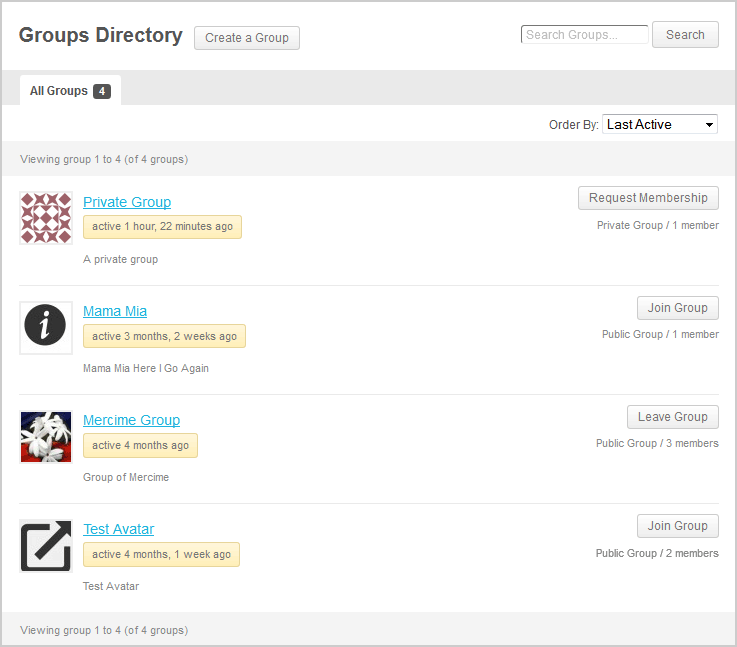
Participant@carolinecalvert what theme are you using? Some themes have page titles which are not within the WP loop, hence BP cannot automagically insert the “Create Group” button beside the page title as seen https://mercime.files.wordpress.com/2013/02/groups-directory.png
On way is to create a link when user is logged in. You only need to append /create/ after your site’s group directory url, e.g. http://example.com/groups/create/
In upcoming BP version, the create a group link will also be added to the Member’s navigation in WP toolbar. If you’re adventurous, you can add the code to have those links already https://buddypress.trac.wordpress.org/changeset/7062
-
AuthorSearch Results