It is actually called “2021” made by the WordPress Team. Thanks for looking at this.
Does this issue also happens when using BP Better Messages?
Anybody tried?
BP Better Messages
BP Better Messages – is a fully featured replacement for standard BuddyPress Messages and also can work as private messaging system for WordPress when using without BuddyPress.
Plugin is fully backward compatible with BuddyPress Messages.
BP Better Messages
BP Better Messages – is a fully featured replacement for standard BuddyPress Messages and also can work as private messaging system for WordPress when using without BuddyPress.
Plugin is fully backward compatible with BuddyPress Messages.
BP Better Messages
Hello.
There is a solution that you exactly looking for.
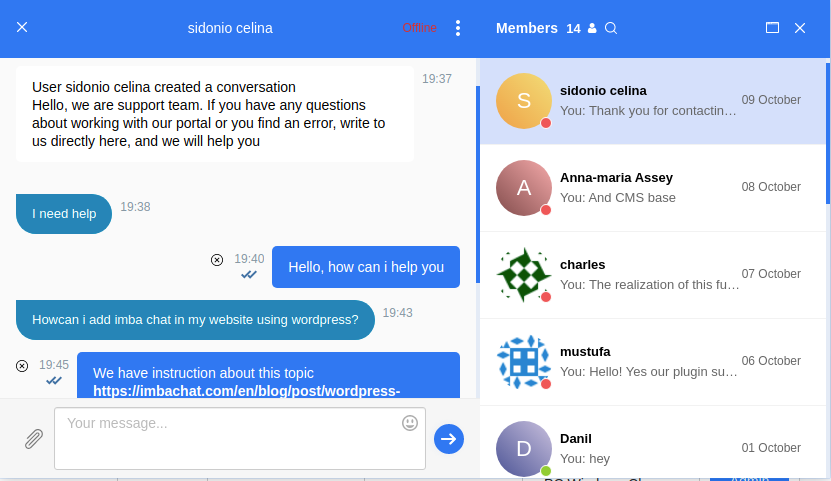
It is a chat plugin for BuddyPress and WordPress.
This chat has three basic feature such as:
- Text group chat between users
- Text private (one-to-one) chat between users
- Online chat support (chat with customers)
Besides these functions, the ImbaChat has also:
- Sharing files (any type of file)
- Chat moderation
- Video chat (group and private)
- Audio calls
The ImbaChat basic functions are free. Pricing for the additional features is from $4.99 to $19 per month. Easy and quick installation on BuddyPress. Full integration with the user base of your website.
Visit the official website of the plugin to learn more.
When I log in buddy press has me displayed as chughes@email.edu. My @mentions is even funkier @chughesggc-edu.
Admin says he doens’t think he can change it. Is there anything I can ask the admin to try. It will let me change my display name to Cory Hughes but then when I log out and back in the name is changed back to chughes@email.edu.
And it carries over to the wordpress blog as author: Chughes@Email.Edu. How can simply have my real name as my display name and a custom @mentions name like @CoryHughes?
I read through the threads and found similar topic but did not understand the fix as I’m just an end user. What do I ask admin to try? Thanks in advance.
See Screen Shots here:
https://ggcedu-my.sharepoint.com/:w:/g/personal/chughes_ggc_edu/EeKRlBi7GhpLtapbYwbb-QYBFK6lbCsTCWGqQU5bSlRHdg?e=XFadd3
I haven’t seen any movement on it. I ended up doing a hack. In my theme’s bp template, I checked (in php) if it’s an invitation button then render a direct link instead of bp_nouveau_groups_loop_buttons()
I use WordPress 5.6 and Buddypress 7.1.0
if I go to the login page on my website and want to log in, I am directed to the start page but not logged in.
My Site:
Registrieren
To Test use:
Buddypress
Buddypress123
Hey Eric,
I’ve written several plugins for that, but they haven’t been tested for years, so frankly I have no idea whether they work or not.
Please check:
https://github.com/slaFFik/bp-feeds
https://github.com/slaFFik/bp-groups-rss-feed-tab
Feel free to report any found issues on GitHub, I will see whether I can fix them.
To install those 2 plugins from GitHub you will need to download ZIP file of the repo and install that zip as a usual plugin using your WordPress admin area.
hi vapvarun and thank you for replying back (: ,
i tried to write a code to override the main template – and i make the script run as a plugin
here what i did
<?php
/*
Plugin Name: PAGTEM
Plugin URI: https://www.example.com
Version: 0.0.1
Author: NULL
Author URI: https://www.example.com
*/

class PageTemplate {

	/**
	 * A reference to an instance of this class.
	 */
	private static $instance;

	/**
	 * The array of templates that this plugin tracks.
	 */
	protected $templates;

	/**
	 * Returns an instance of this class.
	 */
	public static function get_instance() {

		if ( null == self::$instance ) {
			self::$instance = new PageTemplate();
		}

		return self::$instance;

	}

	/**
	 * Initializes the plugin by setting filters and administration functions.
	 */
	private function __construct() {

		$this->templates = array();

		// Add a filter to the attributes metabox to inject template into the cache.
		if ( version_compare( floatval( get_bloginfo( 'version' ) ), '4.7', '<' ) ) {

			// 4.6 and older
			add_filter(
				'page_attributes_dropdown_pages_args',
				array( $this, 'register_project_templates' )
			);

		} else {

			add_filter(
				'theme_page_templates', array( $this, 'add_new_template' )
			);

		}

		// Add a filter to the save post to inject out template into the page cache
		add_filter(
			'wp_insert_post_data',
			array( $this, 'register_project_templates' )
		);

		// template assigned and return it's path
		add_filter(
			'template_include',
			array( $this, 'view_project_template')
		);

		$this->templates = array(
			'FullC.php' => 'Full Canvas',
			// this file exist in the same folder as the plugin like that

		/* Plugin Template ( Folder ) ========
		 		  |
		 		  |
		 		  |
		 	Index.php (file)
		 	FullC.php (file)
	================			*/

		);

	}

	/**
	 * Adds template to the page dropdown for v4.7+
	 *
	 */
	public function add_new_template( $posts_templates ) {
		$posts_templates = array_merge( $posts_templates, $this->templates );
		return $posts_templates;
	}

	/**
	 * Adds our template to the pages cache in order to trick WordPress
	 * into thinking the template file exists where it doens't really exist.
	 */
	public function register_project_templates( $atts ) {

		// Create the key used for the themes cache
		$cache_key = 'page_templates-' . md5( get_theme_root() . '/' . get_stylesheet() );

		// Retrieve the cache list.
		// If it doesn't exist, or it's empty prepare an array
		$templates = wp_get_theme()->get_page_templates();
		if ( empty( $templates ) ) {
			$templates = array();
		}

		// New cache, therefore remove the old one
		wp_cache_delete( $cache_key , 'themes');

		$templates = array_merge( $templates, $this->templates );

		// Add the modified cache to allow WordPress to pick it up for listing
		// available templates
		wp_cache_add( $cache_key, $templates, 'themes', 1800 );

		return $atts;

	}

	/**
	 * Checks if the template is assigned to the page
	 */
	public function view_project_template( $template ) {
		// Return the search template if we're searching (instead of the template for the first result)
		if ( is_search() ) {
			return $template;
		}

		global $post;

		// Return template if post is empty
		if ( ! $post ) {
			return $template;
		}

		// Return default template
		if ( ! isset( $this->templates[get_post_meta(
			$post->ID, '_wp_page_template', true
		)] ) ) {
			return $template;
		}

		// Allows filtering of file path
		$filepath = apply_filters( 'page_templater_plugin_dir_path', plugin_dir_path( __FILE__ ) );

		$file =  $filepath . get_post_meta(
			$post->ID, '_wp_page_template', true
		);

		// check if the file exist first
		if ( file_exists( $file ) ) {
			return $file;
		} else {
			echo $file;
		}

		// Return template
		return $template;

	}

}
add_action( 'plugins_loaded', array( 'PageTemplate', 'get_instance' ) );
now if you go to
Pages > Edit xor Add New Page > Page Attributes > A New Section Called Templates > I Click On the Full Canvas > [UPDATED]
Nothing Changed (:
Why’s Is That – Is There’s Wrong With The Code Or The Buddypress V that i use ?
i use ==> Version 6.3.0 | By The BuddyPress Community
Hello, I’m currently using bbpress 2.6.6 and buddypress 7.1.0, (wordpress 5.6, php 7.4.12, theme is siteorigin-unwind 1.6.6), and experiencing this problem as mentioned here, (members of hidden groups not being able to see the topics of the sub-forum). I’m a newbie with the background code, though my private and public groups are working. I can see the fix 7443 in buddypress.js that was indicated then, but am wondering if other people still have a problem with this, and if so if there is another fix available. Thank you.
it’s using medium editor, you can try it with ACF and https://wordpress.org/plugins/acf-medium-editor-field/ and create any type of frontend form submission.
@mungbean BuddyX is live at wp.org
WordPress version 5.6
PHP: 7.4
BuddyPress Version 7.1.0
https://annarborcommunitycommons.org/members/drron/messages/sentbox/
I see posts going back many years ago reporting this problem, but I don’t see that anyone ever posted a resolution!
Problem
I’m working on a site with a custom theme. The members’ list says “All members 0” and lists no members, and, below the search box “Sorry, no members found”. What do I need to do to show the actual members?
——
Details
I’ve copied wp-content/plugins/bp-templates/bp-nouveau/buddypress to wp-content/themes/my-custom-theme/buddypress. I’ve added links to discussion boards, groups and a members list to the menu and populated the site with members data by using the Buddypress Detault Data plugin (and added a few extra users, and logged in as them).
If I insert the contents of buddypress/members/members-loop.php into the custom theme’s index.php, then the index.php shows me a listing of members (showing when the database says when they were last active). I am wondering if this means I need to set a path somewhere.
I am seeing the same behaviour if I use the “twenty seventeen” “twenty twenty” and “twenty twentyone” themes. This is using WordPress 5.6 and Buddypress 7.1.0. I can’t provide a URL as it’s currently a development version on my NetBSD (unix) laptop.
On a multisite install, as @pcwriter stated here : https://buddypress.org/support/topic/user-marked-as-spammer-how-do-i-un-mark-them-as-a-spammer/
In your WP dashboard, go to “Users” and check the box next to the name of the user highlighted in red. Then, select “Not Spam” from the “Bulk Actions” dropdown (top or bottom of your user list). Click “Apply”. Should do it.
It worked for me! Until when?
Also, Vince Pettit suggested a plugin here https://wordpress.stackexchange.com/a/60583/152860
We are using this wordpress plug in – New User Approve
Provides functionality to approve/deny new user registrations.
Haven’t tried it yet, but it’s probably the best long-term solution.
On a multisite install, as @pcwriter stated here : https://buddypress.org/support/topic/user-marked-as-spammer-how-do-i-un-mark-them-as-a-spammer/
In your WP dashboard, go to “Users” and check the box next to the name of the user highlighted in red. Then, select “Not Spam” from the “Bulk Actions” dropdown (top or bottom of your user list). Click “Apply”. Should do it.
It worked for me! Until when?
Also, Vince Pettit suggested a plugin here https://wordpress.stackexchange.com/a/60583/152860
We are using this wordpress plug in – New User Approve
Provides functionality to approve/deny new user registrations.
Haven’t tried it yet, but it’s probably the best long-term solution.
P.S: I’m using wordpress 5.6–de_DE & Buddypress Version 7.1.0. I hope that helps?
Hi there @jarkin13, sorry to hear that this is happening, and thanks for posting it here.
Can you check your WordPress site settings and let us know what Time Zone your site is set to?
I have a hunch BuddyPress is saving a value that is then impossible to format/convert, resulting in that output, and the most likely culprit is a Time Zone offset miscalculation.
Sorry again, and talk soon!
Hi,
thank you for your reply,
I am newly in wordpress, could you tell me where will I insert this script ?
thanks!
Thanks @shanebp, but I think I’m not getting the right id, it should match with WordPress user id?
Thanks for your tests (and your wishes) @alersn 👌
I’ll try to explain what’s happening in your case and I believe it also concerns most people using a plugin that is managing Group or Member types. First, I had to handle a similar case for a plugin I’ve build to manage Member Types years ago.
These kind of plugins had to make a choice about how to ensure type properties persistency, because when BuddyPress introduced the feature only registering Types using custom code was possible. For instance, I chose a regular WordPress option. BP Create Group Type chose to use a Custom Post Type. So most Group Type properties like the one to show checkboxes into the Group create screen are saved as post metas.
In 7.0.0, as BP Types are custom taxonomies, we decided to use term metas to store these properties. This means, properties are not saved at the same place, that’s why you’re experiencing this issue.
I agree it’s not great for user experience to have 2 group types menu into the admin and have 2 different ways to manage Type properties: it’s confusing. Ideally, these kind of plugins should alternatively:
a. disable Group Types menu generated by BuddyPress.
b. use a specific upgrade routine when the plugin is used with BuddyPress 7.0.0.
I chose b. for my plugin 😉 because I believe it’s important to enjoy the improvements brought by BuddyPress. It’s standardizing how Type properties are saved, and it will avoid users to be stuck with a BP Plugin (that might have dropped its support) in the long term.
If BuddyPress plugin developers are interested about how I’ve migrated the Member Types properties my plugin was using so it now uses the BuddyPress way, here’s a gist about it:
https://gist.github.com/imath/df65b7c856fbd02024a84c7ecc016090
Best wishes to you too 🎉


