Search Results for 'buddypress'
-
Search Results
-
Hi,
I’m using BuddyPress on my website (gowc.fr) for several month, I was using a “hack” in functions.php to use my WP avatar in BuddyPress and it was working like a charm until the last version of BuddyPress. I have updated the plugin yesterday and now all my members have the default avatar instead of their custom avatar.The code I was using in functions.php :
add_filter('bp_core_fetch_avatar_no_grav', '__return_true');

add_filter( 'bp_core_fetch_avatar', 'revert_to_default_wp_avatar', 80, 3 );//late load
function revert_to_default_wp_avatar( $img, $params, $item_id ){
	//we are concerned only with users
	if( $params['object']!='user' )
		return $img;

	//check if user has uploaded an avatar
	//if not then revert back to wordpress core get_avatar method
	//remove the filter first, or else it will go in infinite loop
	remove_filter( 'bp_core_fetch_avatar', 'revert_to_default_wp_avatar', 80, 3 );

	if( !emi_user_has_avatar( $item_id ) ){
		$width = $params['width'];
		// Set image width
		if ( false !== $width ) {
			$img_width = $width;
		} elseif ( 'thumb' == $width ) {
			$img_width = bp_core_avatar_thumb_width();
		} else {
			$img_width = bp_core_avatar_full_width();
		}
		$img = get_avatar( $item_id, $img_width );
	}

	//add the filter back again
	add_filter( 'bp_core_fetch_avatar', 'revert_to_default_wp_avatar', 80, 3 );
	return $img;
}

/**
* Check if the given user has an uploaded avatar
* @return boolean
*/
function emi_user_has_avatar( $user_id=false ) {
	if( !$user_id ){
		$user_id = bp_loggedin_user_id();
	}

	if ( bp_core_fetch_avatar( array( 'item_id' => $user_id, 'no_grav' => true,'html'=> false ) ) != bp_core_avatar_default() )
		return true;
	return false;
}
Please help me to solve this annoying issue.
Thanks
Topic: project feasibility
Ciao to ALL,
I’m absolute beginner in buddypress and I would like to know the feasibility of my project.
I would develop a social platform with a particular features: users can share files (audio and text) and each user can decide who can see these materials (single user groups or pubblic). On the other side I need the possibility to search throught the materials in order to find the user who have interesting file and ask them to share this file with me. I hope the goal is clear.
do you think Buddypress can do it?
best regards
UgoSugoBuddypress 2.0 WP 3.9. Child theme of twentythirteen.
Tried to create a private group, See image for options.

Results in group being created (see image), but options don’t stick and error message “There was an error saving group details, please try again.” gets spit out.

Why, oh why? Is this a bug? Should I create a ticket?
In short: “The basic reason why this isn;t working is because BuddyPress seems to run only on publicly accessible pages and with the proper urls. Since Draft posts have ?page_id=123 like urls, BuddyPress does not set the global variables. Similarly, when Courses are marked private, BuddyPress again does not initialize the global variables.”
What can be done to resolve this?
Here is the discussion:
Kind regards
PS: Thank you for BuddyPress (and v2)!
Topic: profile 404 error
Hopefully someone can help me. Whenever I try to go to a profile I get a 404 error.
I tried to deactivate buddypress so that I can uninstall it and then reinstall it, but I get the following when I click on “deactivate”
Warning: ksort() expects parameter 1 to be array, null given in /home/wp_5dkmdv/mycyberstaff.com/wp-content/plugins/buddypress/bp-core/bp-core-template-loader.php on line 192
Warning: reset() expects parameter 1 to be array, null given in /home/wp_5dkmdv/mycyberstaff.com/wp-content/plugins/buddypress/bp-core/bp-core-template-loader.php on line 197
Warning: current() expects parameter 1 to be array, null given in /home/wp_5dkmdv/mycyberstaff.com/wp-content/plugins/buddypress/bp-core/bp-core-template-loader.php on line 201
Warning: next() expects parameter 1 to be array, null given in /home/wp_5dkmdv/mycyberstaff.com/wp-content/plugins/buddypress/bp-core/bp-core-template-loader.php on line 207
Warning: current() expects parameter 1 to be array, null given in /home/wp_5dkmdv/mycyberstaff.com/wp-content/plugins/buddypress/bp-core/bp-core-template-loader.php on line 201
Warning: next() expects parameter 1 to be array, null given in /home/wp_5dkmdv/mycyberstaff.com/wp-content/plugins/buddypress/bp-core/bp-core-template-loader.php on line 207
Warning: current() expects parameter 1 to be array, null given in /home/wp_5dkmdv/mycyberstaff.com/wp-content/plugins/buddypress/bp-core/bp-core-template-loader.php on line 201
Warning: next() expects parameter 1 to be array, null given in /home/wp_5dkmdv/mycyberstaff.com/wp-content/plugins/buddypress/bp-core/bp-core-template-loader.php on line 207
There are more of these warnings, but this is a sample.
Any advice on how to fix this would be appreciated.
Thanks
Hi,
I’m trying to merge the bbPress profile’s Edit page and the BuddyPress profile’s Settings page.
I don’t understand how HTML forms work with PHP, specifically WordPress and these two plugins, so it would make my day if someone could either explain this to me or point me in the right direction so I can make the forms on these pages work on one page as they do separately.
If you need me to elaborate on what exactly I’m doing and what’s not working, please ask.
Btw, please forgive me if you think this belongs on the bbPress forums; I could be ping-ponging between the two forever, so I just picked the BuddyPress forum since BuddyPress seems like the highest layer in the stack.
Thank you.
Wordpress verion:3.9
Buddypress version:2.0
Hello, my problem is that the Recovery form doesn´t work. The form ask me for entering whether my user name or my email; but, once entered and pressed the button Reset Password, it doesn´t send any email to my email account, which is a big function issue. Thanks for your help!!After updating to the the latest version of wordpress, I had to reactivate plugins. When I activated the buddypress plugin my website kept coming up with 500 internal server error. When I deactivated the plugin buddypress/bp-loader.php my website worked, I was notified that the buddypress issue was due to an error saying the Plugin file does not exist. I love this plug in and vital for my website. Please help me figure out this problem.
Thank you!
Dionne
I’m not too sure what is going on here, i’m relatively new with BuddyPress. I’m building an intranet for a law firm. Anyway, with the “Extended User Profiles” section enabled, I have users able to add things like their “bio” and “favorite things” (both fields in the base field group). When they show up on the live site, they’re links to a search term
{site-url}/?s={text-entered-for-field}I am attaching an image that visually displays what’s going on as well:https://www.dropbox.com/s/9tm5pt30kzia7nf/Screenshot%202014-04-22%2001.03.12.png
Thanks in advance for your help!
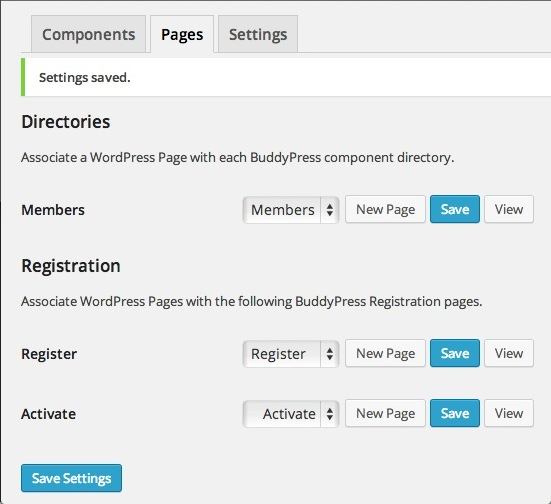
./ZachI created a Register Page in WordPress 3.9. You can see from the first link below that a link to it shows up on the top menu bar.
http://snag.gy/Vt6PG.jpgNext I used the BuddyPress 2.0 settings to associate that WordPress Register Page with the BuddyPress Register page. (See link below.)
http://snag.gy/eBQp7.jpgAnd as you can see, the Register link has now vanished from the top menu bar.
http://snag.gy/dA1Ue.jpgThoughts?
(I just updated to WordPress 3.9. Don’t know if the same thing happened with the previous version. Wonder if it has anything to do with that.)
current theme is latest u-design with childtheme for css search.php functions.
Any Help appreciated in this. Apparently this is the 4th time the org has attempted a go at buddypress and they end up just uninstalling the whole thing. I just took over as dev and am very familiar with wp but bp is a very different beast. Plus its info/docs are lacking unorganized and outdated.The site seems to work with bp out the box, everything looks good. Except when comment or reply is pressed then NOTHING happens..well ok the page moves up and down a bit, but no comment form. Change to 2014 theme and works, change to our theme and nothing.
There are so many, I MEAN 100s, of pages about buddypress theme integration/conversion online and many of them are out of date.
One place I read create a folder in current theme called buddypress and add all files from buddypress/bp-templates/bp-legacy/buddypress in there and change as needed. Another said we can name the folder community instead of buddypress. One said will not work if not multisite…will not work if in directory….will not work if not mu.
Buddypress there needs to a be an update about this; even on this site there is an article that is out of date about themes and checking for compatibility but there is no update to it.
Questions: What makes a theme BP compatible? I looked at several themes that are and none have buddypress anything anywhere let alone a folder, so what makes theme buddypress compatible.
Is there a way to select a template to use JUST for buddypress? we have a site, been using the same wp site for a while, changing theme is not an option. How do we make it work with our theme?without bp legacy files.Please help



Hi
I’m trying to figure out how make my site viewable only to FREE members, their level is set via Paid Memberships Pro, they don’t pay at first, they can check out the site and see it first.
It is a meeting/dating site, and i’m using Sweet Date theme 2.6 on WordPress 3.9, BP 1.9.2, can’t at the moment update to 2.0, cause there’s some issues regarding the Sweet Date theme, they’ll be fixed in a couple of days.
I’m new to Buddypress, so please bear with me 🙂
What i need to do is this:
No public or private messaging.
No be-friending.
No commenting on the activity stream/wall on the profile.
No commenting/creating in forums, not closed/private, they must be able to view them.
No commenting on photo or video (haven’t set those two up yet)
I found this piece of code that restrict private messaging, but it just redirects:
http://buddypress.org/support/topic/hiderestrict-access-to-private-messaging/
How i would like the first two things to work out, is when clicked upon, a message pops up or folds down somewhere on the page telling that this is not possible, they need to upgrade, and a link should be shown.
All the best
Carsten