Search Results for 'buddypress'
-
Search Results
-
I’m not too sure what is going on here, i’m relatively new with BuddyPress. I’m building an intranet for a law firm. Anyway, with the “Extended User Profiles” section enabled, I have users able to add things like their “bio” and “favorite things” (both fields in the base field group). When they show up on the live site, they’re links to a search term
{site-url}/?s={text-entered-for-field}I am attaching an image that visually displays what’s going on as well:https://www.dropbox.com/s/9tm5pt30kzia7nf/Screenshot%202014-04-22%2001.03.12.png
Thanks in advance for your help!
./ZachI created a Register Page in WordPress 3.9. You can see from the first link below that a link to it shows up on the top menu bar.
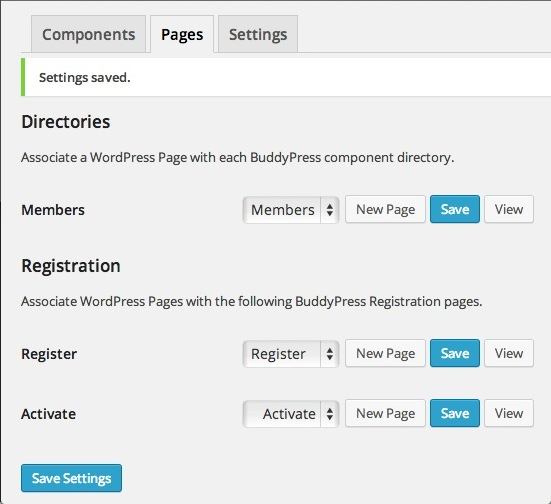
http://snag.gy/Vt6PG.jpgNext I used the BuddyPress 2.0 settings to associate that WordPress Register Page with the BuddyPress Register page. (See link below.)
http://snag.gy/eBQp7.jpgAnd as you can see, the Register link has now vanished from the top menu bar.
http://snag.gy/dA1Ue.jpgThoughts?
(I just updated to WordPress 3.9. Don’t know if the same thing happened with the previous version. Wonder if it has anything to do with that.)
current theme is latest u-design with childtheme for css search.php functions.
Any Help appreciated in this. Apparently this is the 4th time the org has attempted a go at buddypress and they end up just uninstalling the whole thing. I just took over as dev and am very familiar with wp but bp is a very different beast. Plus its info/docs are lacking unorganized and outdated.The site seems to work with bp out the box, everything looks good. Except when comment or reply is pressed then NOTHING happens..well ok the page moves up and down a bit, but no comment form. Change to 2014 theme and works, change to our theme and nothing.
There are so many, I MEAN 100s, of pages about buddypress theme integration/conversion online and many of them are out of date.
One place I read create a folder in current theme called buddypress and add all files from buddypress/bp-templates/bp-legacy/buddypress in there and change as needed. Another said we can name the folder community instead of buddypress. One said will not work if not multisite…will not work if in directory….will not work if not mu.
Buddypress there needs to a be an update about this; even on this site there is an article that is out of date about themes and checking for compatibility but there is no update to it.
Questions: What makes a theme BP compatible? I looked at several themes that are and none have buddypress anything anywhere let alone a folder, so what makes theme buddypress compatible.
Is there a way to select a template to use JUST for buddypress? we have a site, been using the same wp site for a while, changing theme is not an option. How do we make it work with our theme?without bp legacy files.Please help
I get the following error when logging into worpdress:
Warning: Creating default object from empty value in /home/xxx/public_html/wp-content/plugins/buddypress/bp-core/bp-core-avatars.php on line 962The code:
if ( $key == 'baseurl' && is_ssl() ) {
					$retval = str_replace( 'http://', 'https://', $retval );
				}
I just started receiving this error when I updated my WP e-commerce plugin which was outdated.
I can turn deactivate the e-commerce plugin and the warnings go away. I am running the latest versions of wordpress and buddypress. I just wanted to check here first before going over to wp e-commerce support.
Thanks.
After updating to the latest BuddyPress, I noticed that I get the following fatal error whenever updating a profile (with Extended Profiles enabled):
Fatal error: Call to undefined function bp_activity_get() in /plugins/buddypress/bp-xprofile/bp-xprofile-activity.php on line 266Now, I have the Activity Module disabled from BuddyPress. If I enable the Module, the fatal error does go away upon updating a profile. I’ve tried clearing all caches etc. when enabling/disabling. Is this happening to anyone else? I would really prefer not to have Activity enabled just because it avoids a fatal error.
I am building a site at the moment using the ‘divi’ theme from elegant themes. Although buddypress works with this theme there are no styles in the theme for BP which is an issue obviously as it currently looks awful.
There is a lot of styling that needs to be done in a short period of time so I was wondering if the following would work:
I found a buddypress theme I like so if I installed the theme and copied the relevant styles over from that theme to my divi child theme?
Would this work or am I wasting my time?
It would be really useful if there were css files which had basic BP theming in them that could be added to peoples’ themes if they are not BP compatible.
Thanks for any suggestions and help
~YSTTopic: Unable to Register Users
Hello there, I’ve recently updated both my WordPress and my Buddypress and have been having trouble with the Buddypress registration page. Everytime I try to create a user it leads me to the “Error: Invalid Username” message with the WordPress login. I haven’t changed anything on my site other than those updates and it worked previously.
Thanks for the help.
– Sarah S.I’ve been hitting quite a wall trying to solve a problem that perhaps someone else has already found a solution for. I have a moderate knowledge of WordPress and a basic working knowledge of BuddyPress/Commons In A Box. Let me share a bit about my installation, and what I’m trying to do:
ENVIRONMENT: WordPress 3.9 with BuddyPress 2.0 using the cbox Infinity theme
GOAL: To create a collaborative work space where members can contribute project ideas that anyone can view, copy and share.
HOW THIS SHOULD WORK:
Each member will have a workbook to which they can add pages. Each page is devoted to a project idea. Pages should be based on a template containing 5 fields:
1) Category (drop-down selection)
2) Project Name (text field)
3) Project Type (radio buttons)
4) Project Description (text area)
5) Field Notes (text area)- When a user adds a new page, they are given this form/template to enter the data into.
- The page (data) is stored in their personal workbook.
- They have the option of making this page (data) visible to and searchable by other members.
QUESTION:
Is there already a BuddyPress-compatible plug-in available that does this?
If not, is it better to approach this by using:
1) BuddyPress Docs?
Already available, allowing each user can create and either make private or share. I don’t seem to be able to find a way of creating a template doc to make available by default in each user’s area.
2) Pages?
Should I be finding a way to create a template that perhaps leverages the “Advanced Custom Fields” plug-in and somehow making this available to users to copy in their own areas? I’ve installed ACF 4.3.7 and have set up a group of fields for a template, but am having a difficult time understanding how to apply it.
http://wordpress.org/plugins/advanced-custom-fields/
Thanks so much for any suggestions that folks can offer to help steer me in the right direction here.
Susan.
Topic: avatar auto crop
wp-content/plugins/buddypress/bp-core/bp-core-cssjs.php
can someone edit the buddypress in the above folder to make it auto crop or simply make plugin to do the the job?. Thanks



Hi
I’m trying to figure out how make my site viewable only to FREE members, their level is set via Paid Memberships Pro, they don’t pay at first, they can check out the site and see it first.
It is a meeting/dating site, and i’m using Sweet Date theme 2.6 on WordPress 3.9, BP 1.9.2, can’t at the moment update to 2.0, cause there’s some issues regarding the Sweet Date theme, they’ll be fixed in a couple of days.
I’m new to Buddypress, so please bear with me 🙂
What i need to do is this:
No public or private messaging.
No be-friending.
No commenting on the activity stream/wall on the profile.
No commenting/creating in forums, not closed/private, they must be able to view them.
No commenting on photo or video (haven’t set those two up yet)
I found this piece of code that restrict private messaging, but it just redirects:
http://buddypress.org/support/topic/hiderestrict-access-to-private-messaging/
How i would like the first two things to work out, is when clicked upon, a message pops up or folds down somewhere on the page telling that this is not possible, they need to upgrade, and a link should be shown.
All the best
Carsten