Been spinning my wheels on this for hours. Trying to generate an $activity_id var using the following:
global $bp;
$activity_id = bp_activity_get_activity_id( array(
‘user_id’ => $post->author_id,
‘type’ => ‘new_blog_post’,
‘component’ => ‘blogs’,
‘item_id’ => 1,
‘secondary_item_id’ => $post->ID
I’m running this in the loop for posts. Essentially I’m trying to recreate a “favorite button” hack I read about here: http://www.dnxpert.com/2010/06/11/mark-blog-post-as-favorite-in-buddypress/ which if you read the comments, does seem to work for people running BP 1.5.5 w/ WP 3.3.
The problem is I simply cannot get the $activity_id to generate. When I try to echo it out I get nothing…if anyone can shed some insight, I would appreciate it immensely.
Thanks for the feedback. Looks like they are working on it still, but no idea when it could come out.
@mercime: Thanks… change set 3654 https://bbpress.trac.wordpress.org/changeset/3654 looks interesting.
This is a major and awesome step in the right direction. Especially adopting the buddypress extension APIs. Excellent work !!! Now I need to figure what is needed to check it out.
3654 looks like it supports multiple forums per group. It looks like it also supports shared forums across groups.
I didn’t see anything to define a ‘preset’ list of forums on enable or group create.
Being able to define forums private to groups so they can’t be shared would be very useful, at least to remove clutter when you have many groups with 3-4 forums each.
It looks like forums can be part of categories (as a parent).
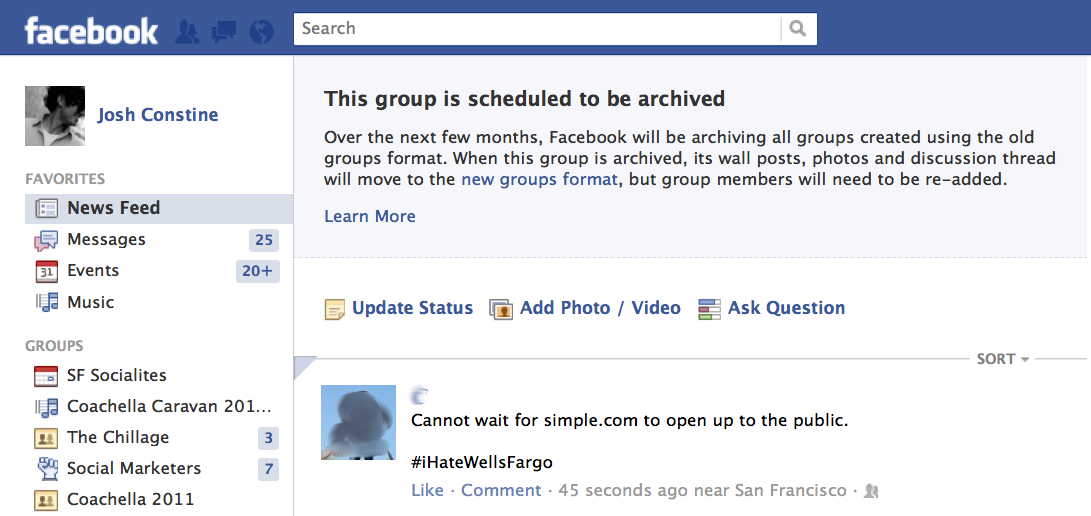
@neodjandre – The way the feature works is somewhat deceptive, what it does is posts a message on the screen (rather than their inbox) similar to what facebook does here – https://tctechcrunch2011.files.wordpress.com/2012/01/facebook-groups-news-feed-error-message.png and it requires the template tag:
`
`
As seen in the default theme sidebar – https://buddypress.trac.wordpress.org/browser/trunk/bp-themes/bp-default/sidebar.php#L26
Hi @elangley,
sorry I could not reply earlier(was a little bit busy with some personal stuff).
Just checked today the case by writing posts on sub network and It showed up correctly on my local install. I am using Sub directory install though(It should not affect the sub domain install I believe). Can you confirm if you already have BP_ENABLE_MULTIBLOG defined in your bp-custom.php or wp-config.php ?
@djpaul, @mercime, Thank you for the mention. My apologies for not responding to this topic earlier. I had got the notification.
I had my site in a subfolder, i.e., http://mysite.com/wp2 and I moved the files to just http://mysite.com. When I did that, all of a sudden, avatar cropping stopped working. It doesn’t show the two images, only the words show up and when I click Crop Image – it returns a blank spot. Can someone explain what happened when I moved the files? Do I have to reinstall WP and Buddypress to get it to work?
@o4tuna the way buddypress works in regards to roles and capabilities is being worked on by the core devs, half of it will be implemented in 1.6. Trac: https://buddypress.trac.wordpress.org/ticket/3740
There’s only one Group Forum per Group with no hierarchy. As for Sitewide Forums (the bbPress plugin), these forums are not associated to groups at all at this time. It’s in the roadmap to refactor/migrate Group Forums to Sitewide Forums @ BP 1.6. https://buddypress.trac.wordpress.org/ticket/3598
1. https://codex.buddypress.org/getting-started/ go to page links on the right sidebar and read them
2. Albums/Galleries
a. BP Album/BP Media – free
b. BP Gallery – premium
Pinterist https://wordpress.org/extend/plugins/tags/pinterest – but none that I know specifically for the Albums/Galleries listed above.though you could make a request with plugin developer
3. User Blogs – you need to “Create a Network” i.e., make it Multisite
Can someone explain to me how Buddypress user management integrates with WordPress’s user management and permissions? The user management part of Buddy Press seems to not have been thought through very well. And, it seems that every Blog application turned CMS has this problem with managing users and the various others. I would like to be able to set permissions on a page basis, and be able to give a person, lets call him/her and Administrative Assistant, the ability to manage user information and password. But, I can’t find a way to do this that isn’t to complex.
@alexanderraoul, i am sure u can hide this with css
https://codex.buddypress.org/developer-docs/iis7-web-config/
Was going to post this link as it might have helped – if you have any choice in the matter try changing to a LAMP setup it’s really a lot less stressful 
email is a function of your server, people do take a shortcut and try and skirt around issues with plugins but really one you should try and sort out at sever level.
Hi,
I am a bit of a newbie, so sorry first of all. I already had buddypress installed on my local installation , with a few plugins and so on, but I couldn’t find a decent theme in my budget that would be compatible with BP so I used one that was for WP and used the template pack. The thing is, I realise it’s quite clear you have to change certain files’ sidebar/header/footer files so I have copied these files and renamed them sidebar-buddypress.php and so on. But, I have tried copying the structure in the page.php file but these pages seem to have confused me even more and I don’t see what I should be changing in order that the content’s width should be reduced on buddypress pages. The bars are slightly too wide and the titles and headings are too close to the edge of the sidebar. Can someone please kindly help me figure out what to do here?
Here’s the content of my page.php file:
<?php get_template_part('includes/breadcrumbs', 'page');
?>
<?php if ( 'on' == get_option('trim_show_pagescomments') )
comments_template(”, true); ?>
@mercime
i took a look into that a while back, the source code seems pretty solid and understandable
also how can i structure the color picker like Farbtastic http://acko.net/blog/farbtastic-jquery-color-picker-plug-in/ to be stored and saved to each user’s profile like different color structure in each column of the profile and so on that’s my main concern thats what im having trouble with..
I just added BuddyPress with all default settings. I downloaded and activated the following plugins: BuddyPress, BuddyPress Wiki Component, and Group Wiki Extension.
I am offered the ability to setup the title of wiki pages in a test group. The wiki home page for that group lists the two test pages. When I go to edit those pages and include text in each page, click save page, nothing happens.
When I try to create a new wiki page from the home wiki page for the test group, nothing happens after clicking save page.
In both instances, I am directed back to the wiki home page, but nothing was added.
Can anyone tell me what I’m doing wrong?
Thank you @djpaul. Do you know if actually is there any site running buddypress with those large number of users?
Thanks and regards!
I see, I was wondering if that was something way worse than what I initially though myself.
Well Paul, thanks a lot for your precious insight. I’ll check with my host and see what’s up. Will let you guys know how stuff ends up going.
I’ll come back here if the strange activity feed beahviour keeps presenting itself after fixing the MySQL issue.
In the meantime, thanks lots for your precious support. Cheers!
`I wish there was more written about what buddypress can do and what the end result will look like. I don’t like the examples in the showcase because they don’t even remotely look like the buddypress that I have. I would love to see a very plain skeleton example of what buddypress does and how to set up a basic forum.`
BuddyPress has a test demo site [http://testbp.org] which will show you what it can do out of the box without doing any extra coding. The only way i can think of to put the end result into words is “It gives you a social network out of the box” (which is already on the BuddyPress.org homepage)
I’d highly recommend reading the Getting started pages on the codex https://codex.buddypress.org/getting-started/ go to page links on the right sidebar and read them
`For instance what is the difference between a forum and a post. They look exactly alike in the dashboard.`
As BuddyPress is an extension of WordPress, and is designed for WP users, is defining Blog Post and Forum Post necessary? I think your concern may be better at WordPress.org/forums as BuddyPress doesn’t define the word themselves, WordPress does.
`You can’t start a group because there are no topics.`
Are you using a plugin that makes topics a prequisite for starting a group? That’s not the way it works out of the box from my experience.
`Wouldn’t it be nice to have a little welcome page saying, “Here’s how to set up your buddypress forums. First you create a few groups. Then add topics to each group. You can’t add this until you add that so start with this.
I just want an overview so that I can know if I’m doing something wrong or if there is a problem with the software when I can’t add a forum or don’t see my topic.`
Seems you’ve already figured it out. As an open source project, You can contribute back what you learn by creating a codex article. https://codex.buddypress.org/
“MySQL server has gone away” is a pretty important error which must be affecting several things, even if it’s not the root cause of this issue. The connection to your database is being dropped, or lost, for some reason.
I do not know too much about configuring MySQL servers. The relevant documentation is http://dev.mysql.com/doc/refman/5.6/en/gone-away.html — I’d hope that your host would have sufficient technical knowledge to better understand approaches to fix the problem (it’s likely to be a configuration change done on the server setup, rather than your WordPress install).
I am going to assume this to be the correct section.
I have installed BuddyPress and have used the option to use System Wide Installation.
Is this it? Does it integrate further than this? or is the only step?
Sorry if this is a redundant question.
Just to put this even more clearly.
This happens with bbpress 2.0.2 plugin forum’s. This forums have not been installed through the BP forum settings admin panel, but rather through bbpress’ own dashboard panel.
Hope this helps a bit more
I can confirm no javascript error is encountered when I reply to a forum’s topic. Just checked with chrome’s debug console. The erroneous behaviour seems to be occurring consistently.
Will now check for PHP error logs