FYI: For folks who stumble on this thread. A whole treasure trove of BuddyPress template functions: https://codex.buddypress.org/developer-docs/functions/
Im using a non-buddypress theme and make it buddypress ready. It works fine and has been working fine for months now. But one thing I can’t seem to understand how to get rid of is the
“You’ll need to activate a BuddyPress-compatible theme to take advantage of all of BuddyPress’s features. We’ve bundled a default theme, but you can always install some other compatible themes or update your existing WordPress theme.” message in the /wp-admin dashbored.. any ideas?
@mercime thanks for the advice. I did try the second method to no avail. I went ahead and adjusted the forum/index.php just to make sure I could align it correctly, which it looks to have worked okay. I’ll probably just do that to the other…15. Par for the course of a career in befriending the interwebs.
I’m not sure what happened but last I checked the button in question started functioning.
@sarbanharble looks like you’ve not completed Step 3 of the BP Compatibility process for members, groups, activity and registration/activation pages- https://codex.buddypress.org/theme-development/wordpress-to-buddypress-theme/#step-three
Based on a quick scan of the HTML structure of The Unstandard theme, you can use the 2nd method per link above to fix alignment of the BP template files – i.e., create necessary content/files header-buddypress.php, sidebar-buddypress.php and/or footer-buddypress.php and upload these to your theme folder – instead of the 1st method which involves changing 16 BP template files.
@starprintbrokers before deleting everything. Follow my instructions in my post above to change to bp-default theme etc.
@nsbalgcom Open up your theme’s header.php file, copy all, paste in pastebin.com, click submit, and post the generated URI here.
Do the same for your theme’s (The Global News Theme, right?) index.php, page.php, sidebar.php, and footer.php
@mercime I am confused where to start with changing the template files
Sanity check: When you said you activated the “default theme” in your first post, did you mean the WordPress default theme Twenty Eleven or the bp-default theme? It should be the bp-default theme. And if you’re using Twenty Eleven or any other WordPress theme, you need to install and activate the BP Template Pack plugin then go through Appearance > BP Compatibility process.
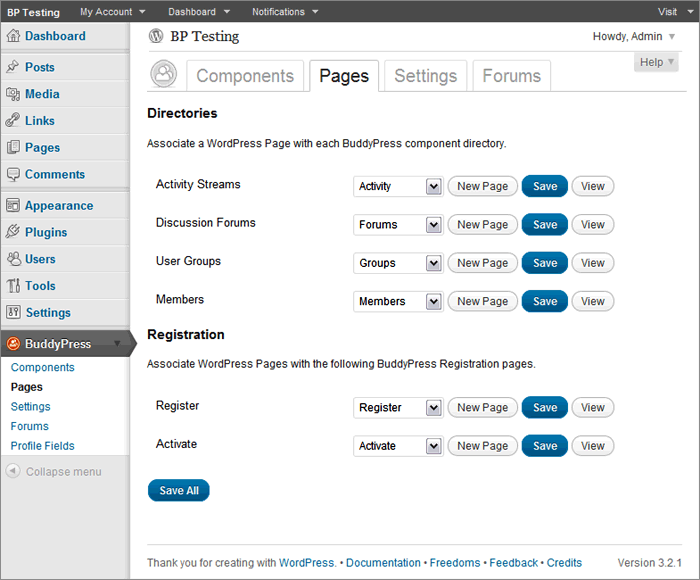
Now if you are using the bp-default theme, go to BuddyPress Pages again and double-check that BP components are indeed associated with respective pages https://mercime.files.wordpress.com/2011/11/bp-installation-wizard-08.gif
If that doesn’t cut it, https://buddypress.org/community/groups/how-to-and-troubleshooting/forum/topic/when-asking-for-support/
@nsbalgcom I see you’ve installed the BP Template Pack plugin. Now you need to fix the alignment within the BP template files to be compatible with your WP theme WPSN – via 1st method of changing 16 BP template files or via 2nd method of creating only the header-buddypress.php, sidebar-buddypress.php and/or footer-buddypress.php.
Initial scan of online source code shows that you need only to implement the 2nd method and adding some styles to fix the alignment of your theme. https://codex.buddypress.org/theme-development/wordpress-to-buddypress-theme/#fixalignment
Hello,
It appears that BuddyPress only allows the user to search Topic Titles – I’m on the hunt for a way to incorporate this search into the contents of the forum posts. I’m unable to find any plugins, or useful information that would help me resolve this and I’m hoping to avoid my own development.
If there is an easy solution to this out there, I’d love to have a point in the right direction. Thank you in advance for your time and assistance.
– Bryce
@MERCIME thank you for the help, communication was fast and very helpful. You rock champ.
Just gettng back to this project.
@mercime, I did confirm that Salutaion will work with the current BuddyPress theme.
Hugo, if this doesn’t work, then I will ask my host provider to wipe out the entire site and I’ll start over. It’s not such a loss, as I am still building the site. I can easily create those missing pages with those names, but would imagine there is code and are layouts that I cannot replicate. I would say my skill level is probably just short of intermediate, so I would rather play it safe than build any more content. I’ve save what I built in Word docs anyway!
I have e-junkie products with a HTTP POST back to my site to create a user by email and send them an email thanking them with their info. Everything works great, but now I just installed buddypress and want to automatically attach a GROUP to certain products —
I am using update_user_meta( $user_id, ”, ” );
What is the equivalent for Buddy PRess Groups ? Thanks!!
Hi all, I wanted to see if anyone was able to find a way to add/show the site wide forum favorites or my topics started on a custom page or anywhere on there buddypress site. I’ve looked around and I see that this hasn’t been implemented fully between the 2. I really like the site wide forums, but at the moment users cannot view or see there own topics or favorite them.
1. Which version of WordPress are you running? 3.3.2
2. Did you install WordPress as a directory or subdomain install? directory
3. If a directory install, is it in root or in a subdirectory? subdirectory (testsite)
4. Did you upgrade from a previous version of WordPress? If so, from which version? no
5. Was WordPress functioning properly before installing/upgrading BuddyPress (BP)? e.g. permalinks, creating a new post, commenting. Yes
6. Which version of BP are you running? 1.5.5
7. Did you upgraded from a previous version of BP? If so, from which version? no
8. Do you have any plugins other than BuddyPress installed and activated? If so, which ones? BuddyPress Community Stats, BuddyPress Global Unified search, CubePoints Buddypress Integration,
9. Are you using the standard BuddyPress themes or customized themes? custom child theme (original buddypress standard theme)
10. Have you modified the core files in any way? no
11. Do you have any custom functions in bp-custom.php? no
12. If running bbPress, which version? Or did your BuddyPress install come with a copy of bbPress built-in? 2.0.2
13. Please provide a list of any errors in your server’s log files. None
14. Which company provides your hosting? Powweb
15. Is your server running Windows, or if Linux; Apache, nginx or something else? Linux
Not sure what I’m doing wrong – though I am sure I’m doing something wrong.
I followed all the instructions for getting a non-buddypress theme to function as correctly. Everything seems sublime except I cannot get new topics to function. I manipulated the code so the sidebar aligns correctly (not in the other files yet, just in the index.php of the forum folder). Still, nothing is happening.
I’m not that savvy at this, but I can follow instructions well and I’m now stuck. This is the page I’m having trouble with: http://www.smashtoast.com/pharmacy/forums/
I’ve got a bit before this goes to the live site, but this part is stumping me. I was able to use bbPress, but I don’t like how it’s nested and not integrated in a cozy way with the rest of Buddypress. This is the first time I’ve attempted integrating Buddypress/forums into a wordpress site, so please forgive my naivety.
Thanks in advance for the help.
I had changed the permalinks before (Day& Name), and saved the settings, but still, whenever I clicked ‘view’ on the ‘Registration’ page, it took me to the ‘Home’ page I created. I deleted that, and then ‘Register’ linked to a page that says ‘Sorry, but you are looking for something that isn’t here’. I deleted ALL pages, uninstalled BuddyPress, re-installed, but then, instead of getting the Installation Wizard, got an error message saying that ‘The following active BuddyPress Components do not have associated WordPress Pages: Activity Streams, Discussion Forums, User Groups, Members, Activate, Register. (REPAIR)’. Was hoping that starting over from the beginning would solve the issue, but no luck. Even now, despite creating all new pages and associating them w/ the BuddyPress components, I still get ‘Sorry, but you are looking for something that isn’t here.’ on both the ‘Register’ and ‘Forums’ page and the ‘Forums’ page says that ‘The forums component has not been set up yet.’ I’m assuming that’s due to my re-installing BP, but not yet having gone through the installation wizard…? I don’t know what the hang-up is… Shouldn’t there be a unique ‘Register’ page created/linked to through the BP component ‘Register’? I’m at a bit of a loss…
The plugin BuddyPress Groupblog at https://wordpress.org/extend/plugins/bp-groupblog/ MAY go some of the way in answering your queries.
” The BuddyPress Groupblog plugin extends the group functionality by enabling each group to have a single blog associated with it. Group members are automatically added to the blog and will have blog roles as set by the groupblog admin settings.”
You will need a BP plugin for the image gallery and a BP plugin to insert the banner image/s of choice like this per member.
For the image gallery:
1. Free – BP Album/Media
2. Premium – BP Gallery by BuddyDev.com
For the banner image/s of user – no plugin available at this time. Check out @sbrajesh – Buddydev.com http://buddydev.com/plugins/bp-custom-background-for-user-profile/ which you could adapt to upload image/banner to the hook available before member header in template
== every single table in my database says pressfix ==
BuddyPress did not add any pressfix in front of your table names. Check your wp-config.php file to see what prefix you added to your tables. BP creates _bp_ tables in your database. It also adds BP options in wp_options table https://codex.buddypress.org/buddypress-site-administration/deleting-buddypress/
I’ve installed – re-installed, manually modified DB’s, a hundred times and never had anything remotely like this happen especially not caused by BP. BP doesn’t cock up in this manner, table prefix sounds like something your theme has done.
As for fix? try renaming your tables back to the wp default ‘wp_’
If you’ve customized a BP site before, you’ll know that the groups nav bp_get_options_nav(); can be a real barrier in getting a site exactly the way you want it.
There was an older solution to involving a permanent redirect (not ideal for SEM purposes) from home/ to forum/….
function redirect_to_forum() {
global $bp;

$path = clean_url( $_SERVER );

$path = apply_filters( 'bp_uri', $path );

if ( bp_is_group_home() && strpos( $path, $bp->bp_options_nav ) === false )
bp_core_redirect( $path . $bp->bp_options_nav . '/' );
}
add_action( 'wp', 'redirect_to_forum' );
and this one works in BP 1.5
function redirect_to_forum() {
global $bp;

$path = clean_url( $_SERVER );

$path = apply_filters( 'bp_uri', $path );

if ( bp_is_group_home() && strpos( $path, $bp->bp_options_nav ) === false )
bp_core_redirect( $path . $bp->bp_options_nav . 'forum/' );
}
add_action( 'bp_init', 'redirect_to_forum' );
Is there no other way of moving functionality around in Buddypress Groups without creating explosions? It would be really nice just to be able to change the include file references in /groups/single/home.php to pull the functionality you wanted. For example…
elseif ( bp_group_is_visible() ) :
locate_template( array( 'groups/single/** change this to any file within /single/ **' ), true );
If you change the home.php include file reference to forumn’s, the forum’s display just fine, however the add new topic functions and support do not seem to be dialed in… create a new topic and nothing happens… so in order to tap into forum functionality you actually need to be at the “forum” slug i.e. /forum/… is there any way of getting around this?
To summarize… I’m trying to get the forum’s functionality working at the group root i.e. “sitename.com/groups/group-name/” WITHOUT a redirect to “sitename.com/groups/group-name/forumn/”
Any thoughts? suggestions? similar experiences? Thanks!!!!
@paul gibbs Removing the registeration folder in my theme worked just fine.
I have no idea why I never tried it before. Thanks a lot!
You rock.



Hi! I love the built-in BuddyPress bar that is at the top of all the pages on my site. (The one with My Account, Dashboard, Notifications etc.)
I’ve set it up that users with a Contributor role cannot manage comments, so it seems silly to have it linking to a page they don’t have permission to view. Is it possible to remove just the “Manage Comments” link from the bar?
I’m having a hard time finding information in the codex. Could anyone point me in the right direction? Thank you!