`
At the bottom of the /activity/index.php, replace
`
`
with your theme’s structure
`
Hello,
I’m having trouble getting the blogs link to show up in the bp navigation bar. And everytime I go to http://www.mywebsite.com/members/username/blogs it redirects me back to http://www.mywebsite.com .
Is this because I haven’t enabled WP Multisite? Currently, I’m using the single site option. The only way I can view blog posts is by looking at the activity stream. I want add an item on the nav menu that can take people to a list of all blog posts by displayed user.
Thanks for any advice.
Since search is still down here, forgive me if this is a repeat topic. Basically wondering if anyone else has encountered this and can provide a solution. Basically install the BuddyPress Skeleton Component into WP 3.2 / BP 1.2.9.
The example menu tab examples work EXCEPT for the example under the settings tab (where general and notifications are for the profile). The menu tab is visible, but click it and you get redirected on the homepage. Maybe this is due to some hooks being moved or switched around – I know the skeleton component is showing it’s age but wondering if perhaps anyone can point me in the right direction. OR if anyone knows of a plugin that currently adds a menu choice under user settings.
Hi,
I have been looking around for plugins to customize the BP admin bar for a site that I am building. I have noticed that the bar used in the buddypress.org site is quite close to what I want. Anyone any hints?
Thanks
When using the UberMenu I found a strange bug on the avatar crop page. It breaks image paths that are in the upload directory.
It’s is changing the img url from:
http://example.com/wp-content/uploads/2011/06/menu1.png
To:
http://example.com/wp-content/uploads/avatars/9/2011/06/menu1.png
From the plugin developer:
http://codecanyon.net/item/ubermenu-wordpress-mega-menu-plugin/discussion/154703?page=18&filter=All%20Discussion#comment_1227533
It’s unfortunate that that solution didn’t pan out, but we were pursuing it based on your suggestion, as I was unable to observe the issue myself at the outset. Now that I am back home with a computer I can investigate and diagnose the problem on my own machine. And I have discovered, in fact, this is not an UberMenu bug at all.
I installed WordPress 3.2, UberMenu 1.1.2, and BuddyPress 1.2.9, with the default BuddyPress theme. I set up an UberMenu with a thumbnail image.
Then I uploaded and cropped an avatar – everything worked perfectly with the upload and crop process.
The only issue was that, on that single screen, the thumbnail image in the menu did not show up, because the source URL was incorrect (as you originally reported). And as I said at the beginning, I had no idea why that would happen – it doesn’t make any sense that UberMenu would be changing this.
I have spent a lot of time tonight digging through the BuddyPress and WordPress core, looking for how the two plugins could be interacting. I’ve determined there is nothing wrong on UberMenu’s end. Rather, BuddyPress changes the WordPress uploads directory for its own purposes on the avatar crop page. As a result, when UberMenu calls the WordPress standard wp_get_attachment_image_src function, which calls image_downsize, which calls wp_get_attachment_url, which calls wp_upload_dir, the wrong upload directory (in this case, BuddyPress’s avatar directory) is returned. So UberMenu has been provided the incorrect path for the thumbnail from the core WordPress functions, because BuddyPress has changed them. The code is in this line:
/*buddypress/bp-core/bp-core-avatars.php line 356 */

add_filter( 'upload_dir', $upload_dir_filter, 10, 0 );
The BuddyPress function that handles this filter is xprofile_avatar_upload_dir in bp-xprofile.php.
As I see it, you have three options:
1. Live with the menu thumbnails going blank on that single page
2. Ask BuddyPress to change how their upload directory filtering works, as it is clearly affecting other plugins that rely on the built in WordPress functionality.
3. Write a “hack” that tests for these BuddyPress-generated avatar upload paths and strip them out before the images are printed via the UberMenu custom walker.
It seems that this is either an oversight on BuddyPress’ part, or this was the only way to accomplish their desired functionality without editing the core. Either way, the proper solution involves changes to BuddyPress, not UberMenu.:
Hi,
I’ve got some data in mysql that’s associated with a person’s name, and I’d like to be able to display a table with that data somewhere on their profile page, or on another page that can be accessed through their profile. Is this kind of thing possible?
I know how to code a few things with php, and mysql, but I’m just starting with wordpress & buddypress (they seem like they’ll be great) but for now…what sort of stuff should I be reading to learn how to do this?
Hi!
I have a blog with alot of different contributors, both regular people and companies, i want to make 2 different post styles depending on if the user is a person or writing as a company.
I have used 2 radio buttons that the user can choose between “Private” and “Company” but how can i use the metadata from the Buddypress member profiles to use as an if statement?
I am sure this have been asked before but i can’t find it, i guess i am a crappy searcher!
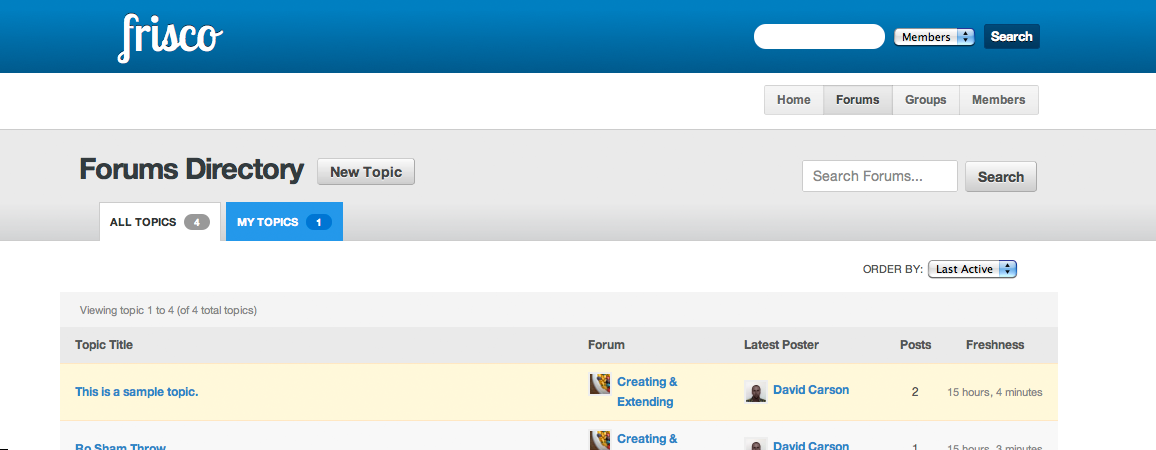
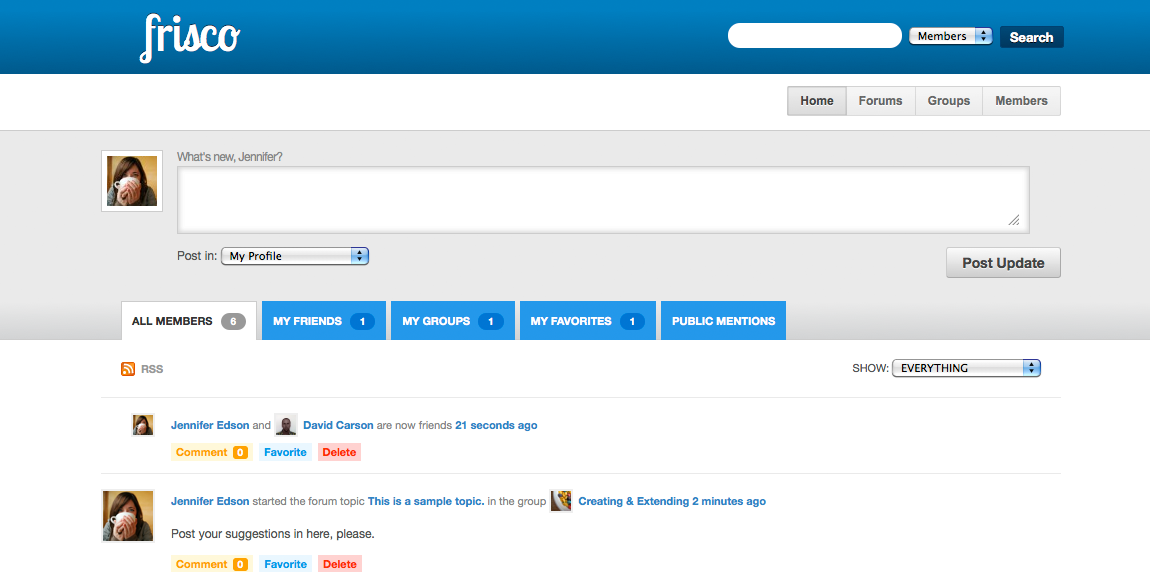
I just started creating a new a child theme called “Frisco”.
The goal is to release it around the same time BuddyPress 1.3 comes out, if possible, so that BuddyPress users have a solid (and free) option for a theme that looks different than the default theme.
Aiming for clean and simple. Ideally, it will just be a stylesheet and functions file. And the theme should be as responsive as possible so that it works reasonably well on mobile devices. It would also be great to add support for the more popular plugins, too.
No demo site yet. But here are a few screenshots from my local setup.
https://s3.amazonaws.com/frisco/screenshot-1.png
https://s3.amazonaws.com/frisco/screenshot-2.png
https://s3.amazonaws.com/frisco/screenshot-3.png
https://s3.amazonaws.com/frisco/screenshot-4.png
If you are interested in contributing or trying it out, please download it from GitHub and report issues. I’ve only put a few hours into it so there’s lots to do. I hope to update it a lot more in the coming days and weeks.
https://github.com/davidtcarson/frisco
Note: This theme is not even close to being ready to use on a live site. It has been tested locally only using the BuddyPress trunk (1.3-bleeding) as of today (July 17th, 2011). Download the theme only if you are going to install it on a development/local install of BuddyPress. Don’t expect anything to work normally after you activate this theme.
If you would like to get notified when the theme is further along or the demo site is available, please head over to the theme site and drop your email in the box.
All I want for users is the ability to register as a member, the ability to send private messages to one another, and the ability to write on a forum.
How do I limit the Groups feature of Buddypress so that the tab doesn’t show up anymore?
Working on a new D3 theme with buddypress integrated. Theme was based on twentyten mostly and then hacked to this. Still need some more coding but all ajax functionalities for BP are integrated into the theme.
I am using the WordPress theme Tropical Dream and have installed BuddyPress, together with the Template Pack. As per the Stage 3 instructions I then checked out the “My Account” links, but found that they weren’t appearing correctly (although the pre-existing WordPress pages were): the (left-hand) sidebar was missing, with the BuddyPress content filling the page and pasted directly on to the background instead of in a containing box as happens with the non-BuddyPress pages. (Also, the BuddyPress admin bar was right at the very top of the page background, rather than merely above the header area.) I checked the structure of the page.php file (see http://pastebin.com/kvWPdga9), as per the instructions, and tried to make appropriate adaptations to the 11 BuddyPress files, but regardless of ANY changes I made to these files’ HTML structure the corresponding pages still appeared exactly the same. I thought this might be a cache problem, but clearing it made no difference whatsoever. I’m not a complete newbie, but neither am I proficient in php, so I’m rather stuck, now. Can you help, please? Exactly what changes do I need to make, and to which files? I know that you’ve been able to assist others with similar problems, so I’m hoping that you might be able to clear up this mystery for me, too.
after i updated buddypress add wordpress when i comment it just refreshes the page any ideas why this might be happening?
I just installed Buddypress on a version of wordpress 3.0.4.
It worked fine.
I then tried to install the album plugin and it crashed my admin section. I can’t click anythin in the admin section without getting this error message:
Fatal error: Cannot redeclare bp_album_admin() (previously declared in /home/jaxsadul/public_html/cilcks.com/wp-content/plugins/bp-album/includes/bp-album-admin-network.php:14) in /home/jaxsadul/public_html/cilcks.com/wp-content/plugins/bp-album/includes/bp-album-admin-local.php on line 331
since It already altered the code, I cant see what the old code looked like.
here is what it is now (line 331 is the second to last line):
<?php
/***
* This file is used to add site administration menus to the single user admin backend.
*
* If you need to provide configuration options for your component that can only
* be modified by a site administrator, this is the best place to do it.
*
* However, if your component has settings that need to be configured on a user
* by user basis – it’s best to hook into the front end “Settings” menu.
*/
/**
* bp_album_admin()
*
* Checks for form submission, saves component settings and outputs admin screen HTML.
*/
function bp_album_admin() {
global $bp;
/* If the form has been submitted and the admin referrer checks out, save the settings */
if ( isset( $_POST ) ) {
check_admin_referer(‘bpa-settings’);
if( current_user_can(‘install_plugins’) ) {
update_site_option( ‘bp_album_slug’, $_POST );
update_site_option( ‘bp_album_max_pictures’, $_POST==” ? false : intval($_POST) );
foreach(array(0,2,4,6) as $i){
$option_name = “bp_album_max_priv{$i}_pictures”;
$option_value = $_POST[$option_name]==” ? false : intval($_POST[$option_name]);
update_site_option($option_name , $option_value);
}
update_site_option( ‘bp_album_keep_original’, $_POST );
update_site_option( ‘bp_album_require_description’, $_POST );
update_site_option( ‘bp_album_enable_comments’, $_POST );
update_site_option( ‘bp_album_enable_wire’, $_POST );
update_site_option( ‘bp_album_middle_size’, $_POST );
update_site_option( ‘bp_album_thumb_size’, $_POST );
update_site_option( ‘bp_album_per_page’, $_POST );
update_site_option( ‘bp_album_url_remap’, $_POST );
update_site_option( ‘bp_album_base_url’, $_POST );
$updated = true;
if($_POST && !$_POST){
bp_album_rebuild_activity();
}
if( !$_POST && $_POST){
bp_album_undo_rebuild_activity();
}
}
else {
die(“You do not have the required permissions to view this page”);
}
}
$bp_album_slug = get_site_option( ‘bp_album_slug’ );
$bp_album_max_pictures = get_site_option( ‘bp_album_max_pictures’ );
$bp_album_max_priv0_pictures = get_site_option( ‘bp_album_max_priv0_pictures’ );
$bp_album_max_priv2_pictures = get_site_option( ‘bp_album_max_priv2_pictures’ );
$bp_album_max_priv4_pictures = get_site_option( ‘bp_album_max_priv4_pictures’ );
$bp_album_max_priv6_pictures = get_site_option( ‘bp_album_max_priv6_pictures’ );
$bp_album_keep_original = get_site_option( ‘bp_album_keep_original’ );
$bp_album_require_description = get_site_option( ‘bp_album_require_description’ );
$bp_album_enable_comments = get_site_option( ‘bp_album_enable_comments’ );
$bp_album_enable_wire = get_site_option( ‘bp_album_enable_wire’ );
$bp_album_middle_size = get_site_option( ‘bp_album_middle_size’ );
$bp_album_thumb_size = get_site_option( ‘bp_album_thumb_size’ );
$bp_album_per_page = get_site_option( ‘bp_album_per_page’ );
$bp_album_url_remap = get_site_option( ‘bp_album_url_remap’ );
$bp_album_base_url = get_site_option( ‘bp_album_base_url’ );
$bp_album_rebuild_activity = false;
$bp_album_undo_rebuild_activity = false;
?>
<?php echo "
” . __(‘Settings Updated.’, ‘bp-album’ ) . “
” ?>
<?php
echo ““;
_e(“Project Calendar”, ‘bp-album’ );
echo “ – “;
_e(“View our development schedule in real-time using Pivotal Tracker.”, ‘bp-album’ )
?>
<?php
echo ““;
_e(“Support Forum”, ‘bp-album’ );
echo “ – “;
_e(“Need help with the plugin? There are hundreds of other users that can answer your questions on our BuddyPress support forum.”, ‘bp-album’ )
?>
<?php
echo ““;
_e(“Official Website”, ‘bp-album’ );
echo “ – “;
_e(“Our base of operations on the internet and the only source of info that’s been checked by our dev team.”, ‘bp-album’ )
?>
<?php
echo ““;
_e(“Features List”, ‘bp-album’ );
echo “ – “;
_e(“See what features we’re adding to upcoming versions of the plugin.”, ‘bp-album’ )
?>
<?php
echo ““;
_e(“Activity Feed”, ‘bp-album’ );
echo “ – “;
_e(“Up-to-the-second bug reports and code updates via Google Code.”, ‘bp-album’ )
?>
<form action="” name=”example-settings-form” id=”example-settings-form” method=”post”>
<?php
_e(“Bad slug names will disable the plugin. No Spaces. No punctuation. No special characters. No accents.”, ‘bp-album’ );
echo ”
“;
_e(“{ abcdefghijklmnopqrstuvwxyzABCDEFGHIJKLMNOPQRSTUVWXYZ01234567890_- } ONLY.”, ‘bp-album’ )
?>
| <input name="bp_album_slug" type="text" id="bp_album_slug" value="” size=”10″ /> |
|
<input type="radio" name="bp_album_require_description" type="text" id="bp_album_require_description" checked=”checked” value=”1″ /> <input type="radio" name="bp_album_require_description" type="text" id="bp_album_require_description" checked=”checked” value=”0″ /> |
|
|
<input type="radio" name="bp_album_enable_comments" type="text" id="bp_album_enable_comments" checked=”checked” value=”1″ /> <input type="radio" name="bp_album_enable_comments" type="text" id="bp_album_enable_comments" checked=”checked” value=”0″ /> |
|
|
<input type="radio" name="bp_album_enable_wire" type="text" id="bp_album_enable_wire" checked=”checked” value=”1″ /> <input type="radio" name="bp_album_enable_wire" type="text" id="bp_album_enable_wire" checked=”checked” value=”0″ /> |
<?php _e( "Accepted values: EMPTY (no limit), NUMBER (value you set), 0 (disabled). The first option does not accept 0. The last option only accepts a number.”, ‘bp-album’ ) ?>
| <input name="bp_album_max_pictures" type="text" id="example-setting-one" value="” size=”10″ /> | |
| <input name="bp_album_max_priv0_pictures" type="text" id="bp_album_max_priv0_pictures" value="” size=”10″ /> | |
| <input name="bp_album_max_priv2_pictures" type="text" id="bp_album_max_priv2_pictures" value="” size=”10″ /> | |
| <input name="bp_album_max_priv4_pictures" type="text" id="bp_album_max_priv4_pictures" value="” size=”10″ /> | |
| <input name="bp_album_max_priv6_pictures" type="text" id="bp_album_max_priv6_pictures" value="” size=”10″ /> | |
| <input name="bp_album_per_page" type="text" id="bp_album_per_page" value="” size=”10″ /> |
<?php _e( "Uploaded images will be re-sized to the values you set here. Values are for both X and Y size in pixels. We strongly suggest you keep the original image files so BP-Media 0.1.9 can re-render your images during the upgrade process.”, ‘bp-album’ ) ?>
| <input name="bp_album_middle_size" type="text" id="bp_album_middle_size" value="” size=”10″ /> | |
| <input name="bp_album_thumb_size" type="text" id="bp_album_thumb_size" value="” size=”10″ /> | |
|
<input type="radio" name="bp_album_keep_original" type="text" id="bp_album_keep_original" checked=”checked” id=”bp-disable-account-deletion” value=”1″ /> <input type="radio" name="bp_album_keep_original" type="text" id="bp_album_keep_original" checked=”checked” id=”bp-disable-account-deletion” value=”0″ /> |
<?php
_e( “If you get broken links when viewing images in BP-Album+, it means your server is sending the wrong base URL to the plugin. You can use the image URL re-mapping function to fix this.”,’bp-album’ );
echo “ “;
_e(“DOCUMENTATION”,’bp-album’ );
echo ““;
?>
|
<input type="radio" name="bp_album_url_remap" type="text" id="bp_album_url_remap" checked=”checked” value=”1″ /> <input type="radio" name="bp_album_url_remap" type="text" id="bp_album_url_remap" checked=”checked” value=”0″ /> |
|
|
<input name="bp_album_base_url" type="text" id="bp_album_base_url" value="” size=”70″ /> /userID/filename.xxx |
<?php _e("A defect in plugin versions before 0.1.8.5 caused all bp-album activity posts to be deleted from the site when the administrator deleted a user. Set 'Rebuild Posts' to 'yes' to add EVERY PHOTO ON YOUR SITE that users have marked as PUBLIC to the site activity stream. This will also ALLOW COMMENTS on the photos. The created posts will have random dates to avoid flooding the activity stream. Set ‘UNDO Rebuild Posts’ to ‘yes’ to remove the posts this function creates it will not harm posts that users created.”, ‘bp-album’ ) ?>
|
<input type="radio" name="bp_album_rebuild_activity" type="text" id="bp_album_rebuild_activity" checked=”checked” value=”1″ /> <input type="radio" name="bp_album_rebuild_activity" type="text" id="bp_album_rebuild_activity" checked=”checked” value=”0″ /> |
|
<input type="radio" name="bp_album_undo_rebuild_activity" type="text" id="bp_album_undo_rebuild_activity" checked=”checked” value=”1″ /> <input type="radio" name="bp_album_undo_rebuild_activity" type="text" id="bp_album_undo_rebuild_activity" checked=”checked” value=”0″ /> |
<input type="submit" name="submit" value="”/>
<?php
/* This is very important, don’t leave it out. */
wp_nonce_field( ‘bpa-settings’ );
?>
<?php
}
?>
Any help?