Search Results for 'buddypress'
-
AuthorSearch Results
-
June 18, 2018 at 2:59 pm #274541
OreilleMalade
ParticipantHello,
Strang behavior here. I was using BuddyPress on 3 sites. On one of them the upgrade to 3.0 ran perfectly. But on the 2 other ones a problem showed up: when you visit some pages you get a 404 error.
- If you deactivate BuddyPress the problem instantly disappear.
- Strangely, if you save again the permalink structure it seems to work OK during a little moment, then the problem gets backs again.
Any idea?
See https://rencontre-surdoue.com/
For example : https://rencontre-surdoue.com/adultes-surdoues/chat/Don’t know if that could be related to this thread? : Oops! That page can’t be found. for all groups activities
Best Regards and keep up the good work! 🙂
June 18, 2018 at 12:46 pm #274539janurmas
ParticipantHello, Mastershas! Thanks, for your help. Now the admin bar is removed from logged-in users. It was that simple. But I have no idea with how to do with customizing the BuddyPress theme. I think this would have some code tweakings. And the Buddydev is a good idea. I’m gonna try it. Many thanks!
June 18, 2018 at 11:10 am #274534jangolin
ParticipantActivation key is empty when a user clicks on their activation URL
I have tried this method
But it still doesnt work
any ideas how to solve this, I am using Sweet Date theme
June 18, 2018 at 8:58 am #274528Shashi Kumar
Participant1. To hide admin bar to non-logged in user, you can use a plugin name Remove Dashboard Access.
2. There is no direct method to make BuddyPress profile page full-width. You can achieve this by editing Buddypress templates. To do this
Create a child theme
Put Buddypress folder in your child theme and edit the profile template. To do we should understand the templating system of Buddypress. Here is a tutorial for that.3. You can use a plugin by Buddydev which lets you write posts from front end and add blog tab under user’s profile menu.
Hope this help you.
June 18, 2018 at 8:12 am #274523Varun Dubey
Participant@sarojweb You can compose emails inside BuddyPress Emails options and for available tokens you can check
June 17, 2018 at 5:45 pm #274505In reply to: Avatars & ‘add friend’ button not working
mojomo
ParticipantI was able to fix the avatar issue. The Firefox add-on Ghostery caused the problem. Deactivating the add-on brought back the avatars.
However, the “add friend” button is still not working. When I deactivate all plugins except for BuddyPress, the problem persists.
June 17, 2018 at 4:53 pm #274498In reply to: How to change language
Participant@filozof86 Try Loco Translate Plugin, you can also check https://codex.buddypress.org/getting-started/customizing/customizing-labels-messages-and-urls/
June 16, 2018 at 6:49 pm #274492In reply to: Notification from bbpress to buddypress
dedotombo
ParticipantOneSocial by BuddyBoss, is it possible to use BuddyPress 3 in a “legacy” mode?
June 16, 2018 at 4:04 pm #274488In reply to: Notification from bbpress to buddypress
ParticipantI have the exact same issue using BuddyPress 2.9.4 (cannot update to 3 because of theme) and bbpress 2.5.14.
June 16, 2018 at 3:59 pm #274486In reply to: Blank Notifications
ParticipantI have the exact same issue using BuddyPress 2.9.4 (cannot update to 3 because of theme issues) and bbpress 2.5.14 (latest).
June 15, 2018 at 10:46 pm #274475In reply to: Prevent Group Post from Showing on Profile Activity
balebond
ParticipantJust found a near-hit for my needs in this post by @modemlooper:
https://buddypress.org/support/topic/disable-group-posts-from-main-activity-stream/
However, the code below is stripping group posts from both the “Activities” page and a member’s page activity. I tried to limit to user pages only by altering if ( bp_is_current_component( ‘activity’ ) to if ( bp_is_current_component( ‘profile’ ) but didn’t work. Anyone see what I need to change so that this snippet only fires if it is on a member’s activity page?
function bp_filter_groups_from_activity( $a, $activities ) {

	if ( bp_is_current_component( 'activity' ) ) {
		foreach ( $activities->activities as $key => $activity ) {

			if ( $activity->component =='groups') {
				unset( $activities->activities[$key] );
				$activities->activity_count = $activities->activity_count-1;
				$activities->total_activity_count = $activities->total_activity_count-1;
				$activities->pag_num = $activities->pag_num -1;
			}
		}

		$activities_new = array_values( $activities->activities );
		$activities->activities = $activities_new;

	}
	return $activities;
}
add_action('bp_has_activities','bp_filter_groups_from_activity', 10, 2 );
June 15, 2018 at 1:12 pm #274455In reply to: Not a spammer but marked as a spammer
Venutius
ModeratorLeave BuddyPress Active, deactivate all other plugins, see that these will not be there, then re-active the plugins one by one till you find the one that is marking the users as spammers.
June 15, 2018 at 1:09 pm #274454In reply to: Not a spammer but marked as a spammer
xprt007
ParticipantHi
Thank you for the quick response.
The question is which plugin?
I tried deactivating a couple starting with Aksimet and when I reached bbforum & buddypress & deactivated both: the pink background of the “Spammer” user disappeared, as well as the link “Extended”. They both do not reappear with bbforum activated. (See screenshot)
That made me assume it’s Buddypress that’s responsible for this pink background and the Extended link.
Moreover it’s under “Extended” edit of User on “wp-admin/users.php”, that one gets the status shown and where one can change from Spammer to Active, which will not work.So just wondering … Or may be I’m just overlooking something obvious?
Regards
June 15, 2018 at 11:10 am #274452In reply to: Not a spammer but marked as a spammer
ModeratorBuddyPress does not mark users as spammers, it must be some other plugin that’s doing that
June 15, 2018 at 9:52 am #274451In reply to: Not a spammer but marked as a spammer
ParticipantI need to add, Wordfence is set to immediately block non-existent usernames and this particular user is actually there. Checked the spelling several times, correct password! So could it be Wordfence takes a cue from this Buddypress Spammer status business?
Anyway, the question is how does the admin remove another admin or other user from spammer status?June 14, 2018 at 2:30 pm #274434Participant@cgkid You can check bp moderation pro
June 14, 2018 at 12:50 pm #274429In reply to: How to perform user search with ‘OR’?
ParticipantJune 14, 2018 at 9:08 am #274422In reply to: Can’t Post in Activity Stream
Mathieu Viet
Moderator@aaronpods no problems.
Have you deactivated all plugins/bp-custom.php/mu-plugins/ except BuddyPress ?
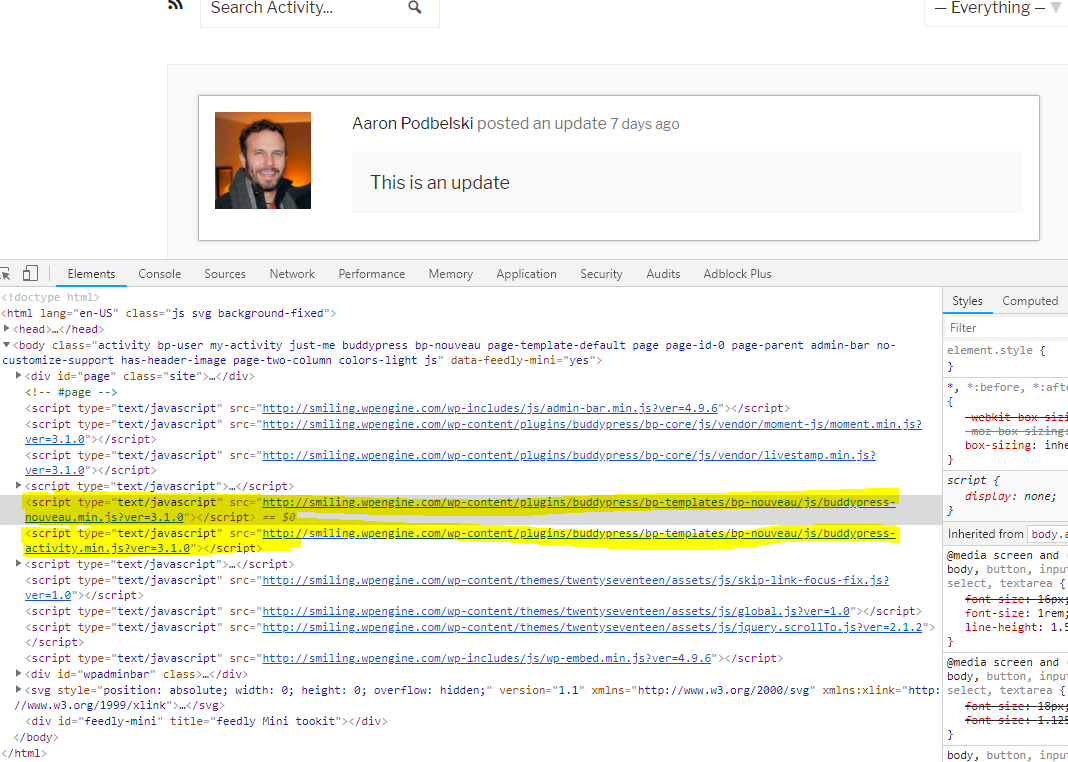
I think there’s something preventing the regular Nouveau JavaScripts to load. As the post form needs it to be displayed because it uses BackBone.JS views, it’s the reason. The other script/plugin is only conflicting with the activity directory, as i’ve checked your profile, the Nouveau JavaScript are loading.
 June 14, 2018 at 8:46 am #274421
In reply to: checkout page: required field
meestergijs
ParticipantSolved. I had to tick the option: Sync BuddyPress signup email address with WooCommerce billing email address in the WC4BP plugin..
June 13, 2018 at 7:33 pm #274407ahad77
Participantmy bp them is sweetdate
The selected Template Pack will serve all BuddyPress templates running buddypress NouveauJune 13, 2018 at 7:23 pm #274406ModeratorMight be wise to confirm with you which bp theme you have in dashboard>>settings>>buddypress>>options ? are you running Nouveau?
June 13, 2018 at 6:50 pm #274398ParticipantDear @venutius thanks your reply
I did your suggestion but it did not work, my wordpress is 4.9.6 and buddypress is 3.1.0June 13, 2018 at 6:40 pm #274397ModeratorThere’s a variety of ways to achieve this, one way is to overload the BP Template profile header template file. It’s located in
plugins/buddypress/bp-templates/bp-noveau(or bp-legacy)/buddypress/members/single/cover-image-header.phpassuming you are using profile cover images.This file constructs the members header, if you copy it to
themes/your-theme/buddypress/members/single/cover-image-header.phpyou can edit it and insert a button in there.June 13, 2018 at 6:16 pm #274393In reply to: Alternate unique identifier instead of email?
kama
ParticipantI’m thinking to use Formidable Forms for the user registration, and they offer this as an option:
Don’t require a unique email#
This can be used alongside a plugin that allows multiple user accounts to be registered to the same email address. This will remove the error added to the email field for a non-unique email address. Replace 50 with the ID of your Email Address field.add_filter( 'frm_validate_field_entry', 'remove_email_error', 25, 3 ); function remove_email_error( $errors, $field, $value ) { $email_field_id = 50; if ( $field->id == $email_field_id && isset( $errors[ 'field'. $field->id ] ) && $errors['field'. $field->id] == 'This email address is already registered.' ) { unset( $errors['field'. $field->id] ); } return $errors; }So I’m just curious if this would work with Buddypress.
June 13, 2018 at 5:21 pm #274387In reply to: Buddypress, Analytics & GDPR
r-a-y
KeymasterI’m not an expert on GDPR, but what are other large sites like Twitter doing about this? Twitter’s user handle is approximately the same as BP’s username.
If you want BuddyPress to use something else for the profile URL, you can set the username in the
user_nicenameDB field and BuddyPress will use that for the user profile URL.Keep in mind that this might break whatever custom configurations you might have on your install.
If you’d rather not mess with altering the data in the user DB columns, you can also potentially filter
'bp_core_get_user_domain'and'bp_core_set_uri_globals_member_slug'.View this ticket for more info:
https://buddypress.trac.wordpress.org/ticket/6694If you wanted to use a plugin to change the profile URL to use the user ID, you can try using a plugin like this (untested):
Reminder: Always test in a development environment before deploying major changes on a live site.
-
AuthorSearch Results


