Lazy load will really speeds up a site, so it’s important to us. LiteSpeed Cache has image lazy loading which is compatible with the BuddyPress avatar uploading feature:
https://wordpress.org/support/topic/lazy-load-breaking-buddypress-upload-avatar-feature/
Thought that might help anyone who runs into this issue!
One solution I’ve found which works for BuddyPress and
Whether you use BuddyPress or not, you would need to write custom code to handle the access restrictions that you described.
Hello,
Hoping someone might be able to help me. I’m not able to get the avatar upload feature to work on any of my sites, it does the same thing on all of them, shows a small black box where the image uploads into and then only allows to crop a tiny part of the image resulting in very bad looking corner of an avatar.. Any help would be very much appreciated.
One of the pages I have the error on is: http://dev-greentv.pantheonsite.io/members/jaymcdonough/profile/change-avatar/ feel free to sign up to see the error on the profile that is created.
I’m using WordPress 5.0.2 and BuddyPress 4.1.0
Hi, I am looking for a simple function at the moment and came across BuddyPress. What do I need?
I have a WordPress Site with several users who have different roles (like Platinum Member, Gold Member, Visitor, …). I want to restrict access to my pages and posts according to these users or roles.
Page1 -> Platinum Member AND Gold Member
Page2 -> Platinum Member
Page3 -> Platinum Member AND Gold Member AND Visitor
If possible, the users should be able to sign in (default as Visitor role), I would like to manually assign the actual role.
Is BuddyPress able to do that?
Cheers, Hannes
I’ve not played with Toolset so have limited knowledge of that. I take it that it’s expecting a comma delimited list of usernames. my first question is – is it looking for the WP Username and is your list returning them correctly (as opposed to the BuddyPress fullname).
I think what I’d do first is to take the shortcode output and paste this into the Toolset shortcode manually to see if that works. If it does then it would appear the Toolset shortcode and your shortcode are not interacting properly.
How can I edit the colors in BP extended profile area as well as the text? I need to remove the “white” background to either the color of my current theme or to something that’s not white.
Do I need to edit my sites theme CSS or is it BuddyPress CSS?
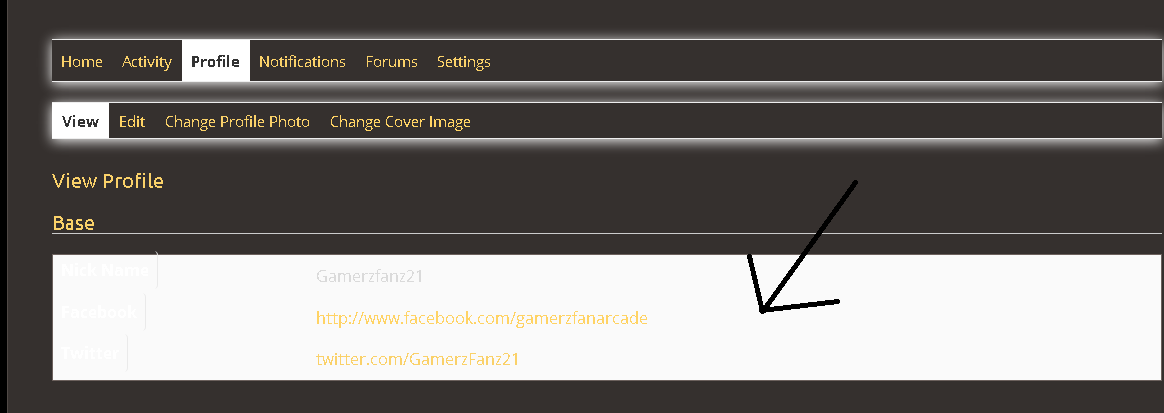
Wordpress V. 5.0.2
BP V. 4.1.0
URL: https://arcade.gamerzfan.com
Theme: Paraxe / Paraxe Child
Thanks in Advance.
Try something like this in your shortcode:
$args = array(
    'group_id' => 666,  // set the ID somehow
    'exclude_admins_mods' => false
);

$group_members_result = groups_get_group_members( $args );
$group_members = array();

foreach(  $group_members_result['members'] as $member ) {
	$group_members[] = $member->ID;
}

return implode(", ", $group_members);
Check the $args by reviewing groups_get_group_members() in buddypress\bp-groups\bp-groups-functions.php
I’m trying to write a shortcode that will produce an array of the user ids that make up a group on my buddypress site.
I’ve spent hours researching, but as I’m not a developer by any stretch I’m still a bit stuck. If anyone able to help?
I’m aware I need to use the bp_group_members() function, but I believe I need to call the correction function file at the start of the shortcode?
I’m also uncertain what I need to write to produce the array. Sorry!
Any help would be much appreciated.
Hi everyone,
I am facing an issue i.e. all the pages that are dynamically created by BuddyPress are taken as secondary pages by my theme, and hence a differently styled header displays on all of them (Profile settings, Friends, Messages, Notifications etc.).
But instead, I would like to have a single header on every page of my website whether the page is dynamic or not. How should I go about doing that?
Thanks
I was able to use phpmyadmin and go into the database – table: wp_users and change the user_nicename to whatever I wanted. That worked fine.
It looks like regular users who signed up already had nice @names but I think mine were bad in part because I set them up before I set up bbpress and buddypress and it was just trying to use my email address. Plus, setting up multiple accounts at different times to test things.
Amazing. Switching to buddypress legacy made everything show.
Thanks for your help
Imgur allows you to upload images and provide a link to view them.
By the sounds of things you probably have a conflict. Things I would try:
1. Set BuddyPress theme to BP Legacy
2. Deactivate all other plugins apart from BuddyPress
3. Try with a default theme such as 2016.
As far as I can tell people on my site start the process of creating an account with membermouse. So, yeah, I will try creating a new account again and see what I can figure out. I’ve made a bunch of test accounts for myself – so maybe I used the same email or something. I need clean up and delete a bunch of those anyway now.
So does buddypress usually use the regular wordpress login user name? If a site just uses bbpress and buddypress – people set up an acccount just through wordpress and bbpress/buddypress use that?
Yikes, afaik, that is not done by BuddyPress.
It looks like you have a plugin or other code that allows emails as user names.
My guess re the ‘2-2-‘ bits is that more than one user was created with that email.
( Try a test registration using a unique email )
WP dictates that login names have to be unique.
BuddyPress uses the login names for @ mentions.
So does bbPress – for example, this forum where your @ mention name is: badusername
So, again, afaik, it will not be reasonably possible to simplify the @ mention names.
With considerable and complicated customization, it might be possible.
One thing about this is that since group creation is open to all users, creating a group would be a simple way to get post creation rights. You may want to look at BuddyPress Restrict Group Creation to limit who can create a group in the first place.
Hello,
I wanted to ask how I can automatically add ‘Author’ capabilities to buddypress group admins 🙂
Thanks for the helps
That’s probably one for the bbPress forums then – https://bbpress.org/forums/ within each group with a forum there should be a forum menu item that links to the group forum. I’d first check there are no plugin conflicts by deactivating all other plugins except for BuddyPress and bbPress, if you still don’t get the menu item within the group then try a default theme such as 2016. BuddyPress forums are provided by bbPress, so that’s the best place to go for support.
https://bbpress.org/forums/
The Groups page does not include any forums, just the group avatar, name and description. You can choose whether to include the groups forums in the forums page, and other options by following these instructions:
Installing Group and Sitewide Forums
I am trying to create forums for groups in buddypress using bbpress.
I am really struggling to understand how they integrate. I have read lots of documentation and been through numerous support.
My users can create a group and a a forum for that group.
That forum then goes onto the forum page under a parent forum of group forums.
Bit on the group’s page I can’t get the forums to show which is frustrating as when the user completes the group the forum isn’t viaible.
Can someone talk me through the set up or point me in the way of comprehensive instructions?
Thanks
Yes, When Icreate a topic and create a reply in bbPress it does not create an item in the BuddyPress activity stream.
Is it better to assign these two post IDs to “$args” and call new as “new WP_Query ($args)”?
Sounds like they have given you the brush off, clearly if it’s WooCommerce that is stopping another plugin from working then the onus is on them to fix it. If it was the other way round, BuddyPress was stopping a WooCommerce feature to stop working, then we’d need to look at it.
Using Healthcheck, and Twenty-Seventeen Theme:
With Buddypress enabled, I can accept friend requests that have been sent.
When WooCommerce is enabled, cannot accept friend requests. Is happening on various browsers, Safari & Chrome.
See Screenshots:
https://www.dropbox.com/s/zaujx9sx74vb44u/Screenshot%202018-12-26%2008.22.48.png?dl=0
(Nonce? This is the string at bottom in Chrome during infinite spin)
Shows friend request accepted – with only BuddyPress & Theme activated, when WooCommerce is activated, infinite load when try to accept the friend request.
If WooCommerce is activated, regardless of theme (ReHub or Twenty-Seventeen) cannot a
Site: https://makyn.me
BuddyPress: 4.1.0
Wordpress: 4.9.9
WooCommerce: 3.5.3
If I post “bbp_create_topic”
Do you mean, create a topic or create a reply in bbPress?
And it does not create an item in the BuddyPress activity stream?
btw- these are the BuddyPress forums.
The bbPress forums are here and are probably a better place to ask your question.


