Search Results for 'buddypress'
-
Search Results
-
Hello,
Please help us fine tune 11.0.0 testing its release candidate!
I would like people to register on my website, without activating their account, how can I make this configuration? I use buddypress
Hello,
I have a problem with the Buddypress Activation Email. When a user makes a new registration, it says, that an activation email was send, but the users do not receive the email. How can I solve this issue?
Regards
Here’s my problem:
I have a list of 100 clubs (tennis club, chess club…). They each have data like title, description, phone…
1) I would like to initialize the buddypress members list with these clubs, adding some data fields and giving them a login/pass
2) I would like people interested in a club to join the network but not be displayed in the top level list of members (which only shows the “club” members)
3) These other members who join should be able to subscribe to a club, manage “members”, respond to posts the club makes…
4) These users would not be visible in the top level list of members (since the members are only the clubs)
Is this kind of thing possible with buddypress? (I’m guessing not) If not, what sort of solution should I be looking at?
Thanks for any helpTopic: BuddyPress 11.0.0-beta3
Hi!
Please help us make the next BuddyPress Major release as stable as possible, test this new beta release 🙏.
Hi,
I work for a public library. We have a website built with WordPress since 2016 : biblio.brossard.ca.
Besides the website made with WordPress, we give access to online resources using a proxy (EZProxy by OCLC) : https://brossard.idm.oclc.org.
I was wondering if it is possible to connect the two together.
Could it be possible for subscribers of the library to connect to a website created with BuddyPress through the proxy?
Furthermore, could library subscribers while connecting to the website (created with BuddyPress) through the proxy would generate their BuddyPress account on that website?
I have this permalink structure.
/%author%/%postname%/and I have enabled ENABLE_ROOT_PROFILES.
https://domain.com/myusername/mypostname
But I can no longer access this page.
It was working before activating it.Any way i can do this?
Buddypress 10.6.0
Wordpress 6.1.1We are using memberpress to create a membership site. We want to create a directory of members. When you click on the member’s name, it goes to their profile with all the information they entered at sign up displayed (things like their social media links, company they work for, etc). All of this information is collected and is stored under “membership information” in the profile section of WordPress. However, the buddypress generated profile page only shows the user’s name and photo if they have one.
How can I customize the buddypress profile page to include all of these membership information fields?
If I paste a link in the activity stream of the website https://berbeta.com/ such as the following berbeta.com/jimmiehendrix a white content box is created with the post /page title and a photo. However it is not possible to follow these links with a single left click of the mouse but instead you have to right click (which is usually for properties and additional information) and then choose to follow the link . Otherwise there is a blue link with the title repeated above the box and that is immediately clickable.
______
If the same link is put on a page https://berbeta.com/musicians/ only the content box with the title and the photo is created and can be followed with one simple click of the mouse.
This seems to be a “flaw” in a buddypress update as a year or so ago if I pasted a link in the activity stream only the content box was created and with one click on the title or photo you would be taken to the original post .Thanks in advance for any solutions offered!
buddypress version Version 10.6.0 |
wp version: 6.1.1Topic: Custom Group directory tab
Hello there,
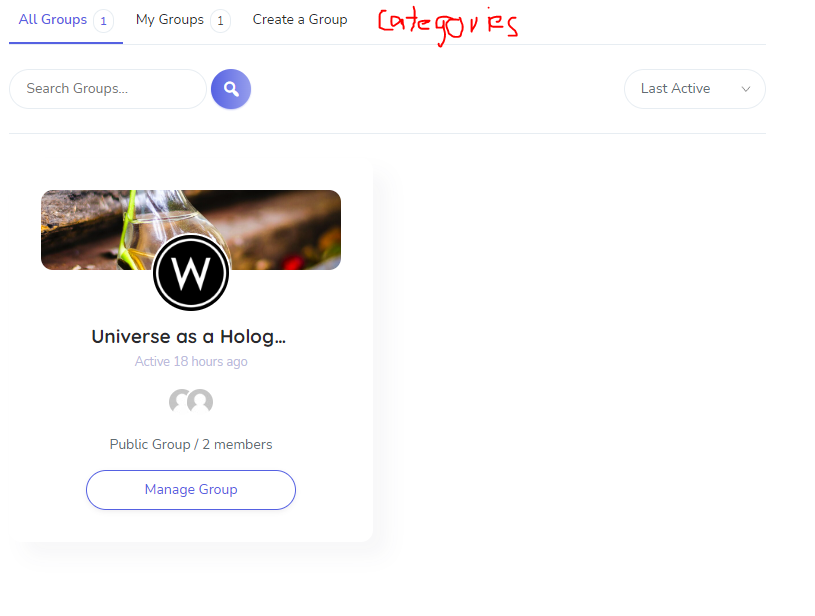
we use wordpress version 6.1.1 and buddypress version 10.6.0.We are total beginners in coding and want to create a new custom tab in the groups directory. We created an own page for group categories and want now to create a new tab called “Categories” in the group directory where we link to the page.
See attached image.
How can we do that? (Beginner friendly)
Thanks in advance!
I noticed that when you go to a user profile and click on the forum tab “/members/user/forums/” that works well, but if you click on page 2 and up you get 404 page not found error and it’s missing “/forums/topics/” before the “page/2/” ect url. This is even occuring in this site if you check the profile of https://buddypress.org/members/imath/forums/
How do I create the basic installation so that it looks like the screenshot on the homepage. I just want a basic buddypress installation out of the box. Not sure how to do it. Do I need to create a specific homepage and add widgets?
Hello, I want to modify two places, but I don’t know and didn’t find where to set up, could anyone help me with this? Thanks so much.
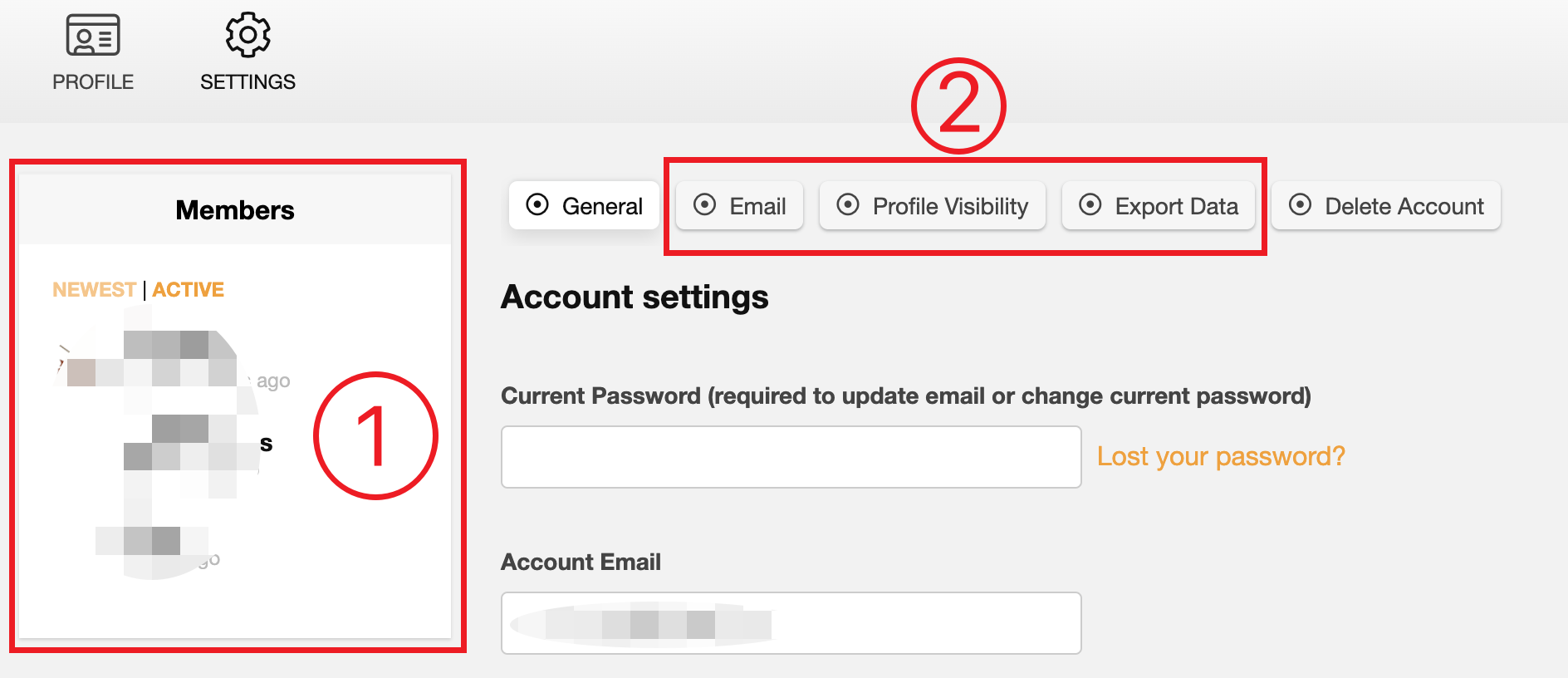
1, when I set up the BuddyPress page, I want to disable the profile sidebar (which was marked 1 in the picture), I just find the Widgets and deleted it, but I want the page to be full width. After I delete the widgets, there is still a blank space in the sidebar. How to disable the sidebar?
2, I want to delete some tabs on the setting profile (which was marked 2 in the picture), I don’t know and didn’t find where to set up, how to delete some tabs there.
Thanks
Topic: Forum E-Mail Notification
Hello,
we use the email-notification to inform all of our employees (over 200) about new posts in the forum. It takes a while till the post is shown. That was no problem so far but since 2 days we get a time out when we post something and then the post is only shown for admins and the mails were only sent to admins as well.
Is there a limit for “New Topic Email Addresses” (is it only meant to be for admins and few important persons) or could the problem be caused by our plugin “Post SMTP” which sends the mails? Settings were no changed.
Wordpress Version 6.1.1
BuddyPress Version 10.6.0
(A link to our site would make no sense cause it is just for members visible)Best regards
SebastianTopic: Buddypress login
Topic: PHP 8.1 deprecation warnings
Hello,
I notice since upgrading to PHP8.1 that Buddypress is throwing deprecation warnings like
Return type of BP_Core_BP_Nav_BackCompat::offsetUnset($offset) should either be compatible with ArrayAccess::offsetUnset(mixed $offset): void, or the #[\ReturnTypeWillChange] attribute should be used to temporarily suppress the noticeI’m using the latest version of BuddyPress (10.6.0) and WordPress (6.1.1)
I understand this is due to restrictions added in the new version of PHP. I was wondering if anybody knew whether these would be fixed in the next release of BuddyPress?
Topic: No index


Well, I would like to add photo to my buddypress post comment section. I have tried rtMedia, but it will upload the photo to my media gallery. I want the result works as yozify media upload in activity or Image Upload for BBPress which won’t ruin your media gallery and only upload in the frontend. Is there any plugin or code can achieve this effect?