Hi,
Members are suddenly unable to upload a profile picture. I tried for them and then I get the following error: “There was a problem cropping your profile photo.” I tried to disable a whole bunch of plugins but that doesn’t seem to resolve the problem.
This happens on http://www.aspie-singles.com
With kind regards,
Douwe
Hello,
since we replaced the change-avatar.php template (with a custom one), the crop image doesn’t work.
Checking the browser console we can see this error:
Uncaught TypeError: o.Jcrop is not a function
    at n.initCropper (avatar.min.js?ver=10.3.0:1:10312) avatar.min.js?ver=10.3.0:1
I tried to put the original code again, but still the same error. BuddyPress Version 10.3.0
How can you solve this problem?
I noticed that many users have problems to upload their userpic,
because they have to crop it before it will be uploaded to their profile.
Many users do not understand it right and, to be honest, it is very tricky to do it on a smartphone.
Is there a way to avoid the cropping?
The image should be used as it is after the upload…
When using the Kadence child theme and BuddyPress, I’m getting a small viewport to see the uploaded image and crop area. Is there a way to fix this issue? Once I crop it, it’s not showing the whole image either. It just shows a section of what I’ve cropped.
Any additional assistance would be wonderful.
This forum is filled with outdated responses, but I will try to get an answer anyway.
I received an email from WordPress that says:
“Since WordPress 5.2 there is a built-in feature that detects when a plugin or theme causes a fatal error on your site, and notifies you with this automated email. In this case, WordPress caught an error with one of your plugins, BuddyPress to WordPress Full Sync.
Everything on my server-side is updated.
WordPress version 5.9.3
Current theme: Cera (version 1.1.13)
BuddyPress 10.2.0.
BuddyPress to WordPress Full Sync (version 0.3.7)
PHP version 7.4.28
I deactivated, then subsequently deleted BuddyPress to WordPress Full Sync. I then downloaded a clean copy of the plugin from the WordPress plugins page. I re-installed and re-activated it without difficulty.
I still cannot upload the group profile picture. I can upload the group cover image, but not the profile picture. The image uploads but fails at the cropping stage. I have read the other responses. My file name was never long, but even the file name “g1” does not work, so the filename length does not seem to be the issue. I have tried different sizes and extensions (.png and .jpeg) with consistent failure.
Please help resolve this issue.
Hm.. wish I could say the update fixed ours but it didn’t. Still getting the “There was a problem cropping the photo” message or am I not understanding that the update was supposed to fix it?
I will share the details you provided with my hosting company… and see if it works… prior to your reply… this is what was shared with me…
Maybe it helps…
[08-Mar-2022 10:23:27 UTC] PHP Fatal error: Uncaught Error: Call to undefined function mime_content_type() in /home/lppbgmmy/public_html/quantummemoirtheory/wp-content/plugins/buddypress/bp-core/bp-core-attachments.php:1664
Stack trace:
#0 /home/lppbgmmy/public_html/quantummemoirtheory/wp-content/plugins/buddypress/bp-core/classes/class-bp-attachment-avatar.php(274): bp_attachments_list_directory_files(‘/home/lppbgmmy/…’)
#1 /home/lppbgmmy/public_html/quantummemoirtheory/wp-content/plugins/buddypress/bp-core/bp-core-avatars.php(1310): BP_Attachment_Avatar->crop(Array)
#2 /home/lppbgmmy/public_html/quantummemoirtheory/wp-content/plugins/buddypress/bp-core/bp-core-avatars.php(1436): bp_core_avatar_handle_crop(Array, ‘array’)
#3 /home/lppbgmmy/public_html/quantummemoirtheory/wp-includes/class-wp-hook.php(307): bp_avatar_ajax_set(”)
#4 /home/lppbgmmy/public_html/quantummemoirtheory/wp-includes/class-wp-hook.php(331): WP_Hook->apply_filters(”, Array)
#5 /home/lppbgmmy/public_html/quantummemoirtheory/wp-includes/plugin.php(474): WP_Hook->do_action(Array) in /home/lppbgmmy/public_html/quantummemoirtheory/wp-content/plugins/buddypress/bp-core/bp-core-attachments.php on line 1664
I believe your host needs to enable mime_content_type on your server.
Hi @nihanthk @maleemuse,
I’m really having difficulties to reproduce the issue, cropping avatars works fine for me and all the BP Team Developers.
The feature we introduced in 10.0.0 is avatar’s history and the possibility for a user to recycle a previously uploaded avatar. There’s a way to deactivate the feature using this filter
<?php
add_filter( 'bp_disable_avatar_history', '__return_true' );
into a bp-custom.php file for example.
Using this filter solves your issue?
Otherwise, if you look into your server’s error_log file, do you see if a specific line is appearing once you tried to crop an avatar?
Not yet, lets hope they fix it soon.
as for workaround, crop the image manually and resize it as you need, then just add “-bpfull” at the end of the filename, and it will use the image without any cropping etc, even though it would prompt to crop image.
at least the image will get loaded.
I am having the same issue… no matter if I upload or take picture… it fails after the crop image…
From what I found it looks like it was fixed in the updated in Version 10.
https://buddypress.trac.wordpress.org/ticket/8619#no0
Buddypress plug in is up to date…
Have you found a fix?
MaLee
Hi, i cannot upload avatar either for profile or groups as its says
There was a problem cropping the photo
Hello buddyprwss family, good day am having issues with budypress I thought it was a youzify thing till I disabled all plugins. The problem is that when you upload a profile photo on my site it will upload successfully and then show you where to crop, when you crop the image and click on crop to save it shows up the red box without any message on it and the image doesn’t display. Now when you go to the upload folder to avatar you will see those images there but they can’t show. Uploading via media works fine, I have changed the permission to 755 to 777 yet this can’t work. I have tried deleting htaccess and saving permalink for new one and it doesn’t work. Only budypress is active now and it’s showing same error. I can’t figure out what’s wrong I even downgrade to other versions of budypress and WordPress no solution. Please help.
@moviefloss & @pasindups
I think I understood your issue:
if you are you using the BP Default Theme or a theme based on it, or if you disabled the Avatar UI we introduced in version 2.3, I was able to find an issue with this very old way to set an avatar: you have a form with a simple button to upload your image and cropping happens after a page load.
Meaning, you don’t have a tabbed interface to upload/recycle/delete your avatar like shown below:
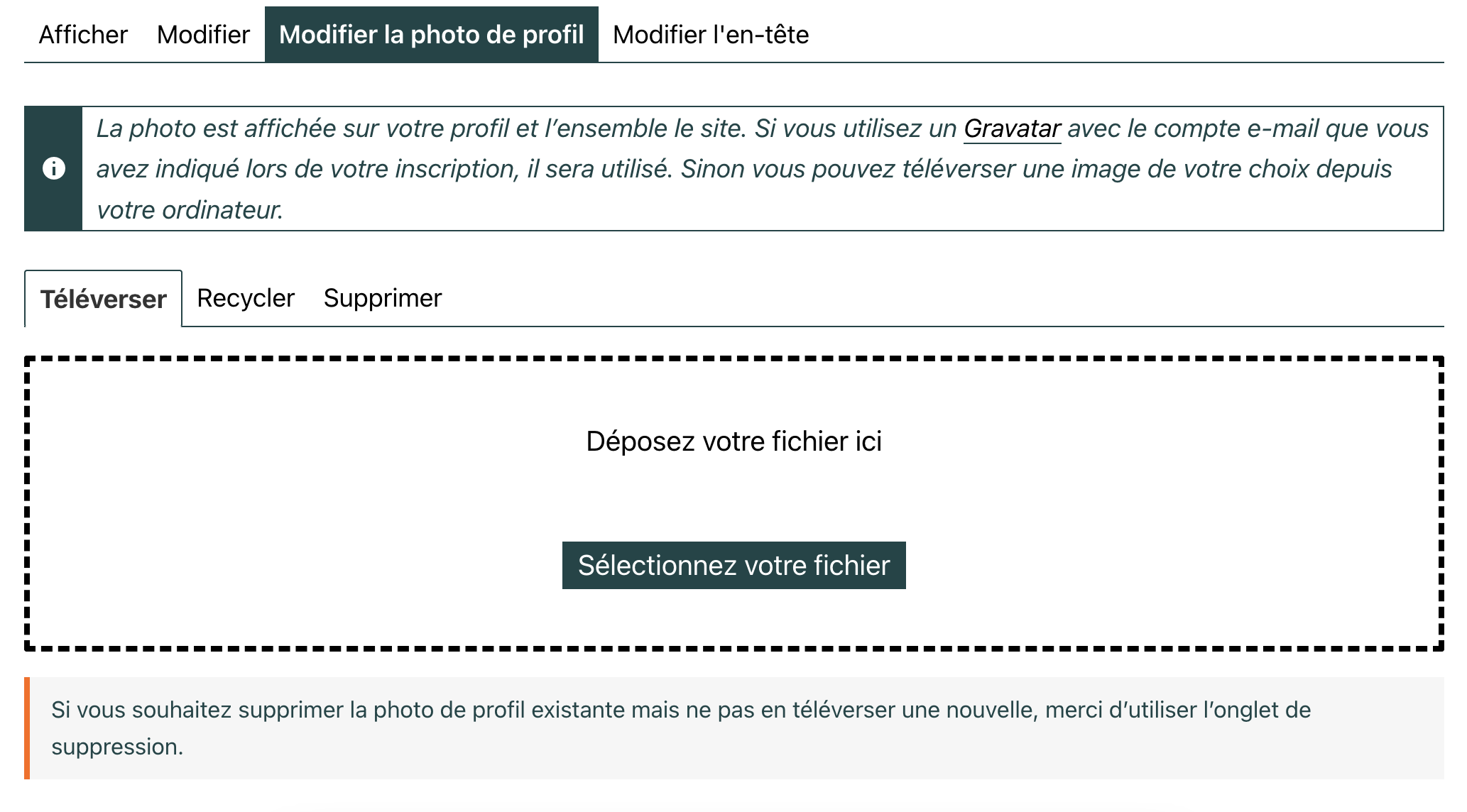
If so, it will be fixed in the 10.1.0 minor release we’ll soon make available. Probably this coming monday or tuesday.
If not I’d like to see the screenshot: to share an image here, just use any free image hosting service, and paste the link here, yes.
Hi @moviefloss & @pasindups
Uploading/cropping avatars works fine with me.
Can you try help me to reproduce the issue so that I can fix it?
1. Before uploading the picture, open the browser’s inspector and activate the network tab, the one which logs pages load, Ajax requests…
2. Upload the picture, according to what you described, you should see an error logged into this tab, double click on the line of this error and make a screenshot of the request result.
3. Repeat the operation activating the console tab of the browser’s inspector, but this time you might see JavaScript errors logged, I also need a screenshot if that’s the case 🙂
Tell me more about the picture you’re trying to upload: file extension, size in pixels.
Tell me more about the browser you are using: Firefox, Chrome, Safari, Edge, Internet Explorer 😬, another one ?
Tell me more about the active theme?
Tell me more about your WordPress configuration (regular, multisite) if Multisite how BuddyPress is activated (Network, on the main site of the network, on a subsite, other)?
If you are using some specific BuddyPress constants into your wp-config.php file which ones?
Thanks in advance for your inputs 😉
Hello community. I’d like to use Buddypress but with this configuration:
fresh wordpress installation 5.4.9 , php 8 , with only Buddypress 10.0 plugin activated on twenty nineteen theme it is not possible to add personal photo as subscriber role nor author role.
I had already tried with wordpress installation 5.9 , php 7.2 , with only Buddypress plugin activated on twenty twenty theme.
The only difference is that now it’s always written “There was a problem cropping your profile photo.”
https://amodio.live/members/buddy_test2/profile/change-avatar/
Someone has a solution or Buddypress has gone forever?
Do you know another plugin to use for creating a community?
Many thanks,
Giuseppe
Updates:
I have updated php from 7.2 to 8 and the only difference is that whatever image you upload it appears (also if you want to take from web camera):
“There was a problem cropping your profile photo.”
I have a wide community to insert in a website but Buddypress seems to be very dangerous to use professionally.
I’m having the same issue. When I go to crop the bar turns red and nothing happens.
Hi,
I’m having an issue with profile images being cropped and won’t upload. It used to work but I’ve updated to the latest version of BP and now I can’t upload profile images. It gets to the cropping of the image and doesn’t upload. If I save the image i.e image-bpfull.png it then works ok. I’m having to set my images at 150 x 150 pixels in photoshop and then uploading the image with the new image name for it to work and then the profile pulls through. It used to work fine when you uploaded a large image crop and then it would set the profile image….any ideas what the issue could be? Thanks
Regards
Philip
If I upload a “Featured Image” or “Product Gallery Image”, I get an error message saying
“The image file uploaded exceeds the maximum height allowed. Maximum height is 615px”
When I comply with the height of 615, I get a warning on the width:
The image file uploaded exceeds the maximum width allowed. Maximium width is 615px
—
I’ve tried:
1. To change the WooCommerce Product Gallery image settings in Appearance / Customize / WooCommerce / Product Images
I’ve set this to 640 main image width and 640 for thumbnails and 1:1 or crop… still doesn’t work
2. Using MediaPress / Settings – and changing the media size settings. Doesn’t work either.
Any ideas?
Each buddypress activity appears cropped in characters, with the option to read more. The truth is, it is very neat and beautiful, but I want to see the complete activities. How can I do it ?
—-
Cada actividad de buddypress me aparece recortada en caracteres, con la opcion de leer mas.
La verdad, queda muy ordenado y bonito, pero me apetece ver las actividades completas.
Como puedo hacerlo ?
After doing this update the site shows the message:
There was a problem cropping your profile photo when trying to change a user’s profile picture from either the frontend or backend.
There are no related errors in the debug log or browser’s console to debug from. Has anyone else experienced this? And are there any suggestions what might be causing this and/or how to resolve?
Hi everyone.
I have been looking around the web for several days, but I have not found anything that satisfies me.. As the title suggests, I would like “my” users to have the ability to upload and use animated avatars.
At the moment it is not possible because when a user tries to upload an animated gif, they are asked to crop it and there is no way to skip image cropping.
Also the Gravatar service does not support animated avatars.. or so I have read around the web.
As silly as it may seem, I find it highly limiting, speaking of user experience, not to be able to upload an animated avatar.
Can someone help me?
In case there is no way to load an animated gif without it being resized, is it possible to add a field in the front-end user’ profile where he can insert a link to an image like in the phpbb forums?
my WordPress is updated to version 5.8.2
my buddypress is updated to version 2.1.1
Link to my site MRLab
I don’t use child theme.
In case I have created a duplicate topic, I apologize in advance.
In my defense my English is not the best and I haven’t seen any other open topics about it.
Thanks in advance to anyone who will help me and Merry Christmas to everyone!
BuddyPress version – 10.0.0-beta1 or 9.1.1(stable version)
Theme – Twenty Twenty or any theme
Wordpress version – 5.8.2
When I change Cover Image it is working fine.
But when I change Profile Photo it is giving error – There was a problem cropping your profile photo.
I am not able to find out why it is giving this error.
Please help urgently
I am using WordPres version 5.8 and Buddypress 9.1.1.
I am using AMP from the Google plugin. I have disabled AMP from pages and only posts are using AMP.
This setting corrected the problems in the registration form.
But, the profile page where people would upload the image is broken. it is showing AMP “form has been submitted… ” error and the crop section is also broken.
I have tried manually disabling AMP in the members and activity page. But nothing is working at all.
Please advice.


