Search Results for 'display users posts'
-
Search Results
-
Hello everyone,
actually I am not using buddypress, but searching for a social network plugin with a very special function. I will describe my idea below, in hope that someone can tell me, if I can do this with buddypress.
My Idea:
I want to post blog entries on my blog and give users the opportunity to like the posts. The user profile should publically display all of the user’s post-likes then. Furthermore post-likes should be weighted with numeric weights I define, so that the user profiles will have a score of the likes weighted.Do you think, that this is possible to do with buddy press? Or do I need further programming? Will that require demanding efforts?
I am looking forward to your suggestions. Thanks in regard.
Robin
Hi ! Here’s my problem : when I post something on the wall from a group, the post fails to be published and I just get this message : “Invalid post type”. My website was created 10 days ago and there’s nobody on it (that’s why I was trying to create content) so I don’t know about how this goes for the very few users I have. Kind of a pain, since the posts just completely disappear to let this message appear. I checked my settings and I could not find any parameter controlling some “Post Types”.
Hi use WP version 5.0.3, installed straight from Softaculous on Siteground, so probably as a directory. Unless the updates are automatic in WordPress, I don’t think I upgraded WP from 5.0.2 since I started creating my site later than the release of the latest version of WP. I had no issues with WP before downloading BuddyPress and I only had one problem after I had : weird display of messages with some code visible in some places of the page. I didn’t get to test much though since the site is very recent. I’m running BuddyPress Version 4.1.0. I didn’t upgrade it since I created the site. I have many plugins activated. Here’s the full list : Antispam Bee; bbp style pack; bbpress Version 2.5.14; BP Better Messages; BuddyDrive; BuddyPress Create Group Types; BuddyPress Follow; BuddyPress Global Search; BuddyPress Member Type Generator; BuddyPress Security Check; Contact Form 7; Events Manager; Flamingo; Footer Putter; GEO my WP; Loginizer; Nested Pages; Orbit Fox Companion; Post Types Order (supposed to deal with order?); SG Optimizer; Sitewide Newsletters; Super Progressive Web Apps; Query Monitor (recently downloaded, after noticing the problem); The GDPR Framework; TranslatePress – Multilingual; Wordfence Security; WP Statistics; Wpworx FAQ; YellowPencil Pro; Yoast SEO; Youzer. I have a few other installed but deactivated plugins. I am using the theme Orfeo by ThemeIsle, a child theme from Hestia if I remember correctly. I didn’t modify the core files and I don’t think I have custom functions.
I don’t know what system my server is running.Thanks in advance ????
Hi,
I installed “BuddyPress Follow”, but the FollowingUser’s activity is not displayed on this page→(http://example.com/members/smith/activity/following).
So I tried to write the code for that, but it does not work well.
<div id="FollowingUsersActivities">

  <?php global $userdata;
  $user_id = $userdata->ID;
  $follow_user = bp_get_following_ids( "user_id=$user_id" );
    $args = array(
      'posts_per_page' => $wp_query->max_num_pages,
      'paged' => $paged,
      'author' => $follow_user
    );
    query_posts($args); ?>

  <?php if ( bp_has_activities( bp_ajax_querystring( 'activity' ) ) ) : ?>
    <?php while ( bp_activities($args) ) : bp_the_activity($args); ?>

      <?php bp_get_template_part( 'activity/entry' ); ?>

    <?php endwhile; ?>
  <?php endif; ?>

</div>
What’s wrong with the following code?
Thanks.
Topic: post via email?
Topic: Most Liked Activity
I have found some plugins (Top 10, WordPress Popular Posts and WP Most Popular) for most liked posts and pages. From experimenting with these, it seems they do not have access to the buddypress activity stream or buddypress activity reactions.
Is the above statement correct? Is there something similar (shortcode or widget) for the buddypress activity stream? The plugin ideal would do anything from views, likes/reactions, or comments and then somehow have a central way to display the top content to all users on the front end, not just admin on the backend.
Thanks in advanced.
Occasionally, the “post update” button will hang and won’t display the post content below when it successfully posts – instead nothing happens, and users are clicking the button again, resulting in posts coming through 2 or 3 times.
Has anyone else experienced this?
Buddypress – are there hooks, or a way via JS like a callback to take some sort of action when that button is pressed(display a message, hide the button etc). Leaving the button there without any state change or indication that the button was clicked or some process has been initiated is a bit clumsy and it’s becoming frustrating for my client’s users. Any thoughts or feedback are appreciated.
Hi
I installed buddypress and users can not do anything.
User registered role standart – subscriberWhat message is displayed when I want to do anything:
“Oopps! You do not have sufficient permissions to access this page.”As an administrator I can do everything (add friends, accept invitations, write posts in my activity)
this is my site, someone wants to register and eg try to send me an invite to friends?
https://modster.pl/members/admin/Yours sincerely and I count on some tips for solving my problem 🙂
Hi all,
I’m new to buddypress and have no experience with php. I have how ever managed to follow instructions on previous posts on preventing users from seeing the admin profile and activity but it hasnt worked correctly and has come up with errors.
I managed to create the bp-custom.php in the wp-content/plugins directory but the admin profile still appears and just comes up with an error message saying fatal error. It still allows the option to add as a friend aswell unless that might be to do with viewing it from an account already adding the admin account with.
This is where I got the code Im using from:
https://buddypress.org/support/topic/hide-admin-from-members-and-activity/Code in the bpcustom file
<?php function bpfr_hide_admins_profile() { global $bp; if(bp_is_profile && $bp->displayed_user->id == 1 && $bp->loggedin_user->id != 1) : wp_redirect( home_url() ); exit; endif; } add_action( 'wp', 'bpfr_hide_admins_profile', 1 ); function bpdev_exclude_users($qs=false,$object=false){ $excluded_user='1'; // Id's to remove, separated by comma if($object != 'members' && $object != 'friends')// hide admin to members & friends return $qs; $args=wp_parse_args($qs); if(!empty($args['user_id'])) return $qs; if(!empty($args['exclude'])) $args['exclude'] = $args['exclude'].','.$excluded_user; else $args['exclude'] = $excluded_user; $qs = build_query($args); return $qs; } add_action('bp_ajax_querystring','bpdev_exclude_users',20,2); // once admin is removed, we must recount the members ! function bpfr_hide_get_total_filter($count){ return $count-1; } add_filter('bp_get_total_member_count','bpfr_hide_get_total_filter'); function bpfr_hide_admin_activity( $a, $activities ) { // ... but allow admin to see his activities! if ( is_site_admin() ) return $activities; foreach ( $activities->activities as $key => $activity ) { // ID's to exclude, separated by commas. ID 1 is always the superadmin if ( $activity->user_id == 1 ) { unset( $activities->activities[$key] ); $activities->activity_count = $activities->activity_count-1; $activities->total_activity_count = $activities->total_activity_count-1; $activities->pag_num = $activities->pag_num -1; } } // Renumber the array keys to account for missing items $activities_new = array_values( $activities->activities ); $activities->activities = $activities_new; return $activities; } add_action( 'bp_has_activities', 'bpfr_hide_admin_activity', 10, 2 ); ?>I would like my member directory to display only users that have posts (standard blog posts). I can’t do it by user role (i.e. Author vs. Subscriber) because of the way my site is set up and need another way to filter the Members Loop for this. I read through the codex, but I am still struggling. I’d be so appreciative of anyone willing to point me in the right direction on this!
Topic: HIDE Profile Subnav title
I’m hitting a bit of a brick wall here on how to hide (not completely remove) a Sub Nav title when users are viewing a profile that isn’t their own.
I have a Parent Tab that displays the users Posts, with the following sub navs:
– Approved
– Pending
– DraftsIf we use the
bp_core_remove_subnav_itemfunction, it completely removes the components. Which poses as an issue when the component is the default landing for the parent tab (in this case, “Approved”).Obviously, this can easily be achieved by using some simple css, but that wouldn’t allow for the conditionals (i.e.
!bp_is_my_profile()). So what I’m trying to do is create a conditional that only “hides” the Approved sub nav, still allowing for the post output in the item loop.Here’s a look at my code so far:
/**
 *
 * Only show certain sub navs to profile owners
 *
 */

function scrib_hide_profile_menu_tabs() {

	if( bp_is_active( 'xprofile' ) ) :

		if ( bp_is_user() && !is_super_admin() && !bp_is_my_profile() ) {
			//bp_core_remove_subnav_item( 'wire_items', 'approved' );
			bp_core_remove_subnav_item( 'wire_items', 'pending' );
			bp_core_remove_subnav_item( 'wire_items', 'draft' );
			//bp_core_remove_subnav_item( 'wire_posts', 'approved' );
			bp_core_remove_subnav_item( 'wire_posts', 'pending' );
			bp_core_remove_subnav_item( 'wire_posts', 'draft' );
		}
	endif;
}
add_action( 'bp_setup_nav', 'scrib_hide_profile_menu_tabs', 15 );

//Hide sub navs some other way to prevent any conflicts with rendering default post display loop
function scrib_hide_profile_sub_nav_title () {
	if (bp_is_active('xprofile')):
		if(bp_is_user() && !is_super_admin() && !bp_is_my_profile()) {

                   //Not sure how to hide without removing tab completely

		}
		endif;

}
add_action('bp_setup_nav', 'scrib_hide_profile_sub_nav_title');
Any ideas?
I want, the users of my social network before to register are categorized by two variables; Soccer team and position.For example Jorge, defender, Pumas FC // Mark, defender Aguilas FC.
I want users after being categorized, all the entries that upload to the social network are saved and displayed in their corresponding category (based on the characteristics of the registry)So that when a user enters the portal, look for in the page / category pumas, see the posts of Jorge and other players of the pumas, when search for position, in this case defenses, see posts of Jorge, Raul and other users who Are defenses, if I look for (team) pumas and (position) defense, I will see the posts of Jorge and other defenses of the Pumas team.I want, All that the users publish is categorized and can be visualized according to its category.
In addition to these categories, I would like all the entries made to be seen on the Actvity pageIm trying do it with these plugins
-Author Category
-BuddyPress Member Type Generator
-BuddyPress Xprofile Member Type Field
-Restrict Author Posting
-Restrict Categories
The last plugin That I was update:
-Blogs categories for groups plugin
-Bp simple front end post, but that one need, change plugin of the directory, and Im am not do that very good, and I dont know if that its the correct way
Excuse me english
Thanks
Regards
Hi,
I’m using Buddypress with BBPress & ActiveMember360. AM360 protects the forum, that works great.
However, I want to filter in the activity stream for users that do not have the rights to access the forum and that does not work.
Here is a global view of my system :
It’s a membership website where you can’t access anything if you are not a member. Login is mandatory.
I have 2 kind of membership :
1. One for the whole site and community access
2. One that does not allow access to the whole community protected parts but grants access to a specific course.The course is associated to a group and a group forum.
The standard membership forums are not part of a group.
Members of 1 can see the sitewide activity but not the course group & forums activity : that works well.
However, member of 2 can see sitewide activity even if I set the forums to private or hidden, which seems logical since they are not part of a group and such Buddypress doesnt know it shouldn’t show them (If I got the documentation / posts here right).
I would like however to find a way to filter the activity stream.
I’m trying to play with bp_parse_args but for it to work I have to check for each bbp_create_topic (or reply) activity if the user has access to it, and if not, to not display it.
I’m getting crasy with that and I wondered if any of you could point me to the right direction.
I’ve tried to assign the n°1 membership to a Buddypress group and assign it a forum. I made that forum a parent one, and all others below, set to hidden or private. But it does not work.
Any hints, help, directions ?
Is what I want to do even possible ?
Thanks a lot for your time,
Hello,
It seems that the activity stream is hiding posts written in the activity stream to my profile?
How can I make the user choose if the post is showed in the activity stream or not?
Now I am using BuddyPress Activity Plus and BuddyPress Activity Privacy so people can choose privacy of the posts. But even though they choose public, the post is not displayed in the activity stream for non logged in users.
Hope somebody can help!
Hello Dear BuddyPressers,
I would like to allow the users of my website to filter the visible posts on my website’s homepage using a text-field on their personal BuddyPress account.
Each user would therefore be able to enter a comma-separated list of keywords in their text-field. Only the posts containing one or many of these keywords would be displayed on the website’s homepage.
In a language developers understand better, here’s what I want to do :
IF [post] CONTAINS [user-keyword] THAN [post-visibility=TRUE];
ELSE [post-visibility=FALSE];
Do you know if there’s any existing plugin that could help me do that or how I could make it by myself?
Thanks in advance!
A. Mayer
The problem:
I want to display different types of names on the updates in the activity stream like:
– first name + last name for updates which the user posts on their stream
– username/display name when there are updates in groupsi have written the following code:
/**
 * Get the fullname of the current member in the loop.
 *
 * Full name is, by default, pulled from xprofile's Full Name field.
 * When this field is empty, we try to get an alternative name from the
 * WP users table, in the following order of preference: display_name,
 * user_nicename, user_login.
 *
 * @return string The user's fullname for display.
 */
function bp_get_member_name_custom() {
	global $members_template, $bp;
	// print_r($members_template->member->id);
	$firstname= bp_get_profile_field_data('field=vorname&user_id='.$members_template->member->id);
	$lastname= bp_get_profile_field_data('field=nachname&user_id='.$members_template->member->id);
	if(!empty($firstname) || !empty($firstname)){
		$fullname = $firstname.' '.$lastname ;
		return apply_filters( 'bp_get_member_name_custom',$fullname );
	}else{
		$name_stack = array(
			'display_name',
			'user_nicename',
			'user_login'
		);

		foreach ( $name_stack as $source ) {
			if ( !empty( $members_template->member->{$source} ) ) {
				// When a value is found, set it as fullname and be done with it.
				$members_template->member->fullname = $members_template->member->{$source};
				break;
			}
		}
		return apply_filters( 'bp_get_member_name_custom', $members_template->member->fullname );
	}
	/**
	 * Filters the display name of current member in the loop.
	 *
	 * @since 1.2.0
	 *
	 * @param string $fullname Display name for current member.
	 */
}

add_filter( 'bp_get_member_name_custom', 'wp_filter_kses' );
add_filter( 'bp_get_member_name_custom', 'stripslashes'   );
add_filter( 'bp_get_member_name_custom', 'strip_tags'     );
add_filter( 'bp_get_member_name_custom', 'esc_html'       );

// full name to all memebr list
add_filter('bp_get_member_name','bp_get_member_name_custom');


// Fullname in group memeber list
function bp_get_group_member_link_custom() {
	global $members_template, $bp;

	$firstname= bp_get_profile_field_data('field=vorname&user_id='.$members_template->member->id);
	$lastname= bp_get_profile_field_data('field=nachname&user_id='.$members_template->member->id);
	if(!empty($firstname) || !empty($firstname)){
		$fullname = $firstname.' '.$lastname ;
		return apply_filters( 'bp_get_group_member_link_custom', '<a href="' . bp_core_get_user_domain( $members_template->member->user_id, $members_template->member->user_nicename, $members_template->member->user_login ) . '">' . $fullname . '</a>' );
	}else{
		$name_stack = array(
			'display_name',
			'user_nicename',
			'user_login'
		);

		foreach ( $name_stack as $source ) {
			if ( !empty( $members_template->member->{$source} ) ) {
				// When a value is found, set it as fullname and be done with it.
				$members_template->member->fullname = $members_template->member->{$source};
				break;
			}
		}
		return apply_filters( 'bp_get_group_member_link_custom', '<a href="' . bp_core_get_user_domain( $members_template->member->user_id, $members_template->member->user_nicename, $members_template->member->user_login ) . '">' . $members_template->member->display_name . '</a>' );
	}

}
add_filter('bp_get_group_member_link','bp_get_group_member_link_custom');

/**
 * Fetch the display fullname for a user.
 *
 * @param int|string|bool $user_id_or_username User ID or username.
 * @return string|bool The display name for the user in question, or false if
 *                     user not found.
 */
function bp_core_get_user_displayname_custom( $user_id_or_username ) {
	if ( empty( $user_id_or_username ) ) {
		return false;
	}
	// return $user_id_or_username;
	if ( ! is_numeric( $user_id_or_username ) ) {
		$user_id = bp_core_get_userid( $user_id_or_username );
	} else {
		$user_id = $user_id_or_username;
	}

	if ( empty( $user_id ) ) {
		return false;
	}

	global $bp;
	$firstname= bp_get_profile_field_data('field=vorname&user_id='.$user_id);
	$lastname= bp_get_profile_field_data('field=nachname&user_id='.$user_id);
	// return $user_id;
	if(!empty($firstname) || !empty($firstname)){
		$fullname = $firstname.' '.$lastname ;
		return apply_filters( 'bp_core_get_user_displayname_custom', $fullname, $user_id );
	}else{

		$display_names = bp_core_get_user_displaynames( array( $user_id ) );

		if ( ! isset( $display_names[ $user_id ] ) ) {
			$fullname = false;
		} else {
			$fullname = $display_names[ $user_id ];
		}
		return apply_filters( 'bp_core_get_user_displayname_custom', $fullname, $user_id );
	}

}
add_filter( 'bp_core_get_user_displayname_custom', 'strip_tags', 1 );
add_filter('bp_core_get_user_displayname_custom');
add_filter('bp_core_get_user_displayname','bp_core_get_user_displayname_custom');

// Fullname on profile page on other member
add_filter('bp_displayed_user_fullname','bp_core_get_user_displayname_custom');
which is creating the following output on my site:
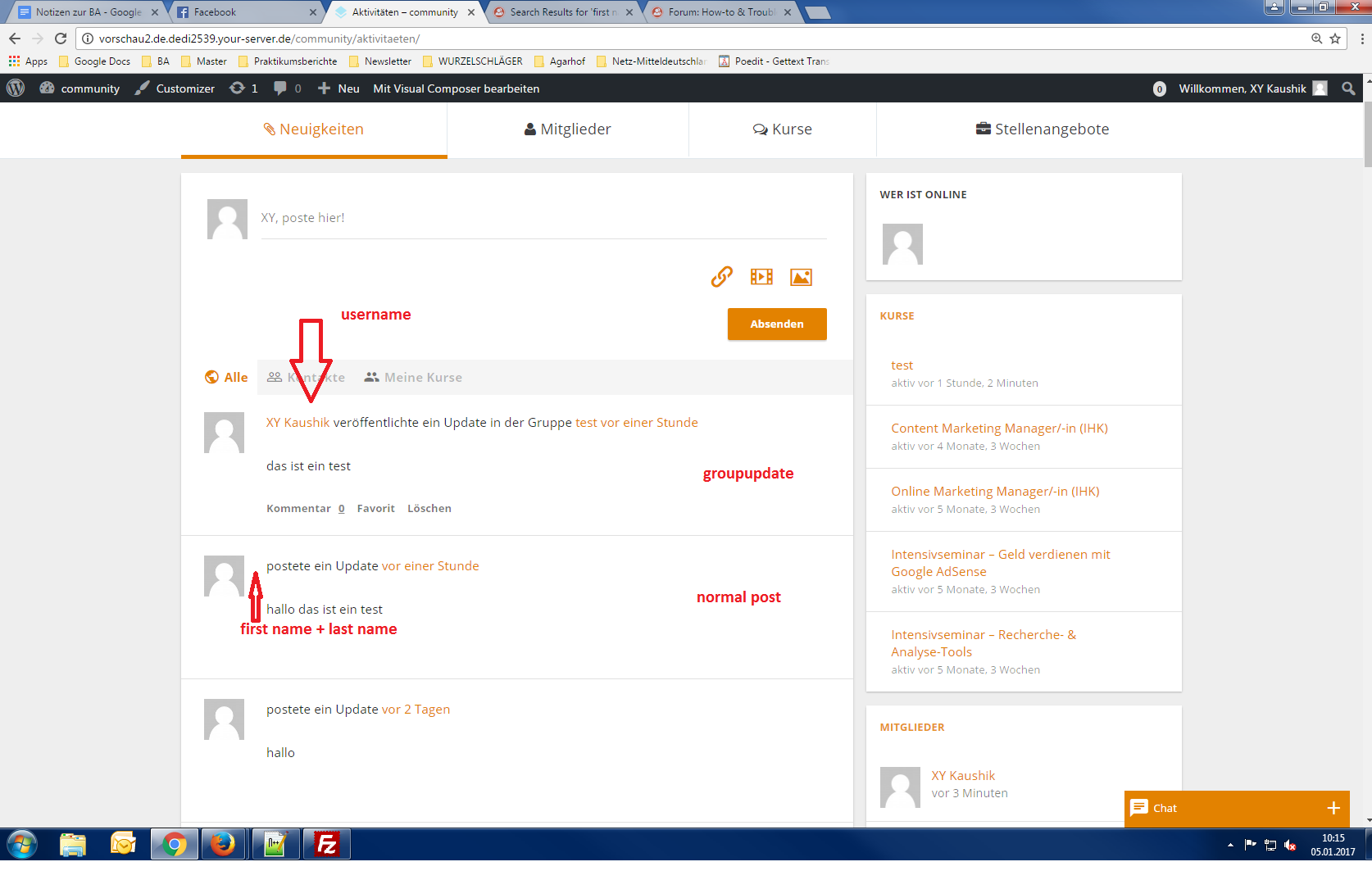
It was working before updating to WordPress 4.7.
Can anyone help since i can’t find a solution or error?
Or am i thinking to complicated?i’m currently working on:
Wordpress Version 4.7.
Buddypress Version 2.7.4
BP Xprofile Member Type Field Version 1.0.2Topic: Theming & Customization
I’ve been working on my theme development and got the basic styling pretty much where I want it. Now I’m trying to make some adjustments to the user profile page, like removing the @ from in front of the user name. I’ve tried making a copy of member-header.php and placing that in my theme directory to no avail. I’ve also tried editing the same file located in vwrx-theme\bp-themes\bp-default\members\single\ still with no luck.
How can I achieve this? I’d like to make some other changes to buddypress, like displaying a users posts/uploaded photos in a gallery etc on their profile. Is there any recommended plugin or way to achieve these goals.
My website, still undergoing development, can be found at http://www.vwrx-project.co.uk
Hello – I’m trying to figure out a way to limit what is shown in the activity stream, so that only content before the MORE tag is display. Is there a simple way to do this?
(I want to do this because I am using another membership plugin that allow content restriction after the MORE tag; however Buddypress displays in the activity stream content after the more tag even to non-logged-in users. I’d like teaser content to appear before the MORE tag in both posts, and the activity stream).
BP 2.6.2, WP 4.6.1, Genesis 2.3.1
Thanks!
KellyHi
I have front.php setup and a home tab on my users profiles .I have a custom posts setup and I want to add a custom post the home tab to each member profile and assign the post by author. I can pull in the custom post content into the home tab by add this code to front.php<?php //My custom post type name in the arguments $args = array('post_type' => 'bios'); //Define the loop based on arguments $loop = new WP_Query( $args ); //Display the contents while ( $loop->have_posts() ) : $loop->the_post(); ?> <h1 class="entry-title"><?php the_title(); ?></h1> <div class="entry-content"> <?php the_content(); ?> </div> <?php endwhile;?>What I need help with is adding the post author to the loop so only the custom post created by that author shows on the home tab for that user . I think you could add something like $profileUserID = bp_displayed_user_id(); but im not sure about the php syntax to do this
Any help is greatly appreciated
Thanks
BrianTopic: Modifying Activity Page
Site:http://www.vwrx-project.co.uk Using WordPress 4.6 and BuddyPress 2.6.2
I’ve just installed BuddyPress as I want to create a community based website within WordPress.
My end goal is to have a site where multiple users can add content regarding their car project/build, where each update they add is displayed on the homepage of the site, but where viewing a users profile you could, should you wish, view someones project in its entirety with all posts and content or view just the images they’ve uploaded.
I’m in the process of creating my own theme for this website but I’m having a hard to changing anything within BuddyPress.
I’ve copied the entire BuddyPress plugin directory into my theme and then each document I edit I make a note of, so then I can remove any files I haven’t touched. I wanted to start with something simple before moving onto bigger modifications so opted to try and change the Site-Wide Activity title that displays.
I have found bp-activity-actions.php line 450 & class-bp-activity-component.php line 125 and edited, saved and uploaded/overwrote these files into my themes version of Buddypress but can’t get the title to change.
Once I’d done that I was hoping to edit the activity page to remove almost everything, the only part I really wanted to keep was the activity feed itself so that anyone visiting my sites homepage will see the most recent updates etc.
Have I missed/overlooked something silly. I’m more accustomed to creating websites myself with CSS and PHP etc but as I want this site to be easy to use and accessible to multiple people adding content I felt this would be a better route to take.
Hey, guys!
I’ve got a working code (copied below), which allows me to create a tab on our profiles for articles that were written by the users. It’s working but I would like to customise it a little bit, and I don’t know a lot about coding. If I click on the tab, the full articles become visible including the title. What I would like however is to be able to click on the title, see the excerpt instead of the full article, and the full-sized featured images above the titles. Also, by the Latest Posts option, is there a way to see how many articles were written by our users?
Thanks a lot!
function bpfr_get_post() { /* * to get all post, comment the line 'author' */ $myposts = get_posts( array( 'posts_per_page' => 3, // set the number of post to show 'author' => bp_displayed_user_id(), // show only this member post 'post_type' => 'post', 'orderby' => 'post_date', 'order' => 'DESC', 'post_status' => 'publish' )); if( ! empty( $myposts ) ) { foreach($myposts as $post) { setup_postdata( $post ); $page_object = get_post( $post ); /* * uncomment next line to show only a list of titles linked to full post * if you uncomment, you have to comment the 2 echo below */ // echo '<a href="' . get_permalink($post->ID) . '">' . get_the_title($post->ID) . '</a>'; /* * comment the 2 following echo (or remove them) if you use the above */ echo '<h3 class="profile_post">'. $page_object->post_title .'</h3>'; echo $page_object->post_content; } wp_reset_postdata(); } else { echo '<div class="info" id="message">---</div>'; } } add_action ( 'my_profile_post', 'bpfr_get_post' ); function bpfr_post_profile_setup_nav() { global $bp; $parent_slug = 'articles'; $child_slug = 'posts_sub'; bp_core_new_nav_item( array( 'name' => __( 'Articles' ), 'slug' => $parent_slug, 'screen_function' => 'bpfr_profile_post_screen', 'position' => 40, 'default_subnav_slug' => $child_slug ) ); //Add subnav item bp_core_new_subnav_item( array( 'name' => __( 'My articles' ), 'slug' => $child_slug, 'parent_url' => $bp->loggedin_user->domain . $parent_slug.'/', 'parent_slug' => $parent_slug, 'screen_function' => 'bpfr_profile_post_screen' ) ); } function bpfr_profile_post_screen() { add_action( 'bp_template_content', 'bpfr_profile_post_screen_content' ); bp_core_load_template( apply_filters( 'bp_core_template_plugin', 'members/single/plugins' ) ); } function bpfr_profile_post_screen_content() { do_action( my_profile_post); } add_action( 'bp_setup_nav', 'bpfr_post_profile_setup_nav' );Hi Everyone,
I’m very new to the BP world and am excited to be using this amazing tool to build a new community online.
GROUPS:
I want to use groups as a notification center, allowing members to comment/interact with the notifications. So what I need is for only group admins/moderators to be able to post to the group activity stream. Other group members can only comment and favorite these posts, but cannot make a new post to the activity stream. Is this possible?MEMBERS
Is there a way to show a google map with pins representing the city/state/country fields that users fill in their profile? Would further like these pins to be clickable, displaying certain fields from a user’s public profile.Any help with plugins and coding for the above would be very much appreciated. Thanks!


Hi
I am looking for a WP plugin that woudl support my clients. I would like the plugin to
– help me create hiearchy strudcture for posts like forlder with subfolders
– both should be able to have permissions on it so I can set it up for each user or group of users
– let users to reply to post via email
– responsive design
– work toghether with a membership plugin
– display majority of posts only for registered users
does your plugin supports all my requirements?
Thank you
Radek