Search Results for 'private'
-
Search Results
-
Hi!
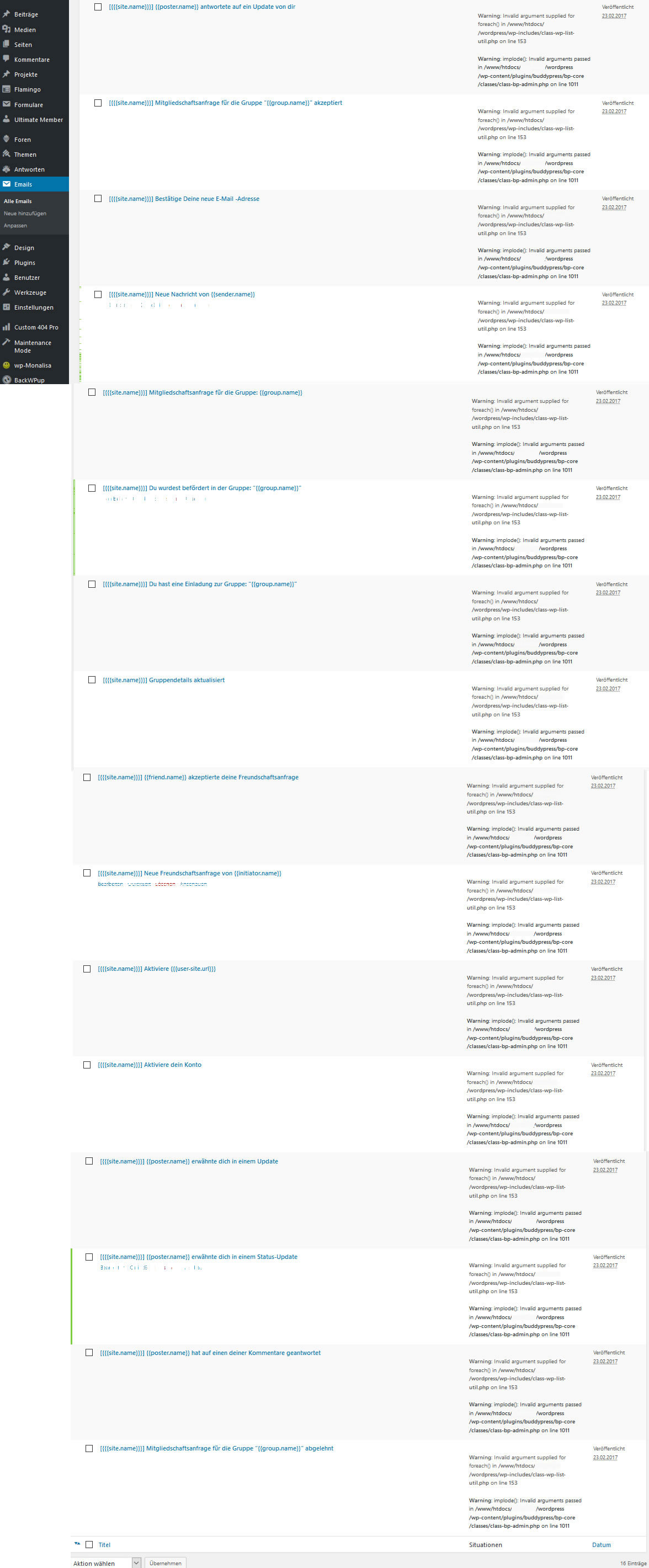
In my Plugin BuddyPress-Emails at the backend there are 2 php errors for the e-mail sample. Could you please help me with this problem?
Error-Screenshot: http://666kb.com/i/dh3uoz52p92h4a7xr.jpg
I already repaired BuddyPress and re installed it but this doesn’t work.
Link: https://www.flotter-feger.atThank You!
Error 1:
Warning: Invalid argument supplied for foreach() in /www/htdocs/XXXXXXX/wordpress/wp-includes/class-wp-list-util.php on line 153147 public function pluck( $field, $index_key = null ) { 148 if ( ! $index_key ) { 149 /* 150 * This is simple. Could at some point wrap array_column() 151 * if we knew we had an array of arrays. 152 */ 153 foreach ( $this->output as $key => $value ) { 154 if ( is_object( $value ) ) { 155 $this->output[ $key ] = $value->$field; 156 } else { 157 $this->output[ $key ] = $value[ $field ]; 158 } 159 } 160 return $this->output; 161 }Error 2:
Warning: imploded(): Invalid arguments passed in /www/htdocs/XXXXXXX/wordpress/wp-content/plugins/buddypress/bp-core/classes/class-bp-admin.php on line 10111009 // Output each situation as a list item. 1010 echo '<ul><li>'; 1011 echo implode( '</li><li>', $situations ); 1012 echo '</li></ul>'; 1013 }Serverconfiguration:
PHP-Version 5.6.29-nmm1 (64bit)
MySQL-Version 5.5.52-nmm1-logWordPress-Version 4.7.2
BuddyPress Version 2.8.1Themes: DIVI + Child-Themes
installed Plugins:
bbpress-notify-nospam Version 1.15.4
bbp-private-groups Version 3.4.1
bbpress Version 2.5.12
buddypress Version 2.8.1
gd-bbpress-tools Version 1.9
wp-monalisa Version 3.9
ultimate-member Version 1.3.83
tinymce-advanced Version 4.4.3
contact-form-7 Version 4.6.1
flamingo Version 1.5
anything-order Version 1.0.3
rocket-maintenance-mode Version 3.7.3
backwpup Version 3.3.6
akismet Version 3.3
elegant-themes-updater-master Version 1.2
custom-404-pro Version 2.0.2
printfriendly Version 3.7.3
user-role-editor Version 4.31.1Hi there
I’m trying to use the BP_User_Query class to filter my members on the member loop. It appears to have successfully filtered them, but once I click on either the “All Members” button, or try to search for members, the query seems to drop and it once more returns all of the members again. Here is my code
class BP_Custom_User_Ids {

    private $custom_ids = array();

    public function __construct() {

        $this->custom_ids = $this->get_custom_ids();

        add_action( 'bp_pre_user_query_construct', array( $this, 'custom_members_query' ), 1, 1 );
        add_filter( 'bp_get_total_member_count', array( $this, 'custom_members_count' ), 1, 1 );

    }

    private function get_custom_ids() {
        $custom_id = wp_get_current_user();

        $custom_id = $custom_id->ID;

        return $custom_id;
    }

    function custom_members_query( $query_array ) {

        $query_array->query_vars['include'] = $this->custom_ids;

        //in case there are other items like widgets using the members loop on the members page
        remove_action( 'bp_pre_user_query_construct', array( $this, 'custom_members_query' ), 1, 1 );

    }

    function custom_members_count ( $count ) {

        $new_count = count( $this->custom_ids );
        return $new_count;

    }
}

function custom_user_ids() {

    new BP_Custom_User_Ids ();

}
add_action( 'bp_before_directory_members', 'custom_user_ids' );
Are there more action/filter hooks that need to be added to my construct?
Thanks in advance
George.
Topic: Activity
When I click on activity column, below the activity Colum, immediately, It displays the people who can see your updates. Such as PUBLIC, FRIENDS,LOGGED USERS, PRIVATE .When I clink now, by default it shows PUBLIC. I want to have FRIENDS as a default one . How can I change the default status as FRIENDS.
Hi there,
How to make the the user profile not clickable for non logged users and logged users as well. I have the code which enables the user himself and admin to open the profile but when any other user clicks on the profile, the page redirects to the home page. What i actually want is that to disable the click function for unregistered users and registered users as well. Only admin and user can access the profile link. I don’t know if i am clear enough Lol. Here’s the code i am using.
function private_profiles() { // Bail if not a profile page. if ( ! bp_is_user_profile() ) return; // Allow admin users. if ( current_user_can( 'manage_options' ) ) return; // Allow the profile owner. if ( bp_loggedin_user_id() == bp_displayed_user_id() ) return; // If we get to here, redirect to homepage. bp_core_redirect( home_url() ); } add_action( 'init', 'private_profiles' );Please help I am trying to get up and running with buddypress and I have most things working but when I try and compose a new private message I get the following error when typing in the recipients name:
Invalid argument supplied for foreach() in /home/vfroot/public_html/wp-admin/includes/plugin.php on line 1422
I have a fresh install of buddypress that says it was updated two days ago. Is there a fix for this?
I’m trying to build a WP with some public content and other content only available for registered users and being able to control their profile and movements (an email automatic sent when a user changes something). I’ve built some webs on WordPress but I am still learning.
Basically, I’m asking if with BuddyPress will be possible:
- – New users with need for administrator approval
- – Some private content only avaliable for certain users
- – Personalized fields in user profile
- – Automatic sending of emails when a user changes a profile field
Thank you in advance
Hello,
I want a network with registration for private persons and companies. Companies need to pay for it.
Companies shouldn’t have the profile like private persons, they should just have the possibility to create a page. Is that possible?Hello, I’m currently using a plugin to show the activity-stream on my home page. I want that if users place an update it always shows up in the stream. Problem is that if i attach an image, it will not show up. Here is the plugin’s code:
<?php /** * Plugin Name: BuddyPress Activity ShortCode * Description: Embed activity stream in page/post using shortcode * Author: BuddyDev * Plugin URI: https://buddydev.com/plugins/bp-activity-shortcode/ * Author URI: https://buddydev.com/ * Version: 1.0.8 * License: GPL */ // exit if access directly if ( ! defined( 'ABSPATH' ) ) { exit; } class BD_Activity_Stream_Shortcodes_Helper { private static $instance; private function __construct() { $this->register_shortcodes(); } /* * Register ShortCode * * @example [activity-stream display_comments=threaded|none title=somethimg per_page=something] */ private function register_shortcodes() { add_shortcode( 'activity-stream', array( $this, 'generate_activity_stream' ) ); } /** * Get Instance * * @return BD_Activity_Stream_Shortcodes_Helper */ public static function get_instance() { if ( ! isset( self::$instance ) ) { self::$instance = new self(); } return self::$instance; } public function generate_activity_stream( $atts, $content = null ) { //allow to use all those args awesome! $atts = shortcode_atts( array( 'title' => 'Updates van Leden',//title of the section 'pagination' => 1,//show or not 'load_more' => 0, 'display_comments' => 'threaded', 'include' => false, // pass an activity_id or string of IDs comma-separated 'exclude' => false, // pass an activity_id or string of IDs comma-separated 'in' => false, // comma-separated list or array of activity IDs among which to search 'sort' => 'DESC', // sort DESC or ASC 'page' => 1, // which page to load 'per_page' => 6, //how many per page 'max' => false, // max number to return 'count_total' => true, // Scope - pre-built activity filters for a user (friends/groups/favorites/mentions) 'scope' => false, // Filtering 'user_id' => false, // user_id to filter on 'object' => false, // object to filter on e.g. groups, profile, status, friends 'action' => activity_update, // action to filter on e.g. activity_update, new_forum_post, profile_updated 'primary_id' => false, // object ID to filter on e.g. a group_id or forum_id or blog_id etc. 'secondary_id' => false, // secondary object ID to filter on e.g. a post_id // Searching 'search_terms' => false, // specify terms to search on 'use_compat' => bp_use_theme_compat_with_current_theme(), 'allow_posting' => false, //experimental, some of the themes may not support it. 'container_class' => 'activity',//default container, 'hide_on_activity' => 1,//hide on user and group activity pages ), $atts ); //hide on user activity, activity directory and group activity if ( $atts['hide_on_activity'] && ( function_exists( 'bp_is_activity_component' ) && bp_is_activity_component() || function_exists( 'bp_is_group_home' ) && bp_is_group_home() ) ) { return ''; } //start buffering ob_start(); ?> <?php if ( $atts['use_compat'] ) : ?> <div id="buddypress"> <?php endif; ?> <?php if ( $atts['title'] ) : ?> <h3 class="activity-shortcode-title"><?php echo $atts['title']; ?></h3><hr color="#000000"> <?php endif; ?> <?php do_action( 'bp_before_activity_loop' ); ?> <?php if ( $atts['allow_posting'] && is_user_logged_in() ) : ?> <?php bp_locate_template( array( 'activity/post-form.php' ), true ); ?> <?php endif; ?> <?php if ( bp_has_activities( $atts ) ) : ?> <div class="<?php echo esc_attr( $atts['container_class'] ); ?> <?php if ( ! $atts['display_comments'] ) : ?> hide-activity-comments<?php endif; ?> shortcode-activity-stream"> <?php if ( empty( $_POST['page'] ) ) : ?> <ul id="activity-stream" class="activity-list item-list"> <?php endif; ?> <?php while ( bp_activities() ) : bp_the_activity(); ?> <?php bp_get_template_part( 'activity/entry' ); ?> <?php endwhile; ?> <?php if ( $atts['load_more'] && bp_activity_has_more_items() ) : ?> <li class="load-more"> <a href="<?php bp_activity_load_more_link() ?>"><?php _e( 'Load More', 'buddypress' ); ?></a> </li> <?php endif; ?> <?php if ( empty( $_POST['page'] ) ) : ?> </ul> <?php endif; ?> <?php if ( $atts['pagination'] && ! $atts['load_more'] ) : ?> <div class="pagination"> <div class="pag-count"><?php bp_activity_pagination_count(); ?></div> <div class="pagination-links"><?php bp_activity_pagination_links(); ?></div> </div> <?php endif; ?> </div> <?php else : ?> <div id="message" class="info"> <p><?php _e( 'Sorry, there was no activity found. Please try a different filter.', 'buddypress' ); ?></p> </div> <?php endif; ?> <?php do_action( 'bp_after_activity_loop' ); ?> <form action="" name="activity-loop-form" id="activity-loop-form" method="post"> <?php wp_nonce_field( 'activity_filter', '_wpnonce_activity_filter' ); ?> </form> <?php if ( $atts['use_compat'] ) : ?> </div> <?php endif; ?> <?php $output = ob_get_clean(); return $output; } } BD_Activity_Stream_Shortcodes_Helper::get_instance();i need some feature on my site and i wonder if there is something ready and cooked for me 🙂
I need to allow an user to create group of discussion and creating a document of a certain “post type” that can be edited just from the users that form this group.for now i’ve installed bbpress and im going to configure the option “Foroums for groups” but to me is not so clear to give the user’s right privilege to edit a document -post type- any suggestion?
cheers
first of all, i’m new to the plugin and wordpress and i am building a website with community features. feel free to tell me about some cool plugins that hook into buddypress to add functionality (i already know about bbpress).
_____________________________________________________on the wordpress dashboard in settings, buddypress, components, there is an unchecked feature named “site tracking”. what is this exactly and what does it do?
i am using the buddypress login widget. the only tabs it has are the user name and the logout button. is there a way to add more tabs to this like friends, private messages, forum topics (when bbpress is installed), etc?
in the options menu i can enable/disable users uploading profile picture and cover picture. is there an option to limit whether they upload a photo to the site or use a url to post the photo? can i make it so that i can select stock images for user to choose their profile picture and cover picture from?
i notice there is also support for additional community interaction like grouping and posting on group pages. is there a way for users to have their own personal mini blogs that can be viewed by other users?
how would i go about customizing the design/layout of user profiles?
any other advice for me?
I want to add an font-awesome icon to the notification link based on what sort of notification it is.For example if it’s a message I want to display a message icon or if its a friend request I would like to display a firends icon. I can’t seem to find where the description is being outputted for different types of notifications to add my icon there, for example:
<i class=”fa fa-comment fa-fw”></i>Joe blow sent you a new private message
I’ve been looking at the function: bp_the_notification_description() in bp-notifications-template.php but can’t figure it out.
Even if I can get a class on different types of notifications that would do the trick.
I managed to add a class based on the url using jquery but it loads to slow. This needs to be done server side some how.Any help would be appreciated..
Hi…I m going through a tough time..Here is my setup…I had buddy press and BB press installed on my intra-net site…I have bb private groups created by department vice and create each department bbpres private forums which linked to respective departmental group from admin panel.(Froum -> create new->select Forum->Private. and on group -> create new group-> select status as private and enable ” Yes. I want this group to have a forum.” and select desired department forum from drop down)..Hope this is the correct steps i had followed…Intention is only members belongs to respective departmental group should be able to start and discuss a topics with in their departmental private forum.
But when i go to a department group with a member log in of that group via front end…on forum tab add new topics option is there…But when i add new topic the ,pages refreshes and back to same add topic page..I cannot find any where the topic i had added..but few lines of the topic shows in the home tab of the buddy press front end.but not full content of the topic ..Then I had tried to add topic from admin panel..There i could add ..but that topic is not visible to receptive group forum tab from front end….Another wared thing ,i had already enabled “allow the group have its own forum ” option..But when i create a new group ,the wizard asking me to give forum name then on next step create forum for this group ,but this option is disabled ..I cannot make it “on” ..!!
So i m confused how this BDP and BBP combination works…I had referred several videos on-line and all shows as simple steps…but i m not sure why i cannot have private group forum with topic the members can start and discuss on it…can any one shed light on this wared issue.!!!
Hi all,
need to force members to search by advanced search on the fields I have set.
Because the default BP search field search everywhere, even in private datas!Thanks a lot
Topic: WPML and Private Message
Hello,
I have BuddyPress & WPML installed
Anytime im trying to open a private message it try to open the message url (messages/view/5/) but it failed and then redirect to another page in my wp install, if i deactivate WPML, the message open normally (messages/view/5/).
i deactivated all plugin and used default theme as well, but no luck, its a conflict between WPML and BuddyPress
Thanks in advanceTopic: Forums: 500 Error
Hi, can’t provide link to page because it’s a private / paid site: fapsa.org.uk
When I try to go to Forums I get ‘HTTP ERROR 500’ and this in my error log:
[30-Jan-2017 18:21:55 UTC] PHP Fatal error: Cannot redeclare class WP_Taxonomy in /home/fapsa******/public_html/wp-content/plugins/buddypress/bp-forums/bbpress/bb-includes/backpress/class.wp-taxonomy.php on line 17
Any suggestions?
Topic: Private message button
Topic: Saving component change
Hi
I have:
WP 4.7.2
BP 2.7.4When I try to enable the “Private Messaging” component, I can only see 1 save button
at the options tab (At the components and pages tabs there are no save buttons).After disabling the “WP Time Capsule” plugin I have been able to see the save in all 3 tabs.
Will also inform “WP Time Capsule” support.Hope someone can fix this.
Thank you.