Search Results for 'theme'
-
Search Results
-
Hello. I am using BuddyPress and there is a section where users can post YouTube videos.
It just doesn’t look the same or appealing without thumbnails displayed by the title.
Is there any way at all to make this work?
I am using the BuddyPress Boss Theme and support said the only way I may be able to do this is to perhaps hire one of their developers.
Geeze, I had paid enough.
I just had to shell out to customize a registration form because there wasn’t a way provided to even change the background color of the page.I’d really appreciate it so much!
Thank you!
Hi all.
On the messages page (/members/runningversity/messages/), there is a twisty next to the search box. See pic: https://photos.app.goo.gl/Dy75x2agYWFoqKXp6 (opens in new tab)
It reorders the messages in some way. Class is “last filter”.
Should it look like this or not? Or should it have some text in it to explain what it does?
Any advice much appreciated, plus would love to see what it should look like if anyone has a moment to share a shot of theirs.Buddypress 7.3.0 (same issue on 7.1.0)
WP: 5.6.2 (would rather not update this quite yet even in my staging copy – in the midst of testing a lot of plugin updates)
All other plugins (apart from security) disabled.
Astra theme (but same happens in 2020 theme)
No errors in the inspect consoleHello all, im using the “Gaming Mag” theme its an child of the “News Vibrant” theme.
Right now when i open a blog you see the author name, when you click it it will display all the posts the author created.
I wish to change that, i would like when you click the author name it brings you to the author’s buddypress profile. Can anyone explain me how to do that?
I wanted to reorganize the ../members/single/default-front.php in my theme and add the Activity Post-Form.
when I use this:
if ( is_user_logged_in() && bp_is_my_profile() ) {
bp_get_template_part( ‘activity/post-form’ );
}
But I wont get the from and i get and JS error?I installed buddy press, followed the manuals and linked the registration and activation pages. When calling the link to the registration page, the page is properly displayed. After filling in the information and clicking on “Complete Sign Up”, the user just gets redirected to the landing page.
There is no new user created in the user in wordpress and also no confirmation email is sent. However, when creating a user in the administration console within wordpress, users can be created and also registration emails are sent to the user.
Any idea how to investigate this problem? All the tricks from other forum entries I have already tried (different themes, activate allow anyone to register etc).
Installation:
Wordpress 5.7.1
Theme: Twenty Seventeen Child Theme, but also ExS
BuddyPress: Version 7.3.0THANK YOU FOR YOUR HELP
Hi everyone!
I am totally new to buddy press and this board.
So far I am getting along great and set up my network already and am super happy with all the support here. But sometimes it is hard to find the right information in this sea of knowledge.
So far I liked the twetytwentyone theme all right and made a simple copy of it on my server so I don’t have to file with child-theme-issues. I got through to find the functions.php and started trying to add some code at the bottom of this document wich shoed some effects already.
So I would be delighted if someone could direct me to the right information for a few points:
– I want to get rid of the different tabs / the menu in the profiles but instead show just Picture and Name (as normal) and than a text (created a profile-tab for this already) and the list of friends below the text.
– I would love to assign user-profiles different categories so I could e.g. select “farmers” from the top menu and sho a list of all “farmers” (actually it would be nice to see the categories that apply in a profile, too. These categories would be predefined (unlike lets say an Instagram hashtag that I could create on my own). Could someone point me in a direction how to make this happen? This could also be something like a sing up question where one could check the boxes that apply…
Some informations on the why: I trie to help friends from an NGO here in Switzerland with an makeshift network to bridge some time until they can raise money for a developer who will take over (so pardon me as I have very limited knowledge). The network will showcase you as a person or organization (basically the same in terms of the website) and show links to other persons or organizations. It is not intended that people create posts and content beyond their initial profile wich should make it easier to start but sometime contradicts a bit the default of BuddyPress i think.
Thank you all very much for reading and helping and also letting me know if I move my question to a different part of this board.
/Leo
Hi, I am getting error 524 frequently. I am using Olympus theme, Youzify plugin, Cloudflare, and Litespeed Cache.
Problem with the theme?
Problem with Youzify?
or with a hosting company?
when i contacted the theme developer he blames youzify plugin and the Hosting companymy site URL is https://buddiesbuzz.com
Topic: Comment buttons not working
Hi! I modified my entry.php file on the child theme and the comment button stopped working, I tried putting the original into my child theme and it still not working. How can I change it without breaking the comment button?
Topic: Buddypress widgets
So this seem to be the forum that has current users talking.
Issue: Buddypress widgets and Buddypress/BP plugins for media not working correctly for updates.
Discussion: So using the latest activities there are a few thing seen.
-
Creating Activity
- when updates selected any activity with an image will not show, so latest list is not correct
- when gallery updates selected activities will show latest but only if no images attached, so latest list is not correct.
Buddypress version: 7.3.0
Wordpress Version: 5.4.5 but have tested with newer version
Plugin: Mediapress 1.5.1 (able to control what media can be added to community)
other Plugins: n/a have disabled in testingSolution: None found so far
Alternate: Alter code at plugin/level – have not done(but able to if need/able to write new code)
Theme Goal: Achieved – twitter/like community.
Hi
I was wondering if you could help me please with php.
After the user fills in the create an account section and base register form I would like 2 things to happen when the user the hits complete signup button.
1. Disable the auto activation so I can assign a member group in the wordpress users section
2. Redirect to an external website for their tiered membership paymentI have tried this for the redirection but I cant get it to work (I added the URL). I placed it in the child theme’s function.php
function ps_bp_redirect($user) {
$redirect_url = ‘url goes here’;
wp_safe_redirect( add_query_arg( array( ‘user’ => $_POST[‘signup_username’] , ’email’=> $_POST[‘signup_email’]), $redirect_url ) );
}
add_action(‘bp_core_signup_user’, ‘ps_bp_redirect’, 100, 1);and I used this to stop the auto activation and this works perfect. I added the code to snippets plugin.
add_filter( ‘bp_core_signup_send_activation_key’, ‘ps_disable_activation_email’ );
function ps_disable_activation_email() {
return false;
}
add_filter( ‘gettext’, ‘ps_change_activation_message’, 20, 3 );function ps_change_activation_message( $translated_text, $text, $domain ) {
switch ( $translated_text ) {
case ‘You have successfully created your account! To begin using this site you will need to activate your account via the email we have just sent to your address.’ :
$translated_text = __( ‘Your membership account is awaiting approval by the site administrator.’, ‘buddypress’ );
break;
}return $translated_text;
}I am using the newest version of wordpress and buddypress Version 7.3.0
Many thanks and kind regards
Tracey Kinchella
Topic: Buddypress Page Templates
Hey all.
I’m trying to determine the best way to change the header and footers on my buddypress pages like member etc. I’ve done a fair bit of searching, but haven’t been able to find the right approach. It seems like something simple that I’m just missing. To be clear, I want, for example, member pages or activity to use a theme header or footer I specify for that page…very similar to what I could do for regular wordpress pages.
Thanks for any help you can provide!
TimTopic: Indent
Is there a way to stop each reply indenting… it makes the messaging very quickly unreadable on any screen.
It’s not Theme related, as I’ve switched it to different themes and it’s still doing it.
Also, the same with spam being repeated.
New to BP, so apologies if it’s something simple I’ve overlooked.
http://fringenetwork.co.uk/wp-content/uploads/2021/04/indent.jpg
How do I fix the fact that the “read more” button on a long post doesn’t work? I’ve tested this in three themes: Ixion, Fluida, and now Melos Dark. Is there a way to enforce a character limit if this isn’t fixable?
Hello,
the signin and signup form is mixing english and german language
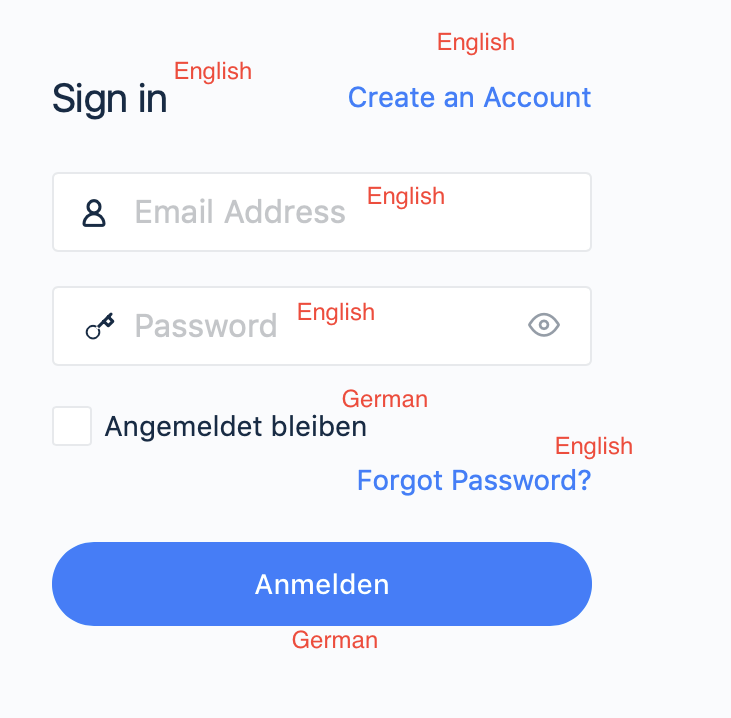
Can someone please help me to fix this?
I’m pretty new to wordpress and buddyboss
I’m using plattform v.1.5.8 and theme v1.6.5 and wp 5.7.1.Topic: Image Upload Help!
Hey guys i really hope you can help.
i have buddy press with inspirebook theme.
everything works well except when me or users try to upload media it shows a reaaaaaaly slow loading bar but if you just press post it will post it anyway. but the main thing is no photos or videos are showing when someone uploads them , ive checked all settings and tried looking for conflicts


