Search Results for 'wordpress'
-
AuthorSearch Results
-
April 16, 2016 at 8:34 pm #252526
In reply to: All I get is a list of comments
@mercime
Participant@noahboddy BuddyPress is compatible with nearly all WordPress themes. Checked out the source code of your theme’s page.php. It’s clean and should work with BP. So in all probability, the conflict could with another plugin. Good luck.
April 16, 2016 at 6:49 pm #252525In reply to: Group with multiple forums?
OpenRing
ParticipantYES WE CAN!!
We can combine simultaneously these 2 features below:
– Multiple forums assigned to 1 or more Groups
– Multiple groups assigned to 1 or more UsersJust using THIS PLUGIN: https://wordpress.org/plugins/bbp-private-groups/
This guy is a holy person!!!April 16, 2016 at 5:57 pm #252523In reply to: Where’s the plugins directory page?
Participant@jazzbuzz The page is not available at this time. Check out the list of plugins tagged ‘buddypress’ at WordPress.org. Disclaimer: There are some plugins which use the ‘buddypress’ tag but could just only be compatible (no conflict) with BP or just use the tag for “SEO”.
April 16, 2016 at 5:08 pm #252520In reply to: Profiles & Member List: Redirect all subscribers
Jens
ParticipantOkay, seems like I really have to learn more about PHP. Via google I found https://wordpress.stackexchange.com/questions/60272/find-out-if-logged-in-user-is-not-subscriber. That gave me a rough idea, but I did not manage to change the code for a redirect.
However, I found a workaround. I placed the following code…
<?php if ( current_user_can('member') ) : ?>and
<?php endif; ?>in these files:
/wp-content/plugins/buddypress/bp-templates/bp-legacy/buddypress/members/index.php (lines 27 and 144)
/wp-content/plugins/buddypress/bp-templates/bp-legacy/buddypress/members/single/home.php (13 and 122)There´s no redirection now, but the content is not visible anymore for the role “subscriber”, but visible for “member”.
April 16, 2016 at 12:52 pm #252516Henry Wright
ModeratorIn that case, try checking if there’s a plugin available. There could be something for WordPress which you could try to adapt to your needs.
April 16, 2016 at 10:41 am #252507In reply to: Email Notifications not sending
Participant@djpaul Does BuddyPress use the same email-address for sending like WordPress? If not, that might be the problem: Some webhosters (like Hosteurope) restrict the usage of email addresses in scripts like WordPress to prevent spam.
For example I usually have to choose one email-address on my webhoster´s config platform. After that I can use it in WordPress. Any other email address won´t work for sending with WordPress, if I don´t use a plugin like https://wordpress.org/plugins/wp-mail-smtp/.
April 16, 2016 at 8:09 am #252499In reply to: Buddy Press LIVE NotificationBar
sharmavishal
Participanthttps://wordpress.org/plugins/buddymenu-buddylinks/screenshots/
not updated for a while check if it still works
April 16, 2016 at 8:07 am #252498In reply to: Activity Header Post title link error
Participantchange in ur DB or use this
April 15, 2016 at 10:59 pm #252489In reply to: Bulk add a member to all groups and promote to admin
gdams82
ParticipantBTW, that was tested in WordPress 4.4.2 and BuddPress 2.5.2 on local XAMPP running Apache/2.4.17, PHP/5.6.15, custom theme, 25 plugins.
April 15, 2016 at 8:44 pm #252485In reply to: follow button instead of add friend
shanebp
ModeratorYou need to do more than add a button – you need a plugin:
https://wordpress.org/plugins/buddypress-followers/If you don’t want Friends functionality, turn off the Friends component:
wp-admin > Settings > BuddyPressApril 14, 2016 at 4:49 pm #252457In reply to: Most links redirect to homepage
skulldragon
Participant1. Which version of WordPress are you running? The latest
2. Did you install WordPress as a directory or subdomain install? Normal install in root
3. If a directory install, is it in root or in a subdirectory? Root
4. Did you upgrade from a previous version of WordPress? If so, from which version? No
5. Was WordPress functioning properly before installing/upgrading BuddyPress (BP)? e.g. permalinks, creating a new post, commenting. Yes
6. Which version of BP are you running? The latest
7. Did you upgraded from a previous version of BP? If so, from which version? If there was another version around 2 months ago, yes. Issue persists through both updates.
8. Do you have any plugins other than BuddyPress installed and activated? If so, which ones?
404 to 301
All in one Favicon
bbPress
BP Profile Search
BuddyPress
BuddyPress Cover Photo
Custom Facebook Feed
Divi Builder
Elegant Themes Updater
Events Manager
Go – Responsive Pricing & Compare Tables
K Elements
List category posts
Page Links To
rtMedia for WordPress, BuddyPress and bbPress
s2Member Framework
Slider Revolution
Taxonomy Metadata
WP FullCalendar
WPBakery Visual Composer9. Are you using the standard WordPress theme or customized theme? KLEO
10. Have you modified the core files in any way? No
11. Do you have any custom functions in bp-custom.php? No
12. If running bbPress, which version? Or did your BuddyPress install come with a copy of bbPress built-in? Latest
13. Please provide a list of any errors in your server’s log files.
14. Which company provides your hosting? Siteground
15. Is your server running Windows, or if Linux; Apache, nginx or something else? Apache I think.
April 14, 2016 at 4:37 pm #252456In reply to: Buddypress comment showing in all pages
danbp
ParticipantWe’re unable to help you for Yoo Helios premium theme.
Have you assigned a particular template to the mandatory BP pages: activity, members, groups,… ? If yes, remove them, as BP pages must stay “empty”. Just give them a title and nothing else.
Instead of using an exotic function, better try this solution.
is_buddypressfn definition: You can tell if a page is displaying BP content by whether the current_component has been defined. More here.April 14, 2016 at 3:02 pm #252446In reply to: Chaning DB prefix
ParticipantWell, I’m no securities expert by any means, but I need this site to be as hard as possible. I’m just trying to take every precaution. From what I’ve read it’s a fairly common practice: http://www.firedaemon.com/blog/wordpress-hardening-guide
Also, you can block access to wp-config.php with the following in .htaccess, although I’m not sure how someone would be able to view the php anyways.
#block wp-config.php
<files wp-config.php>
order allow,deny
deny from all
</files>Yes, it’s not a catch all. If some one is determined I’m sure there are ways to find your unique prefix. However, I think it would still stop a lot of script kiddies. If someone can inject sql I’d imagine your still in trouble. I would still like to know how to do it though.
Can some one please help me out. The site supports a good cause and they are nice clients. I really don’t want them getting sued if some ones info gets leaked.
April 14, 2016 at 7:20 am #252439vinzen
ParticipantWould disabling the BuddyPress registration process and falling back on WordPress one’s by creating a custom registration form help avoid the need to sync BuddyPress to WordPress profile? – as I interpreted from here – http://stackoverflow.com/questions/15379839/registration-form-in-buddypress. Thanks.
April 14, 2016 at 12:38 am #252433In reply to: Specific management for specific user types
Rimon Habib
ParticipantBuddyPress doesn’t have role based access management system for its components like WordPress roles, However, It has Member Type API now which is a potential lead to creating access management system using member type.
I am actually working on creating this plugin, which will be extension of my another plugin,
http://rimonhabib.com/buddypress-member-type-manager/This plugin allows you to synchronize member types with WordPress user role, which is a potential way to control content based on Member type
By the way, you can turn off friend, messaging features from BuddyPress settings. But I guess you are talking about interacting one specific type of users to that type of users only, in this case, you must need to use Member Type API anyway.
April 13, 2016 at 7:52 pm #252422In reply to: Conflict with Buddypress and WordPress Email
Dono12
ParticipantI figured out the solution. I had to call
add_filter( ‘wp_mail_content_type’, ‘notification_content_type’ );
in each individual email function:
add_filter( 'wp_mail', 'dirty_wp_mail_filter' );
function dirty_wp_mail_filter( $args ) {

	// you can include your custom html mail template here
	// just use file_get_contents() functions to get template file and any php replace function like
	// str_ireplace or preg_replace to replace your given placeholder in template by the content which is sent by wp

	$stripped_mail_content = preg_replace("/<http(.*)>/m", "http$1", $args['message']);
	add_filter( 'wp_mail_content_type', 'dirty_notification_content_type' );
	$dirty_wp_mail = array(
		'to'          => $args['to'],
		'subject'     => $args['subject'],
		'message'     => $stripped_mail_content,
		'headers'     => $args['headers'],
		'attachments' => $args['attachments']
	);
	return $dirty_wp_mail;
}

function dirty_notification_content_type() {
	return 'text/html';
}
found here:
core.trac.wordpress.org/ticket/21095April 13, 2016 at 7:09 am #252395ParticipantBuddyPress doesn’t have role based access management system for its components like WordPress roles, However, It has Member Type API now which is a potential lead to creating access management system using member type.
I am actually working on creating this plugin, which will be extension of my another plugin, BuddyPress Member Type ManagerBy the way, you can turn off friend, messaging features from BuddyPress settings. But I guess you are talking about interacting one specific type of users to that type of users only, in this case, you must need to use Member Type API anyway.
April 12, 2016 at 9:16 pm #252390In reply to: Conflict with Buddypress and WordPress Email
ParticipantNo, the plugin is not online. I built it with bits of code and tuts across the web about customizing WordPress notification emails. if you can send me an email address (please black this out **** (removed at users request ~hnla)) I can send you the plugin and you look it over. I saw on the web that you should remove filter after applying it but it didn’t seem to have any affect.
remove_filter( 'wp_mail_content_type','mycustom_mail_content_type' );April 12, 2016 at 2:03 pm #252379Paul Wong-Gibbs
KeymasterIf one type of email is getting sent and the others aren’t, it might be some part of the content triggering some kind of spam filter on the remote server. It could be some kind of throttling issue, and it’s only by coincidence one type of email is being sent. I don’t know. There’s all sorts of weird possibilities.
We have 2 further email delivery fixes that have been identified, which I imagine we will implement and release within the next 2 weeks. I don’t see how either would directly affect your site since you have SOME BP HTML emails being delivered, but not all — but maybe they will. This is certainly pretty weird.
April 12, 2016 at 11:32 am #252373ParticipantApril 12, 2016 at 9:40 am #252367In reply to: buddypress members search errors
MC-land
ParticipantHi Henry, thanks ive tried that plugin, its not quite what im after.
Ive also tried https://wordpress.org/plugins/buddypress-global-search/installation/ which was just as inconsistent.We did import all the users through a database import through a custom script, which we suspect might have caused problems. dont know if that helps at all.
April 11, 2016 at 3:44 pm #252342In reply to: Buddypress Upload avatar and photos to ftp
nader.jalayeri
Participanteverything works fine when i upload media using wordpress media library but in user xprofile avatar upload form, can’t upload image to another ftp
April 11, 2016 at 3:10 pm #252338ParticipantSince WP 4.0, you no more need to add the language constant to wp-config.
Read from here: https://codex.wordpress.org/Installing_WordPress_in_Your_LanguageConcerning brazilian portuguese, the WP translation file is named pt_BR.mo
Once this file is stored in wp-content/languages/, you select pt_br as site language from dashboard > General > site language. This is slightly different from other languages like german or french, who appear as a name in the list and not as de_DE or fr_FR.To get BuddyPress in brazilian, you simply add the buddypress-pt_BR.mo to
wp-content/languages/plugins/directoryTested as ok on a beta install of WP 4.5RC2 and BP 2.6alpha
Portuguese Brazilian translations files
WP Stable 4.4.x pt_BR
BuddyPress 2.5.x stable pt_BRAt the botom of these pages, select Machine Object Message Catalog before exporting.
And to get a plain translation of WordPress dashboard, don’t forget to export admin-pt_BR.mo (stored as sub-project on the left sidebar of translate.wordpress.org).
April 11, 2016 at 2:08 pm #252335In reply to: Complete chat system???
celziobiaz
ParticipantWell, there are several Group chat rooms integrated well with BuddyPress.
When you choose, you need to consider the following:
1 – You can install one on your server, but if you have more than 10 chatters, that will probably load your server. Most shared hosting services, do not allow to install a chat on the server as it is high cpu/mem consumer. In addition, sharing files is dead slow.2 – I recommend a group chat hosted service, it will offload all activity to a remote server, bandwidth is not a consideration. They work with CDN, so everything is pretty fast.
As for your question:
I am very much in favor of RumbleTalk chat plugin, works very well and integrate with your users base.– Ability to send any files (anything from videos, photos, music, etc.)
Yes -You can upload files, pdf,excel..etc, I think any file, but they have size limit
– Ability to text chat
Yes
– Ability to video or voice call to a friend
Yes – they have private chat (you need to allow it in the settings), you must be in ssl to use it (WebRTC)
– (Optional) ability to add other friends or users to the chat
Yes – you can allow facebook/twitter friends
– (Optional) ability to screen share (desktop sharing)
No – no screen sharing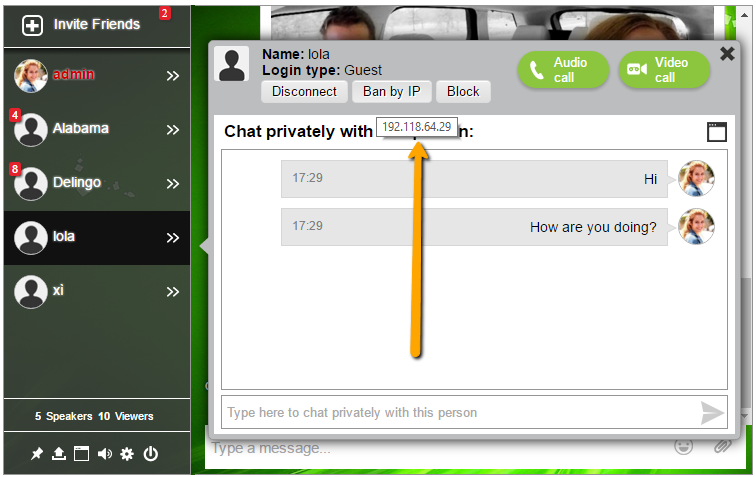 April 11, 2016 at 9:58 am #252320
In reply to: New Email Template (Self defeating?)
Keymaster@backpackersunion Some have asked about the “Hi” part. I suppose that could be changed. I have seen a few people ask, but if I see one post about something here, I normally multiple that number by 100, because very few people find it easy or convenient to get in contact with us (with support question), so probably quite a lot of people would like the option, even if it wasn’t the majority.
The unsubscribe I am a bit less sure of. I don’t want to make it easy for evil people running BP to remove the unsubscribe link for emails they send. In BuddyPress 2.6, an upcoming change means that this unsubscribe link will work, even if you’re not logged in to the site.
From a technical perspective, if we remove the token from the template and put it into the option, if a user has already customised the footer text option, they won’t see the new updated (default value for the) option.
This is not unsolvable, we’d run something on the upgrade routing, but we’d have to stick the token at the very bottom or top of the template. It’d be easy for the site admin to change, but it would annoy them. But it might be worthwhile.
So — maybe? You could create a ticket on buddypress.trac.wordpress.org to see if any other regular contributor likes the idea, or see if you can start a discussion or get feedback from other users via the forum.
-
AuthorSearch Results


