Search Results for 'wordpress'
-
Search Results
-
This is probably a dumb question, but how do I load BuddyPress functions in a custom page?
I’ve created a custom page template in WordPress, and had expected that I can access bp functions (such as
bp_displayed_user_domain()in that page. But it’s not working, so I assume I have to include a file or call a function to access BuddyPress functions.Can anyone help me out with how to access BP functions from a custom template?
I have a private group – If a non-logged in user tries to access the group, they are given the option to join, but not to login.
I have BP connected to MemberPress but believe this page content is coming from BP.
I am running WordPress 4.4.2 (soon to be updated) and BuddyPress 2.5.2This is the link/private group page:
http://trs.twcfit.com/groups/temple-rodef-shalom/Thank you.
I am looking for general advice and maybe help strategizing how to do this:
I want to set up a custom, default page for 1) member listing, 2) member profile, 3) group listing, and 4) group detail where the output from the WordPress and Buddypress loops are combined. Essentially, the rendered page structure would look like this:
[global header etc]
[Content from the WP page editor]
[dynamic Buddypress content for Members or Groups]
[global footer etc]I successfully created a custom WordPress template for the member directory where I inserted /wp-content/plugins/buddypress/bp-templates/bp-legacy/buddypress/members/index.php as a PHP include right after the WP loop code is done. It works as long as it is a custom listing page (NOT set as the default for Members in Settings) but the members profile page is still the generic default. If I adjust the site settings to define this page as default for Members, it doesn’t work at all or it just ignores the content from the WP editor.
Is it possible to do this inversely — e.g. insert the WordPress content loop into the Buddypress template? I haven’t had any luck. I am not even sure the WP loop is invoked when a core BP page (e.g. members or groups) is rendered.
FYI, I’m on the latest version of BuddyPress and WordPress 4.4.2, and have implemented BP with the BP Project Framework plugin for my customizations. I am using Cumulo, a commercial theme that seems to be pretty good, and have that set up with a child theme (in case that matters here).
I am new to Buddypress but have used WordPress for years (not a hard core coder but can write/edit code) and am familiar with how it works under-the-hood, but am not sure about the best approach here. Thanks in advance for any advice/guidance/ideas with what you think the best way is to do this!
I’m having trouble getting BuddyPress to work correctly, and I have no idea why. When I activate it, anytime I click on ANY of the links in the drop-down menu by my profile icon in the upper right corner, all I get is a list of all the comments on my site. Whether I click my name, activity, profile, notifications, messages, etc., that’s what I get. None of the features can be accessed; I just get a complete list of comments. Does anybody have any idea what’s going on? Is it a compatibility problem with another plugin? I’m new to all of this WordPress stuff, so I really don’t know how it all works yet. I haven’t edited the plugin in any way. Any assistance would be greatly appreciated.
WordPress version 4.4.2
BuddyPress version 2.5.2
Website: http://scribblers.xyz/
Theme: LovecraftI created a plugin which sends custom emails to users when they Register, Submit Post, Comment on a Post (email to post author), and Reset Password.
Problem is all the styles are missing from the Buddypress Email notification when my custom WordPress Email Notification Plugin is Active. When I deactivate my Custom WordPress Plugin all the styles for Buddypress email Notifications return.I know one can’t have it all but geee’s. I would like users to get a nice email message when interacting with b all aspects of my site. How can I fix this issue?
URL: thedivisionrpcommunity.com
WordPress 4.4.2 (New Installation)
BuddyPress 2.5.2
bbPress 2.5.8
Theme: Spacious 1.3.8
Hosting: Media Temple (Grid)I am nearly finished with the setup of my site, but quickly realized that I am having trouble with BuddyPress emails. WordPress emails are working fine, but none of the BP emails are going through to the admin or the users. I’ve read through a lot of forum posts suggesting various SMTP plugins, but haven’t seemed to find the magic plugin (or plugin configuration) to get it working. I tried PostMan and Easy WP SMTP, as well as some I don’t recall the name of. In all cases, the WordPress mail continued to get delivered as well as the test emails sent via the plugins, but never the BuddyPress mail. Interestingly enough, I noticed that with Postman installed it didn’t even show that it tried to send an email from BuddyPress. Other emails showed up in the log, but BuddyPress never registered.
I’ve also been looking at my host configuration and I have opened a support request with them to see if they might be able to shed some light on this. During my research I came across the following in their WordPress documentation.
— Begin Quote —
Third-party Mail ConnectionsWhile no third-party mail plugins are explicitly banned by our plugin blocker, all connections from ports 25, 465, and 587 are blocked for security reasons. Therefore, it is not possible to send mail from your WordPress Hosting service using a third-party mail system.
— End Quote —Now, I might accept this could be the issue, but I’ve seen a lot of people, including moderators, that have recommended Media Temple and are using them for their BuddyPress installation. Either this quote does not apply to my Grid account or they’ve figured out how to work around it. Hopefully one of these WP/BP users on MT has some insight for me.
-don
Hi, Is there any way to sync the website URL in the Xprofile to the website URL in the WordPress profile?
I’ve checked “Enable BuddyPress to WordPress profile syncing” in the BuddyPress settings. In fact, all other attributes like username, nicename, useremail, etc are synced except the URL (probably because it is not a part of the main BuddyPress profile?). But still, is there any way we can achieve this sync? Thanks.
Hi all (hoping that @djpaul notices this),
Email trouble in BP is apperantly very hard to solve (I’ve been sifting through email related posts in the forums for hours!), so I’m going to include as many clues here as possible. Hopefully someone has the patience to read all this and make sense of it, and hopefully this problem is not specific to my installation. Yes, I have a lot of plugins. But, I have disabled all of them at times to test this, and I’m fairly confident that it is not a plugin conflict.
Problem Summary:
It seems like some of the messages generated by BP are formed in such a way that they are being rejected (silently?) by external mail servers (i.e. google, yahoo, hotmail) while other email messages are fine. I think this may be giving the impression that BP is not sending the email, but the email messages are in fact being sent (in my case anyway). They just don’t seem to be handled properly on the recieving end. Why?… I have no idea. Hoping for some tips to continue troubleshooting here.
Product Versions
WP: v4.4.2
BP: v2.5.2Relevant Plugins in use:
wp-mail-smtp: In case the email problems were PHP mail() related
bp-email-to-wp-mail-from-bridge: To fix BP ignoring existing mapping for the From email
buddypress-group-email-subscription: To add group email functionality (mentioning only because email sent from this plugin works fine – plain text)Relevant Config Info:
At first I wasn’t using an SMTP plugin, but my current config is using WP-Mail-SMTP.
It is configured with the localhost as the SMTP Server (HostGator shared host).
Outoing email seems to work fine (with or without the plugin). It’s only outgoing BP mail that isn’t working properly.High Level Details:
Some BuddyPress generated email works and some doesn’t. There are 3 specific examples that I’ve been testing:
* The “Friend Request” email works great! It’s a really nice HTML formatted email that informs the target of the request that the request has been made.
* A PM to a member doesn’t work. No email notification is sent to the target of the PM (Notification settings are correct)
* A Mention doesn’t work. No email is sent to the BP user targeted by the mention (Notification settings are correct).The email messages that don’t appear to be working (i.e. not reaching it’s destination) are actually being sent. However, it seems like they are completely ignored by the receiving mail server.
* This has been confirmed with the debug plugin (bp-email-debug-2.php). In all cases it reports that the email was sent.
* This has been confirmed by my ISP. I had them watch the email get sent out from the localhost (the smtp server) to a google mail server (for example) but the message was not received.I know that my mail server/domain is not blacklisted because as mentioned above, the “Friend Request” email is sucesfully sent and delivered to the same recipeint. Also, the buddypress-group-email-subscription plugin works well and sends email succesfully to the same recipients.
NOTE:The same email (eg. PM and Metion related email) that is not delivered successfuly to external mail servers (google, yahoo, hotmail) IS sucessfully delivered to email addresses hosted on my local mail server (i.e. the mail server running on the same WP/BP host – Hostgator).
Some steps I’ve taken to test/resolve
I’ve ensured that the “From” email address is correct (i.e. not being rejected because it is “wordpress@domain.com”). BTW, this led me to the bp-email-to-wp-mail-from-bridge Plugin which bridges wp_mail_from settings that I had in WP functions.php (child theme) to BP Email fuction(s). Everything is fine here.
I’ve installed and tested WP-Mail-SMTP plugin in every way I can imagine. No change in email behaviour
I made sure all available options in the notification settings (i.e. to receive all types of notifications) are enabled and have tested the various email scenarios on many different users.
Other important notes
I’m using the plugin buddypress-group-email-subscription to send email to group members when things happen in the forums. As mentioned above, this plugin successfully sends email to the same recipeints that are not recieving the PM and Metnion emails. Worth noting is the email messages sent by this plugin are plain text.
Finally
Thanks for getting this far… that’s a lot of reading. Sorry. I’m not expecting a simple answer to this. I’m just hoping for someone to point me in the right troubleshooting direction.
<br><br>I wrote this article in bbpress.
But somebody reply like this‘This seems a BuddyPress question, not a bbPress question, right ?
I think the BuddyPress forum would be a better option to get an answer.’So I write again in buddypress forum.
———————————————————————————
I want to link a group to a forum which exits,
So I checked it and set a forum name (first one below ‘Customer Center’) in group forum box and save
but then check in the checkbox is disappeared
at last, I found that if I modify the group forum settings in the group page setting in backend,
the setting sustain, even though I click or not group forum setting in the group setting option in in frontend.I tried with default theme twenty-thirteen and KLEO.
Is it normal or bugs?
– frontend setting page :
https://www.miinfra.co.kr:44373/infra/groups/%EA%B3%A0%EA%B0%9D%EC%A7%80%EC%9B%90/admin/forum/
– Backend setting page :
https://www.miinfra.co.kr:44373/infra/wp-admin/admin.php?page=bp-groups&gid=588&action=edit
wordpress ver 4.42
buddypress Version 2.5.2
bbpress Version 2.5.8Topic: Complete chat system???
Sorry if this question has been posted before. I did search and did not find any answer to my question.
My site. http:/thevegansandwich.com (under construction)
At the time posting this (April 11, 2016)
WordPress version: 4.4.2
BuddyPress version: 2.5.2
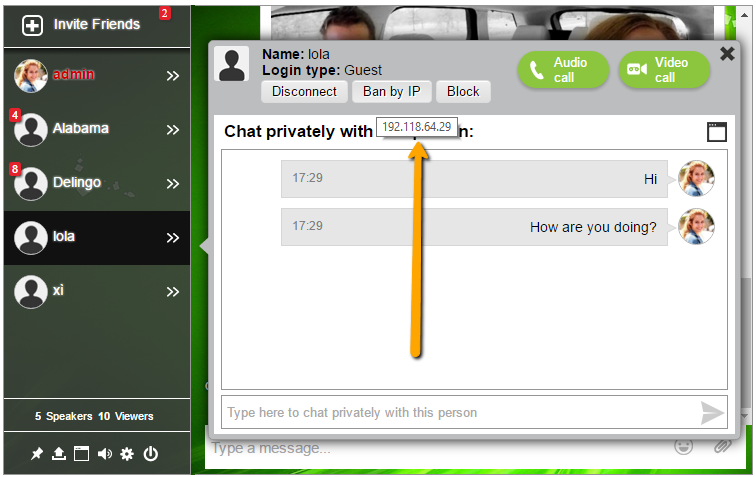
(I always updated all plugins and WordPress)My question is, I am looking for a complete free or inexpensive chat system/plugin or a way to implement a chat system similar to Facebook, with:
– Ability to send any files (anything from videos, photos, music, etc.)
– Ability to text chat
– Ability to video or voice call to a friend
– (Optional) ability to add other friends or users to the chat
– (Optional) ability to screen share (desktop sharing)Thank you.
Hello,
I have a WordPress/BuddyPress/bbPress installation.
I have noticed in the activity stream that all activity coming from either the blog or the social network functionality of BuddyPress, the user name displayed is the one filled by the user during registration as the Display Name.
On the other hand, in bbPress forums and in the activity stream related to the forums, the user name displayed is the login name.
It is really annoying, because the same user appears with different names in the same stream (if user has selected a different Display Name than the user name).
Is there a way to have the Display name everywhere, including bbPress forums?
Thank you
Wordpress version 4.4.2
Buddypress version 2.5.2
Socrates theme version 4.05Setting up my revived site:
Problem: the “Search Groups…” and “Search Members…” buttons are partially obscured by the main menu of the theme.
I can look on line 170 of the source code from both pages and see this line:
<div class=”separator” style=”height:27px;”></div>
I have tested the following line on my mock-up, and it works perfectly:
<div class=”separator” style=”height:67px;”></div>
>>>>
So, my real question is where/how do I edit the actual line in the Buddypress plugin code? I think I can edit it. I just can’t find it.
Thanks so much for any guidance.
Mark