Hi. everyone I’m new to wordpress. is it possible to share my development site to other computer or maybe to smart phones? so that i can test it?
When I registered on my site in an “Incognito Window” I inadvertently used an already in use email address and a note on top of the screen, provided that information. Then I corrected it, and submitted the form successfully. However the error warning “Sorry, that email address is already used!” was still visible on the next screen “Check your email to activate your account”. Might be quite confusing to the user.
Screenshot: http://bit.ly/1OMwTZF
WordPress: 4.3.1
BuddyPress: 2.4.2
Theme: Apostrophe 1.0.7
I have published blank Register and Activate page on my site but I keep getting the error message?
@beginner3 If you have enabled registration again, then go wp-admin menu Settings > BuddyPress and click on the “Pages” tab, and in the Registration and Activate section, choose the blank pages you created and associate each with respective functions per

I just figured that out. I have the activity folder added to the twentyfifteen theme. I am trying to modify the file, but it really doesn’t look like it should. I am logged in and I dont see any activity nor do i see the message Sorry, there was no activity found, Please try a different folder.
I am so confused and frustrated. I am pretty competent with wordpress as well as php, and i don’t feel like this should be so difficult.
https://codex.buddypress.org/getting-started/register-and-activation-pages/ At the bottom of this page it show you the Assign the Pages section once you assign the page you have an option to Save? I dont have that option and keep getting the below error message? I have tried to deactivate delete and reinstall plugin but nothing is working?
Also I have published blank Register and Activate pages and am still having trouble?
ERROR MESSAGE:The following active BuddyPress Components do not have associated WordPress Pages: Activate, Register.
There is no such filter hook as messages_notification_new_message.
There is an email_subject filter hook:
$email_subject = apply_filters( 'messages_notification_new_message_subject', $email_subject, $sender_name, $ud );
But as you can see, the variables passed do not include the message subject.
So, I don’t see a way to do what you want.
There is an enhancement ticket in the works
https://buddypress.trac.wordpress.org/ticket/6460
It might expose the fields you need.
You aren’t alone in asking for a different filtering system:
https://buddypress.trac.wordpress.org/ticket/6460
Thanks for the responses Shane. I have the same issue as the user.
I am unable to delete the index.php portion of the link
I want to create the following permalink: http://localhost/wordpress/groups/
However, only the bold area can be changed http://localhost/wordpress/index.php/groups/
I am trying to start using buddypress. I am currently a wordpress developer, but the documentation gives little to no api information for starters. It tells me the php files and the order of importance, but I have no idea what any of these files actually do. It doesn’t say buddypress.php’s purpose is this or this file will be used for this. Can someone help me out with this?
Hey,
Thanks for the response, i am so silly i cant believe i didnt realise they were always there but because i am logged in i cant access them i can only see them using incognito window or when logged out.
Do you know how i can “log out” without logging out of my wordpress site?
>> The”membership” option in the image on the link you posted.
@functionmunchkin The option to “allow users to register” in Network Admin > Settings is the same as the one in a single WP site’s option in Settings > General in that link.
>> Register goes the the login page and clocking the register link on there goes to page not found.
You mentioned that “I’ve setup the bp register and activate pg”
– did you set up BP network-wide or in one subsite? Reference: https://codex.buddypress.org/getting-started/installation-in-wordpress-multisite/
– have you double-checked that you created the Register and Activate pages in the main site (if network-wide) or in the subsite, then associated the pages in Settings > BuddyPress > Pages?
Many thanks Henry!
Yes that is what would be needed, but how can i assign “.some-wrapper-class” to the element i am trying to resize ? I am still a newbie with wordpress and buddypress … i have looked all over the net and couldnt find anything helpful.
Best,
Yvan
ERROR MESSAGE:The following active BuddyPress Components do not have associated WordPress Pages: Activate, Register.
https://codex.buddypress.org/getting-started/register-and-activation-pages/ At the bottom of this page it show you the Assign the Pages section once you assign the page you have an option to Save or View? I dont have that option and there for keep getting the above error message? I have tried to deactivate delete and reinstall plugin but nothing is working?
Hi there,
I am attempting to create pages for new registrations and link pages etc as seen on this this page:
Register and Activation Pages
Unfortunately I am not getting the option to create these new pages and when i click view it takes me to my home page. I am unsure what I may have done that could be preventing this. I have buddypress as a part of a bundle “kleo” theme.
I have the most recent versions of both buddypress Version 2.4.0 and wordpress 4.3.1
my site link is shoestringweddings.com.au there is currently an coming soon page up.
Thanks for your time,
From,
Alex
Hi Henry,
Yes i have done that, but there’s still no option for users to join groups, nor anything other than very basic styling. 
Whereas the documentaiton shows a ‘group directory’ which looks like this 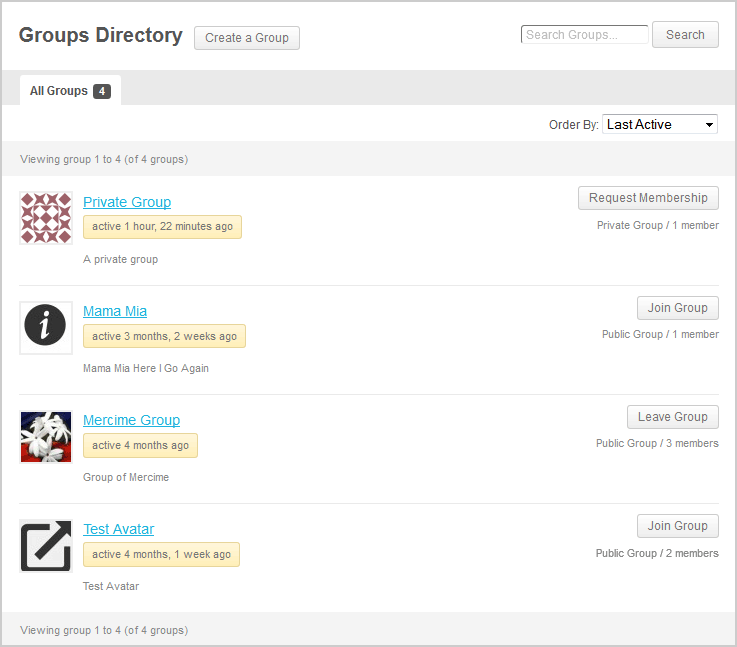
I have no group avatars, join now buttons or anything like that. Do we actually have to create all those basic features manually every time? I would have thought it should be automatic…?
Thanks
Please use the code when sharing code.
current_user_xxx refers to the logged in user – not the displayed user.
Use is_super_admin() to determine if the current user is a site admin.
https://codex.wordpress.org/Function_Reference/is_super_admin
$displayed_user_level = some_s2_function( bp_displayed_user_id() );
if( is_super_admin() && $displayed_user_level == 'some level' ) )
some_s2_function is whatever s2 function returns the member level based on a user_id.
This is everything what is written to the log after i tried to upload an image:
[02-Dec-2015 17:45:42 UTC] PHP Notice:  bp_setup_current_user was called <strong>incorrectly</strong>. The current user is being initialized without using $wp->init(). Please see <a href="https://codex.wordpress.org/Debugging_in_WordPress">Debugging in WordPress</a> for more information. (This message was added in version 1.7.) in /home/***/domains/***/public_html/wp-includes/functions.php on line 3622
[02-Dec-2015 17:45:43 UTC] PHP Fatal error:  Cannot use object of type WP_Error as array in /home/***/domains/***/public_html/wp-content/plugins/buddypress/bp-core/bp-core-avatars.php on line 874
I have deactivated all my plugins, and just tried activating Buddypress, but I am still getting this error code again and again! I have deleted the Buddypress from my server and reinstalled it, but still the same problems. I can’t figure out how to fix this, if you could please help I would be thankful! Everything was running fine till I made the mistake of changing a setting on my wordpress theme in which it made my theme (website) private or public. I made it public so you could visit the front end of the website while logged out, but after doing that it wouldnt allow me to log in because it was saying it wasnt allowing registration at that time. So I had my hosting provide help me deactivate and change the plugins so I could log in. But after doing that everytime I try reactivating buddypress I get those errors!
Thanks for you time, hope you can help me out!
Warning: Creating default object from empty value in /home/dtente5/public_html/SocialNetwork/wp-content/plugins/buddypress/bp-xprofile/bp-xprofile-functions.php on line 258
Fatal error: Call to undefined method stdClass::save() in /home/dtente5/public_html/SocialNetwork/wp-content/plugins/buddypress/bp-xprofile/bp-xprofile-functions.php on line 275
>> I know that Base group are shown in the Registration Form
@shmk thanks for confirming, just had to make sure you did. There’s a trac ticket which needs some more work done to get the feature you want at https://buddypress.trac.wordpress.org/ticket/6347
@darkdog
This post may help you with this: https://buddypress.org/support/topic/swap-out-the-buddypress-page-title-with-the-wordpress-page-tile/
I have no idea if BP is going to make this easier in the future to change these things dashboard backend or not – I have made some posts about this a time or two around here – but bp pages, their displayed on screen titled, and the meta titles have been a mess for a long time. Unless you know php and are willing to dig deep through documentation that is disorganized and possible outdated, there is no easy way of handling these issues.
This isn’t currently possible. Your best bet is to try searching for a plugin.
Ref: https://wordpress.org/plugins/
I want to disable sidebars for my buddypress pages (activity, individual members’ pages, etc.). I’m very new to WordPress. Please kindly give me a step-by-step instruction.
So i’ve had some success trying to change the profile links with this code:
function _bp_core_get_user_domain($domain) {
	$url = get_home_url();
	$user_id = bp_get_member_user_id();
	if (empty($user_id)) {
		$user_id = bp_get_activity_user_id();
	}
	if (empty($user_id)) {
		//$user_id = bp_displayed_user_id();
	}
	$user_info = get_userdata($user_id);
	$link = $user_info->display_name;
	$domain = '' . $url . '/profiles/' . $link . '';
	return $domain;
    }
add_filter('bp_core_get_user_domain', '_bp_core_get_user_domain', 10, 4);
apply_filters( 'bp_get_activity_user_link', '_bp_core_get_user_domain', 15, 1);
This seems to work on every profile link except the one in the activity header section. This link is being changed but just to /profiles/. The display name is not being added to the end… so looking at my code this means i’m not retrieving the user id in the activity. Strangely enough though the user avatar next to the post has the correct link applied to it with the above filter! Any ideas?
My other option is to use the buddypress member profile location but replace it with my profile templates. I tried to implement this by creaing a members/single/home.php in my wordpress custom theme folder… but the profile loads inside another page, i get a page within a page type effect with the username above the inner page… not sure what is going on there? If anyone can help with either of these solutions i’d really appreciate it!
James
I have the exact same problem. 
Newest wordpress Newest Buddypress using 2014 theme.


