@tduschei How to add sidebar to all BuddyPress pages in Twenty Eleven theme http://wp.me/p1I84P-60
Tried, didn’t worked.
If anyone will ever need this, the trick is done via .htaccess file.
RewriteCond %{HTTP_HOST} !^www\..* [NC]
RewriteRule ^ http://www.domain.com%{REQUEST_URI} [R=301,L]
So, explained, if your blog/BP network has old links without www. and you recently changed the website URL to http://www.domain.com because you started using a CDN, this will help you to get you’re whole network back with no dead links. Tested on all sides, no errors.
my .htaccess file looks like this:
# BEGIN WordPress
<IfModule mod_rewrite.c>
RewriteEngine On
RewriteBase /
RewriteCond %{HTTP_HOST} !^www\..* [NC]
RewriteRule ^ http://www.domain.com%{REQUEST_URI} [R=301,L]
RewriteRule ^index\.php$ – [L]
RewriteCond %{REQUEST_FILENAME} !-f
RewriteCond %{REQUEST_FILENAME} !-d
RewriteRule . /index.php [L]
</IfModule>
# END WordPress
Credits:
– http://www.456bereastreet.com/archive/200601/search_engines_and_canonical_urls/
– the most awesome hosting company support for tweaking the code (KnownHost)
Cheers! 🙂
I stumbled on this recently and it seems to be like cubepoints but slightly different or even better in some regards.
Home
I’m curious if there are any who have experience with it and could give us some feedback on how it actually works (or doesn’t)
btw I have no relation or connection to the plugin or its developer(s).
edit- http://wordpress.org/plugins/mycred/
added the link ~~~ mercime
BuddyPress Default (BuddyPress 1.7.2, WordPress 3.5.1). What number did you mean? I see fewer entries in the list as it should be. I see 2 instead of 3, 4 instead of 5, etc. And I get “Not Found” if only one item is available from the author. Only after a page refresh I get to see all the entries. Twenty Ten theme has no problem and displays author’s archives correctly.
Upload profile image at activation https://buddypress.trac.wordpress.org/ticket/4132
+1 to that idea or any way of encouraging users to add an avatar during sign up.
A big improvement could also be made to the activity stream. Currently it isn’t possible to have personal activity AND friend’s activity in the same feed. Would be nice.
I installed buddypress a few weeks ago now i have so many fake members making groups empty albums and they post for more info about blank go to blank.comand then they vanish.
*Blank means there website and company PLEASE HELP-WPBP buddypress 1.7.2 wordpress 3.5.1
http://WWW.Postau.com
Hi!
I have a strange problem.
I have the latest version of WordPress and Buddypress and I have built a child theme for the default BP theme. I have successfully changed a lot (both text and markup) in register.php and activate.php. The thing is that my recent changes don’t seem to stick.
I’ve tried deleting the files, deleting the whole registration directory and I’ve tried renaming the files but I still see my old versions of the files. If I activate the default BP theme, I see the register.php and activate.php from that theme. I have read similar posts on this forum, but it hasn’t helped me to find a solution.
I can change the other files in my child theme.
I have deactivated all the plugins, but that didn’t help.
I have run out of ideas.. I’m not sure when this problem occured but at least a few weeks ago.
Help would be most appriciated.
/Lisa
(The web site isn’t live yet, so I can’t give you a link)
giving members the ability to flag things as spam through akismet seems like a very sticky wicket to me probably something which would be better addressed as plugin. i for one would not want to give that ability to any user. i can barely get my staff to do that correctly under wordpress.
 SK
SKParticipant
@bphelp Are you referring to this one? https://wordpress.org/plugins/buddypress-activity-privacy/
The description says
The plugin add the ability for members to choose who can read his activity before it posted (Anyone, Logged In Users, My Friends, Admins Only, Only me, My Friends in Group , Group Members …etc).
@inetbizo you can post blocks of code in pastebin.com and post the generated URI here. You’re describing what looks to be this section of the Groups Directory page https://buddypress.trac.wordpress.org/browser/tags/1.7.2/bp-themes/bp-default/groups/groups-loop.php
User registration is currently not allowed.
@theoptimystic If as you said in previous post that you enabled registration in Settings > General, then you might have a plugin that’s controlling your registration process.
Checking the source code of your home page, I see that there’s a pageline-buddypress plugin and the BP Template Pack plugin activated in your site. BP Template Pack plugin is no longer required as of BP 1.7 to make your theme compatible with BuddyPress. At least that’s true for nearly all WordPress themes. Deactivate those plugins, change to Twenty Twelve theme and check if issues are resolved.
Ok I did that but then it took me to my Log In page but it says “User Registration Is Currently Not Allowed.” So I went into my general setting of wordpress and went to go check the “Anyone Can Register” box but it is greyed out. How can I make it so that anyone can register?
SKParticipant
@bphelp I think you aren’t giving the developers enough credit. Version releases have been accelerating
1.2 to 1.5 took 20 months
1.5 to 1.6 took 11 months
1.6 to 1.7 took 8 months
Trac can be deceptive, but based on current roadmap https://buddypress.trac.wordpress.org/roadmap 32% of 1.8 is completed and 1.8 is due in July (7 weeks from now). Even if that is revised and we get 1.8 only in November, we could possibly see 1.9 as early as May next year (or we may not…this is pure speculation).
Eitherway, most major projects I know close scoping for a version long before a beta of the previous version is released.
@mercime Thanks. BTW #4796 was started by Boone.
w.r.t. #5008, the idea is to have widget for “previews” of the different tabs. Site/Group admins can decide for themselves which widgets (or even none at all) they want to show on the member profile page.
In a similar vein, groups could have member widgets too (though I havent requested them yet, and there is no ticket for them). I think it’s pretty reasonable to show some group members on the group profile.
Thanks so much for documenting this rcain. I’m set up in a local server development environment (obviously not advertising to search engines) and was trying to figure out why the WP comments were not showing up in the BP activity stream! You just saved me a lot of time!!
I am using wordpress version 3.5.1
It is a directory install, but it is in a subdirectory.
I did not upgrade wordpress. This was a new install.
I am running buddypress version 1.7.2
I have the following plugins installed and active: bbpress, all in one event calendar, tinymce advanced, buddypress media, jetpack, subtle background patterns, wordpress importer.
I am using a customized theme called “Salutation” which is designed to work with buddypress.
I have not modified the core files and do not have any custom functions.
I am running bbpress version 2.3.2
My host is godaddy.
I am on a linux server.
Hello,
I am using wordpress 3.5.1 and buddypress 1.7.2 (latest)
I have turned on “Extended Profiles” from buddypress component settings
But I can see only one filed (‘name’field) with the base profile group

My question is, how can I add additional field like about/description, email, password etc?
@fearracious glad you resolved the issue on your own 🙂
Marking this as resolved.
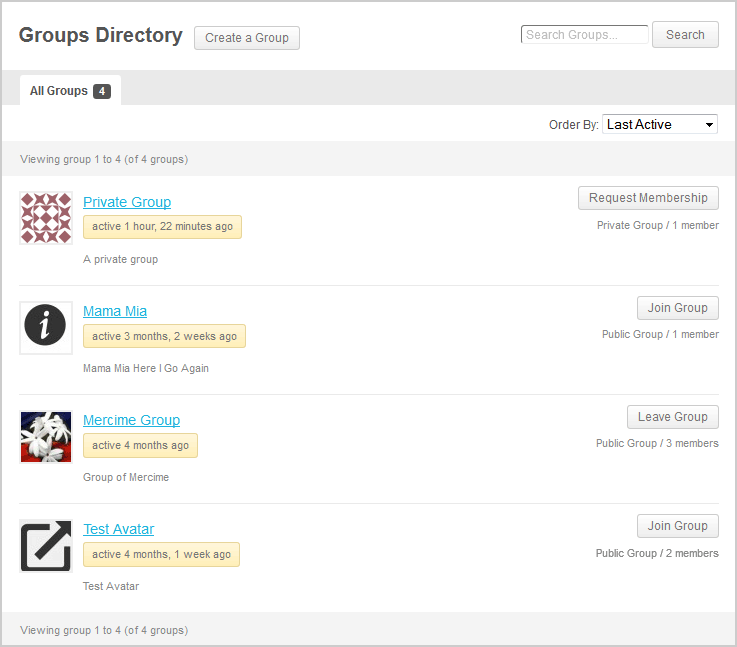
@carolinecalvert what theme are you using? Some themes have page titles which are not within the WP loop, hence BP cannot automagically insert the “Create Group” button beside the page title as seen https://mercime.files.wordpress.com/2013/02/groups-directory.png
On way is to create a link when user is logged in. You only need to append /create/ after your site’s group directory url, e.g. http://example.com/groups/create/
In upcoming BP version, the create a group link will also be added to the Member’s navigation in WP toolbar. If you’re adventurous, you can add the code to have those links already https://buddypress.trac.wordpress.org/changeset/7062
Hello,
This is my first time posting on buddypress support so I wanted to say in advance I really appreciate any help. I have a wordpress site which is running buddypress. I have also have two themes under my wordpress page. What I need to do is have one theme for almost all of my pages and then change the theme when a user goes to one of the buddypress pages such as “/member/” or “/activity/”.
I was able to have this happen and change my theme based on the suburl using the plugin “jonradio Multiple Themes” but when I activate buddypress the plugin does not work anymore. I’ve seen forum postings saying that that plugin does not work with buddypress.
Is there a php code that I could add into the index pages which will load a different theme? Or is there another way to do it?
Thank you!!
I have installed buddy Press in my website and for some reason I am not seeing the option to create groups. I have the latest version of both WordPress and Buddypress. I have it enabled so that members can create groups….still nothing.
help!