Search Results for 'wordpress'
-
Search Results
-
Topic: Plugin will not activate
HI all, I just installed the latest Buddypress (1.2.6) in a fresh install of WP (3.0.3) and the plugin will not activate, in fact, it takes WordPress down with it until I change the plugin directory name to deactivate it. Completely fresh install on a host that I currently use for a half-dozen WordPress blogs. Have reinstalled manually, same issue.
No other plugins running, have not altered any files.
Directory structure in error message below, which is correct:
Error message:The website encountered an error while retrieving http://www.caremovement.org/wp-admin/plugins.php?activate=true&plugin_status=all&paged=1
Server 500 error
Permissions issue? Dbase issue?
Thanks for your help!I’ve looked at a few plugins, but I cannot seem to create this feature.
When a user registers, I want them to have to option of using their Facebook Account. I have already created a FB appliction, but I can’t find a good plugin.Any ideas?
I’m using wordpress 3.0.3 and buddypress 1.2.6 with the theme bp column and it’s not showing a link for people to click on to register at my site I have tried using login with ajax plugin and some other plugins but nothing is working.Help please!!!!
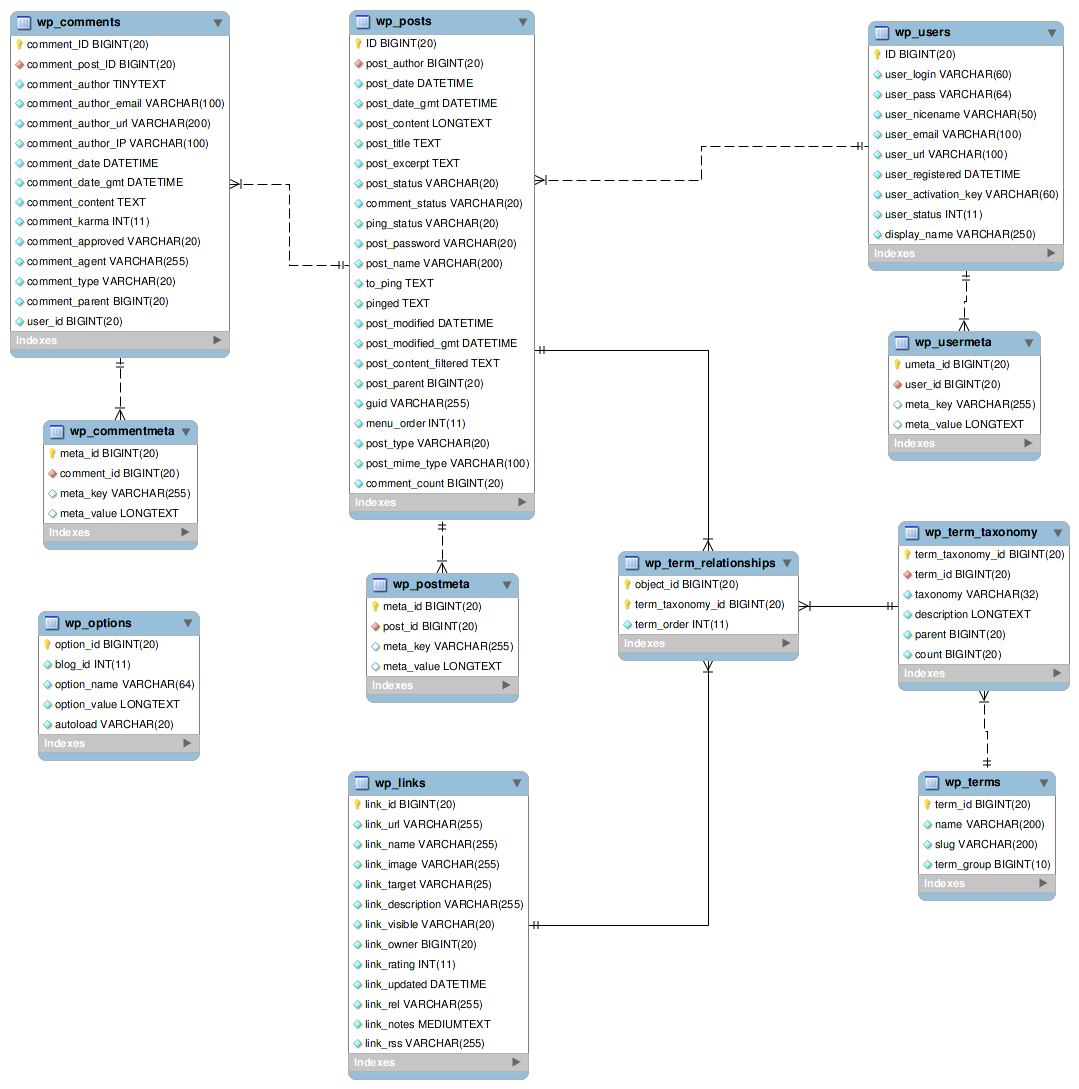
Topic: Database Schema map
I can’t find a Database Schema for Buddypress. I’m looking for something similar to the one posted on WordPress found here: http://codex.wordpress.org/images/9/9e/WP3.0-ERD.png
Has anyone mapped this and posted it somewhere?
hi…
I’m very new to buddypress….
I have tried to install buddypress… but it is’nt working properly.
First I’m downloaded wordpress latest from wordpress.org.
then installed it.
after that in admin i tried to install buddypress… that is also fine
but after that while activating buddypress following error occurred.
Unhandled exception at 0x023cdc22 in apache.exe: 0xC0000005: Access violation reading location 0xe87f4f0c.
after the error i couldn’t access the site, sometimes my Apache server will stopped.is there any way to solve this?
Please help me….I’m using php5, windows xp servicepack2
Thanks in advance
I have tried several time …Thankz…
I wan to use Single Random post and according to the instruction:
1. Upload wp-single-random-post.php to the /wp-content/plugins/ directory
2. Activate the plugin through the ‘Plugins’ menu in WordPress
3. Place in your templatesMy question is: What do they mean by “Post in your template? What file is that? Header? Index.php? What is it??
Hello, I’m running buddypress 1.2.6 on wordpress 3.0.2. I have used the bp-template-pack to make a wordpress theme buddypress-compatible.
I have a minor issue with the template list in the theme editor: it doesn’t actually display all the templates. For instance it only list one index.php which is groups/index.php.
I can edit the invisible templates by modifying the url but I wondered if there was any fix. I wish there was a hierarchical view of template files, is it possible to code this ? If so, I might be able to do it myself.
I dont know why i cannot install Buddypress
I have done all these before i ask here:
– deactivate all plugins and try activate the buddypress only – FAILED
– change to default twentyten theme and reactivate the buddypress while other plugins still deactivate – FAILEDFYI, i am using WordPress 3.0.2 and BP 1.2.6
Topic: Dynamic Nav Highlighting
I’m generating my navigation bar using WordPress menus, and I was wondering if there is something I could add to my functions.php file that would check to see if I’m on a buddypress-related page; anything under activity, blogs, forums, groups, members, or registration. And then set my $current page to ‘clubhouse’ (which is the “social” area of my site)
I don’t know how to check if the page being called is from one of several directories. I know how to check for a specific page, but I need this to be dynamic. Currently no nav items are highlighted and I’d like the user to know where they are.
Is anything like this possible? Thanks in advance!
I’m using Buddypress 1.2.6 with WordPress 3.01. I noticed that when you are using a plugin such as Bp gallery and you are navigating through a subdomain and click on the plugin link to go to the gallery it points to http://www.subdomain.site/gallery instead of http://www.site/gallery like it does on the home domain. This is a problem fo sites operating multiple blogs that are trying to make those blogs seem like once site. I can’t hard code the links to the appropriate pages because I’m using a plugin that alters my nav bar. Any feed back is appreciated
Thanks
Hi there,
I have a small recipe-sharing site I want to port to WordPress/Buddypress, but from my research it doesn’t seem like custom post types are fully supported yet. From what I can tell, http://thepioneerwoman.com/tasty-kitchen/ makes each recipe a post. That’s fine, but it is a hack when compared to creating a custom post for recipes. Does anyone have any suggestions? Is using posts for other content types typical of buddypress communities that aren’t blog-related? Is there an ETA for Buddypress 1.3?
Thanks so much, any help is appreciated!
Seems like there’s been quite a few new people here that might not know about the BP Dev chat. You can find more details: http://bpdevel.wordpress.com/2010/12/05/the-next-dev-chat-is-wednesday-8th-at-19/
Here’s the details of where to go for the IRC chat:
IRC: irc.freenode.net
Channel: #buddypress-dev
Web-based IRC client: http://java.freenode.net/