@mercime Thanks, works perfectly! 
Simplest way – Your child theme should have a `style.css` file where you can add the changes to default styling under the import `@` calls you made (if any). e.g. `body { background-color: #000000; }`
I have recently followed this guide http://codex.buddypress.org/theme-development/building-a-buddypress-child-theme/ about how to create a BuddyPress Childtheme, but how do I change the colours ect.? Do I edit the default.css file?
Following this, https://codex.buddypress.org/theme-development/building-a-buddypress-child-theme/
you can add styling directly on style.css file of your child theme
@imjscn – There is no straightforward way to do what you’re trying to do.
For the message at the top of the screen, you can change that with a language file and then change the display with CSS. Removing the class=”error” div will be more trouble than it’s worth.
The other part will be harder. You can get the error info out of the $bp global – $bp->signup->errors – on page load. Then you’ll probably have to use Javascript to change the color of the labels.
@boonebgorges sorry to bother you again…but do you have any ideas how this can be done or a direction to go in? thanks
Hi,
I didn’t realize this was a problem. I’ll go patch it today. Easy fix. Please friend me or something if there’s a problem. I didn’t see this one until someone on the wordpress forum pinged me. I’m happy to fix stuff, just need to know 
Thanks,
Dave
I think it happens only on local setup and specially when buddypress is accessed via http://localhost/… ? Is that correct ?
It does work on live servers and local machines having a vhost setup (http://www.WHATEVERYOUWANT.SOMETHING).
The plugin does not create cookies on local machine (comparing both phpinfo() outputs), is it related to cookies on localhost (http://stackoverflow.com/questions/1134290/cookies-on-localhost-with-explicit-domain) ?
Thanks for help.
In my site I show a list of activities by custom query.
I want to add delete button for each activity.
Can I use buddypress “activity delete button” for my activity list items.
WP 3.0.3 BP 1.2.6 with BP default theme. As well as expressing concerns elsewhere in this forum (http://buddypress.org/community/groups/how-to-and-troubleshooting/forum/topic/messages-sent-to-self/) regarding Messaging, I am finding further issues with this feature.
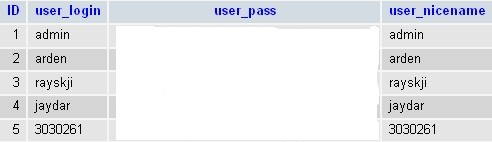
I have a simple install withe the following users – http://hsyst.com.au/images/wp_user_list.jpg
I composed and sent a message to arden, jaydar, 3030261 (these are the login names)
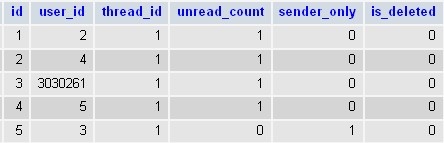
However, on posting the message the browser returned an “Internal Server Error!”. On inspection the recipients of the message were: http://hsyst.com.au/images/bp_msg_recipients.jpg.
Clearly 3030261 is NOT a user_id. So, why in God’s name would BP want to use such a label as a foreign key in the message_recipients table??
Another issue is that when someone replies to a message the throbber is displayed on the the submit event but the throbber is not cleared after submission. This leads to the user pressing (ad nauseum) the submit button creating multiple reply messages.
Hi. I have successfully installed WPMU into my WordPress & Buddypress install. My question is how do the users actually create a blog?
still cannot figure this out. Can we please go 1 by 1? I have a single installation WP+BP and i have buddypress registration on, so everybody is becoming a member through BP. Let’s say that i want to create a simple widget “About me” and echo what the author’s filled in *this* profile field. The profile field would be called “About me
.This will appear only in author’s posts. I say again my wordpress installation is not MU but it is multi authors write in the same blog. this plugin does exactly what i want, but it echos the WP’s core “About me” and i want to modify it with buddyopres’s field!
https://wordpress.org/extend/plugins/author-profile/
Please help 
Hi @andrea_r,
Oh, I see.
But my situation is a little bit defrrent from what you seem to understand.
First, I use WP 3.0.3 with multi site enabled. Then I install buddypress plugin and enable it.
Thus, I have no extra blog but only one attached to buddypress (primary) site.
In this situation, a user registers the site and he/she becomes “author” of the site blog. However, it does not show in the user’s “My Blogs” nor listed in “Blog Directory”.
As a result, when the user wants to post, he/she has to access to dashboard by typing directory the url of dashboard.
Of course, the user can post a new post, and it will be displayed in the site blog. Nevertheless, the user still can not see the site blog in his/her “My Blogs” in the admin bar nor in “Blog Directory” until the administrator re-activates the buddypress plugin.
I do not think this is due to WP core features. I think this is a bug lies in the buddypress plugin.
How do you think?
Hi I would like to change the front page of my buddypress site, but when i change the index.php file the whole site goes down.
I tried to use Settings->reading-> front-page as static page , but i want the front page to have a different them than the rest of my site.
Any suggestions? anyone having this problem?
 Anonymous User
Inactive
Hi all,
Trying to test out BP for the first time and am having some trouble. I’m on WP 3.0.3, BP 1.2.6, default BP theme, running as a sub-site using subdomains. BP is installed and working for the most part. Tried creating a few test accounts though but the activation emails don’t seem to be getting sent. Figured I’d try just going to the main site’s login page and registering and account, which did generate an email. The link, which pointed to a BP sub site page, brings up:
Fatal error: Call to undefined function bp_page_title() in /home4/poptopcr/public_html/wp-content/plugins/buddypress/bp-themes/bp-default/header.php
Any advice much appreciated.
Josh
@gunju2221
It’s not css, it’s in the process of validation. I need to find which function deliver this error message, then I can work on changing the way it deliver.
@boonebgorges
I meant the error messages on register.php.
“
If input is invalid, it adds a `
…
`
I don’t want to show the erro message. — this can be done by something like : .erro{ dispaly:none;}
Then, If there’s any invalid input in this form, I want to add a line at the top of the form saying “invalid input, please review the input marked in red”;
Then, I want to change the invalid field’s label color to red.
I want to do this because I feel very annoyed seeing a big block of red message.
I’ve just checked your site. Looks like you’ve disabled BuddyPress.
Hi everyone I am a beginner at all this and I am having a little problems with the bp implementation with the bp -mystique theme and was wondering if someone could guide me towards the right direction. The wp portion of the site is looking good but as soon as i go to a bp part the header is not where it suppose to be there is a big space and the background image for the site is not there anymore.
It seems that the bp is not registering the modification I have made on the wordpress part.
the site im working on is icacsports.com
Any help would be most appreciated
cheers,
Is this a new installation or did you recently upgrade WP? WP/BP versions? What theme are you using?
Deactivate all plugins but leave BuddyPress activated and use bp-default theme. Clear cache. See if the same erratic behavior shows up.
Hi
Thanks, you have a solution ?
A have a idea but, i’m not a expert in php, look :
https://buddypress.org/community/groups/creating-extending/forum/topic/field-edit-and-popup/
I need you help
(sorry for my english level ^^”)
Same here. It works when you type it in as a permalink ie https://codex.buddypress.org/search/member, but not when you use the search form.
@thealchemist do bear in mind that Multisite is a WordPress feature (and therefore really a WP support issue rather than a BP one) even though we are happy to help where we can with non BP support issues 
@boonegorges , @r-a-y I have setup my test environment and I have found that it is my theme causing the problem. I have made some changes to it and Im not certain to which area I should be looking in for problems. Can you point me to some of the main function which are used for the messaging? Thanks.