Search Results for 'buddypress'
-
AuthorSearch Results
-
July 25, 2017 at 6:58 pm #267211
In reply to: Help with this code
Henry Wright
Moderatoris_user_logged_in()is a WordPress function. It’ll returntrueif the user is authenticated andfalseif not.bp_loggedin_user_id()will return the ID of the BuddyPress member currently logged in.The two functions are different.
July 25, 2017 at 5:33 pm #267209In reply to: Allow Underscores in Username
livingflame
ParticipantJuly 25, 2017 at 3:33 pm #267208In reply to: jQuery-cookie upgrade to js-cookie
r-a-y
KeymasterAlready reported.
July 23, 2017 at 6:54 pm #267165In reply to: Warning: Illegal string offset ‘slug’
ModeratorWhat code do you have at line 102 in themes/buddyapp/lib/plugins/buddypress/navigation-icons.php?
July 23, 2017 at 10:07 am #267157In reply to: Change member URL on members directory page?
wzshop
ParticipantOk found that you can just create a child template for /buddypress/members/members-loop.php
July 21, 2017 at 10:35 pm #267145In reply to: Conditional redirect for non-logged in users
porcusheep
ParticipantI got it working! Thank you so much for you help Henry.
I ended up modifying the code I found in this post: https://buddypress.org/support/topic/hiding-groups-activity-members-list-to-non-members/Ran into some issues as bp_is_page( BP_MEMBERS_SLUG ) is no longer working, replaced it with your bp_is_members_directory()
Then had to figure out why bp_is_page() doesn’t work, found it is replaced with is_page()
After, some figuring out how to use is_page(), I got everything working with the code below:
function nonreg_visitor_redirect() {
	global $bp;

	if (is_page('alchemist-top-250-companies') ) {

		if(!is_user_logged_in()) {
			wp_redirect('/stillneedtosetupage' );
		}

	}

	if (bp_is_members_directory() ) {

		if(!is_user_logged_in()) {
			wp_redirect('/register' );
		}
	}
}
add_filter('get_header','nonreg_visitor_redirect',1);
July 21, 2017 at 7:14 pm #267141In reply to: Conditional redirect for non-logged in users
ModeratorThe code should go in your bp-custom.php file.
Ref https://codex.buddypress.org/themes/bp-custom-php/
That looks like it would work for my members directory but what about doing this for a conditional redirect for a specific post page?
Which post page are you referring to?
July 21, 2017 at 4:13 pm #267132In reply to: Issue With YITH Frontend Manager Plugin
ModeratorOr you can try to access to some page in WordPress admin area (e.g.: with an ajax call) ?
BuddyPress doesn’t do this by default. Considering you can’t reproduce, I expect the client is using custom code that’s causing the problem (either in their functions.php file, bp-custom.php file or in an activated plugin). Check those 3 locations on your client’s site for anything strange.
July 21, 2017 at 1:45 pm #267130In reply to: Show members list in private group
bambidotexe
ParticipantI found a workaround, I’am quite not completely satisfied but…
First of all, disable members list on group:
function change_access_group_nav_tabs() {
  if(bp_is_group()) {
    buddypress()->groups->nav->edit_nav( array( 'user_has_access' => false ), 'members', bp_current_item() );
  }
}
add_action( 'bp_actions', 'change_access_group_nav_tabs' );
(btw, setting the value to true actually make the the nav items always here, but we still can’t access the group list on click)
And then I simply add a custom BP Group Extension to make my own members list:
class Group_Extension_List_Members extends BP_Group_Extension {
    /**
     * Here you can see more customization of the config options
     */
    function __construct() {
      $args = array(
          'slug' => 'members-list',
          'name' => 'Membres',
          'access' => array( 'anyone'),
          'show_tab' => array( 'anyone'),
          'nav_item_position' => 12,
          'screens' => array(
              'create' => array(
                  'enabled' => false
              ),
              'edit' => array(
                    'enabled' => false
              ),
          )
      );
      parent::init( $args );
    }
    function display( $group_id = NULL ) {
      //Remove user who do not belong to the group on members loop
      function filter_for_groups( $members_template_has_members, $members_template, $r ) {
        for ($i=sizeof($members_template->members)-1; $i >= 0 ; $i--) {
          $user_id = $members_template->members[$i]->id;
          if(!groups_is_user_member( $user_id, bp_get_group_id() )){
            $members_template->member_count = $members_template->member_count-1;
            array_splice($members_template->members, $i, 1);
          }
        }
        if ($members_template->member_count <= 0) {
          return '';
        } else {
          return $members_template_has_members;
        }
      };
      add_filter( 'bp_has_members', 'filter_for_groups', 10, 3 );

      require('/Your/theme/custom/members/loop/members-loop.php');
    }
}
bp_register_group_extension( 'Group_Extension_List_Members' );
Hope it will help other in the future, And I’m still open to know the good way to proceed.
July 21, 2017 at 9:41 am #267124In reply to: Error Call to undefined function dbDelta ()
emmanuel123
ParticipantHi.
After I installed. When I log into the admin page. I get the message: “Fatal error: Call to undefined function dbDelta () in wp-content / plugins / BuddyPress / bp-core / admin / bp-core-admin-schema.php on line 159″How do I do to fix this?.
We wish everyone helpJuly 19, 2017 at 10:32 am #267101In reply to: Profile page not found
wbcomdesigns
ParticipantHi, @mmjr2000
Please take a look…
https://buddypress.org/support/topic/replace-%20-usernames-with-a-dash-in-url/
Hope this will help.
Thanks.
July 19, 2017 at 8:24 am #267099Hugo64
ParticipantHi @johnriggs78,
Thank you for your answer.
Let me precise my message: If I install the 2.8. version and above, the install will be done, and the main site will run, but not the subsites with Error 500.
This is also the case with only buddypress activated in my wordpress, which shows it is a problem of Buddypress plugin.
Best,Hugo
July 19, 2017 at 7:06 am #267094In reply to: Notifications
johnriggs78
ParticipantHi @lovechard,
I’ve understood what your need is and would like to inform you that none such plugin exists.
Its a complete custom code that someone will need to write. You can hire any developer for this need.One such plugin exists that notifies for group activities : BP Group Notifier
Regards,
John.July 19, 2017 at 12:13 am #267092In reply to: Invalid Activation Key
kcscience
ParticipantI am having the same problem with my web site, and I have figured out why the problem happens, and why the problem is intermittent…
Here is the problem: a user registers for a BuddyPress account, receives the activation email, follows the link in the activation email, and gets the “Invalid activation key” error. Yet, their account really *is* activated, and they can log in and use their account. A different user does exactly the same thing, and everything works great for them – they get the “Account Successfully Activated” page.
*Some* users have this problem, most don’t. The ones that do? They seem to have “Blue Coat K-9 Web Protection” software installed on their computers. This is software that is generally installed by parents to keep children from viewing inappropriate content on the internet. When the user follows the “activation” link, K-9 (running on the user’s computer) sends the URL to Blue Coat’s servers, which hit the URL (causing the account activation to succeed). Blue Coat’s servers analyse the “account activation succeeded” response, decides that web page is “kid friendly”, and then tells the user’s computer that that URL is “safe”. The user’s browser is then allowed to hit the URL, but, since that BuddyPress account has already been activated (by Blue Coat’s servers), the user sees the “Invalid activation key” error message, because we tried to activate the BuddyPress account twice.
Assuming that Blue Coat’s K-9 software is not the only “internet safety” software that acts in this way, it might be a good idea to change the BuddyPress “account activation” system to display an “activation succeeded” message when a user (or their “internet safety” software) tries to activate a BuddyPress account more than once.
Here are more details, in case if anybody is interested…
I instrumented my site’s “index.php” and my site’s “public_html\wp-content\plugins\buddypress\bp-templates\bp-legacy\buddypress\members\activate.php” with code that logs tons of stuff, including the IP address of the user. This led to the following discovery…
When a non-K-9 user follows the “activation” link, “index.php” gets hit (from their computer’s IP address), which invokes the fore-mentioned “activate.php”, which activates the account and emits the “activation successful” web page, and all is well. One web request happened, as demonstrated by “$_SERVER[‘UNIQUE_ID’]”.
When a K-9 user follows the “activation” URL, however, a MUCH different situation occurs, which involves four separate web requests. The first two requests come from an IP address that is registered to Blue Coat Systems / Symantec Corporation, the makers of the K-9 Internet Protection software. The second two requests come from the user’s computer…
* Web request #1 – Blue Coat’s computer hits “index.php” with the activation URL’s ending slash missing.
* Web request #2 – Blue Coat’s computer hits “index.php” again, with the correct activation URL this time. This invokes lots of PHP code (on my server), which eventually results in “activate.php” running and the account activation succeeding. The reply (the “account activation succeeded” web page) is delivered to Blue Coat’s servers, who analyses it and decide that the web page is “kid friendly”, so it tells K-9 (running on the user’s computer) that it’s OK to show that page.
* Web request #3 – The user’s computer finally hits “index.php”, in order to activate the account.
* Web request #4 – The user’s computer hits “index.php” again, with the registration key removed from the end of the URL this time. This invokes lots of misc PHP code, which eventually results in “activate.php” running and failing this time, because the activation has already happened (back in web request #2, which Blue Coat made, in order to determine if that web page is “kid friendly” or not).
I have no idea why the user’s computer (in #3 and #4) make two requests instead of one. However, even if it made just one, it would still show the error message, because that’s the second time the BuddyPress account was activated.
– kcscience
July 18, 2017 at 3:39 pm #267086In reply to: Profile, activity, notification pages 404 error
ruchika88
ParticipantHi John,
Thanks for reverting I reactivated buddypress plugin but no luck. I am a first time user of Buddypress please help.
Thanks
RuchikaJuly 18, 2017 at 2:32 pm #267083In reply to: Creating a group by activity post
brucelewis55
ParticipantHI, we have worked on some add ons in buddypress.
July 18, 2017 at 1:31 pm #267082In reply to: Profile, activity, notification pages 404 error
ParticipantHello ruchika,
I checked your Pages like- profile, Activity & Notification.
At least you couldn’t Deactivate Buddypress plugin, Anyway When you will activate Buddypress Plugin All pages will be work.And if you Need Notification plugin you can download – BP Favorite Notification
If you need another plugins you can also downlod from Plugin Shop, It’s totaly Free, So Go Head & Enjoy. If you need any help i will around.Regards
JohnJuly 17, 2017 at 1:59 pm #267073In reply to: BuddyPress Newsletter relaunched
Slava Abakumov
Moderator#BuddyPress Newsletter #35 – BuddyPress 2.9.0 RC1, new theme and lots of plugins to consider
Subscribe here: http://bpmail.ovirium.com/
July 17, 2017 at 7:07 am #267064ParticipantHello @thelovebridges
Anyone can upload cover images to groups or profiles by applying the setting…
Settings > BuddyPress > Settings screen
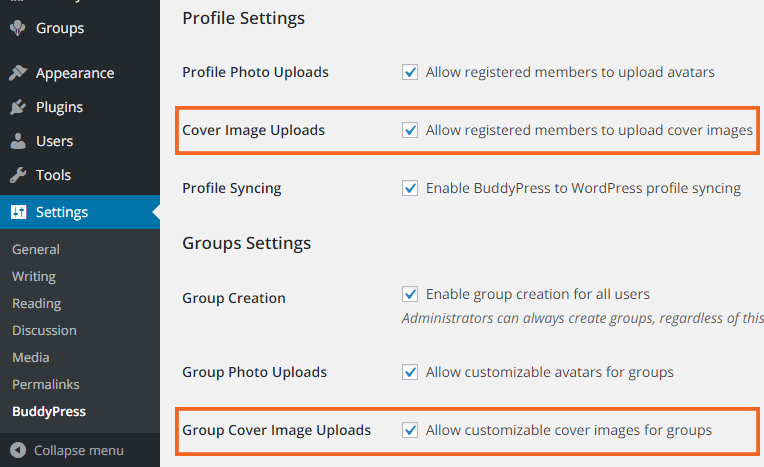
Please take a look…
Hope this will help.
Thanks.
July 17, 2017 at 5:36 am #267061In reply to: [access request]Documentation contribution
deimz
ParticipantBefore I linked actions and add_filter lists but I forgot apply_filters list, so you can get it here 🙂
Mickaël
July 17, 2017 at 4:48 am #267060In reply to: [access request]Documentation contribution
ParticipantThanks for forwarding my request 🙂
In the meanwhile, feel free to access actions and filters as PDF here :
Mickaël
July 16, 2017 at 7:26 pm #267057thelovebridges
ParticipantWordPress 4.8
BuddyPress 2.8.2July 16, 2017 at 5:09 am #267045In reply to: disable buddypress email sending for custom role?
andrew55
ParticipantRobin W over at bbPress was kind enough to provide this filter for functions.php:
add_filter( 'bbp_get_topic_subscribers', 'rew_filter_subscrbers' );
add_filter( 'bbp_get_forum_subscribers', 'rew_filter_subscrbers' );

function rew_filter_subscribers ($users) {
	$role = 'my_custom_role' ;
	$filtered_ids = array();
	foreach ( (array) $users as $user_id ) {
		$user_info = get_userdata($user_id);
		$user_roles = $user_info->roles ;
		if (!in_array ($role, $user_roles)) {
			array_push($filtered_IDs, $user_id);
		}

	}
return $filtered_ids ;
}
Used with a custom role, it works great at preventing emails from going out from bbPress.
Of course, BuddyPress sends out several emails (friend request, private messages, etc).
Any ideas on how I can modify the filter above to prevent sending of BuddyPress emails to user if they have a custom role enabled? Even a place to go where I might find some ideas to work with?
Thanks for any suggestions.
July 15, 2017 at 10:17 pm #267043In reply to: Plugin: BuddyPress Strong Username And Password
ParticipantCorrection:
<?php
/*
Plugin Name: BP strong username and password
Description: Force the new registered in BuddyPress to use strong username and password.
Version: 1.0
Author: Anonymous
*/

add_action( 'plugins_loaded', 'plugin_load_textdomain' );
function plugin_load_textdomain() {
  load_plugin_textdomain( 'bp-strong-username-password', false, dirname( plugin_basename( __FILE__ ) ) . '/languages' );
}

// Force Strong Username
function strong_username() {
 global $bp;

 if ( !empty( $_POST['signup_username'] ) )
   if ( !valid_username( $_POST['signup_username'] ) ){
    $bp->signup->errors['signup_username'] = __( 'Your username is too weak or short. Please, use uppercase, lowercase and numbers. Minimum 8 chars.', 'bp-strong-username-password', 'buddypress' );
   }
 }
 add_action( 'bp_signup_validate', 'strong_username');

 function valid_username($candidate) {
   $r1='/[A-Z]/';  //Uppercase
   $r2='/[a-z]/';  //lowercase
   $r3='/[0-9]/';  //numbers

   if(preg_match_all($r1,$candidate, $o)<1) return FALSE;
   if(preg_match_all($r2,$candidate, $o)<1) return FALSE;
   if(preg_match_all($r3,$candidate, $o)<1) return FALSE;
   if(strlen($candidate)<8) return FALSE;

   return TRUE;
}

// Force Strong Password
function strong_validation() {
 global $bp;

 if ( !empty( $_POST['signup_password'] ) )
   if ( !valid_pass( $_POST['signup_password'] ) ){
    $bp->signup->errors['signup_password'] = __( 'Your password is weak or too short. Please, use uppercase, lowercase, numbers and special characters. Minimum 8 chars.', 'bp-strong-username-password', 'buddypress' );
   }
 }
 add_action( 'bp_signup_validate', 'strong_validation');

 function valid_pass($candidate) {
   $r1='/[A-Z]/';  //Uppercase
   $r2='/[a-z]/';  //lowercase
   $r3='/[!@#$%^&*()-_=+{};:,?<.>]/';  // whatever you mean by special char
   $r4='/[0-9]/';  //numbers

   if(preg_match_all($r1,$candidate, $o)<1) return FALSE;
   if(preg_match_all($r2,$candidate, $o)<1) return FALSE;
   if(preg_match_all($r3,$candidate, $o)<1) return FALSE;
   if(preg_match_all($r4,$candidate, $o)<1) return FALSE;
   if(strlen($candidate)<8) return FALSE;

   return TRUE;
}
July 15, 2017 at 7:30 pm #267039In reply to: Cropping profile image broken
enacta2
Participant@r-a-y a ticket for this issue with WP Rocket is active on WP Rocket’s GitHub: bug report for broken BuddyPress profile cropping
It appears the issue is CDN rewrite by WP Rocket. I’m going to ping the ticket assignee to see if they’re making any progress.
Do you want to lend a hand to the WP Rocket people, if they need the help? (Maybe it could get this done sooner. The ticket has been open for more than 3 months!)
-
AuthorSearch Results


