Search Results for 'buddypress'
-
Search Results
-
hello, I’m trying to hide an activity update that appears on the feed which says “posted a new activity comment”. I tried using the buddypress activity filter plugin but there’s nothing on the plugin to hide new comments from the activity feed
My buddypress site has a database that is now over 7 GB.
I’m moving the site to a new server as it’s getting pretty slow and wondering what if there are things I could do to make it more efficient?
It’s been tracking activity since 2009 – any way to trim that to just past few months?
(I already block most spiders from paginating through that via robot.txt)I occasionally get crashed tables, and the current server fails for memory problems if I run a repair DB via command line – so it must be repair single table to make it work – (DB too bit for me to use phpmyadmin as well which sucks)
Should I consider splitting the site being hosted on one server with files and then move the DB to a separate web server or something?
Do I need to have a system that can dedicated 8GB or Ram just for the DB or something to make it better?
Maybe the new server move will be better – the old server is stuck on older centos/php – I was planning to move to a debian box with nginx – but read some docs this week that make it look flimsy for doing a multi-site that way perhaps. Another distro and caddy perhaps?
Anything else I should consider to make it run better? Any advise would be appreciated.
Hello all,
I’m working in a custom theme in wordpress. I’m getting an error on page /register. It is a blank page and sends directly to the buddypress template php file.
The fields are all there, but it shows a critical error. Anyone have an idea as to what I can do to solve this?
Thanks
Hi guys
Is it possible to remove/hide the “Popular” filter which displays above the Members list widget (Newest/Active/Popular) ?
It kinda encourages friend-request spamming on my site, users competing to be at the top of that “Popular” list.
So just remove the Popular filter, the Newest and Active should remain.
Thanks for any help.
WP 5.9.3
BP 9.1.1
Twenty Sixteen Theme
Site is NSFW, sorry no link unless requestedI encountered a strange behavior: in a WP 5.9.3 / bbPress 2.6.9 / BP 10.2.0 environment, when logged out, when leaving ANY page I get the JS warning “Leave this site? Changes that you made may not be saved.”
I took the old path of deactivating all plugins and activating them one by one. The culprit was BuddyPress.
Furthermore, I found out that changing BP template pack to “Nouveau” instead of “default” solved the warning issue.
Now, my problem is solved, but I have no explanation. Maybe someone could come with an answer to that…—
Theme: GeneratePress
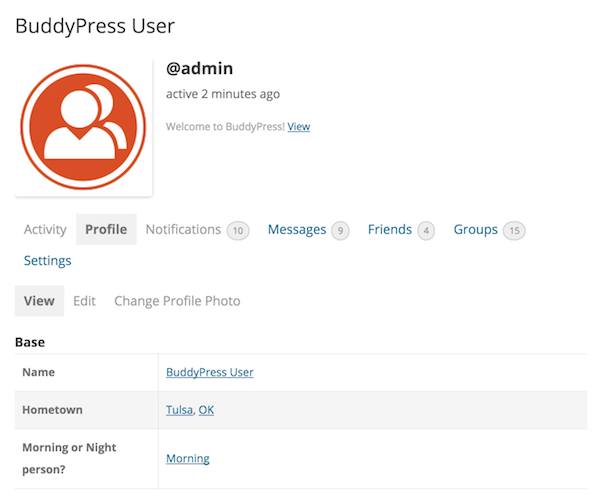
Builder: Elementor ProHi all, I am new to buddypress and my coding skills are almost nule. I am sorry. So far I have been able to set up few things in my website but I cant find an option to hide some large tags (Base and other H4 tags) from users profile. I am using woostify theme (child) and everything is updated. I need help. Thank you !
Topic: Join group ajax not working
I’m getting an admin-ajax 403 error when clicking the Join Group button. It seems to be the switch case in the functions. It seems to be completely ignored somehow. Logging within any of the cases returns nothing at all. Also a quick note… it’s not every group. It’s only on random ones
function bp_legacy_theme_ajax_joinleave_group() { if ( ! bp_is_post_request() ) { return; } // Cast gid as integer. $group_id = (int) $_POST['gid']; if ( groups_is_user_banned( bp_loggedin_user_id(), $group_id ) ) return; if ( ! $group = groups_get_group( $group_id ) ) return; // Client doesn't distinguish between different request types, so we infer from user status. if ( groups_is_user_member( bp_loggedin_user_id(), $group->id ) ) { $request_type = 'leave_group'; } elseif ( groups_check_user_has_invite( bp_loggedin_user_id(), $group->id ) ) { $request_type = 'accept_invite'; } elseif ( 'private' === $group->status ) { $request_type = 'request_membership'; } else { $request_type = 'join_group'; } // NOTE: WHY IS THIS BROKEN?!!? switch ( $request_type ) { case 'join_group' : if ( ! bp_current_user_can( 'groups_join_group', array( 'group_id' => $group->id ) ) ) { esc_html_e( 'Error joining group', 'buddypress' ); } check_ajax_referer( 'groups_join_group' ); if ( ! groups_join_group( $group->id ) ) { _e( 'Error joining group', 'buddypress' ); } else { echo '<a id="group-' . esc_attr( $group->id ) . '" class="group-button leave-group" rel="leave" href="' . wp_nonce_url( bp_get_group_permalink( $group ) . 'leave-group', 'groups_leave_group' ) . '">' . __( 'Leave Group', 'buddypress' ) . '</a>'; } break; case 'accept_invite' : if ( ! bp_current_user_can( 'groups_request_membership', array( 'group_id' => $group->id ) ) ) { esc_html_e( 'Error accepting invitation', 'buddypress' ); } check_ajax_referer( 'groups_accept_invite' ); if ( ! groups_accept_invite( bp_loggedin_user_id(), $group->id ) ) { _e( 'Error requesting membership', 'buddypress' ); } else { echo '<a id="group-' . esc_attr( $group->id ) . '" class="group-button leave-group" rel="leave" href="' . wp_nonce_url( bp_get_group_permalink( $group ) . 'leave-group', 'groups_leave_group' ) . '">' . __( 'Leave Group', 'buddypress' ) . '</a>'; } break; case 'request_membership' : check_ajax_referer( 'groups_request_membership' ); if ( ! groups_send_membership_request( [ 'user_id' => bp_loggedin_user_id(), 'group_id' => $group->id ] ) ) { _e( 'Error requesting membership', 'buddypress' ); } else { echo '<a id="group-' . esc_attr( $group->id ) . '" class="group-button disabled pending membership-requested" rel="membership-requested" href="' . bp_get_group_permalink( $group ) . '">' . __( 'Request Sent', 'buddypress' ) . '</a>'; } break; case 'leave_group' : check_ajax_referer( 'groups_leave_group' ); if ( ! groups_leave_group( $group->id ) ) { _e( 'Error leaving group', 'buddypress' ); } elseif ( 'public' === $group->status ) { echo '<a id="group-' . esc_attr( $group->id ) . '" class="group-button join-group btn" rel="join" href="' . wp_nonce_url( bp_get_group_permalink( $group ) . 'join', 'groups_join_group' ) . '">' . __( 'Join Group', 'buddypress' ) . '</a>'; } else { echo '<a id="group-' . esc_attr( $group->id ) . '" class="group-button request-membership" rel="join" href="' . wp_nonce_url( bp_get_group_permalink( $group ) . 'request-membership', 'groups_request_membership' ) . '">' . __( 'Request Membership', 'buddypress' ) . '</a>'; } break; } exit; }Hi,
I have a big Problem.
I used the BuddyPress Version 10.2.0 Plugin in combination whith Ultimate Member Version 2.3.2 and bbPress Version 2.6.9. I think this combination is a little bit difficult but it finaly worked well.I just changed some settings in the BuddyPress and then i got this Error:
Fehler-Details
==============
Ein Fehler vom Typ E_ERROR wurde in der Zeile 349 der Datei /mnt/web114/d1/63/5855963/htdocs/STRATO-apps/wordpress_10/app/wp-content/plugins/buddypress/bp-core/admin/bp-core-admin-functions.php verursacht. Fehlermeldung: Uncaught ArgumentCountError: 3 arguments are required, 2 given in /mnt/web114/d1/63/5855963/htdocs/STRATO-apps/wordpress_10/app/wp-content/plugins/buddypress/bp-core/admin/bp-core-admin-functions.php:349
Stack trace:
#0 /mnt/web114/d1/63/5855963/htdocs/STRATO-apps/wordpress_10/app/wp-content/plugins/buddypress/bp-core/admin/bp-core-admin-functions.php(349): sprintf()
#1 /mnt/web114/d1/63/5855963/htdocs/STRATO-apps/wordpress_10/app/wp-includes/class-wp-hook.php(307): bp_core_activation_notice()
#2 /mnt/web114/d1/63/5855963/htdocs/STRATO-apps/wordpress_10/app/wp-includes/class-wp-hook.php(331): WP_Hook->apply_filters()
#3 /mnt/web114/d1/63/5855963/htdocs/STRATO-apps/wordpress_10/app/wp-includes/plugin.php(474): WP_Hook->do_action()
#4 /mnt/web114/d1/63/5855963/htdocs/STRATO-apps/wordpress_10/app/wp-content/plugins/buddypress/bp-core/admin/bp-core-admin-actions.php(120): do_action()
#5 /mnt/web114/d1/63/5855963/htdocs/STRATO-apps/wordpress_10/app/wp-includes/class-wp-hook.php(307): bp_admin_init()
#6 /mnt/web114/d1/63/5855963/htdocs/STRATO-apps/wordpress_10/app/wp-includes/class-wp-hook.php(331): WP_Hook->apply_filters()
#7 /mnt/web114/d1/63/5855963/htdocs/STRATO-apps/wordpress_10/app/wp-includes/plugin.php(474): WP_Hook->do_action()
#8 /mnt/web114/d1/63/5855963/htdocs/STRATO-apps/wordpress_10/app/wp-admin/admin.php(175): do_action()
#9 /mnt/web114/d1/63/5855963/htdocs/STRATO-apps/wordpress_10/app/wp-admin/plugins.php(10): require_once(‘…’)
#10 {main}
thrownAnd no – of corse I dont have an up to date back up 🙁
What can I do to fix the problem?Great thaks to all hwo want to help me
WordPress-Version 5.9.3
Aktives Theme: ColorMag (Version 2.1.2)
Aktuelles Plugin: BuddyPress (Version 10.2.0)
PHP-Version 8.0.17Hello everyone,
I’m wondering if it’s possible to change the menu icons for custom links using BuddyPress?
If so, how would one go about that?
I’ve done a bit of searching but can’t seem to find the answer.I’m using the latest wp/bp installation.
Thank you in advance
I am sure this has been asked before but I can’t find it. I would be very appreciative if someone could help me change the grey to my theme colors. The search bar and other navigation are all greys despite the customizer being the theme color. I use Youzify so all those pages and styling are perfect.
Hello, im creating a buddypress website and im trying to add a feature that allows users to join a room and queue to stream a song each. Is there any plugin or other way to make it possible?
Hello, I am using Page View Count plugin to show information on post visits, that shows whenever those are fully displayed. Everything ok there.
The thing is that I would like to display also that information on each Buddypress post activity loop.Page View Count plugin offer some code (see below) to display that information, but I don´t understand yet on which buddypress file (and where) should I insert those lines of code (I’m using a child-theme):
For Single post, page, object
<?php pvc_stats_update( $postid, 1 ); ?>
Increase Page Views Count and echo stats of this post<?php pvc_stats_update( $postid, 0 ); ?>
Increase Page Views Count and return stats of this postfor Index pages
<?php pvc_stats( $postid, 1 ); ?>
Echo stats of this post<?php pvc_stats( $postid, 0 ); ?>
Return stats of this postThanks
——–
Wordpress version 5.9.3
Buddypress versión 10.2.0
Page View Count versión 2.5.3Hi, I’m using Buddyboss theme, and when a user creates a group and its forum, I need the forum to have by default certain topics set up, eg. ‘Rules’, ‘General Chat’ etc. Not sure how to code this, any help appreciated thanks!
Hi,
I am trying to setup Buddypress but Friend, public message, private message are not showing on frontend. Neither is members. Can anyone help please?
Thanks
JaneIm sure you have seen listings on websites and filters right next to them, the filters help sort out the results.
Now, how can I link profile details from a member directory with a filter? I want to use BuddyPress and then filter details such as price, star rating etc in the filter (displayed in sidebar)? So when I look at BuddyPress websites, the members (saved in member directory not under posts) are shown in a list grid like a normal listing. If I want to use a filter, e.g. Jet Smart Filter, how can I link the (meta) data from the member directory/profile details with the filter? As the filter is 3rd party, it is not natively connected/linked with the BuddyPress member directory. Any suggestions?Does anybody suggest the best setting for LiteSpeed cache for BuddyPress for best performance?
My current setup
site Buddies Buzz
Litespeed Hosting with Memcached/Redis, opcode cache, and Cloudflare CDNTopic: Help setting up buddypress
Hi,
The buddypress profile options dropdown is present in the wp admin bar. How do I get it to display in a specific section. I cannot use shortcodes of specific pages because they don’t work which is weird because the profile in the admin bar works all right.Anyone else seen this? My admin can upload an Avatar but my Users can’t. I deactivated all of my plugins and found that the conflict lies with WooCommerce. I have a store on my site so I need to keep WooCommerce running but I also need people to be able to upload Avatar photos. It is definitely Woo that is doing it as I turned off every plugin but that.
I am running WordPress 5.9.3 and BuddyPress 10.2 and woo 6.4.1 This happened on several themes including 2012. It is for the site http://www.13hikes.com


We want to provide the feature in the groups that possibly allowed members to post and comment anonymously.
Is it possible for members to post and comment anonymously In BuddyPress groups?