Search Results for 'notification user id'
-
Search Results
-
Hi!
I’ve been trying to display the total number of buddypress notifications in front end of my website. I’ve been using code from a topic that addressed a few of my concerns. It uses the code from the buddypress admin bar:
http://wordpress.stackexchange.com/questions/84072/show-buddypress-notification-in-the-frontend
It works fine, except that it only displays the total amount of notifications in 2 groups for messages, and friend request. So it doesn’t display any number greater then 2.
https://dl.dropboxusercontent.com/u/8411723/front-end.png
What I want is a way to display the notification count number shown in the member’s profile menu that shows the total amount of notifications individually:
https://dl.dropboxusercontent.com/u/8411723/notifications.png
If someone knows a way to display this specific number count outside the profile, I’d greatly appreciate any advice.
Thank you in advance!
Hi I am developing a new site for a client. I’m trying to crate a sidebar for logged in users with their avatar, username, notifications and the Buddypress pages. I’m trying to add the avatar with the code below:
<?php
$userid = bp_loggedin_user_id();
$avatarurl = bp_core_fetch_avatar( array( ‘item_id’ => $userid, ‘html’ => false ) );
echo $avatarurl;
?>This works on Buddypress profile page but no other page, is there anything I need to include in the header. This is a personal theme not the Buddypress default. I’m using WordPress 3.8.1 and Buddypress 1.9.2. The site is beta.hyperjake.com
Thanks for your help
ConorHi I am developing a new site for a client. I’m trying to crate a sidebar for logged in users with their avatar, username, notifications and the Buddypress pages. I’m trying to add the avatar with the code below:
<?php
$userid = bp_loggedin_user_id();
$avatarurl = bp_core_fetch_avatar( array( ‘item_id’ => $userid, ‘html’ => false ) );
echo $avatarurl;
?>This works on Buddypress profile page but no other page, is there anything I need to include in the header. This is a personal theme not the Buddypress defult.
Thanks for your help
ConorI swear this was working until very recently and I just noticed it no longer is and can’t work out why…
I use a customised registration form.
In my functions.php I have
add_filter( 'bp_core_signup_send_activation_key', '__return_false' );and
add_action( 'bp_core_signup_user', 'my_user_signup', 5, 3 );
function my_user_signup( $user_id, $user_login, $user_password ) {
  global $wpdb;

  // WE SKIP BP ACTIVATION EMAIL, SO LET'S INCLUDE STEPS FROM bp_core_activate_signup HERE
    // Tell admin we have a new user
    wp_new_user_notification( $user_id );
    // Activate user
    $wpdb->query( $wpdb->prepare( "UPDATE {$wpdb->users} SET user_status = 0 WHERE ID = %d", $user_id ) );
    // Remove the activation key meta
    delete_user_meta( $user_id, 'activation_key' );

  // ...Bunch of other stuff to do with populating extra profile fields...

  // Now sign them on
  $signon = wp_signon( array('user_login' => $user_login, 'user_password' => $user_password, 'remember' => false) );

  //Redirect
  if ( is_wp_error($signon) ) {
    error_log( "auto-login error for user " . $user_id . " : " . $signon->get_error_message() );
  }
  else {
    wp_redirect( home_url('some-page') );
    exit;
  }
Now, in every case, it is logging the error “Your account has not been activated. Check your email for the activation link” and so failing to log them in and redirect.
Any ideas?
Wordpress 3.8.1 bo 1.9.1
Hi,
I have spent hours trying to figure this out. My objective is to allow the user to change their online notification settings but disable the settings>general tab whilst leaving the settings>email menu tab in tact, or disable the output of “change email” and “change password” so it doesn’t show at all on the font end under settings>general.I do not want users to be able to change their passwords or email address through buddypress as I am using formidable pro for my registration for the site.
Is it just a case of editing out a few lines of code or do I need a php script to put in my theme functions.php?
regards
I ran into an issue where I loaded BuddyPress and BBPress at the same time. I performed a conversion from vBulletin to WordPress and it went swimmingly well. However, over the past couple of weeks, my users have reported they have received anywhere from 20-50 emails a day with retroactive notifications about posts they were quoted on years ago. After two weeks of trying to figure out a solution, I came across this plug-in which I really feel needs to be apart of the core functionality of BuddyPress. I say that, because I found a lot of threads that were started and attempts at controlling notifications that did not seem to have a lot of traction.
http://wordpress.org/plugins/buddypress-notifications-manager/
This diamond in the rough of a mod not only controls the default notifications set for users, but retroactively updated all the existing user accounts. I am happy to report that I all of these notifications have stopped and I am not upsetting my user base.
I have this code
<?php if(!bp_is_user_messages() || !bp_is_user_notifications() || !bp_is_user_settings()) : ?>
	<?php bp_get_template_part('members/single/member-header'); ?>
<?php endif; ?>
Which works as intended with the first part !bp_is_user_messages().
However it ignores !bp_is_user_notification() and !bp_is_user_settings() and renders the member header.
I’d prefer the member header to be visible on all other pages minus messages, notifications and settings.
Any ideas how to achieve this?
I am helping a nonprofit I support by building a site totally built on Buddypress: http://parishcollective.org/beta
We are allowing users to create a profile with minimal information (via Social Login) but we want to keep the user role at ‘subscriber’ until they fill out the required profile fields. At that point, we need to be notified that they updated their info so an admin can check their info and up their role to ‘contributor.’ (It gives them access to creating blog posts and other things)
Initially I started with something basic from this post: http://buddypress.org/support/topic/notification-on-profile-update-2/
However, wp_mail() is conflicting with something in our site and causing a fatal error.
So I’ve been attempting to add a user meta key (when a user updates their profile) that can be queried in the backend in a custom admin menu so the users with completed profiles can be displayed.
Here was the adapted code based on the post above:
function my_update_profile_mark() {
$user_ID = get_current_user_id();
$power_level = 9000;
add_user_meta( $user_ID, '_level_of_power', $power_level);
}
add_action( ‘xprofile_updated_profile’, ‘my_update_profile_mark’ );
If I understand the ‘xprofile_updated_profile’ hook correctly, it should just fire anytime any field is updated on a profile, right?
From there I planned to experiment with something like this based on the Force Profile Update plugin to make the function fire when the profile is totally updated:
function my_update_profile_mark() {

                        global $wpdb;

			$bp_prefix = bp_core_get_table_prefix();
			$xprofile_fields = $wpdb->get_results("SELECT count(*) AS empty_fields_count FROM {$bp_prefix}bp_xprofile_fields WHERE parent_id = 0 AND is_required = 1 AND id NOT IN (SELECT field_id FROM {$bp_prefix}bp_xprofile_data WHERE user_id = {$user_id} AND valueIS NOT NULL AND value` != '')");

			foreach ($xprofile_fields as $field)
			{
				if ($field->empty_fields_count > 0)
				{
                                  $user_ID = get_current_user_id();
                                  $power_level = 9000;
                                  add_user_meta( $user_ID, '_level_of_power', $power_level);
                                }
add_action( ‘xprofile_updated_profile’, ‘my_update_profile_mark’ );
I’m a pretty new to programming and I don’t totally understand all the code here, but I’m trying hard to make something work here. Any ideas/guidance?
I also realize this solution, even if it worked, would update the meta key ‘_level_of_power’ to the specified value “9000” every time the user updated their profile after their profiles were filled out. But that’s an annoyance we can live with for now. Not knowing the user is ready to be upgraded wouldn’t work at all for the site. Any help would be appreciated. 🙁
Hi I am using WP 3.8 with the Thesis theme and Buddypress 1.91.
Buddypress was working fine with the Thesis Theme on version 1.7-1.8 with the addition of the awesome theme compatability, but when I upgraded to 1.91 it no longer works.
I get some output basically this:
Jeremy Francis – Online Design Specialist”>Jeremy Francis – Online Design Specialist
@jeremy active 2 seconds ago ActivityProfileSites 2Notifications 0Messages 0Friends 0Groups 0Settings PersonalMentionsFavoritesFriendsGroups Show: Everything Updates Posts Comments Friendships New Groups Group Memberships What’s new, Jeremy? Sorry, there was no activity found. Please try a different filter.But it is pure text inside a <p> tag and there are no links at all.
Here is a link to my site: http://sendasites.com/members/jeremy/
it is in development so there are no links on the site to the buddypress compnents but I use standard naming for the other pages, the other pages ie http://sendasites.com/register/ http://sendasites.com/user-groups/ http://sendasites.com/activity-2/ etc.
I can confirm that it worked in version 1.8 I rolled back the plugin and everything worked just fine.
Topic: Hide profile tabs
Topic: Notifications show error
Hi all,
Just upgraded to the latest versions of WP, BP and bbP. When I click the thread link under “Notifications,” users receive the following error:Fatal error: Call to undefined function bp_core_mark_notifications_by_item_id() in /home/content/37/9672937/html/wp-content/plugins/bbpress/includes/extend/buddypress/notifications.php on line 140Any ideas?
I’ve made a custom Notification Loop inside the header of my site that should of course only be visible for logged-in users + only the notifications-list of the current loggedin_user_id.
This is what I made, first I check if user_is_logged in -> if TRUE start the has_notifications Loop of the user_id => loggedin_user_id.
Everything seems to work fine but I’m not very convinced I did this the correct way.
<?php if ( is_user_logged_in() ): ?> <?php if ( bp_has_notifications( array( 'user_id' => bp_loggedin_user_id() ) ) ): ?> ... here I've got the loop stuff ... <?php endif; ?> <?php endif; ?>I have the legacy forums set up on my site, http://barronsquare.org. I want to move up to bbPress. I especially want the “Follow this topic” notifications and reply ‘threading’.
- Running WP v3.7.1, BP v1.9, Suffusion child theme with Suffusion BuddyPress Pack
- ‘Public’ portion visible to users who are not members
- ‘Private’ portion for members only.
- “All Residents” GROUP with auto join for all MEMBERS with forums.
- Several other smaller sub-groups with forums.
- Forums are not public.
Tried the upgrade to bbPress 2.2 (with Suffusion bbPress Pack) on my WAMP localserver version of site and had all kinds of problems migrating content, etc. Many of the data ‘repair’ functions failed. I could not get the ‘threaded replies to work. Eventually got the forums to mostly work, but still have questions.
- Would I be better with a ‘site-wide’ forum rather than the private All Residents group?
- Can I make a site-wide forum private?
- How do I modify the formatting of the forum postings?
- Where do I look to troubleshoot the ‘threading’ function?
Happy Holidays to all.
Maury
Hi guys! I have a WP 3.7.1 and BP 1.8.1 and I have created the following function in my functions.php to retrieve the number of notifications of the current user. The function has one parametrer $type_notification that can be: ‘new_message’, ‘group_invite’ or ‘friendship_request’.
The function works quite well, but the point is that with that function in functions.php, the BP ajax doesn’t work. For example: the search box in members or the members list pagination. If I delete this function from functions.php, the members pagination, etc. works fine again.
Does anyone know why is this happening? or an alternative function that I can use for this porpouse that doens’t break the ajax?
Thanks in advance! 🙂
Rocío Valdivia
/** * Get notifications for a specific user */ function buddyboss_childtheme_core_get_notifications_for_user( $type_notification ) { global $bp; $user_id = $bp->loggedin_user->id; $notifications = BP_Core_Notification::get_all_for_user( $user_id ); $grouped_notifications = array(); // Notification groups $renderable = array(); // Renderable notifications // Group notifications by component and component_action and provide totals for ( $i = 0, $count = count( $notifications ); $i < $count; ++$i ) { $notification = $notifications[$i]; $grouped_notifications[$notification->component_name][$notification->component_action][] = $notification; } if($type_notification == 'new_message'): $number_notifications = count($grouped_notifications['messages']['new_message']); elseif($type_notification == 'group_invite'): $number_notifications = count($grouped_notifications['groups']['group_invite']); elseif($type_notification == 'friendship_request'): $number_notifications = count($grouped_notifications['friends']['friendship_request']); endif; return $number_notifications; }Hiyya,
Firstly.. My Info :
WordPress Version 3.7.1
BuddyPress Version 1.8.1
Site : duffitness.com/coachportal/ – this site is private and only accessible by registered coaches, however I have attached an image of the title I am referring to.Okay, so I can activate new accounts with Google Chrome, Firefox, Opera and Safari but IE(8) redirects to login without activating…
I can have users go to the activate page and enter the activation key but that is not very user friendly.
I do receive this message when other browsers activate, but they do still activate the account…
“Warning: unserialize() expects parameter 1 to be string, array given in /”mysitedirectory removed for privacy”/wp-content/plugins/buddypress-notifications-manager/loader.php on line 77”
I did locate the source of this warning and I have attached a screenshot of the code…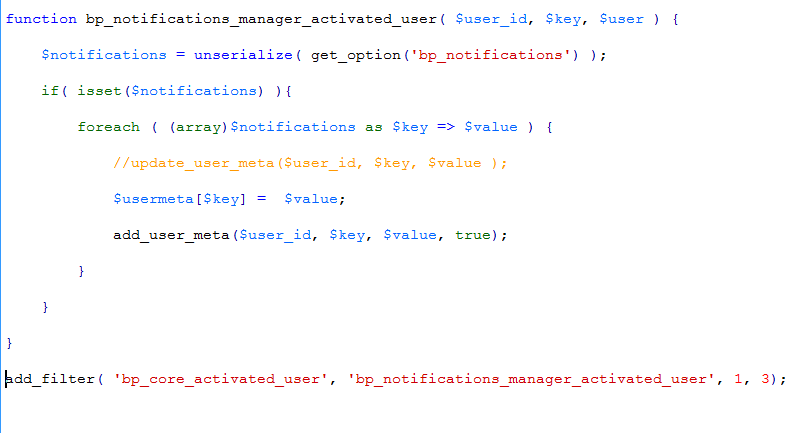
However, Upon disabling the notifications manager plugin I found that this is not the source of the problem. I now get no errors with any of the other browsers but IE redirects to log in without completing the activation process when a user clicks the link from their email and then returns the error…
“ERROR: Your account has not been activated. Check your email for the activation link.”
…when attempting to log in.Thanks for any insight into this problem… (Go figure it’d be IE that decides to be difficult, lol)
Cassey


