I fixed most of mine by adding a few fields in the Profile Field Setup. I added City, State ( as a dropdown menu and a zipcode. I got rid of 70% just from this. also, I have seen in my log files they are searching for
“yes i d like to create a new blog”
“registering for this site is easy just fill in the fields below and we ll get a new account set up for you in no time yes i d like to create a new blog”
“intext yes i d like to create a new blog blog with wordpress inurl register”
“i d like to create a new blog”
maybe someone can tell us where this text lives so we can remove these tags from the search engines. just by this they are able to see all wordpress sites. I tried it with google and it does work.
Hi
I’ve built a website for teaching Irish, which has á é í ó ú in it’s alphabet (you probably know where this is going). I saw that my database was set to UTF8_general_ci but noticed when creating post, the post cut off after an accented letter.
I then followed the steps to convert the DB to latin1 and changed the ‘Reading’ under the WordPress dashboard to latin1 and this solved the problem for posts.
However, it seems that the Buddypress Posts and AJAX functionality ignore the latin1 characterset from WordPress as it displays the accents as strange characters. E.g. tést is appearing as tést when I post something from a group ‘Whats new in Group A’.
If anyone has any ideas it would be greatly apperciated as since its a language website, these characters (á é í ó and ú for Irish) are very important.
Thanks
Dónal
Here’s another way of using your current WordPress theme with BuddyPress – http://bp-theme-converts.com/convert-buddypress-theme-to-wp-theme/ See popular WP themes converted- http://bp-theme-converts.com/category/bpthemes/
As for BP Template Pack, it needs to be updated whether it’s for someone who knows how to code or for those who don’t know how to code. Check out Kobe Bryant’s site which uses BP Template Pack http://kb24.com/ specifically for BP components.
This is the plugin you want: https://wordpress.org/extend/plugins/bp-profile-as-homepage/ – does exactly what you’re asking for.
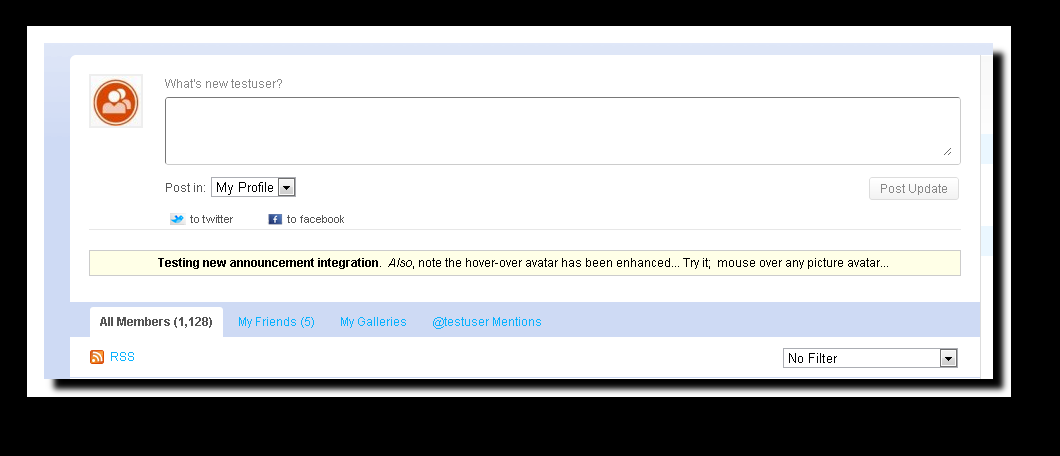
I found a nice integration of an announcement plugin for WordPress that works well with buddpress…
Plugin is Announcer: http://wordpress.org/extend/plugins/announcer/
Mod is this: edit post-form.php and add this after the ` `:
`
<?php if(function_exists('announcer')) { announcer();} // insert for announcer plug
?> `
Then in the admin… just choose the choose the “I will place myself option…”
Here is a quick pict:
http://gyazo.com/adbdd55ee44f08cb35cae80e333f999e.png
I wouldn’t use the template pack. I’d create my own framework with the bp files inside or call them via a child theme. There isn’t a right or wrong way but the template pack is really for someone who isn’t capable of coding and a quick start to adding BP to an existing WordPress. If you go the template pack route then the files could be out of sync with the BP core.
I FINALLY got it to work. Had to totally uninstall wordpress and start from scratch on setting up a mu site, but it works. My recommendation to anyone else who is encountering this error… Do not use the Buddypress theme template pack that automatically reorganized your theme. Just install Buddypress and then enable a buddypress compatible theme. If you use the template pack and then install and activate a compatible theme, things may go sideways.
Remember, you can always start from scratch. Good luck. -B
@r-a-y
Unfortunately that method breaks the adminbar in the wordpress admin panel 
Thanks.
Let me apologize up front if some of these questions are basic, I’m getting ready to tackle my first BuddyPress project but have been developing for WordPress for the last few years so I’m hopeful it will be quick to pick up for me.
I know that there is some work required to make any theme BuddyPress ready and I do a lot with custom WordPress themes so using an out of the box BuddyPress theme is out for me.
Any way the question I have is this, I’ve created a framework that I use for my theme development then just create WP child themes off of that, if I wanted to make one of those child theme BuddyPress ready could I just copy the files from the BP Theme Pack and adjust the HTML to fit my existing structure? Or is there more I have to do other then that?
Also Is there an unstyled BuddyPress theme that I could then style, like say the Sandbox WordPress theme?
Hi, Thanks mercime. I am using a wordpress three column theme with the BP template pack. For now my BP component pages(activities, fourms etc) not showing any sidebar. Hope it is clear now. Thanks!
“I am working with a two column site where i installed BuddyPress”
Not clear whether your current theme is WordPress theme with BP Template Pack or are you using child theme of bp-default theme. Adding sidebar to bp-component pages involves the same amount of work as adding a sidebar to a regular WordPress theme. You might also want to check this out – https://wordpress.org/extend/themes/bp-columns
https://codex.wordpress.org/Pages#Creating_Your_Own_Page_Templates and widgetize it.
Add http://bp-theme-converts.com/buddypress-log-inout-widget/
Then change the old static page in front page to the new one you created. After all, there can only be one home page, normally.
Figured it out:
– Create a blog specifically for WoW achievements.
– Install http://feedwordpress.radgeek.com/, and then find my character feed using the WoWArmory.
– Set the Syndication to syndicate that character feed.
– Feed shows up Activity via blog posts from the blog I created for WoW achievements.
I’m developing a theme and would like a help / opinion.
I’m planning to allow users to choose through a menu page the buddypress page template (left sidebar, no sidebar, two sidebar or right sidebar). This is easy in wordpress, because you just use the templates page, but buddypress doesn´t use this function.
Does anyone know how I can do this without profoundly alter the page templates of buddypress?
I figured a way through variables ($), but it would change both the sidebar.php on all the index.php buddypress and probably problems may arise with the use of plugins using this method.
I have an Issue with the Autocomplete Function of bp-messages:
The AJAX Function always puts in rows with crap content into the autocomplete list, when it doesn’t find real users:
– As 10 is the Max Number of Users showd it always generates 10 Rows
– If it finds Users, it fills the first rows with the users
– the rest is filled with the first rows of the html body! why this?!
the generated Autocomplete div looks like this (with one actual found member):
<div style="display: block; position: absolute; width: 275px; top: 519.8px; left: 225.5px;" class="ac_results">
<ul style="max-height: 250px; overflow: auto;">
<li class="ac_event"><img width="15" height="15" class="avatar user-4-avatar" alt="Avatar Bild" src="http://www.gravatar.com/avatar/2d4295744122a2d5c31fde29b569409a?d=http://www.entrepreneurship.de/campus/wp-content/plugins/buddypress/bp-core/images/mystery-man.jpg&s=15"> <strong>Ch</strong>ristian Fenner (<strong>ch</strong>ristianfenner)</li>
<li class="ac_odd"></li>
<li class="ac_event"></li>
<li class="ac_odd ac_over"></li>
<li class="ac_event"><meta content="text/html; charset=UTF-8" http-equiv="Content-Type"></li>
<li class="ac_odd"><title>Entrepreneurship Campus | Administrator | Messages</title></li>
<li class="ac_event"><meta content="WordPress 3.0.1" name="generator"> <!– leave this for stats –></li>
<li class="ac_odd"><link media="screen" type="text/css" href="http://www.entrepreneurship.de/campus/wp-content/themes/campus/style.css" rel="stylesheet"></li>
<li class="ac_event"><link campus="" title="Entrepreneurship" type="application/rss+xml" rel="alternate"></li>
<li class="ac_odd"><link campus="" title="Entrepreneurship" type="application/rss+xml" rel="alternate"></li>
</ul>
</div>
you can look it yourself at http://www.entrepreneurship.de/campus but the site is in german…
the fun thing is, that, on another install, which is the development state of the website and very similar, but not same, the function works without the mentioned bug.
Main differences of the installs:
– Dev: Multisite WP3.01 Install, the Buddypress is installed in a “user blog”, Live: Single Site WP 3.01 install
– Different Servers / Server Configurations
Installation Details of the Systems:
– WP 3.01, BP 1.2.6
– Buddypress childtheme with almost all template files changed because of theme translation (but the theme is the same on both installs and also i tried to use standard theme which didn’t help)
– Several Plug-Ins installed (But I deactivated all Plug Ins which didn’t solve the problem)
I already tried to see myself through tje ajax functions of the autocomplete but i didn’t find anything that gave me a hint how to solve the problem…
would be great if you came up with an idea how to solve this problem. if you need more information about the installation details, tell me!
cheers, oli
I just found a WP-Plugin called Allow Categories https://wordpress.org/extend/plugins/allow-categories/stats/ which might be used for acces rights.
Same way you do with WordPress blog theme. Either create
– home.php with the HTML, special widget area, and/or login code etc. Then upload to active theme folder. OR
– special Page Template with special widget area for login and/or login code.. Then Page > Add New with title Home and associate page template, Publish. Then go to Settings > Reading and choose – static front page with name of page as home page.
I was able to accomplish this by simply installing https://wordpress.org/extend/plugins/forum-server/
Looks like my webhost managed to fix the upload issue. As you might expect, I made a rather dumb mistake. Although I’m not too technical, so no surprises!
“The problem was the blogs.dir directory was created as a file rather than a directory”
Although NOW my issue is that once the image is uploaded, the jquery cropper fails to load, so I’m still unable to get unique images to either profiles or groups. I know many others are having this particular problem, too. If others have particular insights into fixing the jcropper issue – please post. Thanks!!
And again, I’m using WordPress (3.0.1) in multisite and the latest version of BuddyPress (1.2.6) on a subsite.
Why wait? I think it could be tossed in easily with a if has nav and use the old li links as an else. It’s not like it’s some crazy functionality, it’s built into wordpress and added with minimal fuss.
If it’s not in 1.2.7 I’ll write a tut.  1.3 probably won’t be around for months.
I’m a novice using WP 3, installing Buddypress and having 2 permalink issues:
Question#1) I need to change from the default permalink structure. What is better?
a) /%post_id%/%post_name%
b) /post/%post_name%/%post_id%/
I prefer (a) because it’s shorter and avoids the structure issue which would happen if I begin with just the postname. But the wordpress site says the following about it “Some people recommend /%post_id%/%post_name%/ which works for performance reasons but others recommend against it because it is unfriendly to users in the many contexts in which users interact with URLs.” But it doesn’t give any more details (nor do the links)
#2) I need to redirect posts. Although in various places its says WP does this if I am migrating from the default, on my site it doesn’t. So I installed Deans Permalink Migration plugin but I need to put in the code for the default permalink structure. Can someone tell me what that is?
Thanks,
Ari
Does anybody have Idea creating a Chat plugin using tinychat’s API? I know PHP ,but not an expert . As far as I know there is no other plugin or app which provides unlimited access .
I heard that Tinychat planned to launch wordpress plugin but i wonder it have not released yet
Thanks in advance !
Did you ever find a resolution to this? I am looking to allow site members to update their profiles in BP, ideally have it sync with their WP profile, and publish the WP contact info in a “roster” type page, where the contact info is only visible to a logged in member. I have BP set up, and the WP profile roster page set up, now I just need the profiles to sync…
I am starting a community site for architects, and I know there is a google maps plugin out there: http://buddypress.org/community/groups/mappress-google-maps-for-wordpress/ – Can anyone give me feedback on this plugin? Is it possible to allow users to add their own map icons/destinations? I want users to be able to add their own destinations, and at the same time upload images and other files associated with that destination.
Basically, I want a search page that looks like the homepage of google maps, and when someone searches a destination, all of the files/images uploaded from different users pop up. On the left hand sidebar, the destination name will show with a list of files. People will be able to download and comment on these files as well.
Any feedback is appreciated! Thanks!
-I’m running the regular wordpress 3.01, i downloaded just yesterday
-I downloaded wordpress as a directory
-root
-it’s not an upgrade and wordpress was running fine
-i uploaded buddypress 1.2.6 and it was not an upgrade
-my host is network solutions and they run unix
does this help?