Skip to:
Content
Pages
Categories
Search
Top
Bottom

Search Results for 'buddypress'

Viewing 25 results - 31,776 through 31,800 (of 94,540 total)
  • Author
    Search Results
  • #165162
    @mercime
    Participant

    It’s all cool. This is the Requests and Feedback forum 🙂

    @sooskriszta can share the enhancement tickets he/she posted in BuddyPress Trac and lobby for such, exercising first amendment rights. Ticket #5008 reminds me of the original BP theme which had the avatars of group admin/mod under the avatar with member avatars below it 🙂

    adnan0777
    Participant

    Hello,
    I am using wordpress 3.5.1 and buddypress 1.7.2 (latest)
    I have turned on “Extended Profiles” from buddypress component settings
    But I can see only one filed (‘name’field) with the base profile group

    Image and video hosting by TinyPic

    My question is, how can I add additional field like about/description, email, password etc?

    Prolet
    Participant

    Dear aces,
    Thank you for your suggestion to caedaldwych. I’d like to use it too.
    My problem is that I can’t find the bp-custom.php file 🙁
    The path “wp-content/plugins/bp-custom.php” is incorrect.
    Of course I went to buddypress’s directory and opened all subdirectories and still no bp-custom.php
    It’s weird to ask for this type of help, but please advise me!
    Thank you so much for your time!

    Best regards,
    Prolet

    #165156
    carmeetsroad
    Participant

    Hey there @yuttadhammo

    can I brand it so that it has my sites logo, etc?

    can I hardcode the url? -I think this feature disappeared

    sinetwo
    Participant

    Hi all,

    I’ve been trawling through google and all sorts of resources for a plugin that does the following:
    * Allows members of BuddyPress to create their own routes using google maps
    * Adding multiple markers (i.e. more than 2)
    * Allows the user to add information for those specific markers
    * Potentially able to search like one would on google maps and add destinations, i.e. search for London Bridge, click add a new destination, then Big Ben, then Buckingham Palace etc.
    * Allowing the user to post their submission

    I’m reasonably technical but inexperienced with javascript/php etc. Happy to dabble in code as long as it’s well documented, but either way, I’d be incredibly grateful if anyone could supply me with a link or a plugin that seems fitting for this purpose.

    Thanks!
    SineTwo

    @mercime
    Participant

    @fearracious glad you resolved the issue on your own 🙂
    Marking this as resolved.

    #165153

    In reply to: can't create groups

    @mercime
    Participant

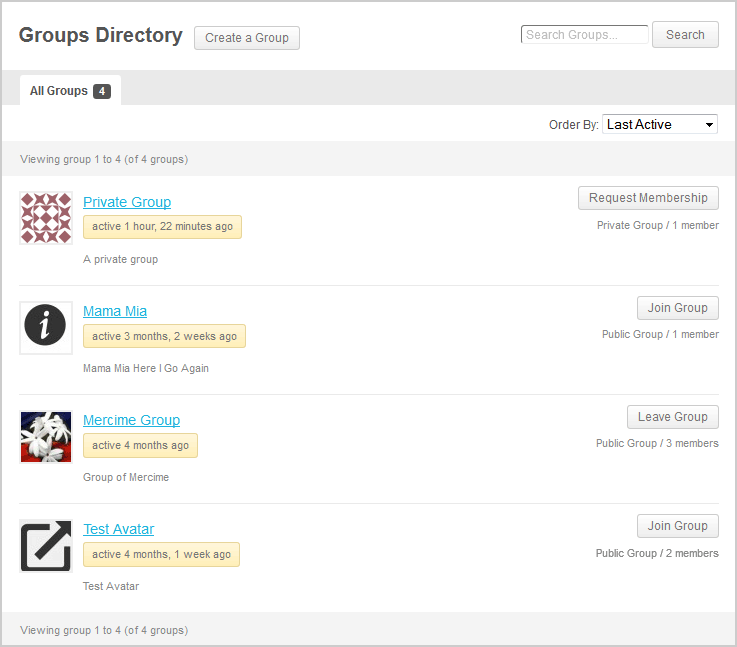
    @carolinecalvert what theme are you using? Some themes have page titles which are not within the WP loop, hence BP cannot automagically insert the “Create Group” button beside the page title as seen https://mercime.files.wordpress.com/2013/02/groups-directory.png

    On way is to create a link when user is logged in. You only need to append /create/ after your site’s group directory url, e.g. http://example.com/groups/create/

    In upcoming BP version, the create a group link will also be added to the Member’s navigation in WP toolbar. If you’re adventurous, you can add the code to have those links already https://buddypress.trac.wordpress.org/changeset/7062

    #165152
    Ben Hansen
    Participant

    +1 for that, was my primary thought regarding the anti-spam functionality i was referring to. actually had a sort of deep thought about that the other day.

    i think in todays landscape on the internet spam is becoming an ever increasing issue and without doubt buddypress sites/admins are bearing in inordinate brunt of that battle. Now that we have lowered the bar of entry there is (if we have our way) liable to be a lot more fresh targets for these malicious interests. Nothing dissipates the enjoyment (by admins or users) of a social network faster or more easily then spamming. Not to in any way subtract from the great strides that have already been made in this regard, we owe it to not only our own community but the internet as a whole to be proactive and step up our game in regards to making these leaches lives more difficult.

    Now stepping down from the soap box 😛

    #165151
    @mercime
    Participant
    #165150
    Asynaptic
    Participant

    I like your enthusiasm but it seems you’re getting a bit ahead of yourself. The trac for 1.8 has been on 100 active and outstanding tickets for weeks on end now and there is no discussion of 1.9 anywhere.

    But as long as we’re throwing out ideas for the upcoming, I’d like to vote for throttling as discussed here:

    https://buddypress.org/support/topic/best-way-to-limit-friend-requests-to-avoid-spam

    jeffp808
    Participant

    Hello,
    This is my first time posting on buddypress support so I wanted to say in advance I really appreciate any help. I have a wordpress site which is running buddypress. I have also have two themes under my wordpress page. What I need to do is have one theme for almost all of my pages and then change the theme when a user goes to one of the buddypress pages such as “/member/” or “/activity/”.

    I was able to have this happen and change my theme based on the suburl using the plugin “jonradio Multiple Themes” but when I activate buddypress the plugin does not work anymore. I’ve seen forum postings saying that that plugin does not work with buddypress.

    Is there a php code that I could add into the index pages which will load a different theme? Or is there another way to do it?

    Thank you!!

    #165146
    carolinecalvert
    Participant

    I have installed buddy Press in my website and for some reason I am not seeing the option to create groups. I have the latest version of both WordPress and Buddypress. I have it enabled so that members can create groups….still nothing.

    help!

    #165144
    kathytarochione
    Participant

    I hope this doesn’t sound stupid, but I’m new to BuddyPress and Woocommerce. I have 3 levels of members at my site. How do I create different levels of members in BuddyPress? I’m also confused as to setting up the General Settings for Subscribers. What do I set it to to connect the member profile to the Woocommerce when a purchase is made. Hope I’m making this clear. Here is my website: http://caninecommunityreporters.com

    #165142
    angelladesigns
    Participant

    I went to create a group. I made it through all the steps, clicked finish and got a 404 page not found. The group shows up in the list, but when clicked it goes to the page not found.

    http://blog.skemaholicsanonymous.com/groups/skemanon-blog/

    So, I hit the back button to go back to the group creation and after going through a second time the group page was created with numbers following the slug.

    http://blog.skemaholicsanonymous.com/groups/skemanon-blog-1976713/

    Not sure what to make of this issue. I do have buddypress set to not allow group creation by all members and I am using an admin account to create group.

    1. Which version of WordPress are you running?
    3.5.1

    2. Did you install WordPress as a directory or subdomain install?
    subdomain

    3. If a directory install, is it in root or in a subdirectory?

    4. Did you upgrade from a previous version of WordPress? If so, from which version?
    Not sure

    5. Was WordPress functioning properly before installing/upgrading BuddyPress (BP)? e.g. permalinks, creating a new post, commenting.
    Yes

    6. Which version of BP are you running?
    1.7.2

    7. Did you upgraded from a previous version of BP? If so, from which version?
    1.7.1

    8. Do you have any plugins other than BuddyPress installed and activated?
    Yes

    9. Are you using the standard BuddyPress themes or customized themes?
    2012

    10. Have you modified the core files in any way?
    No

    11. Do you have any custom functions in bp-custom.php?
    yes`function remove_xprofile_links() {
    remove_filter( ‘bp_get_the_profile_field_value’, ‘xprofile_filter_link_profile_data’, 9, 2 );
    }
    add_action( ‘bp_init’, ‘remove_xprofile_links’ );`

    12. If running bbPress, which version? Or did your BuddyPress install come with a copy of bbPress built-in?
    2.3.2

    13. Please provide a list of any errors in your server’s log files.

    14. Which company provides your hosting?
    hostmysite.com

    15. Is your server running Windows, or if Linux; Apache, nginx or something else?
    Linux

    #165139
    mcmook
    Participant

    Wordpress 3.5.1. Buddypress 1.7.2

    Site admin is not receiving new user registration email notification.

    Emails ARE working. The new user receives the activation email, and when I create a user from WP Admin (Add New User) an email IS sent to the site admin.

    fearRacious
    Participant

    Guys,,

    I fix it..I just added a code in the wp-config.php – define ( ‘BP_ENABLE_MULTIBLOG’, true );

    If you got this error try adding that code..Might help you also..

    Cheers

    fearRacious
    Participant

    Hello,

    Im having this problems,I have used a multisite and used BP on my subdirectories.But after the success installation it gives me this error The following active BuddyPress Components do not have associated WordPress Pages: Activity Streams, Site Tracking, User Groups, Members, Activate, Register..

    I try to click on repair but when I click on new page it wont create a page on my subdirectory,but it create pages on the main directory..

    Anyone know how i can fix this..here is the link of my subdirectory http://209.105.244.10/~executiv/employee,when click sign up it goes to the main site..Which I dont want to..Can you please help me…

    Thank you

    #165131

    In reply to: [Resolved] RSS Error

    Ben Hansen
    Participant

    bp rss feeds can definitely be erratic, we are working on it:

    https://buddypress.trac.wordpress.org/ticket/5020

    Ben Hansen
    Participant

    well i know that we are working on the feeds i have definitely seen erratic behavior in the bp rss feeds:

    https://buddypress.trac.wordpress.org/ticket/5020

    #165129
    nomad-one
    Participant

    Thanks @ubernaut for keeping us updated. Most of my feeds are working now with the exception of one. It sounds like generally there’s alot of buggyness across wordpress with regards to feeds and with similar mime type error messages showing not only in Buddypress

    #165128
    akukskuks
    Participant

    Yes @nomad-one, mine are starting to have mood swings as well. Fickle things!! The individual group feeds I had feeding into my reader have stopped working, and now can’t get any more valid feeds registered at all from the site. Just can’t figure out what to do…

    Question: do the WP RSS feeds on your dashboard work?
    Reference: https://buddypress.org/support/topic/no-rss-feeds-are-coming-in/

    Sounds like maybe there’s some structural BP issues here? I’m equally as desperate to get these to work…how can we figure this out? Or are we S.O.L. until the next BP update??

    #165127
    denorm
    Participant

    Hi Hugo, thanks for the response! Yes, I agree and I feel uncomfortable editing the buddypress core files.

    In my opinion, ideally buddypress core functions would not include any references to CSS class names, as that’s purely presentation and should be located separately in the theme/template files. I can understand id tags being required for functionality, but it seems there must be some way to move the css class references out of the main code.

    It just seems weird to define a new css class even though bootstrap already has an “active” definition similar to buddypress’ “current selected”?

    But like I said, I’m new to BuddyPress. And as a back-end programmer I really dislike messing around with css. I’ll follow your advice and add buddypress-specific css classes..

    Thanks for the advice!

    #165125
    kathytarochione
    Participant

    I hope this doesn’t sound stupid, but I’m new to BuddyPress and Woocommerce. I have 3 levels of members at my site. How do I create different levels of members in BuddyPress? I’m also confused as to setting up the General Settings for Subscribers. What do I set it to to connect the member profile to the Woocommerce when a purchase is made. Hope I’m making this clear. Here is my website: http://caninecommunityreporters.com

    nomad-one
    Participant

    @mercime

    unfortunately it’s not working, I created a clone of the site, moved the site to a new server, switched off all plugins and used twenty twelve theme, I’m logged in at the site here:

    rns.the-colab.com

    Even when logged in, with the group as a public group, the feeds don’t work
    The feeds sometimes work and sometimes don’t work, sometimes give incorrect mimetype messages, sometimes just says the feed might be down.

    I had this problem on 2 servers, logged in or not, public groups or not etc etc

    The feeds are reportedly working on external sites but not on my own sites with buddypress running. When I put the feeds into feed validators it says

    I created a subscriber account here

    rns.the-colab.com
    testuser
    password123

    #165122
    BigYummi
    Participant

    Hello,

    This is my first social website, “mYYummi”, created with buddypress.
    I try to make a french website about sharing recipes.

    http://www.myyummi.com
    login : demo
    password : demo

    thx

Viewing 25 results - 31,776 through 31,800 (of 94,540 total)
Skip to toolbar