Search Results for 'private message button'
-
Search Results
-
My wordpress is 4.1 and Buddypress 2.1.1
Hello Community,
I am having a problem with a custom member page pagination, when clicking link to pagination page 2, pagination takes us to page 2 and adds the string “?upage=2” to the site URL.
After that, clicking page 1 or back symbol on pagination links does nothing, only refreshes page.
Problematic page: http://wp1.kodeserver.net/coach/
I have set the page above in Twentyfifteen theme as to exclude any third party theme related errors.If we use the default member page “http://wp1.kodeserver.net/members/” then pagination works ok.
I believe the error might be caused by the member filter i made or maybe i messed up the template.
Hope you can help.
Below is the code i am using:
functions that i use to filter member loop by member types on the site:
function bp_exclude_users_but_player() {

$excluded_users_but_player = implode(',',get_users('role=coach&fields=ID'));

$excluded_users_but_player = $excluded_users_but_player.','.implode(',',get_users('role=seniorcoach&fields=ID'));

$excluded_users_but_player = $excluded_users_but_player.','.implode(',',get_users('role=subscriber&fields=ID'));

$excluded_users_but_player = $excluded_users_but_player.','.implode(',',get_users('role=editor&fields=ID'));

$excluded_users_but_player = $excluded_users_but_player.','.implode(',',get_users('role=administrator&fields=ID'));

return $excluded_users_but_player;

}
function bp_exclude_users_but_coach() {
$excluded_users_but_coach = implode(',',get_users('role=player&fields=ID'));
//$excluded_users_but_coach = $excluded_users_but_coach.','.implode(',',get_users('role=seniorcoach&fields=ID'));
$excluded_users_but_coach = $excluded_users_but_coach.','.implode(',',get_users('role=subscriber&fields=ID'));
$excluded_users_but_coach = $excluded_users_but_coach.','.implode(',',get_users('role=editor&fields=ID'));
$excluded_users_but_coach = $excluded_users_but_coach.','.implode(',',get_users('role=administrator&fields=ID'));
return $excluded_users_but_coach;
}function bp_exclude_users_but_senior_coach() {
$excluded_users_but_senior_coach = implode(',',get_users('role=player&fields=ID'));
$excluded_users_but_senior_coach = $excluded_users_but_senior_coach.','.implode(',',get_users('role=coach&fields=ID'));
$excluded_users_but_senior_coach = $excluded_users_but_senior_coach.','.implode(',',get_users('role=subscriber&fields=ID'));
$excluded_users_but_senior_coach = $excluded_users_but_senior_coach.','.implode(',',get_users('role=editor&fields=ID'));
$excluded_users_but_senior_coach = $excluded_users_but_senior_coach.','.implode(',',get_users('role=administrator&fields=ID'));
return $excluded_users_but_senior_coach;
}function bp_exclude_cc_backend_users() {
$excluded_cc_backend_users = implode(',',get_users('role=subscriber&fields=ID'));
$excluded_cc_backend_users = $excluded_cc_backend_users.','.implode(',',get_users('role=editor&fields=ID'));
$excluded_cc_backend_users = $excluded_cc_backend_users.','.implode(',',get_users('role=administrator&fields=ID'));
return $excluded_cc_backend_users;
}
Member Loop that calls member “Coach” filter:
<?php if ( bp_has_members( bp_ajax_querystring( 'members').'&exclude='.bp_exclude_users_but_coach().'&per_page=24' ) ) : ?>And this is the problematic page template code (The one that filters by role type (coach))
<?php

/**

 * The template for displaying all pages

 *

 * This is the template that displays all pages by default.

 * Please note that this is the WordPress construct of pages and that

 * other 'pages' on your WordPress site will use a different template.

 *

 * @package WordPress

 * @subpackage Kleo

 * @since Kleo 1.0

 */
get_header(); ?>
<?php get_template_part('page-parts/general-title-section'); ?>
<?php get_template_part('page-parts/general-before-wrap'); ?>
<?php
if ( have_posts() ) :
// Start the Loop.
while ( have_posts() ) : the_post();
/*
* Include the post format-specific template for the content. If you want to
* use this in a child theme, then include a file called called content-___.php
* (where ___ is the post format) and that will be used instead.
*/
get_template_part( 'content', 'page' );
endwhile;
endif;
?><?php do_action( 'bp_before_directory_members_page' ); ?>
<section class="container-wrap main-color">
<div class="section-container container"><div id="buddypress">
<?php do_action( 'bp_before_directory_members' ); ?>
<?php do_action( 'bp_before_directory_members_content' ); ?>
<!--<div id="members-dir-search" class="dir-search" role="search">
<?php //bp_directory_members_search_form(); ?>
</div>--><!-- #members-dir-search --><?php do_action( 'bp_before_directory_members_tabs' ); ?>
<form action="" method="post" id="members-directory-form" class="dir-form">
<div id="subnav" class="item-list-tabs" role="navigation">
-
<!--<li class="selected" id="members-all">"><?php //printf( __( 'All Members <span>%s</span>', 'buddypress' ), bp_get_total_member_count() ); ?>--> <!--Contatore membri totali-->
<?php //if ( is_user_logged_in() && bp_is_active( 'friends' ) && bp_get_total_friend_count( bp_loggedin_user_id() ) ) : ?>
<!--<li id="members-personal">"><?php //printf( __( 'My Friends <span>%s</span>', 'buddypress' ), bp_get_total_friend_count( bp_loggedin_user_id() ) ); ?>-->
<?php //endif; ?><?php //do_action( 'bp_members_directory_member_types' ); ?>
<?php //do_action( 'bp_members_directory_member_sub_types' ); ?>
<!--<li id="members-order-select" class="last filter">
<label for="members-order-by"><?php //_e( 'Order By:', 'buddypress' ); ?></label>
<select id="members-order-by">
<option value="active"><?php //_e( 'Last Active', 'buddypress' ); ?></option>
<option value="newest"><?php //_e( 'Newest Registered', 'buddypress' ); ?></option><?php //if ( bp_is_active( 'xprofile' ) ) : ?>
<option value="alphabetical"><?php _e( 'Alphabetical', 'buddypress' ); ?></option>
<?php //endif; ?><?php //do_action( 'bp_members_directory_order_options' ); ?>
</select>
--></div><!-- .item-list-tabs -->
<div id="members-dir-list" class="members dir-list">
<?php
/**
* BuddyPress - Members Loop
*
* Querystring is set via AJAX in _inc/ajax.php - bp_legacy_theme_object_filter()
*
* @package BuddyPress
* @subpackage bp-legacy
*/?>
<?php if ( bp_has_members( bp_ajax_querystring( 'members').'&exclude='.bp_exclude_users_but_coach().'&per_page=24' ) ) : ?>
<div id="pag-top" class="pagination">
<div class="pag-count" id="member-dir-count-top">
<?php bp_members_pagination_count(); ?>
</div>
<div class="pagination-links" id="member-dir-pag-top">
<?php bp_members_pagination_links(); ?>
</div>
</div><?php do_action( 'bp_before_directory_members_list' ); ?>
<ul id="members-list" class="item-list row kleo-isotope masonry">
<?php while ( bp_members() ) : bp_the_member(); ?>
<?php $user_info = get_userdata(bp_get_member_user_id()); ?>
<?php
$user_roles = $user_info->roles;
$user_role = array_shift($user_roles);// echo 'User ID: ' . $user_info->ID . "\n";
// echo bp_core_get_user_displayname( $user_info->ID ) ;
// echo $user_info->ID ;
?><li class="kleo-masonry-item type-<?php echo $user_role; ?>">
ID ; ?>' value='show/hide'> <!-- link che apre info's nascoste -->
<div class="member-inner-list animated animate-when-almost-visible bottom-to-top">
<div class="item-avatar rounded">
<!-- ">
--> <?php bp_member_avatar( 'type=full&height=150&width=150' ); ?>
<!-- -->
<?php //do_action('bp_member_online_status', bp_get_member_user_id()); ?>
</div>
<!-- "> -->
<div class="item">
<div class="item-title"><span class="loop-nome"><?php bp_member_name(); ?></span><span class="loop-cognome"><?php bp_member_profile_data( 'field=Cognome' ); ?></span></div><!-- <?php if ( bp_get_member_latest_update() ) : ?>
<span class="update"> <?php bp_member_latest_update(); ?></span>
<?php endif; ?>
-->
<?php do_action( 'bp_directory_members_item' ); ?><?php
/***
* If you want to show specific profile fields here you can,
* but it'll add an extra query for each member in the loop
* (only one regardless of the number of fields you show):
*
* bp_member_profile_data( 'field=the field name' );
*/
?></div>
</div><!--end member-inner-list-->
<!-- link che apre informazioni nascoste -->
<div id="contenuto-nascosto-<?php echo $user_info->ID ; ?>" class="hidden-infos">
<div class="nascondi-infos">
ID ; ?>' value='show/hide'>
<i class="icon-cancel"></i>
</div>
<div class="unhidden-infos unhidden-infos-first ">
<div class="item-avatar-small">
">
<?php bp_member_avatar( 'type=full&height=50&width=50' ); ?>
<?php do_action('bp_member_online_status', bp_get_member_user_id()); ?>
</div>
</div>
<div class="unhidden-infos">
<div class="item-title">
">
<span class="loop-nome"><?php bp_member_name(); ?></span>
">
<span class="loop-cognome"><?php bp_member_profile_data( 'field=Cognome' ); ?></span>
</div>
</div>
<div class="unhidden-infos">
<span class="nomeazienda-titolo custom-title">Azienda:</span>
<span class="nomeazienda custom-infos"><?php bp_member_profile_data( 'field=Azienda' ); ?></span>
</div>
<div class="unhidden-infos">
<span class="pos-lavorativa-title custom-title">Funzione:</span>
<span class="pos-lavorativa custom-infos"><?php bp_member_profile_data( 'field=Funzione' ); ?></span>
</div>
<div class="unhidden-infos">
<span class="settore-title custom-title">Settore:</span>
<span class="settore custom-infos"><?php bp_member_profile_data( 'field=Settore' ); ?></span>
</div>
<div class="unhidden-infos">
<span class="laurea-title custom-title">Laurea:</span>
<span class="laurea custom-infos"><?php bp_member_profile_data( 'field=Laurea' ); ?></span>
</div><div class="action">
<div class="generic-button" id="send-private-message">
" title="Clicca per profilo completo" class="send-message">Profilo Completo
</div><?php //do_action( 'bp_directory_members_actions' ); ?>
</div>
</div><script type="text/javascript">
jQuery(document).ready(function(){
jQuery('#nascondi-mostra-<?php echo $user_info->ID ; ?>').live('click', function(event) {
jQuery('#contenuto-nascosto-<?php echo $user_info->ID ; ?>').toggle('show');
});
});
</script><?php endwhile; ?>
<?php do_action( 'bp_after_directory_members_list' ); ?>
<?php bp_member_hidden_fields(); ?>
<?php else: ?>
<div id="message" class="info">
<p><?php _e( "Sorry, no members were found.", 'buddypress' ); ?></p>
</div><?php endif; ?>
<?php do_action( 'bp_after_members_loop' ); ?>
</div><!-- #members-dir-list -->
<?php do_action( 'bp_directory_members_content' ); ?>
<?php wp_nonce_field( 'directory_members', '_wpnonce-member-filter' ); ?>
<?php do_action( 'bp_after_directory_members_content' ); ?>
</form><!-- #members-directory-form -->
<?php do_action( 'bp_after_directory_members' ); ?>
</div><!-- #buddypress -->
</div>
</section><?php do_action( 'bp_after_directory_members_page' ); ?>
<?php get_template_part('page-parts/general-after-wrap'); ?>
<?php get_footer(); ?>
Hello 🙂
Is there any short-code for Profile buttons such as (Add Friend and Private Message) ?
because i want to insert these buttons in another page :3Hi,
I just noticed that after Updating one of my site to 2.1.1, Private Message Button is now showing on My own Profile which is very weird.
Please how can I solved this problem, have searched google and couldnt find anything.
Am using Latest wordpress and Latest Buddypress.
Thanks
ABI hope it’s OK to post something like this…
I’m brand new to Buddypress and not a professional developer. I’m moving a community from a Facebook group to my new Buddpress site. A lot of my members are not very net-savvy and are unfamiliar with how other community sites/forums work. So, I’m trying to offer familiar functions that they’ve seen on Facebook. The forum is going to be the main hub of the site, so I need to get it look good and easy to use.
Set up has gone well do far, but the forum is just looking a bit dull.
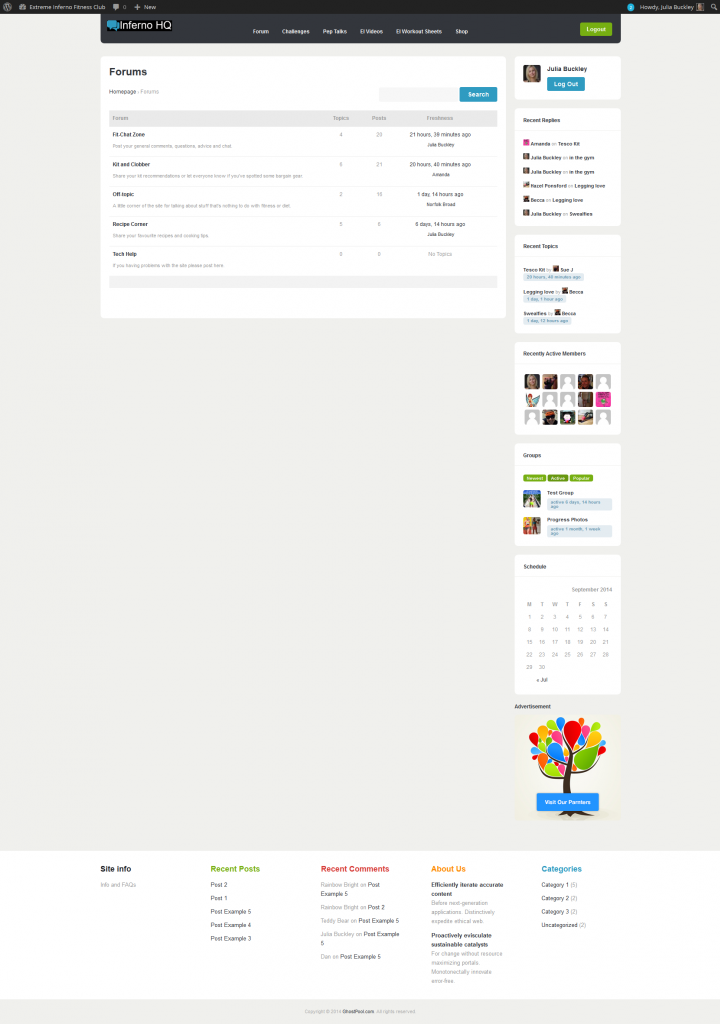
Is there a better way I can display the forum to show the activity?
Are there any other plugins or shortcodes people would recommend to make the forums as similar as possible to what my members have been used to in the Facebook group? (I’m only just getting to grips with shortcodes, so I’m afraid I’d need pretty basic instructions)
I have a Latest Activity feed on the site homepage which shows all activity:
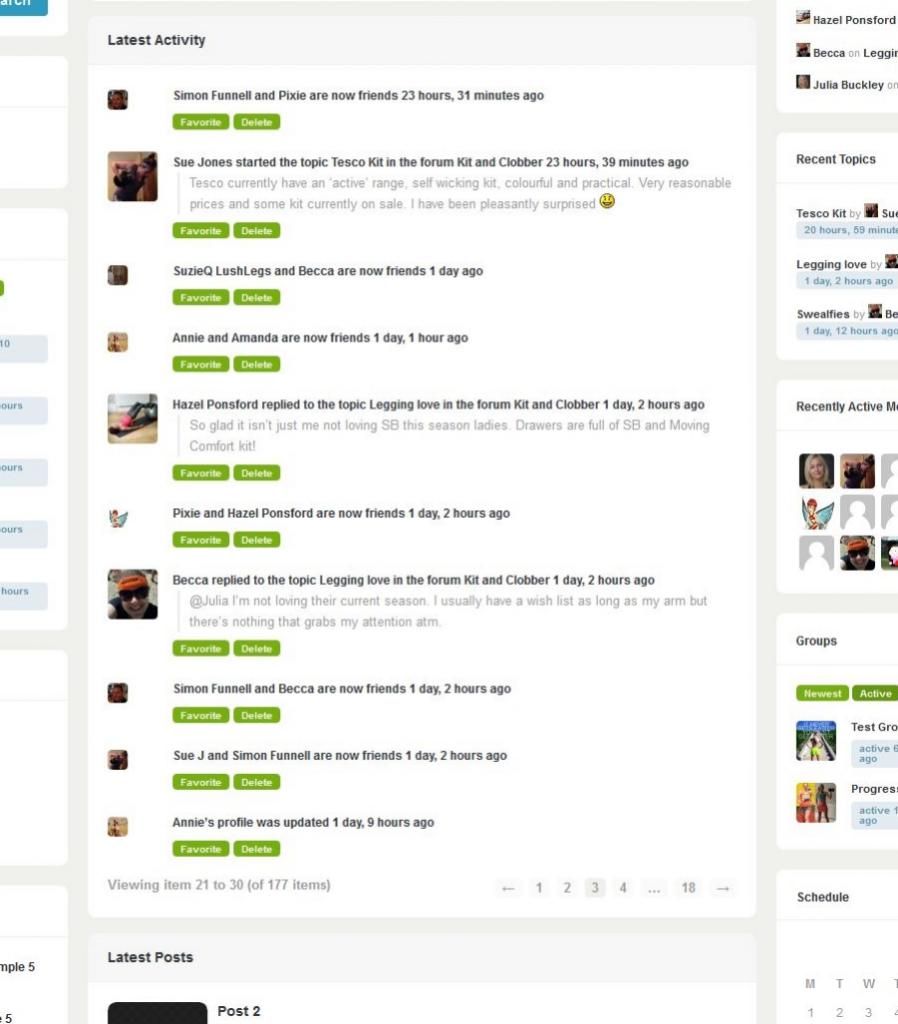
This looks a bit more compelling than the forum page, but it would be nice if it could have things like reply buttons or ‘Go to forum’ to make it more obvious how people can get in the conversations.I’m also having trouble getting the Private Message function set up. I do have it selected in Buddypress settings, but it’s not working (error page comes up). Any ideas?
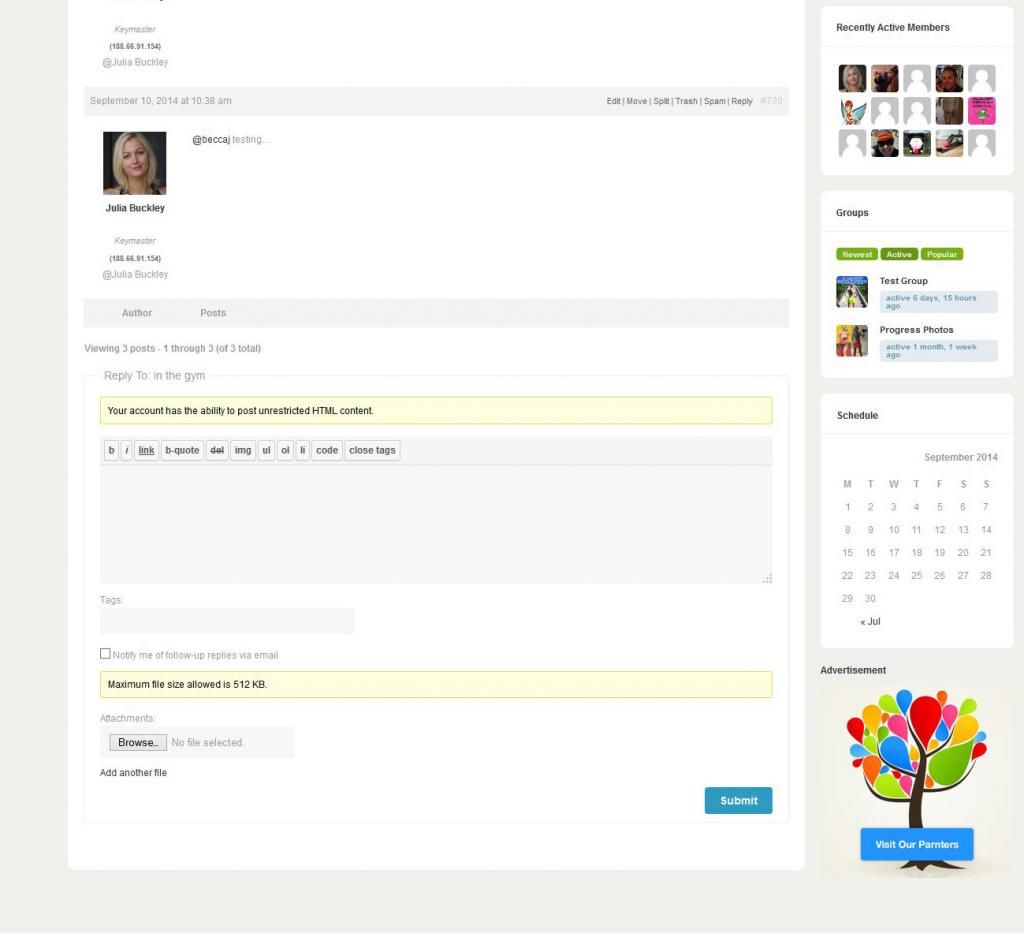
Just one more thing, people are getting confused about how to @mention each other due to @names being different from the usernames which appear under member’s profile photos. Because my members are used to a Facebook group they expect to be able to @ message using user names. At the moment, as a temporary work around, I’ve installed some shortcode which displays the @name below the user name, but it’s not ideal (and also seems to display the ip address which I don’t like):
Suggestions on all of the above would be great and anything else I can do to make my site’s community elements more similar to Facebook really. Thanks. 🙂
Topic: Forwarding Messages
1. Which version of WordPress are you running?
Latest
2. Did you install WordPress as a directory or subdomain install?
Directory
3. If a directory install, is it in root or in a subdirectory?
Root
4. Did you upgrade from a previous version of WordPress? If so, from which version?
N/A
5. Was WordPress functioning properly before installing/upgrading BuddyPress (BP)? e.g. permalinks, creating a new post, commenting.
N/A
6. Which version of BP are you running?
Latest
7. Did you upgraded from a previous version of BP? If so, from which version?
N/A
8. Do you have any plugins other than BuddyPress installed and activated? If so, which ones?
N/A
9. Are you using the standard BuddyPress themes or customized themes?
Custom
10. Have you modified the core files in any way?
No
11. Do you have any custom functions in bp-custom.php?
No
12. If running bbPress, which version? Or did your BuddyPress install come with a copy of bbPress built-in?
Not using bbpress anymore
13. Please provide a list of any errors in your server’s log files.
N/A
14. Which company provides your hosting?
Dedicated server
15. Is your server running Windows, or if Linux; Apache, nginx or something else?
Linux with NginxI am unable to figure out how to forward a message. I’ve searched Google and this site for some information unsuccessfully. I did find some people asking to have this added as a feature, or ask how to do it, but there have been no answers.
"Private Messages

Private Messaging works like an internal site email. Members can message people on their friends list as well as forward and reply to received messages. Each member will have their own individual Inbox and Sent messages folders as well as a Compose message screen. Members will be notified of new messages by a new message count in own Messages tab, in notification circle in Admin toolbar, as well as receive email notifications of the private message, if enabled."
It is clearly stated that this is a feature that is already there, but on our site we have no button for forwarding messages. Only replies.
Could someone clear this up or help troubleshoot the problem?
I would also like to know if there is a way to disable the “feature” that only allows you to message people on your friends list? Instead, I’d like everyone to have the ability to start typing a name in the “TO” field and have the the auto-matching feature enabled so you can select from the list.
I’m getting emailed notices that I have received messages and replies to my posts in the Activity Stream but when I go to look for the items that are being referred to they aren’t there. I have no idea where to start looking for this one.
I’m running WP 3.9.2 and BP 2.0.2, bbP 2.5.4. Using BuddyBoss Theme 3.3.2. the site is http://www.buttonwoodfriends.com which is locked down with jonradio Private Site 2.11.2.
Hi all,
I’m using BuddyPress 2.0.2 on top of WordPress 3.9.2, running on Linux.The problem I’m trying to solve is that for some themes (specially, ) when viewing a profile ( http://mysite/members/some_username ) the buttons like “Add Friend” or “Send Private Message” do not appear.
I kind of worked around it adding an action to bp_member_header_actions and calling bp_get_button passing block_self=>false, the rest of the arguments copied from BuddyPress internals.
What I’ve found so far is that within that action bp_get_member_user_id() always returns the logged in user if using that theme (looking at line 1904 of bp-core/bp-core-classes.php ).
Inspecting the code of bp_get_member_user_id (line 385 of bp-members/bp-members-template.php ) $members_template is NULL when using the stock WordPress themes (so that function returns false, the check inside BP_Button passes and I have them) but on the one I’d like to use it is a populated object.
I’m blaming this on the theme but that behavior puzzles me.
Any thoughts?
My Site is http://outwire.net/
I’m using the latest wordpress/buddypress with the following mods:
bbpress
BuddyPress Activity Plus
BuddyPress MyMood
BuddyPress WallOk, I’m also using a non related chat app called cometchat, I’m trying to integrate the two a little better. I want to do this: http://www.cometchat.com/documentation/developers-api/javascript-api/chatwith/
It’s pretty straight forward, instead of a link I want a button that matches the other contact buttons. I want to add it after the “Public Message” “Private Message” buttons on the main profile page but I can’t for the life of me find correct file to edit. Can someone smart point me in the correct direction? Here is a direct link to a user profile to see what I mean…
Hi Guys,
I Want to Add new button named ‘Work With’ similar to ‘Add Friend’ in Member Header. I want to implement a function similar to Add friend using this button. When logged in User will Click this button on Other Member’s profile; It will mean logged in user is interested to work with that member.
Currently I have written function code in a plugin. But problem is that I am unable to add button on profile. I want to place this button next to ‘Private Message’ button. and when that button is clicked my function should be triggered. Please help me add button on Profile.
I am not using any custom theme. I am using default twentyfourteen theme. Someone please help; its very urgent.It looks like bp_get_send_message_button is reserved for private messages only, and returns a filtered result of bp_get_button according to some private-message-specific parameters.
I’d like to remove the term “Private” from the language, since it is the only kind of messaging I’m going to use, but with two additional requirements:
1) I don’t want to deal with language files
2) I want to keep the customization on this element of BP with the other customizations — i.e. in my functions.phpIt seems I cannot redefine bp_get_send_message_button in my functions.php. When I use an if (!function_exists.. my changes are ignored. When I remove the check, the conflict between the functions is fatal.
How can I override the link_title and link_text without modifying BP core or using language files?
function bp_get_send_message_button() { // Note: 'bp_get_send_message_button' is a legacy filter. Use // 'bp_get_send_message_button_args' instead. See #4536 return apply_filters( 'bp_get_send_message_button', bp_get_button( apply_filters( 'bp_get_send_message_button_args', array( 'id' => 'private_message', 'component' => 'messages', 'must_be_logged_in' => true, 'block_self' => true, 'wrapper_id' => 'send-private-message', 'link_href' => bp_get_send_private_message_link(), 'link_title' => __( 'Send a private message to this user.', 'buddypress' ), 'link_text' => __( 'Private Message', 'buddypress' ), 'link_class' => 'send-message', ) ) ) ); }I did some searches first, but have not found much.
Has anyone created a “flag this”, “report user” “report abuse” kind of button thing for buddypress that works and is currently usable?
I have seen things for admins to mark things as spam, but I think we all need a button for other users to click and report – anything from an activity stream post, to a private message, or a user, (media and or blog posts would be a bonus)
I found: http://www.icoder.com/wordpress/buddypress/bp-abuse/
but I doubt it works with any current wp / bp combo, and have no idea if it was even supposed to work in this manner. Since it is not in the official wp plugin depository I am not even going to mess with it.
Certainly someone can put together some code to mix a “like button” kind of code with a “send info to admin” kind of thing.
I think most of us need or will need something like this. I am trying to learn php right now, wish I could help with this!
Any ideas?
Hello
WP 3.8
BP 1.9.2
Friends and private message buttons disappeard.
It was working fine with 1.7
I know it’s an issue related to my custom theme, the buttons are fine with default themes.
Any idea what I can do ?
I think it’s related to this buddypress bug :
https://buddypress.trac.wordpress.org/ticket/5170
I have some buddypress calls in my header, which makes the rest of the calls not working.
I’m not a dev but I know how to edit files.
I tried to edit the files from the changhes in the patch that it didn’t work out, maybe it was me who did not do it correctly
My custom theme developer is looking into it but it’s a pro team and they are very busy, if I can do it myself maybe it would be nice 🙂 Any suggestions ? Should I try again to do the edit from patch2 ?Hello,
I have just installed Buddypress 1.9 to my website http://plantswap.com.au and what used to be a great forum search tool no longer functions. When I click the submit button nothing happens.
The reason I installed buddypress 1.9 is to allow users of my forum to private message each other. I read on a number of other topic posts here, JJJ said that the PM functionality was not available in BBPress.
So my option now is either – I have no search functionality, or no PM functionality.
I have tried to install a large number of plugins such as WP Ultimate Search, Relevanssi and BBPress Forum Search (and the extended forum search) but none of these works with the BBPress Forum search widget. Some of them do work with the blog side search but that is not what I want unfortunately.
I have looked at Buddypress options/settings and none pertain to bbpress forum search engine.
Cheers,
Henry Gomez


