Search Results for 'wordpress'
-
AuthorSearch Results
-
December 6, 2015 at 9:00 pm #247463
In reply to: I don’t understand the template files
Joshua Blevins
ParticipantCreating a child theme is not necessary. I figured out that if you create template files using the //Template Name you can go to the pages that BuddyPress makes and assign template pages to those pages. So you can create a file named activity.php and make it a template file and add the activity loop inside of that file. Once you have assigned that template to the Activity page in the WordPress dashboard you can then go to the BuddyPress settings and make sure that your Activity page is set up under the Activity drop down and save changes and it will work. I didn’t want to add unnecesary steps to making a single theme that did everything I needed. I will work on compiling a tutorial series on how to work with BuddyPress and then contribute it to the codex. Thank you for the response. Also if you look at the code in the BuddyPress plugin on the codebase you will see that bp-legacy is completely deprecated. There is compatibility code to not break old themes, but it is not the best way to do things.
December 6, 2015 at 2:40 pm #247457In reply to: Buddypress and IPV6
Paul Wong-Gibbs
Keymasterwp_bb_postsis bbPress 1, *not* BuddyPress. 🙂I don’t know if there’s anyone interesting in working on that old versions of bbPress any more. If you haven’t already, I’d suggest posting on https://bbpress.trac.wordpress.org/ so that at least the issue is logged.
December 5, 2015 at 1:03 pm #247441In reply to: Save Button Not Showing?
@mercime
ParticipantI have published blank Register and Activate page on my site but I keep getting the error message?
@beginner3 If you have enabled registration again, then go wp-admin menu Settings > BuddyPress and click on the “Pages” tab, and in the Registration and Activate section, choose the blank pages you created and associate each with respective functions per
 December 5, 2015 at 9:16 am #247436
In reply to: I don’t understand the template files
ParticipantI just figured that out. I have the activity folder added to the twentyfifteen theme. I am trying to modify the file, but it really doesn’t look like it should. I am logged in and I dont see any activity nor do i see the message Sorry, there was no activity found, Please try a different folder.
I am so confused and frustrated. I am pretty competent with wordpress as well as php, and i don’t feel like this should be so difficult.
December 4, 2015 at 10:51 pm #247424In reply to: Change Message Email Subject
shanebp
ModeratorThere is no such filter hook as
messages_notification_new_message.There is an email_subject filter hook:
$email_subject = apply_filters( 'messages_notification_new_message_subject', $email_subject, $sender_name, $ud );
But as you can see, the variables passed do not include the message subject.So, I don’t see a way to do what you want.
There is an enhancement ticket in the works
https://buddypress.trac.wordpress.org/ticket/6460
It might expose the fields you need.You aren’t alone in asking for a different filtering system:
https://buddypress.trac.wordpress.org/ticket/6460December 4, 2015 at 4:44 pm #247419In reply to: I Cannot Create Groups
JonathanKnight
ParticipantThanks for the responses Shane. I have the same issue as the user.
I am unable to delete the index.php portion of the link
I want to create the following permalink: http://localhost/wordpress/groups/
However, only the bold area can be changed http://localhost/wordpress/index.php/groups/
December 4, 2015 at 12:48 am #247399In reply to: Assign Pages for new registration
alid88
ParticipantHey,
Thanks for the response, i am so silly i cant believe i didnt realise they were always there but because i am logged in i cant access them i can only see them using incognito window or when logged out.
Do you know how i can “log out” without logging out of my wordpress site?
December 3, 2015 at 11:09 pm #247392In reply to: Save Button Not Showing?
ModeratorHow do i Publish those pages?
Let me google that for you:
http://easywpguide.com/wordpress-manual/saving-and-publishing-content/December 3, 2015 at 7:23 pm #247378In reply to: REGISTER PAGE, ACTIVATE PAGE, BOTH INVISIBLE
Participant>> The”membership” option in the image on the link you posted.
@functionmunchkin The option to “allow users to register” in Network Admin > Settings is the same as the one in a single WP site’s option in Settings > General in that link.>> Register goes the the login page and clocking the register link on there goes to page not found.
You mentioned that “I’ve setup the bp register and activate pg”
– did you set up BP network-wide or in one subsite? Reference: https://codex.buddypress.org/getting-started/installation-in-wordpress-multisite/
– have you double-checked that you created the Register and Activate pages in the main site (if network-wide) or in the subsite, then associated the pages in Settings > BuddyPress > Pages?December 3, 2015 at 2:36 pm #247374In reply to: Sizing specific avatar img
Ynasr
ParticipantMany thanks Henry!
Yes that is what would be needed, but how can i assign “.some-wrapper-class” to the element i am trying to resize ? I am still a newbie with wordpress and buddypress … i have looked all over the net and couldnt find anything helpful.
Best,
YvanDecember 3, 2015 at 1:05 pm #247373In reply to: Private Site????
danbp
ParticipantHi,
have you found https://wordpress.org/plugins/restricted-site-access/ ?
In addition to this plugin, @imath coded an add-on which can be found here:
https://github.com/imath/bp-restricted-community/December 3, 2015 at 12:05 am #247347In reply to: Where is the group directory?
balmainboy
ParticipantHi Henry,
Yes i have done that, but there’s still no option for users to join groups, nor anything other than very basic styling.

Whereas the documentaiton shows a ‘group directory’ which looks like this
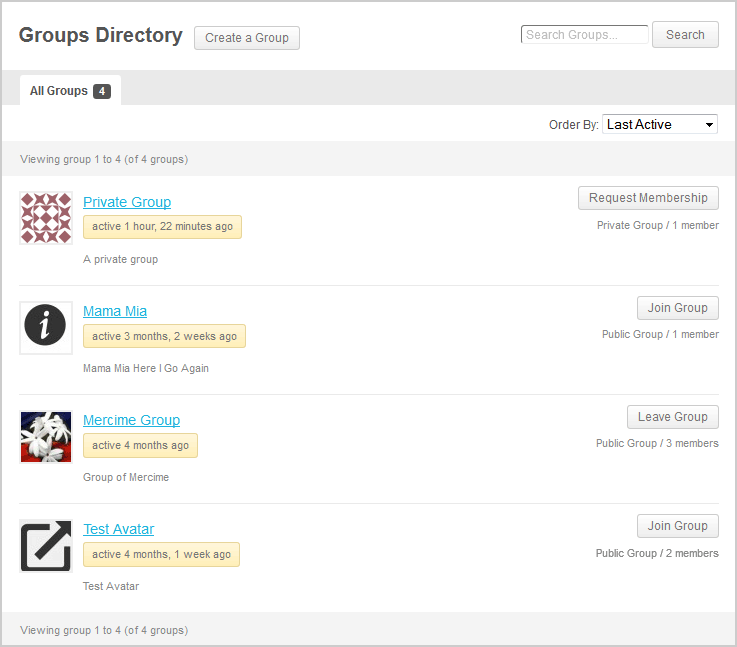
I have no group avatars, join now buttons or anything like that. Do we actually have to create all those basic features manually every time? I would have thought it should be automatic…?
Thanks
December 2, 2015 at 7:05 pm #247343ModeratorPlease use the
codewhen sharing code.current_user_xxx refers to the logged in user – not the displayed user.
Use
is_super_admin()to determine if the current user is a site admin.
https://codex.wordpress.org/Function_Reference/is_super_admin$displayed_user_level = some_s2_function( bp_displayed_user_id() ); if( is_super_admin() && $displayed_user_level == 'some level' ) )some_s2_functionis whatever s2 function returns the member level based on a user_id.December 2, 2015 at 5:47 pm #247341In reply to: Buddypress profile photo / cover image fails
Bas van der Togt
ParticipantThis is everything what is written to the log after i tried to upload an image:
[02-Dec-2015 17:45:42 UTC] PHP Notice:  bp_setup_current_user was called <strong>incorrectly</strong>. The current user is being initialized without using $wp->init(). Please see <a href="https://codex.wordpress.org/Debugging_in_WordPress">Debugging in WordPress</a> for more information. (This message was added in version 1.7.) in /home/***/domains/***/public_html/wp-includes/functions.php on line 3622
[02-Dec-2015 17:45:43 UTC] PHP Fatal error:  Cannot use object of type WP_Error as array in /home/***/domains/***/public_html/wp-content/plugins/buddypress/bp-core/bp-core-avatars.php on line 874
December 1, 2015 at 2:29 am #247314In reply to: Add profile fields groups to registration
Participant>> I know that Base group are shown in the Registration Form
@shmk thanks for confirming, just had to make sure you did. There’s a trac ticket which needs some more work done to get the feature you want at https://buddypress.trac.wordpress.org/ticket/6347November 30, 2015 at 10:34 pm #247310In reply to: Changing Page Titles On The Page
djsteveb
Participant@darkdog
This post may help you with this: https://buddypress.org/support/topic/swap-out-the-buddypress-page-title-with-the-wordpress-page-tile/I have no idea if BP is going to make this easier in the future to change these things dashboard backend or not – I have made some posts about this a time or two around here – but bp pages, their displayed on screen titled, and the meta titles have been a mess for a long time. Unless you know php and are willing to dig deep through documentation that is disorganized and possible outdated, there is no easy way of handling these issues.
November 30, 2015 at 4:48 pm #247300In reply to: organize users into groups
Henry Wright
ModeratorThis isn’t currently possible. Your best bet is to try searching for a plugin.
November 29, 2015 at 10:36 pm #247273In reply to: Changing avatar images and profile links
jimme595
ParticipantSo i’ve had some success trying to change the profile links with this code:
function _bp_core_get_user_domain($domain) {
	$url = get_home_url();
	$user_id = bp_get_member_user_id();
	if (empty($user_id)) {
		$user_id = bp_get_activity_user_id();
	}
	if (empty($user_id)) {
		//$user_id = bp_displayed_user_id();
	}
	$user_info = get_userdata($user_id);
	$link = $user_info->display_name;
	$domain = '' . $url . '/profiles/' . $link . '';
	return $domain;
    }
add_filter('bp_core_get_user_domain', '_bp_core_get_user_domain', 10, 4);
apply_filters( 'bp_get_activity_user_link', '_bp_core_get_user_domain', 15, 1);
This seems to work on every profile link except the one in the activity header section. This link is being changed but just to /profiles/. The display name is not being added to the end… so looking at my code this means i’m not retrieving the user id in the activity. Strangely enough though the user avatar next to the post has the correct link applied to it with the above filter! Any ideas?
My other option is to use the buddypress member profile location but replace it with my profile templates. I tried to implement this by creaing a members/single/home.php in my wordpress custom theme folder… but the profile loads inside another page, i get a page within a page type effect with the username above the inner page… not sure what is going on there? If anyone can help with either of these solutions i’d really appreciate it!
James
November 29, 2015 at 10:40 am #247253In reply to: Extra White Space In Groups
dwsowash
ParticipantI have the exact same problem.

Newest wordpress Newest Buddypress using 2014 theme.
November 28, 2015 at 7:42 pm #247243In reply to: Problem with the send button in Buddypress comment
r-a-y
KeymasterWhen you click inside the textarea box, the textarea should expand and show the submit button.
Does that work?
If not, it might be related to the Sahira theme. Since Sahira is a premium theme, we do not have access to it. What happens when you switch to one of the WordPress Twenty themes?
Do you have the BuddyPress Activity Privacy plugin activated? If so, read this:
https://buddypress.org/support/topic/buddypress-2-4-0-and-buddypress-activity-privacy/#post-246630November 28, 2015 at 6:39 pm #247242tstrickland415
ParticipantSorry for keeping you guys in the dark but what I’ve discovered is that BP’s implementation of member types is pretty underwhelming since it’s only an xprofile field. In regards to my original use case, I discovered I was better off defining custom user roles (AKA member types) and adding appropriate permissions. This can easily be achieved with a few simple lines of code in your functions.php or your custom plugin. If coding isn’t your thing then there are a bunch of freemium plugins available for you to use. Why the Buddypress team elected not to leverage WordPress’ built in User Roles for this feature is beyond me, but if anybody is still looking for an answer to this then I highly recommend checking out the WordPress Codex on User Roles and Capabilities. Hope this helps!
November 27, 2015 at 4:43 pm #247229In reply to: Can’t upload Group Avatars
Pietro117
ParticipantHi, we’re having exactly the same problem with not being able to upload avatar photos, and we have the repeated path in the error message, e.g.: Upload Failed! Error was: The uploaded file could not be moved to wp-content/uploads/avatars/9/avatars/9.
We are on a fresh (< 1 week old) 1-click WordPress installation, with BuddyPress, bbPress and a few other plugins.
Did you have any joy with resolving this issue please?
Many thanks
PeterNovember 27, 2015 at 3:08 pm #247228ModeratorYou can use multiple filters with commas:
&action=activity_update,new_blog_postSee the comments here for other info:
Using bp_parse_args() to filter BuddyPress template loopsNovember 26, 2015 at 6:23 pm #247208In reply to: Buddypress profile photo / cover image fails
KeymasterThanks for the report.
Can you do three things?
1) Set
WP_DEBUGto true inwp-config.php:
https://codex.wordpress.org/WP_DEBUG2) Open up
/bp-core/bp-core-attachments.phpand look for the following lines:// Resize the image so that it fit with the cover image dimensions $cover_image = $cover_image_class->fit( $args['file'], $dimensions );Right after that line, add:
_doing_it_wrong( 'bp_attachments_cover_image_generate_file', print_r( $cover_image, true ), '2.4.0' );3) Go to the “Change Cover Photo” page and try reuploading a photo.
Next, go to
/wp-content/debug.log, copy the entirebp_attachments_cover_image_generate_file was called incorrectlydebug message and paste it here.Going to ping @imath as well.
November 26, 2015 at 6:03 pm #247207In reply to: Problem with language/translate
KeymasterTry downloading the following:
- https://translate.wordpress.org/projects/wp-plugins/buddypress/stable/de/default/export-translations
- https://translate.wordpress.org/projects/wp-plugins/buddypress/stable/de/default/export-translations?format=mo
Rename the files to
buddypress-de_DE.poandbuddypress-de-DE.morespectively.Then, move the files to
/wp-content/languages/plugins/.Since the translation is not 100% complete, you might see some English strings.
Let me know if that works for you.
-
AuthorSearch Results


