What I want to achieve is a BuddyPress setup that allows members:
– to post products and or services they have for sale
– to accept and delete friends for private messaging
– to NOT be able to comment publicly (only through private messaging)
– to post images and text, and delete their old posts
– to create and maintain site wide, searchable hash tags
This is to create a small regional data base that looks like a social platform. The two key elements I want to achieve:
1 Members can post their products and services.
2 Can only communicate with other members through private messaging.
If there is someone who has a setup like this, and I don’t have to re-invent the wheel… that wo7uld be great.
Thank you in advance… Andrew
When I invite people to private group they get error when clicking on accept invitation on group list or profile page. Only way to join group is by request membership button.
How do I get working accept invitation buttons for private groups.
I use BP v7.2
 Anonymous User
Inactive
Hi,
BP Nouveau introduced a new interface for dealing with private conversations. It now uses an instance of the classic editor, so I believe it’s using paragraphs.
I like the idea of having a period of time to edit the message content, thanks for suggesting it. We’ll see how to implement this for private conversations and activities (public conversations).
Buddypress support,
Why can’t I change my username. Also, why can’t I make my administrator aaccount a private account that that doesn’t show up on the leaderboard? I just need those two things done. Someone please help me.
Hi,
I have a wp + BP installation where users do not get email notifications when a private message is being sent (all other emails notifications are ok).
can you help me please ?
thanks a lot
David
Hi
I use to wordpress + bbpress + buddypress
When sending a private message between members, I want to put an image in the body
Right now the only way is to use the image url link.
I would like to upload a file using the upload button like a reference image and put it in the body
Ref img : https://ibb.co/4pvMLDg
This image is the “Inline Image Upload for BBPress” plugin
Currently, images are not attached to buddypress’s private messages (inline).
Is there any possible way?
Best Regards,
Hyunho
I was wondering if there was a small snippet of code I could use to disable the friends part of buddypress all together for everyone but admins as I don’t want users to add friends. I would like to do this as I want to allow users to make their profiles private however their accounts are not accessible by admins if the friends feature is not enabled.
Thanks in advance!
Hi there, Those are not features that come with the base plugin, but you can enable them with plugins, BP Registration Options holds users pending and sends an email to the main admin, you could use this with either a group email address or a wp_mail filter to forward it to the other admins.
There’s a range of different private membership plugins, Simple Private springs to mind, which allow you to take differing levels of privacy to your site.
Dear Sir/Madam,
How can we customize the private messages, send by buddypress-users to each other? What we would like to do: Add a question in the message-content, that gives the sender the option if having the receiver to choose from a multiple choice question. (example: Sender asks: what is your favorite football team: Ajax, Barcelona or Juventus? Receiver responds with the name of his/her favorite team.)
We already know how to send multiple choice options to a receiver. These options are saved in the MySql-database. The receiver gets al list with radiobuttons.
The problem is that the receiver can check a radiobutton, but his choice is not sent to the original sender, nor is it saved in the database.
The only thing that is sent back and saved is what you type in the message-reply-box.
We already added an input textfield where the reciever types his/her choice in. This textfield is under the reply-box. But the content is not saved or sent when you click the reply-button.
We use WordPress version 5.6.1.
We use buddypress 7.1.0.
Our website is 2tango.org/dating
-Theme: twentytwenty
The program-file is: bp-custom.php.
In this file bp-custom we use add_action( ‘bp_after_messages_compose_content’, function() for adding the multiple-choice things when sending a message. This works fine.
In this file bp-custom we use add_action( ‘bp_after_message_reply_box’, function() for adding the choice of the receiver to the reply-message.
He or she can type his/her choice in an input-textfield.
Unfortunately this does not work.
So only the content of the classic message-reply textarea is sent and saved and not the content of the additional input-textfield.
Can anyone help us?
Thanks in advance.
I would like to add the option for users, when they send each other private messages, to also be able to send each other a ice-breaker question, that can be responded to by te receiver of the message.
I was able to add a icebreaker question in the compose area of the sender, but I was not able to have sent the actual answer of the question received by the receiver of the message when he/she answered. Where in Buddypress can I enable that an added questions answer, is also received by the receiver of the message, in that private message? “please advice!” even suggestions to which is the right file, helps me at this stage. Thank you for your effort to support me!
Hello everyone,
I have a couple of private and hidden groups and when I go to the feed, I can see the group posts but also I can see the public posts of another public group inside my private’s groups, I am using Body Boss Child Theme.
I have a topic that I set as super sticky. Once I’ve set it as super sticky, the topic only appears in forums that don’t have a buddypress group assigned (regardless of the public/private/hidden nature). This seems to negate the super sticky notion of showing up in all groups. Is this a bug or behavior as it is supposed to be?
Wordpress version is 5.6.1; Buddypress is 7.1.0, bbPress is v2.6.6. Site is wtf.chiaribridges.org ; see the behavior at https://wtf.chiaribridges.org/forums (you can look at each forum and see the ones with and without the super sticky).
I’ve also posted on the bbPress site for help.
Hi.
In Message > Compose, the ‘Send To’ field searches the username and displays result in the contextual menu to autocomplete.
In our website, the username is generated by an external system. ie, it’s 00123456789 – not something someone will know.
If I use the user’s ‘name’ – ie ‘kirsten’ – the contextual menu does not display with any results.
Is it possible to change what this is searching for – eg, the Full Name, or the Nickname?
Anyone got the code to do that?
(Using Legacy theme on BP7.0.0)
Hi,
I’m starting to use the BuddyPress Nouveau template an I noticed that not all the Private Messages are displaying (on /messages/).
In this case only the last 12 messages are displayed and there is no pagination.
I didn’t find any setting to change it (if there is any).
If I rollback to the legacy template I can see all the messages (+100) and the pagination to move around.
I’m I missing something?
Thanks!
Nahuai
Hello, I’m currently using bbpress 2.6.6 and buddypress 7.1.0, (wordpress 5.6, php 7.4.12, theme is siteorigin-unwind 1.6.12), and experiencing this problem as mentioned here, (members of hidden groups not being able to see the topics of the sub-forum). I’m a newbie with the background code, though my private and public groups are working. I can see the fix for ticket 7443 in buddypress.js that was indicated then, and believe I’ve implemented it, but am wondering if other people still have a problem with this, and if so if there is another fix/workaround available. Thank you.
Hi, I have a site with no functions. the only plugin activated is buddy press,
so when it loads the object for the nav after the bp-wrap div it has
<nav class=”main-navs no-ajax bp-navs single-screen-navs horizontal users-nav” id=”object-nav” role=”navigation” aria-label=”Member menu”>
I had the site with custom themes and functions and removed everything to try and find out where it was getting hung up.
Is there something else I can trouble shoot this with to find out why it does not load with Ajax – I thought that should be the default
WP is 5.6
Theme twenty twenty-one 1.1
php 7.4
Buddy Press info Version 7.1.0
Active components Community Members, Extended Profiles, Account Settings, Friend Connections, Private Messaging, Activity Streams, Notifications, User Groups
Active template pack BuddyPress Nouveau 7.1.0 ( I have tried with bp legacy also )
Toolbar No
Account Deletion Yes
Community Members: Profile Photo Uploads Yes
Community Members: Cover Image Uploads Yes
Extended Profiles: Profile Syncing Yes
User Groups: Group Creation Yes
User Groups: Group Photo Uploads Yes
User Groups: Group Cover Image Uploads Yes
Activity Streams: Post Comments Yes
Activity Streams: Activity auto-refresh Yes
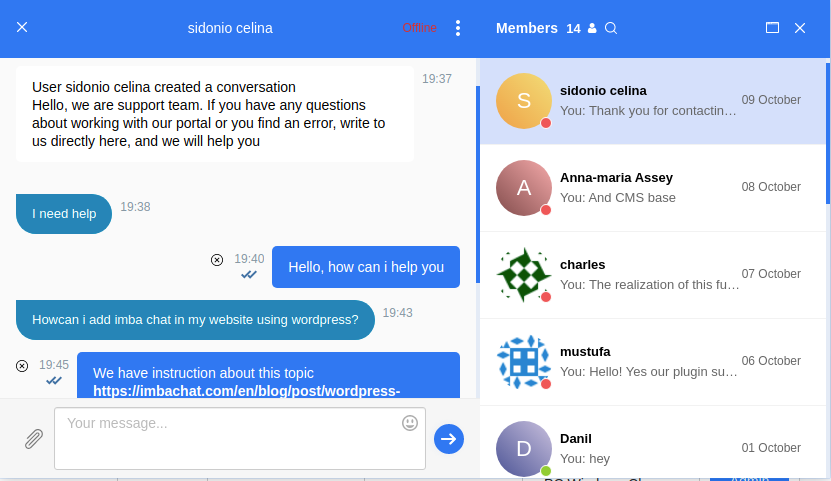
BP Better Messages – is a fully featured replacement for standard BuddyPress Messages and also can work as private messaging system for WordPress when using without BuddyPress.
Plugin is fully backward compatible with BuddyPress Messages.
BP Better Messages
BP Better Messages – is a fully featured replacement for standard BuddyPress Messages and also can work as private messaging system for WordPress when using without BuddyPress.
Plugin is fully backward compatible with BuddyPress Messages.
BP Better Messages
Hello.
There is a solution that you exactly looking for.
It is a chat plugin for BuddyPress and WordPress.
This chat has three basic feature such as:
- Text group chat between users
- Text private (one-to-one) chat between users
- Online chat support (chat with customers)
Besides these functions, the ImbaChat has also:
- Sharing files (any type of file)
- Chat moderation
- Video chat (group and private)
- Audio calls
The ImbaChat basic functions are free. Pricing for the additional features is from $4.99 to $19 per month. Easy and quick installation on BuddyPress. Full integration with the user base of your website.
Visit the official website of the plugin to learn more.
hi vapvarun and thank you for replying back (: ,
i tried to write a code to override the main template – and i make the script run as a plugin
here what i did
<?php
/*
Plugin Name: PAGTEM
Plugin URI: https://www.example.com
Version: 0.0.1
Author: NULL
Author URI: https://www.example.com
*/

class PageTemplate {

	/**
	 * A reference to an instance of this class.
	 */
	private static $instance;

	/**
	 * The array of templates that this plugin tracks.
	 */
	protected $templates;

	/**
	 * Returns an instance of this class.
	 */
	public static function get_instance() {

		if ( null == self::$instance ) {
			self::$instance = new PageTemplate();
		}

		return self::$instance;

	}

	/**
	 * Initializes the plugin by setting filters and administration functions.
	 */
	private function __construct() {

		$this->templates = array();

		// Add a filter to the attributes metabox to inject template into the cache.
		if ( version_compare( floatval( get_bloginfo( 'version' ) ), '4.7', '<' ) ) {

			// 4.6 and older
			add_filter(
				'page_attributes_dropdown_pages_args',
				array( $this, 'register_project_templates' )
			);

		} else {

			add_filter(
				'theme_page_templates', array( $this, 'add_new_template' )
			);

		}

		// Add a filter to the save post to inject out template into the page cache
		add_filter(
			'wp_insert_post_data',
			array( $this, 'register_project_templates' )
		);

		// template assigned and return it's path
		add_filter(
			'template_include',
			array( $this, 'view_project_template')
		);

		$this->templates = array(
			'FullC.php' => 'Full Canvas',
			// this file exist in the same folder as the plugin like that

		/* Plugin Template ( Folder ) ========
		 		  |
		 		  |
		 		  |
		 	Index.php (file)
		 	FullC.php (file)
	================			*/

		);

	}

	/**
	 * Adds template to the page dropdown for v4.7+
	 *
	 */
	public function add_new_template( $posts_templates ) {
		$posts_templates = array_merge( $posts_templates, $this->templates );
		return $posts_templates;
	}

	/**
	 * Adds our template to the pages cache in order to trick WordPress
	 * into thinking the template file exists where it doens't really exist.
	 */
	public function register_project_templates( $atts ) {

		// Create the key used for the themes cache
		$cache_key = 'page_templates-' . md5( get_theme_root() . '/' . get_stylesheet() );

		// Retrieve the cache list.
		// If it doesn't exist, or it's empty prepare an array
		$templates = wp_get_theme()->get_page_templates();
		if ( empty( $templates ) ) {
			$templates = array();
		}

		// New cache, therefore remove the old one
		wp_cache_delete( $cache_key , 'themes');

		$templates = array_merge( $templates, $this->templates );

		// Add the modified cache to allow WordPress to pick it up for listing
		// available templates
		wp_cache_add( $cache_key, $templates, 'themes', 1800 );

		return $atts;

	}

	/**
	 * Checks if the template is assigned to the page
	 */
	public function view_project_template( $template ) {
		// Return the search template if we're searching (instead of the template for the first result)
		if ( is_search() ) {
			return $template;
		}

		global $post;

		// Return template if post is empty
		if ( ! $post ) {
			return $template;
		}

		// Return default template
		if ( ! isset( $this->templates[get_post_meta(
			$post->ID, '_wp_page_template', true
		)] ) ) {
			return $template;
		}

		// Allows filtering of file path
		$filepath = apply_filters( 'page_templater_plugin_dir_path', plugin_dir_path( __FILE__ ) );

		$file =  $filepath . get_post_meta(
			$post->ID, '_wp_page_template', true
		);

		// check if the file exist first
		if ( file_exists( $file ) ) {
			return $file;
		} else {
			echo $file;
		}

		// Return template
		return $template;

	}

}
add_action( 'plugins_loaded', array( 'PageTemplate', 'get_instance' ) );
now if you go to
Pages > Edit xor Add New Page > Page Attributes > A New Section Called Templates > I Click On the Full Canvas > [UPDATED]
Nothing Changed (:
Why’s Is That – Is There’s Wrong With The Code Or The Buddypress V that i use ?
i use ==> Version 6.3.0 | By The BuddyPress Community
We are using the native function of buddyPress to send message between users:
messages_new_message()
We follow the example of this page:
messages_new_message()
Instead of getting the thread ID, we are getting a False.
How can we get the thread ID?
Hello, I’m currently using bbpress 2.6.6 and buddypress 7.1.0, (wordpress 5.6, php 7.4.12, theme is siteorigin-unwind 1.6.6), and experiencing this problem as mentioned here, (members of hidden groups not being able to see the topics of the sub-forum). I’m a newbie with the background code, though my private and public groups are working. I can see the fix 7443 in buddypress.js that was indicated then, but am wondering if other people still have a problem with this, and if so if there is another fix available. Thank you.
My BuddyPress community is private. Would this photo help determine what CSS needs to be added and where?

Hello,
I am trying to find a developer who can help me create a private BuddyPress community. I have some unique ideas that I would like to implement that have not been created. I can pay money for time if needed. If you are an expert with development and have the time to work on a project please let me know.
Hi,
Mega newbie on BuddyPress,
When a new user select a group (when he register) or when the moderator after a register select a group for this user,
how to attach / permission / a user to the same Forum Group (status private) ?
Thank you !


