Search Results for 'wordpress'
-
Search Results
-
Good day to you (all),
I’m working a new site, so this issue revolves with the staging environment. I use WPLMS, everything from theme, wordpress to plugins are up-to-date. And my problem is that the core function of adding students to groups isn’t working. I can add them in admin, and I see that they are added. But students doesn’t see a class added to it’s profile or is able to access the class.
The first reply from WPLMS support was: “I think its due to some kind of caching or something ,pelase clear cache and deactivate it for day or two and check this issue again.”
So I went to Kinsta Hosting and they told me that the staging environment has all caching options disabled. So I went back to WPLMS.
Their second reply is: “groups_join_group is a buddypress core function which is not working in your site .
Please contact buddypress plugin author support on this. in the past with your site we had a similar experience with caching where profile menu items were not appearing. This is caching believe it or not. I have debugged this already. If host cannot resolve this you can consider changing the webhost to wpengine.”
Could you help me? Adding students to classes/groups is essential for my dynamic educational website.
My website: https://env-meestergijs-premium.kinsta.cloud/
Buddypress: 10.6.0
WP: 6.1.1Thanks,
Gijs
I am using the BuddyBoss platform in WordPress. I’d like to add content to the Documents tab in user profiles. I’ve been looking for a hook to target this tab, but I just can’t find it.
How can I do this?
Thank you.
I have this permalink structure.
/%author%/%postname%/and I have enabled ENABLE_ROOT_PROFILES.
https://domain.com/myusername/mypostname
But I can no longer access this page.
It was working before activating it.Any way i can do this?
Buddypress 10.6.0
Wordpress 6.1.1Topic: Custom Group directory tab
Hello there,
we use wordpress version 6.1.1 and buddypress version 10.6.0.We are total beginners in coding and want to create a new custom tab in the groups directory. We created an own page for group categories and want now to create a new tab called “Categories” in the group directory where we link to the page.
See attached image.
How can we do that? (Beginner friendly)
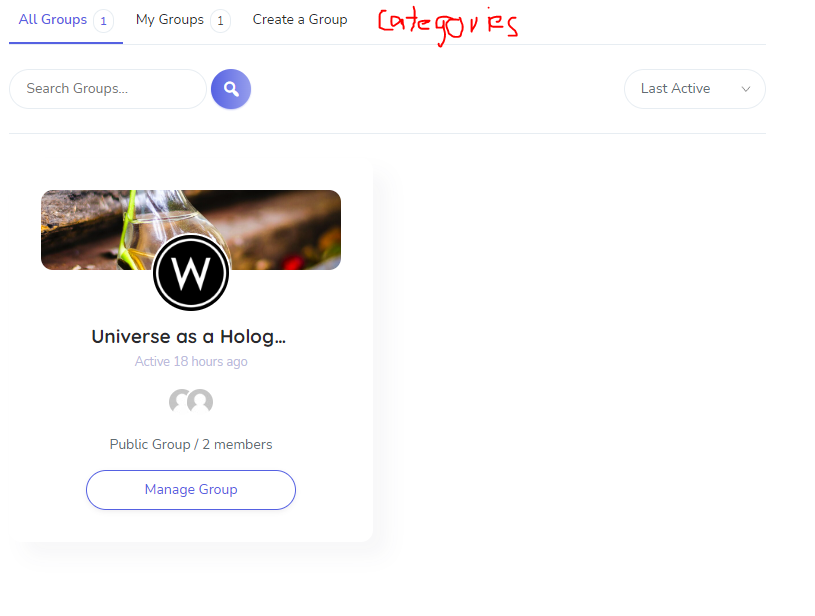
Thanks in advance!
Topic: Forum E-Mail Notification
Hello,
we use the email-notification to inform all of our employees (over 200) about new posts in the forum. It takes a while till the post is shown. That was no problem so far but since 2 days we get a time out when we post something and then the post is only shown for admins and the mails were only sent to admins as well.
Is there a limit for “New Topic Email Addresses” (is it only meant to be for admins and few important persons) or could the problem be caused by our plugin “Post SMTP” which sends the mails? Settings were no changed.
Wordpress Version 6.1.1
BuddyPress Version 10.6.0
(A link to our site would make no sense cause it is just for members visible)Best regards
SebastianI am running WordPress 6.0.3 and am on BuddyPress 10.6.0.
I turned off the Private Messaging component in BuddyPress Settings over 2 years ago. Now all of the sudden my users are getting email notifications of Private Messages. I know these are legit because they include text I wrote before I shut Messaging down due to rampant spamming.
I checked BuddyPress Settings and the Private Messaging Component is still unchecked. Is there something else I need to do to ensure Private Messaging is off?
My site has its own login, register area but by some defaults (which I cannot yet figure out how to bypass or disable) users are directed to wp-login – this is disruptive to to the process and confusing/frustrating to users. I don’t want them directed to any pages asking to log into wordpress (which they get an error for trying to use their login info for my site) – Is there a way to redirect these to my specific buddypress/theme login, register, reset pages? I hope this is making sense.
I’m new to BuddyPress.
I’m running version 10.6.0 under WordPress 6.1.1.
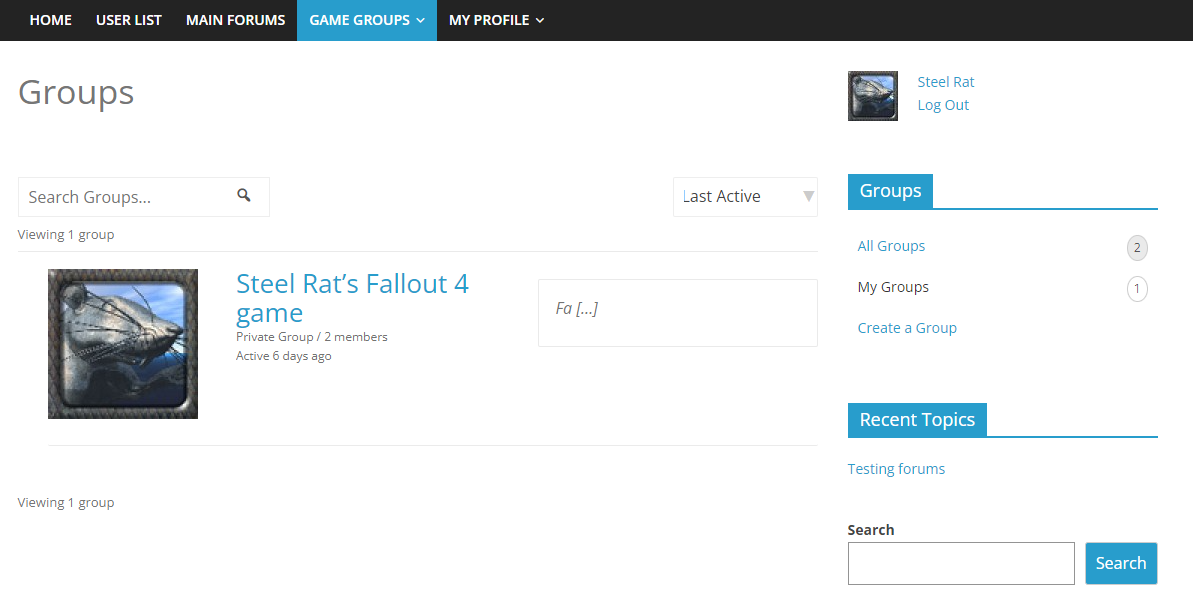
Using the Nouveau theme, the group description only shows 2 characters. If I use the legacy theme, which I prefer, the description is shown, but then the Groups Navigation widget becomes unavailable.
I’m using the Colormag WP theme. Switching to a different overall theme does not solve the issue.
I see old references to this problem from several years ago.
Attaching a screenshot
Topic: Groups Page Selector
In the groups page the Selector does not work with the options “Newest”, “Oldest”, “Alphabetical” I have the latest version of WordPress 6.1 it is not a multisite installation, version BuddyPress 10.6.0 I have tried both with the Kadence theme and the BuddyX theme and both have the same problem.
Can someone please confirm if it is a problem only with my site?
My site is a private intranet and I can’t pass a link for them to test.
Is there a place where I can check that the new version of Buddypress works on the groups page with the “Newest”, “Oldest”, “Alphabetical” Selector?
Thank you very much.I am currently testing an installation where
- User registration is handled by WordPress and not BuddyPress
- I can register a user through the above interface without interference from BP registration
- BuddyPress’ Extended Profile fields is enabled
- I have added custom Profile fields and I am able to update them as a user (not during registration)
All of the above seem to work without issues. BP’s Name field is never touched.
But there are several support requests, such as this, asking that the field ‘Name (required)’ not be a required field and, invariably, the standard reply appears to be ‘here some code to fix that’, ‘this is not an easy fix’ or ‘there is a plugin for that’.
I have also seen tickets on Trac logged for this.
There was even a comment by Boone somehwere (either here or on Trac) saying that this field is so deeply embedded in BP that this modification is not easy (I can’t find this reference right now).
So I am trying to understand why I don’t have any issues with this field not being populated (see above) when much of the documentation saying it is required.
As it stands, all I’d have to do is to hide the “Base” Profile Group from my profile template with a hook or something and not worry about it being ever populated.
Am I missing something?
Thanks


